Running Gemma 4 as a Local Model in the Codex CLI Harness: A Complete Setup Guide
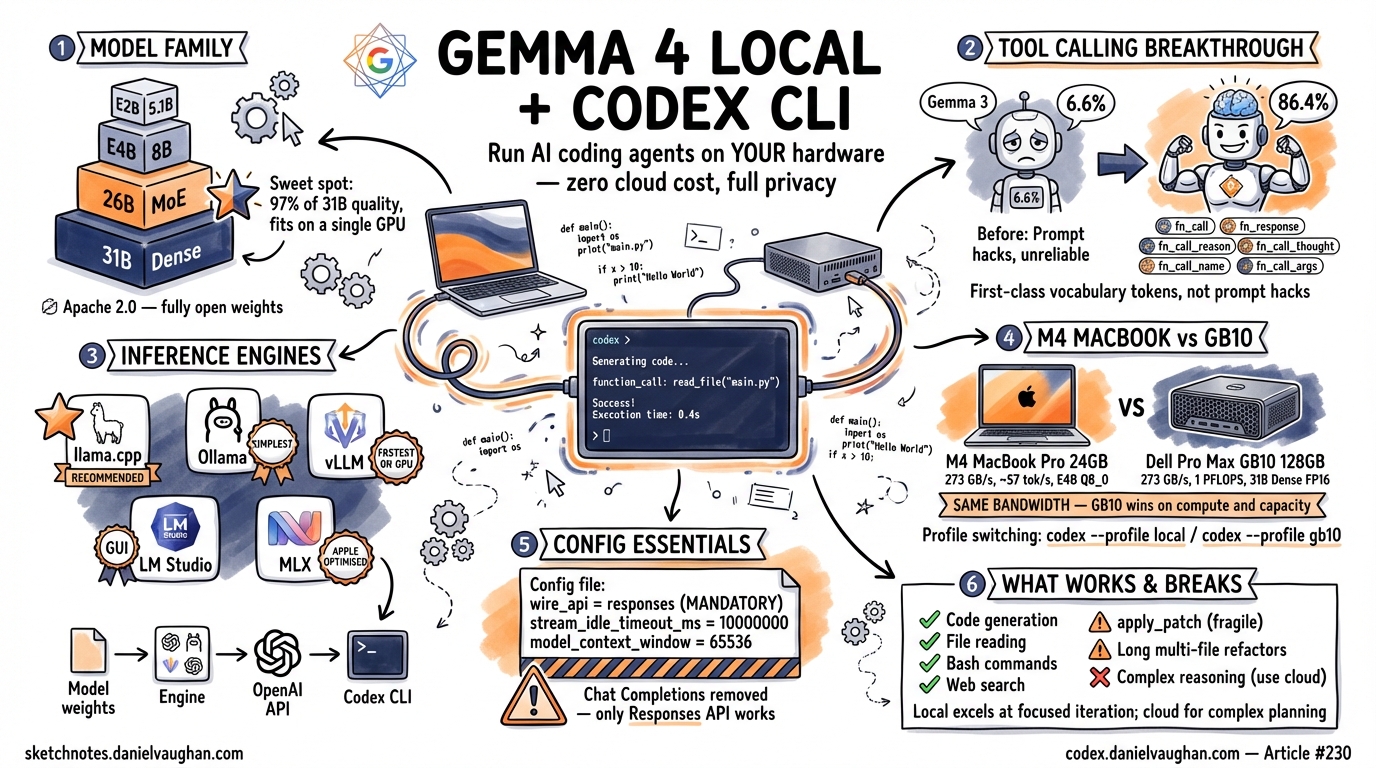
Running Gemma 4 as a Local Model in the Codex CLI Harness: A Complete Setup Guide
Every token you send to a cloud API is a cost you accept, a latency you tolerate, and a privacy decision you make on behalf of your codebase. For many workflows those trade-offs are fine. For others — rapid iteration loops, air-gapped environments, proprietary source code, or simply the desire to stop watching your API bill climb — running a local model is the better answer. Google’s Gemma 4 family, released in April 2026, is the first open-weights model family where local tool calling actually works well enough to drive the Codex CLI harness end to end.
This guide walks through the full setup: choosing a Gemma 4 variant, picking an inference engine, configuring config.toml, verifying tool calling, and tuning performance. Every command is intended to be run exactly as written. Where things break — and they do break — the failure modes and workarounds are documented honestly.
Why Run a Local Model?
Four forces push developers toward local inference.
Cost elimination. Once you own the hardware, inference is free. There is no per-token billing, no surprise invoice at the end of the month, and no anxiety about whether a long-running agent session just burned through your budget. If you already have a 32 GB Apple Silicon Mac or a Linux workstation with a discrete GPU, the marginal cost of running a local model is electricity.
Privacy. Your code never leaves your machine. This matters for regulated industries, for proprietary algorithms, and for anyone who simply prefers not to send their entire codebase to a third-party API. No data-processing agreement is required when the data never crosses a network boundary.
No rate limits. Cloud APIs throttle. During peak hours, during model launches, during outages — you wait. A local model serves exactly one user at exactly the speed your hardware allows, with no queue and no 429 responses.
No subsidy withdrawal risk. Cloud API pricing is subsidised today. When providers adjust pricing upward — as economic reality eventually demands — your workflows break or your costs spike. Running locally insulates you from that risk entirely. The anchoring problem article in this series (article #224) explores why developers systematically underestimate this exposure1.
A necessary caveat. Local models are not universally better. Cloud models — particularly GPT-5-codex and Claude Opus 4 — still outperform local models on complex multi-file refactors, long-horizon planning, and tasks requiring deep reasoning. Local inference shines for iteration speed on focused tasks, for privacy-sensitive codebases, and for cost control. This guide assumes you have already decided that a local model fits your use case, or that you want to evaluate whether it does.
The Gemma 4 Model Family
Gemma 4 ships in four variants. The differences matter for hardware planning and inference speed2.
| Variant | Total Params | Active Params | Architecture | Context Window | Modalities | GGUF Size (Q4_K_M) | GGUF Size (Q8_0) |
|---|---|---|---|---|---|---|---|
| E2B | 5.1 B | 5.1 B | Dense | 128 K | Text, Image, Audio, Video | ~3.2 GB | ~5.4 GB |
| E4B | 8 B | 8 B | Dense | 128 K | Text, Image, Audio, Video | ~4.9 GB | ~8.5 GB |
| 26B-A4B (MoE) | 25.2 B | 3.8 B | Mixture of Experts | 128 K | Text, Image, Audio, Video | ~16 GB | ~27 GB |
| 31B Dense | 31.2 B | 31.2 B | Dense | 256 K | Text, Image, Audio, Video | ~19 GB | ~33 GB |
Hardware Requirements
| Hardware | Recommended Variant | Quantisation | VRAM / Unified Memory | Expected Speed |
|---|---|---|---|---|
| 32 GB Mac (M2/M3/M4) | 26B-A4B MoE | Q4_K_M | ~18 GB | 40–75 tok/s |
| 64 GB Mac (M2/M3/M4 Pro/Max) | 31B Dense or 26B-A4B MoE | Q5_K_M or Q8_0 | ~22–27 GB | 50–90 tok/s |
| Linux + RTX 4090 (24 GB) | 26B-A4B MoE | Q4_K_M | ~16 GB | ~120 tok/s |
| Linux + RTX 3090 (24 GB) | 26B-A4B MoE | Q4_K_M | ~16 GB | ~80 tok/s |
| Linux + 2x RTX 4090 | 31B Dense | Q5_K_M | ~22 GB | ~150 tok/s |
| Dell Pro Max GB10 | 31B Dense | Q8_0 or FP16 | ~33-62 GB of 128 GB | ~150-200+ tok/s |
The Recommendation
The 26B-A4B Mixture of Experts variant is the sweet spot for local Codex CLI use. Despite having 25.2 billion total parameters, only 3.8 billion are active for any given token. This means inference speed approaches that of a 4B model while quality approaches that of a 31B model. On standard benchmarks, the 26B-A4B MoE achieves approximately 97% of the 31B Dense model’s score across code generation tasks3. It fits comfortably on a single 32 GB Mac or a single RTX 4090 at Q4_K_M quantisation.
The smaller E2B and E4B variants are viable for extremely constrained hardware but produce noticeably lower quality output for code generation and, critically, less reliable tool calling. Unless your hardware cannot run the 26B MoE, start there.
Tool Calling: Why Gemma 4 Changes Everything
Previous Gemma generations were effectively unusable with Codex CLI. Gemma 3 27B scored 6.6% on the tau2-bench function-calling benchmark — meaning it failed to call the right tool with the right arguments roughly 93 times out of 100. That is not a reliability level anyone can build a workflow on.
Gemma 4 31B scores 86.4% on the same benchmark3. The 26B-A4B MoE scores only marginally lower. This is the breakthrough that makes this entire guide possible.
What Changed Architecturally
Gemma 4 introduces six dedicated special tokens for structured function calling4:
| Token | Purpose |
|---|---|
<fn_call> |
Marks the start of a tool invocation |
</fn_call> |
Marks the end of a tool invocation |
<fn_response> |
Marks the start of a tool result |
</fn_response> |
Marks the end of a tool result |
<fn_call_reason> |
Wraps the model’s reasoning about why it is calling a tool |
</fn_call_reason> |
Closes the reasoning block |
These are not prompt-engineered conventions. They are first-class vocabulary tokens embedded during pre-training. The model has seen billions of examples of tool-call sequences delimited by these tokens, which is why it calls tools reliably rather than hallucinating function names or malforming JSON arguments.
Why This Matters for Codex CLI
Codex CLI’s harness provides a fixed set of tools to the model: apply_patch, Bash, Read, Write, Glob, Grep, and WebFetch5. The model does not need to implement any of these capabilities itself. It only needs to emit the correct tool name and arguments in the correct format. The harness handles execution.
This is the critical insight: tool execution is a harness responsibility, not a model capability. When the model emits {"tool": "WebFetch", "args": {"url": "https://example.com"}}, the Codex CLI harness performs the HTTP request and returns the result to the model. The model never touches the network. If the model can reliably produce well-formed tool calls, every harness tool works — including WebFetch.
The same applies to apply_patch. The model does not need to understand the v4a diff format at a byte level. It needs to produce a syntactically valid patch and invoke the apply_patch tool. The harness applies it. (In practice, apply_patch is the tool most likely to cause problems with local models — more on this in the “What Works and What Breaks” section.)
Choosing Your Inference Engine
Five inference engines can serve Gemma 4 with an OpenAI-compatible API. Each has trade-offs.
| Engine | Setup Complexity | Tool Calling | Responses API | Performance | Best For |
|---|---|---|---|---|---|
| llama.cpp | Medium (build from source) | Reliable with --jinja |
Yes (server mode) | Excellent (Metal/CUDA) | Most users; recommended path |
| Ollama | Low (ollama pull) |
Fixed in v0.20.2+ | Yes (since v0.13.3) | Good | Users who want simplicity |
| vLLM | Medium-High | Native Gemma 4 parser | Yes | Best (GPU clusters) | Multi-GPU Linux servers |
| LM Studio | Low (GUI) | Supported | Yes (0.4.0+) | Good | GUI preference |
| MLX | Low-Medium | Requires wrapper | Needs proxy | Best on Apple Silicon | Mac-only, max performance |
llama.cpp (Recommended)
The llama.cpp server provides the most reliable tool-calling implementation for Gemma 4. Building from source ensures you get the latest Jinja template support, which is required for Gemma 4’s tool-calling format. The --jinja flag activates the chat template processor that correctly handles Gemma 4’s special tokens6.
Ollama
Ollama offers the simplest setup path. However, versions 0.20.0 and 0.20.1 contained a bug where tool-calling responses were silently dropped for Gemma 4 models7. This was fixed in v0.20.2. If you use Ollama, verify your version before troubleshooting tool-calling failures. Ollama has supported the Responses API since v0.13.38.
vLLM
vLLM is the best choice if you have one or more dedicated NVIDIA GPUs and want maximum throughput. It includes a native Gemma 4 tool-call parser activated via --tool-call-parser gemma49. Tensor parallelism across multiple GPUs is straightforward.
LM Studio
LM Studio provides a GUI-based experience. Version 0.4.0 and later support the Responses API. This is a viable option if you prefer a graphical interface for model management, but offers less control over inference parameters than the command-line alternatives.
MLX
Apple’s MLX framework provides the best raw inference performance on Apple Silicon hardware. However, MLX does not natively expose an OpenAI-compatible HTTP endpoint. You need a wrapper such as mlx-lm-server or a proxy layer. For users who prioritise maximum tokens-per-second on Mac hardware and are comfortable running additional infrastructure, MLX is worth investigating. For most users, llama.cpp with Metal acceleration is simpler and nearly as fast.
Setup Guide: llama.cpp (Recommended Path)
This section provides exact commands for a working setup. Adjust paths as needed for your system.
Step 1: Clone and Build llama.cpp
macOS (Metal acceleration):
git clone https://github.com/ggml-org/llama.cpp.git
cd llama.cpp
cmake -B build -DLLAMA_METAL=ON
cmake --build build --config Release -j$(sysctl -n hw.ncpu)
Linux (CUDA acceleration):
git clone https://github.com/ggml-org/llama.cpp.git
cd llama.cpp
cmake -B build -DLLAMA_CUDA=ON
cmake --build build --config Release -j$(nproc)
Verify the build succeeded:
./build/bin/llama-server --version
Step 2: Download the Model
Download the 26B-A4B MoE at Q4_K_M quantisation from the GGUF repository10:
# Using huggingface-cli (install with: pip install huggingface-hub)
huggingface-cli download ggml-org/gemma-4-26B-A4B-it-GGUF \
  gemma-4-26B-A4B-it-Q4_K_M.gguf \
  --local-dir ./models
Alternatively, download the Unsloth-quantised variant:
huggingface-cli download unsloth/gemma-4-26B-A4B-it-GGUF \
  gemma-4-26B-A4B-it-Q4_K_M.gguf \
  --local-dir ./models
The download is approximately 16 GB. Verify the file:
ls -lh ./models/gemma-4-26B-A4B-it-Q4_K_M.gguf
Step 3: Start the Server
./build/bin/llama-server \
  --model ./models/gemma-4-26B-A4B-it-Q4_K_M.gguf \
  --port 8001 \
  --jinja \
  -ngl 99 \
  -c 65536 \
  --cache-type-k q8_0 \
  --cache-type-v q8_0 \
  --n-predict 4096
Flag explanation:
| Flag | Purpose |
|---|---|
--jinja |
Enables Jinja chat template processing — required for Gemma 4 tool calling |
-ngl 99 |
Offloads all layers to GPU (Metal or CUDA). Set lower if you run out of VRAM. |
-c 65536 |
Context window size in tokens. 64K is a good balance of capability and memory. |
--cache-type-k q8_0 |
Quantises the key cache to 8-bit, reducing memory usage by ~50% vs f16 |
--cache-type-v q8_0 |
Quantises the value cache similarly |
--n-predict 4096 |
Maximum tokens per generation. Increase if you expect long outputs. |
The server will log its listening address. Wait until you see a line like:
main: server is listening on http://127.0.0.1:8001
Step 4: Verify the Server
curl -s http://localhost:8001/v1/models | python3 -m json.tool
You should see the model listed. Then test a simple completion:
curl -s http://localhost:8001/v1/chat/completions \
  -H "Content-Type: application/json" \
  -d '{
    "model": "gemma-4-26B-A4B",
    "messages": [{"role": "user", "content": "Write a Python function that adds two numbers."}],
    "max_tokens": 256
  }' | python3 -m json.tool
If this returns a valid response, the server is working.
Step 5: Test Tool Calling Directly
Before configuring Codex CLI, verify that tool calling works at the server level:
curl -s http://localhost:8001/v1/chat/completions \
  -H "Content-Type: application/json" \
  -d '{
    "model": "gemma-4-26B-A4B",
    "messages": [{"role": "user", "content": "What is the current time?"}],
    "tools": [
      {
        "type": "function",
        "function": {
          "name": "get_current_time",
          "description": "Get the current time in a given timezone",
          "parameters": {
            "type": "object",
            "properties": {
              "timezone": {"type": "string", "description": "The timezone, e.g. UTC, America/New_York"}
            },
            "required": ["timezone"]
          }
        }
      }
    ],
    "tool_choice": "auto"
  }' | python3 -m json.tool
The response should contain a tool_calls array with get_current_time and a valid timezone argument. If the model responds with plain text instead of a tool call, the --jinja flag may not be active or the model file may not include the correct chat template. Rebuild or re-download.
Step 6: Configure Codex CLI
Create or edit ~/.codex/config.toml:
model = "gemma-4-26B-A4B"
model_provider = "llama_cpp"
model_context_window = 65536

[model_providers.llama_cpp]
name = "llama.cpp Gemma 4"
base_url = "http://localhost:8001/v1"
wire_api = "responses"
stream_idle_timeout_ms = 10000000
Key configuration notes:
model: Must match the model name reported by your llama.cpp server. Checkcurl localhost:8001/v1/modelsif unsure.model_provider: References the[model_providers.llama_cpp]section below.model_context_window: Set this explicitly. Codex CLI cannot auto-detect context window size for local models. This must match the-cflag you passed to the server11.wire_api = "responses": Mandatory. Codex CLI only supports the Responses API wire format12.stream_idle_timeout_ms = 10000000: Local inference is slow compared to cloud APIs. The default 300-second timeout will kill long generations. Set this to 10,000 seconds (approximately 2.7 hours) to prevent premature disconnection during complex tool-calling chains.
Step 7: Disable Reasoning Tokens
Gemma 4 does not support reasoning tokens in the way that GPT-5-codex or Claude models do. If your config contains model_reasoning_effort, remove it or comment it out for your local profile. Leaving it in may cause the harness to expect a reasoning block that never arrives, resulting in stalled sessions.
If you use profiles, create a dedicated local profile:
model = "gpt-5-codex"
model_provider = "openai"

[profiles.local]
model = "gemma-4-26B-A4B"
model_provider = "llama_cpp"
model_context_window = 65536

[model_providers.llama_cpp]
name = "llama.cpp Gemma 4"
base_url = "http://localhost:8001/v1"
wire_api = "responses"
stream_idle_timeout_ms = 10000000
Then invoke with:
codex --profile local "your prompt here"
Step 8: Run Codex and Verify Tool Calling
codex "list the files in the current directory"
If tool calling is working, Codex CLI will invoke the Bash tool with a command like ls or ls -la, execute it in the sandbox, and return the output. If the model instead responds with a textual description of what the ls command does without actually running it, tool calling is not being invoked correctly. Check that:
- The llama.cpp server was started with
--jinja - The
wire_apiinconfig.tomlis set to"responses" - The model file includes the Gemma 4 chat template (official GGUF files do; some third-party quantisations may strip it)
Step 9: Test apply_patch
The apply_patch tool is the most demanding test of a local model’s tool-calling reliability. Create a test file and ask Codex to modify it:
echo 'def greet(name):\n    return f"Hello, {name}"' > /tmp/test_patch.py
codex "add type hints to the greet function in /tmp/test_patch.py"
Watch for the model invoking apply_patch with a valid v4a diff. If it instead tries to run a sed command or rewrites the entire file via Bash, the model is falling back to non-tool-calling patterns. This is a known fragility — see the “What Works and What Breaks” section.
Setup Guide: Ollama (Simpler Alternative)
Ollama trades configurability for simplicity. If you want a working local model in under five minutes and are willing to accept less control over inference parameters, this is the path.
Step 1: Install or Upgrade Ollama
# macOS / Linux
curl -fsSL https://ollama.com/install.sh | sh
Critical: Verify your version is 0.20.2 or later:
ollama --version
Versions 0.20.0 and 0.20.1 contain a bug where Gemma 4 tool-calling responses are silently dropped7. If you are on an affected version, upgrade before proceeding.
Step 2: Pull the Model
ollama pull gemma4:26b
This downloads the 26B-A4B MoE variant with Ollama’s default quantisation (typically Q4_K_M). The download is approximately 16 GB.
Verify the model is available:
ollama list
Step 3: Configure Codex CLI
Edit ~/.codex/config.toml:
model = "gemma4:26b"
model_provider = "ollama"
model_context_window = 65536

[model_providers.ollama]
name = "Ollama Gemma 4"
base_url = "http://localhost:11434/v1"
wire_api = "responses"
stream_idle_timeout_ms = 10000000
Step 4: Alternative — Use the –oss Flag
Codex CLI provides a shorthand for Ollama-hosted models:
codex --oss -m gemma4:26b "list the files in the current directory"
The --oss flag automatically sets the base URL to Ollama’s default endpoint and configures the Responses API wire format. This is convenient for quick testing but does not persist configuration — you will need the config.toml approach for regular use.
Step 5: Verify Tool Calling
codex "read the contents of ~/.codex/config.toml"
The model should invoke the Read tool. If it responds with a guess about the file’s contents instead, check your Ollama version first.
Known Ollama Issues
| Issue | Versions Affected | Status | Workaround |
|---|---|---|---|
| Tool-calling responses dropped | 0.20.0–0.20.1 | Fixed in 0.20.2 | Upgrade Ollama |
| Large tool responses truncated | < 0.19.0 | Fixed | Upgrade Ollama |
| Responses API not available | < 0.13.3 | Fixed | Upgrade Ollama |
| Context window not auto-detected | All | By design | Set model_context_window explicitly |
Setup Guide: vLLM (GPU Server)
vLLM is the appropriate choice if you have dedicated NVIDIA GPU hardware and want maximum throughput, tensor parallelism, or plan to serve the model to multiple clients.
Step 1: Install vLLM
pip install vllm
Ensure your CUDA toolkit version is compatible. vLLM requires CUDA 12.1+.
Step 2: Serve the Model
vllm serve google/gemma-4-26b-a4b-it \
  --tool-call-parser gemma4 \
  --port 8001 \
  --max-model-len 65536 \
  --tensor-parallel-size 1 \
  --gpu-memory-utilization 0.90
For multi-GPU setups, increase --tensor-parallel-size to the number of GPUs:
vllm serve google/gemma-4-26b-a4b-it \
  --tool-call-parser gemma4 \
  --port 8001 \
  --max-model-len 65536 \
  --tensor-parallel-size 2 \
  --gpu-memory-utilization 0.90
The --tool-call-parser gemma4 flag activates vLLM’s native Gemma 4 tool-calling parser, which correctly handles the <fn_call> / </fn_call> token pairs9.
Step 3: Configure Codex CLI
model = "google/gemma-4-26b-a4b-it"
model_provider = "vllm"
model_context_window = 65536

[model_providers.vllm]
name = "vLLM Gemma 4"
base_url = "http://localhost:8001/v1"
wire_api = "responses"
stream_idle_timeout_ms = 10000000
Step 4: Verify
curl -s http://localhost:8001/v1/models | python3 -m json.tool
codex "list the Python files in the current directory"
Setup Guide: 24 GB M4 MacBook Pro
The 24 GB M4 MacBook Pro is the most common Apple Silicon configuration developers own. It is powerful enough to run Gemma 4 locally — but with hard constraints that determine which variant to choose and how to configure it.
What Fits in 24 GB
Unified memory on Apple Silicon is shared between macOS, the inference engine, model weights, and the KV cache. Budget 2–4 GB for the OS and runtime overhead, leaving roughly 20–22 GB for the model and its working memory.
| Model | Q4_K_M | Q5_K_M | Q8_0 | FP16 | Verdict |
|---|---|---|---|---|---|
| E2B (5.1B) | 3.1 GB | 3.4 GB | 5.1 GB | 9.3 GB | ✅ Fits easily at any quantisation |
| E4B (8B) | 5.0 GB | 5.5 GB | 8.2 GB | 15.1 GB | ✅ Fits comfortably, Q8_0 recommended |
| 26B-A4B MoE | 16.9 GB | 21.2 GB | 26.9 GB | 50.5 GB | ⚠️ Q4_K_M only, tight — see caveats |
| 31B Dense | 18.3 GB | 21.7 GB | 32.6 GB | 61.4 GB | ❌ Does not fit usably |
The 26B MoE at Q4_K_M (16.9 GB weights) leaves approximately 3–5 GB for KV cache and overhead. At full 128K context the KV cache alone demands ~5.2 GB, which pushes total memory past the physical limit. In practice, context windows must be limited to 8K–16K tokens before macOS begins swapping to SSD, at which point throughput collapses from ~50 tok/s to ~2 tok/s13.
The 31B Dense at Q4_K_M (18.3 GB weights) technically loads but leaves less than 2 GB for everything else. It is not usable for Codex CLI workflows, which require KV cache headroom for multi-turn tool-calling chains.
Recommended Configuration for 24 GB
The E4B at Q8_0 is the best choice for a 24 GB M4 MacBook Pro running Codex CLI. It fits in 8.2 GB, leaving 12+ GB for KV cache and full 128K context, and generates tokens at ~57 tok/s — fast enough for interactive agentic coding with no perceptible lag.
If code quality is the priority and short contexts are acceptable, the 26B-A4B MoE at Q4_K_M is a stretch option. Limit the context to 16K tokens and expect occasional memory-pressure slowdowns.
| Configuration | Tokens/Second | Usable Context | Codex CLI Experience |
|---|---|---|---|
| E4B, Q8_0, Ollama | ~50–57 tok/s | Full 128K | Smooth, responsive, no memory pressure |
| E4B, Q4_K_M, Ollama | ~57–65 tok/s | Full 128K | Slightly faster, marginal quality loss |
| E2B, Q8_0, Ollama | ~80–95 tok/s | Full 128K | Fastest, but lower code quality and less reliable tool calling |
| 26B-A4B, Q4_K_M, Ollama | ~40–50 tok/s | 8–16K max | Best quality, but memory-constrained |
Ollama Setup (Recommended for Mac)
Ollama is the simplest path on macOS. It uses Metal acceleration automatically with no driver configuration.
# Install Ollama (if not already present)
brew install ollama

# Pull the recommended model
ollama pull gemma4:e4b-q8_0

# Start the server (if not running as a service)
ollama serve
The server binds to http://localhost:11434 by default. Verify the model loaded correctly:
curl http://localhost:11434/api/tags | jq '.models[] | .name'
MLX Alternative (Apple-Optimised)
MLX is Apple’s machine learning framework, optimised specifically for Apple Silicon unified memory. For some configurations it uses memory more efficiently than Ollama, though throughput is comparable:
pip install mlx-lm
mlx_lm.server --model mlx-community/gemma-4-E4B-it-4bit --port 8080
MLX is a good choice if memory pressure is a concern (e.g. running the 26B MoE), as it tends to manage the unified memory pool more efficiently than Ollama’s GGML backend.
Codex CLI Configuration for M4 MacBook Pro
model = "gemma4:e4b-q8_0"
model_provider = "mac_local"
model_context_window = 131072

[model_providers.mac_local]
name = "MacBook Pro Ollama"
base_url = "http://localhost:11434/v1"
wire_api = "responses"
stream_idle_timeout_ms = 1800000
Configuration notes:
stream_idle_timeout_ms = 1800000: Set to 30 minutes. The M4 generates tokens much more slowly than a GB10, and longer tool-calling chains may appear to stall during think time. A generous timeout prevents premature disconnection.model_context_window = 131072: Matches E4B’s native 128K context. For the 26B MoE on 24 GB, reduce this to16384to avoid memory pressure.
Running the 26B MoE on 24 GB (Stretch Configuration)
If you want the highest quality output and accept the constraints:
model = "gemma4:26b-a4b-q4_K_M"
model_provider = "mac_local_stretch"
model_context_window = 16384

[model_providers.mac_local_stretch]
name = "MacBook Pro Ollama (MoE Stretch)"
base_url = "http://localhost:11434/v1"
wire_api = "responses"
stream_idle_timeout_ms = 3600000
Key adjustments:
- Context limited to 16K to prevent swap thrashing
- Timeout extended to 60 minutes because token generation may slow dramatically under memory pressure
- Close other memory-hungry applications (browsers, IDEs) before starting a session
- Monitor Activity Monitor — if memory pressure shows red, the experience will degrade
Setup Guide: Dell Pro Max with GB10
The Dell Pro Max with GB10 represents a different class of local inference hardware. Built around the NVIDIA Grace Blackwell Superchip, it provides 128 GB of unified LPDDR5x memory at 273 GB/s bandwidth, 1 petaflop of FP4 compute, and 1000 TOPS of AI performance. The system ships with DGX OS (Ubuntu-based) with CUDA, Docker, and vLLM pre-installed. Models up to approximately 200B parameters fit in memory — Gemma 4 31B is comfortable headroom14.
Why the GB10 Changes the Model Recommendation
On consumer hardware, the 26B-A4B Mixture of Experts variant is recommended because the 31B Dense requires aggressive quantisation to fit in 24-32 GB of VRAM. The GB10 eliminates this constraint. With 128 GB of unified memory, the 31B Dense model runs at Q8_0 (32.6 GB) or even FP16 (~62 GB) without compromise.
This matters because the 31B Dense outperforms the 26B MoE on every benchmark — better reasoning, more reliable tool calling, and more consistent apply_patch output. On consumer hardware, the MoE’s memory efficiency justifies the quality trade-off. On the GB10, there is no trade-off. Run the 31B Dense at full or near-full precision.
The GB10 also enables practical use of the full 128K context window (or even the 31B Dense model’s native 256K window) without KV cache pressure. On consumer hardware, context windows must typically be limited to 32-64K to avoid out-of-memory conditions. For large codebases where the Codex CLI harness needs to read multiple files into context, this additional headroom is significant.
Recommended Model for GB10
| Model | Quantisation | VRAM Usage | Speed | Recommendation |
|---|---|---|---|---|
| 31B Dense | FP16 | ~62 GB of 128 GB | ~100-150 tok/s | Maximum quality, no quantisation loss |
| 31B Dense | Q8_0 | ~33 GB of 128 GB | ~150-200+ tok/s | Best balance — near-lossless, faster inference |
| 26B-A4B MoE | Q8_0 | ~27 GB of 128 GB | ~200+ tok/s | Unnecessary — the 31B Dense fits comfortably |
The recommended configuration is the 31B Dense at Q8_0. The quality difference versus FP16 is negligible for code generation, and the speed improvement is meaningful for interactive agentic workflows. Both are fast enough for Codex CLI use with no perceptible lag on tool calls. For comparison, these speeds exceed many cloud API response times.
vLLM Setup (Recommended for GB10)
Since DGX OS ships with CUDA and Docker pre-installed, vLLM is the natural inference engine for the GB10. No additional driver installation or dependency management is required.
vllm serve google/gemma-4-31B-it \
  --max-model-len 131072 \
  --gpu-memory-utilization 0.85 \
  --enable-auto-tool-choice \
  --tool-call-parser gemma4 \
  --host 0.0.0.0 --port 8000
Key flags:
| Flag | Purpose |
|---|---|
--max-model-len 131072 |
128K context window — practical on GB10 due to the massive unified memory |
--gpu-memory-utilization 0.85 |
Reserves 15% for KV cache overhead and OS processes |
--enable-auto-tool-choice |
Enables automatic tool-call detection |
--tool-call-parser gemma4 |
Activates the native Gemma 4 function-calling parser |
--host 0.0.0.0 |
Binds to all interfaces (useful if accessing from another machine on the network) |
The 128K context window is a significant advantage over consumer hardware setups, where context must typically be limited to 32-64K. For Codex CLI workflows that involve reading large files or maintaining long tool-calling chains, this additional context capacity reduces the frequency of context compaction and improves session coherence.
Codex CLI Configuration for GB10 + vLLM
model = "gemma-4-31B-it"
model_provider = "gb10_local"
model_context_window = 131072

[model_providers.gb10_local]
name = "Dell GB10 vLLM"
base_url = "http://localhost:8000/v1"
wire_api = "responses"
stream_idle_timeout_ms = 600000
Configuration notes:
model_context_window = 131072: Matches the--max-model-lenflag passed to vLLM. These must agree.stream_idle_timeout_ms = 600000: Set to 10 minutes (600,000 ms). This is lower than the value recommended for llama.cpp setups on consumer hardware because the GB10’s Blackwell GPU generates tokens significantly faster. A 10-minute timeout provides ample headroom for long tool-calling chains without masking genuinely stalled sessions.base_url: Port 8000 is used here (the vLLM default). Adjust if running multiple services.
Alternative: llama.cpp on GB10
llama.cpp also runs well on the GB10. Build with CUDA support:
cmake -B build -DGGML_CUDA=ON -DLLAMA_CURL=ON
cmake --build build --config Release -j$(nproc)
./build/bin/llama-server \
  -hf ggml-org/gemma-4-31B-it-GGUF:Q8_0 \
  --port 8001 -ngl 99 -c 131072 --jinja
This approach is viable and may be preferred if the workflow already uses llama.cpp on other machines. However, vLLM is the recommended engine for the GB10 because DGX OS ships with it pre-configured and because vLLM’s paged attention implementation is optimised for the Blackwell architecture.
Performance Expectations
| Configuration | Tokens/Second | Latency (First Token) | Notes |
|---|---|---|---|
| 31B Dense, Q8_0, vLLM | ~200+ tok/s | Low | Recommended configuration |
| 31B Dense, FP16, vLLM | ~100-150 tok/s | Low | Maximum quality, still fast |
| 31B Dense, Q8_0, llama.cpp | ~150-180 tok/s | Low | Slightly slower than vLLM on this hardware |
Both the Q8_0 and FP16 configurations are fast enough for interactive agentic coding with no perceptible lag on tool calls. For comparison, these speeds match or exceed many cloud API response times, while providing the privacy and cost benefits of local inference.
Two-Machine Scaling
Two GB10 units can be connected to create a single compute node with 256 GB of unified memory. This configuration supports models up to approximately 400B parameters and is relevant for two scenarios:
- Future Gemma releases. As model families grow, larger variants may require more memory than a single GB10 provides. A two-node configuration provides forward compatibility.
- Multi-model serving. Running Gemma 4 31B for coding alongside a separate model for code review, test generation, or documentation — each with its own vLLM instance — becomes practical with 256 GB of aggregate memory.
For current Gemma 4 31B workloads, a single GB10 is more than sufficient. The two-machine option is relevant for planning, not for immediate necessity.
Head to Head: 24 GB M4 MacBook Pro vs Dell Pro Max GB10
The two machines represent opposite ends of the local inference spectrum — the laptop developers already own versus the purpose-built AI workstation. Here is how they compare running Gemma 4 for Codex CLI workflows.
Hardware Comparison
| Spec | M4 MacBook Pro (24 GB) | Dell Pro Max GB10 |
|---|---|---|
| Memory | 24 GB unified LPDDR5x | 128 GB unified LPDDR5x |
| Memory Bandwidth | 273 GB/s | 273 GB/s |
| AI Compute | ~7 TFLOPS (FP16 Neural Engine + GPU) | 1 PFLOPS (FP4 sparse) |
| Max Model (comfortable) | E4B (8B) at Q8_0 | 31B Dense at FP16 |
| Max Model (stretch) | 26B MoE at Q4_K_M (16K context) | 200B+ at NVFP4 |
| Price | ~£2,000 | ~£4,500 |
| Portability | Laptop — use anywhere | Desktop — fixed location |
| Power (inference) | ~60–80 W | ~143 W |
Performance Comparison (Same Workflow)
Running the same Codex CLI agent session — a multi-file refactor touching 8 files with 6 tool calls:
| Metric | M4 (E4B Q8_0) | M4 (26B MoE Q4) | GB10 (31B Q8_0) |
|---|---|---|---|
| Token Generation | ~57 tok/s | ~40–50 tok/s | ~200+ tok/s |
| Time to First Token | ~0.5–1s | ~1–2s | ~0.1–0.3s |
| Usable Context | Full 128K | 8–16K | Full 256K |
| Tool Call Reliability | Good (E4B) | Better (26B) | Best (31B) |
| Session Duration (8-file refactor) | ~3–5 min | ~5–8 min | ~1–2 min |
| Memory Pressure | None | High | None |
| Swap Risk | None | Yes, if context >16K | None |
The Critical Insight: Memory Bandwidth Is Identical
Both machines have 273 GB/s memory bandwidth. Token generation (the decode phase) is memory-bandwidth-bound, not compute-bound. This means for the same model at the same quantisation, decode speed is approximately equal. The GB10’s advantage comes not from faster token generation per se, but from the ability to run a much larger model — the 31B Dense at Q8_0 or FP16 — which produces higher quality output and more reliable tool calls. It also benefits from dramatically faster prefill (prompt processing), which is compute-bound and where the GB10’s 1 PFLOPS of FP4 compute dwarfs the M4’s ~7 TFLOPS.
When Each Machine Wins
The M4 MacBook Pro wins when:
- Budget is the constraint — you already own it
- Portability matters — coding on the train, at a café, on the sofa
- The E4B is sufficient for your workflow — rapid iteration on focused tasks, single-file edits, test generation
- Privacy is the only requirement — any local model satisfies this regardless of hardware
The GB10 wins when:
- Code quality and tool-calling reliability are paramount — the 31B Dense is measurably better than E4B
- Long context is needed — 256K vs 16K (for the 26B MoE on 24 GB)
- Multi-model workflows — running a coding model and a review model simultaneously
- Speed compounds — for agentic sessions with 10+ tool calls, the GB10 completes in a fraction of the time
- Future-proofing — 128 GB accommodates the next generation of open-weight models without hardware replacement
The Hybrid Approach
The most practical setup for a developer with both machines is to use them for different workloads:
| Task | Machine | Model | Why |
|---|---|---|---|
| Quick edits, single-file changes | M4 MacBook Pro | E4B Q8_0 | Fast enough, portable, no setup overhead |
| Multi-file refactors | GB10 | 31B Dense Q8_0 | Better quality, full context, faster completion |
| Privacy-sensitive code (on the go) | M4 MacBook Pro | E4B Q8_0 | Entirely local, no network needed |
| Long agentic sessions (10+ tool calls) | GB10 | 31B Dense Q8_0 | Speed difference compounds over many calls |
| Code review (cross-model) | GB10 | 31B Dense + E4B | Two models simultaneously in 128 GB |
Both machines point at the same config.toml structure — only the base_url and model name change. Switching between them is a one-line profile change:
# Profile for MacBook Pro
[profiles.mac]
model = "gemma4:e4b-q8_0"
model_provider = "mac_local"

# Profile for GB10
[profiles.gb10]
model = "gemma-4-31B-it"
model_provider = "gb10_local"
Launch with codex --profile mac or codex --profile gb10.
The Responses API Requirement
This is the single most important compatibility requirement and the most common source of setup failures. It deserves its own section.
Codex CLI only supports wire_api = "responses" as of February 2026. The Chat Completions API wire format was removed in PR #10157 following Discussion #778212. This was a deliberate design decision by the Codex team: the Responses API provides structured tool-calling support, streaming semantics, and session management that the Chat Completions API does not.
Every config.toml entry for a local model provider must include:
wire_api = "responses"
If your inference engine does not implement the /v1/responses endpoint, it will not work with Codex CLI. There is no fallback. There is no compatibility shim. The harness will fail with an error about unsupported wire format.
Engine Responses API Support
| Engine | Minimum Version | Endpoint |
|---|---|---|
| llama.cpp | Recent builds (March 2026+) | /v1/responses via server mode |
| Ollama | v0.13.3+ | /v1/responses |
| vLLM | 0.8.0+ | /v1/responses |
| LM Studio | 0.4.0+ | /v1/responses |
| MLX | Requires proxy | Not natively supported |
If you are running an older build of any engine and Codex CLI fails with a wire-format error, upgrading the engine is the first troubleshooting step.
What Works and What Breaks
Honesty about failure modes saves more time than optimistic documentation. This section reports the actual state of Gemma 4 inside Codex CLI as of April 2026.
What Works Well
| Capability | Reliability | Notes |
|---|---|---|
| Basic code generation | High | Single-file functions, classes, scripts |
File reading (Read, Glob, Grep) |
High | Tool calls are simple, single-argument |
| Bash command execution | High | Model reliably calls the Bash tool |
| Simple tool chains (read → edit → verify) | Medium-High | Works for 2–3 step chains |
| WebFetch | Medium-High | Works when tool calling is reliable — the model calls the tool, the harness fetches the URL |
Single-file edits via apply_patch |
Medium | Works most of the time; see caveats below |
What Is Fragile
apply_patch reliability. The model sometimes invokes apply_patch as a bash command instead of as a tool call — running bash -c "apply_patch ..." rather than calling the apply_patch tool directly. This is tracked as Issue #223515. When this happens, the patch is not applied and the model may enter a retry loop. Workaround: if you see this behaviour, interrupt the session and re-prompt with explicit language like “use the apply_patch tool to modify the file.”
Complex multi-tool chains. Chains involving more than 3–4 sequential tool calls become unreliable. The model may lose track of intermediate results, repeat tool calls unnecessarily, or emit malformed JSON arguments for later calls in the chain. Cloud models handle 10+ step chains routinely; local models do not.
Long context sessions. As the conversation grows beyond 32K tokens, generation quality degrades and tool-calling reliability drops. The model’s 128K context window is a theoretical maximum, not a practical one. Keep sessions focused and short. Use context compaction (/compact in the TUI) aggressively.
Parallel tool calls. Gemma 4 sometimes emits multiple tool calls in a single turn when sequential calls would be more appropriate, or vice versa. This can confuse the harness’s tool-execution pipeline.
What Does Not Work
| Capability | Status | Notes |
|---|---|---|
| Reasoning tokens | Not supported | Set model_reasoning_effort to remove or do not set it. Gemma 4 does not produce <reasoning> blocks. |
model_reasoning_effort config key |
Ignored / breaks | Remove from config when using Gemma 4 |
| Multi-file refactors (5+ files) | Unreliable | The model loses coherence across files. Use a cloud model for these tasks. |
| Image input via Codex CLI | Not yet supported | Gemma 4 is multimodal, but the Codex CLI harness does not currently pass images to local models |
| Subagent delegation | Not supported | The Codex multi-agent system requires model capabilities that Gemma 4 does not yet provide |
Known Issues Reference
| Issue | GitHub Reference | Status | Workaround |
|---|---|---|---|
| apply_patch invoked as bash | [#2235]15 | Open | Re-prompt with explicit tool-call language |
| Ollama tool-call drops | [#15315]7 | Fixed in 0.20.2 | Upgrade Ollama |
| Responses API removal breaks Chat Completions configs | [#7782]12 | By design | Use wire_api = "responses" |
| KV cache OOM on 128K context | llama.cpp issue | Intermittent | Reduce -c to 65536 or use --cache-type-k/v q8_0 |
Performance Tuning
Once the basic setup works, tuning can meaningfully improve the experience.
Quantisation Selection
The quantisation level controls the trade-off between model quality and memory usage.
| Quantisation | Quality vs F16 | Size (26B-A4B) | Speed Impact | When to Use |
|---|---|---|---|---|
| Q4_K_M | ~97% | ~16 GB | Fastest | Default choice for 32 GB machines |
| Q5_K_M | ~98.5% | ~19 GB | Slightly slower | If you have 40+ GB RAM/VRAM |
| Q6_K | ~99.2% | ~22 GB | Moderate | 64 GB machines, quality-sensitive work |
| Q8_0 | ~99.8% | ~27 GB | Slower | 64 GB machines, maximum quality |
| F16 | 100% | ~50 GB | Slowest | Research benchmarking only |
For most users, Q4_K_M is the right default. The quality difference between Q4_K_M and Q8_0 is measurable on benchmarks but rarely noticeable in practice for code generation tasks. The speed and memory savings are significant.
KV Cache Quantisation
The --cache-type-k and --cache-type-v flags in llama.cpp quantise the key-value cache, dramatically reducing memory usage for long contexts:
# Default (f16) — maximum quality, maximum memory
--cache-type-k f16 --cache-type-v f16

# Recommended — good quality, ~50% less cache memory
--cache-type-k q8_0 --cache-type-v q8_0

# Aggressive — slight quality loss, ~75% less cache memory
--cache-type-k q4_0 --cache-type-v q4_0
With q8_0 cache quantisation, a 64K context window for the 26B-A4B model uses approximately 4 GB of cache memory instead of 8 GB. This often makes the difference between fitting in memory and swapping to disk.
Context Window Sizing
Larger context windows consume more memory and slow down inference (due to attention computation scaling quadratically). Choose the smallest context window that meets your needs:
| Context Size | Memory (KV cache, q8_0) | Use Case |
|---|---|---|
| 16384 (16K) | ~1 GB | Short, focused prompts |
| 32768 (32K) | ~2 GB | Minimum for practical Codex CLI use |
| 65536 (64K) | ~4 GB | Recommended default |
| 131072 (128K) | ~8 GB | Long sessions, large file reading |
Set the context window with the -c flag on the server and model_context_window in config.toml. These must match. If the config.toml value exceeds the server’s actual context window, the harness will send prompts that the server truncates silently, causing tool calls to be cut off mid-JSON.
GPU Layer Offloading
The -ngl flag controls how many transformer layers are offloaded to the GPU. For maximum performance, offload all layers:
-ngl 99 # Offloads all layers (excess is silently ignored)
If the model does not fit entirely in VRAM, reduce this number. Layers that remain on CPU will slow inference significantly. As a rough guide:
- 26B-A4B Q4_K_M: ~16 GB VRAM for all layers
- 31B Dense Q4_K_M: ~19 GB VRAM for all layers
- Each layer is approximately 200–400 MB depending on the model and quantisation
Partial offloading (e.g., 30 of 40 layers on GPU) gives most of the speed benefit while leaving room for the KV cache and OS overhead.
Apple Silicon: MLX Consideration
On Apple Silicon Macs, the MLX framework from Apple can outperform llama.cpp by 10–30% for inference speed, because it is optimised specifically for the Apple Neural Engine and unified memory architecture. If you find llama.cpp’s performance insufficient:
pip install mlx-lm
mlx_lm.server --model mlx-community/gemma-4-26B-A4B-it-4bit --port 8001
Note that mlx_lm.server exposes a Chat Completions API, not the Responses API. You will need a proxy layer (such as litellm or a custom adapter) to translate to the Responses API format. This adds complexity. Evaluate whether the performance gain justifies it for your workflow.
Cost Comparison
The economics of local inference depend entirely on whether you already own suitable hardware.
Monthly Cost Comparison
| Setup | Monthly Cost | Notes |
|---|---|---|
| Local — existing 32 GB Mac | ~$5 (electricity) | No new hardware. Gemma 4 26B-A4B at Q4_K_M. |
| Local — existing Linux + RTX 4090 | ~$8 (electricity) | Faster inference than Mac, higher power draw. |
| Local — new Mac Mini M4 (32 GB) | ~$50/mo amortised | $599 hardware amortised over 12 months, plus electricity. |
| Local — new RTX 4090 workstation | ~$150/mo amortised | ~$1800 hardware amortised over 12 months, plus electricity. |
| Gemma 4 31B via Google AI API | Variable | $0.14/1M input tokens, $0.40/1M output tokens. Light use: $5–15/mo. Heavy use: $50–200/mo. |
| Codex CLI with GPT-5-codex | Variable | Subscription + per-token API costs. Light use: $20–40/mo. Heavy use: $100–500/mo. |
Break-Even Analysis
If you already own a 32 GB Mac or an RTX 4090 workstation, local inference is essentially free. The break-even point is immediate.
If you are considering purchasing hardware specifically for local inference:
- Mac Mini M4 (32 GB), $599: Breaks even against $50/month cloud spend in 12 months. Against $100/month cloud spend, break-even is 6 months. The hardware has residual value and serves other purposes.
- RTX 4090 build, ~$1800: Breaks even against $150/month cloud spend in 12 months. The GPU has significant residual value for other ML workloads, gaming, or resale.
The calculation is straightforward: if your current cloud API spend exceeds the amortised hardware cost, local inference saves money. If your cloud spend is under $20/month, the convenience of cloud APIs likely outweighs the savings.
The Hidden Cost: Your Time
Setup, debugging, and maintenance consume developer time. Budget 2–4 hours for initial setup, plus occasional time for upgrades and troubleshooting. If your hourly rate is high and your API spend is low, the economic case for local inference weakens. If your API spend is high or your privacy requirements are non-negotiable, the time investment pays for itself quickly.
When to Stay on Cloud Models
Local Gemma 4 is good. Cloud models are still better for specific tasks. Knowing when to use which is the actual skill.
Complex multi-file refactors. Tasks that require modifying 5+ files in a coordinated way, maintaining consistency across interfaces, and reasoning about architectural implications — these still belong to cloud models. GPT-5-codex and Claude Opus 4 have significantly higher reliability for multi-step, multi-file tool chains.
Production codebases where reliability matters more than cost. If a failed apply_patch costs you 30 minutes of debugging, the $0.02 you saved by running locally was not worth it. For production-critical work, use the most reliable model available.
When you need reasoning tokens. Extended reasoning (chain-of-thought with dedicated reasoning blocks) is not available with Gemma 4. If your workflow depends on model_reasoning_effort = "high", you need a cloud model.
Subagent orchestration. The multi-agent patterns documented elsewhere in this series require model capabilities that Gemma 4 does not yet provide. If you use orchestrator/worker patterns, the orchestrator should remain a cloud model.
The Hybrid Approach
The most productive configuration for many developers is a hybrid: local Gemma 4 for fast iteration, cloud models for quality-critical tasks.
# Default: cloud model for complex work
model = "gpt-5-codex"
model_provider = "openai"

[profiles.local]
model = "gemma-4-26B-A4B"
model_provider = "llama_cpp"
model_context_window = 65536

[profiles.fast]
model = "gpt-4.1-mini"
model_provider = "openai"

[model_providers.llama_cpp]
name = "llama.cpp Gemma 4"
base_url = "http://localhost:8001/v1"
wire_api = "responses"
stream_idle_timeout_ms = 10000000
Usage pattern:
# Quick iteration, zero cost
codex -p local "add error handling to the parse function"

# Complex refactor, maximum reliability
codex "refactor the authentication module to use JWT tokens across all 12 service files"

# Fast cloud model for moderate tasks
codex -p fast "write unit tests for the parse function"
This three-tier approach — local for iteration, fast cloud for moderate tasks, default cloud for complex work — optimises across cost, speed, and reliability simultaneously.
Troubleshooting Quick Reference
| Symptom | Likely Cause | Fix |
|---|---|---|
| “Unsupported wire format” error | wire_api not set to "responses" |
Add wire_api = "responses" to provider config |
| Model responds with text instead of tool calls | --jinja flag missing on llama.cpp server |
Restart server with --jinja |
| Tool calls silently fail (Ollama) | Ollama version < 0.20.2 | Upgrade Ollama |
| Out of memory during inference | Model + KV cache exceed available RAM/VRAM | Reduce -c, use --cache-type-k/v q8_0, or use smaller quantisation |
| Session hangs / times out | stream_idle_timeout_ms too low |
Set to 10000000 in provider config |
apply_patch invoked as bash command |
Known model behaviour (Issue #2235) | Re-prompt with “use the apply_patch tool” |
| Garbled output or repeated tokens | Quantisation artefact or temperature too high | Try Q5_K_M or lower temperature in server config |
| Context window mismatch errors | model_context_window in config.toml does not match server -c |
Ensure both values match |
| Model not found error | Model name mismatch between config and server | Check curl localhost:8001/v1/models for exact name |
Summary
Gemma 4’s tool-calling breakthrough — from 6.6% to 86.4% on tau2-bench — makes local models viable for Codex CLI for the first time. The 26B-A4B Mixture of Experts variant is the recommended choice: 3.8 billion active parameters deliver fast inference, consumer hardware compatibility, and near-31B quality.
The recommended setup path is llama.cpp with --jinja enabled, configured via config.toml with wire_api = "responses" and a generous stream_idle_timeout_ms. Ollama provides a simpler alternative if you accept its version-sensitivity. vLLM is the right choice for dedicated GPU servers.
Local inference is not a replacement for cloud models. It is a complement. Use local Gemma 4 for fast, private, zero-cost iteration. Use cloud models for complex refactors and production-critical work. The profile system in config.toml makes switching between them a single flag.
Citations
-
The Anchoring Problem: Why My Brain Still Thinks Code Is Expensive — codex-resources article #224 ↩
-
Google Gemma 4 Model Card — https://ai.google.dev/gemma/docs/core/model_card_4 ↩
-
Gemma 4 Benchmarks — https://gemma4all.com/blog/gemma-4-benchmarks-performance ↩ ↩2
-
Gemma 4 Function Calling — https://ai.google.dev/gemma/docs/capabilities/text/function-calling-gemma4 ↩
-
Codex CLI Advanced Configuration — https://developers.openai.com/codex/config-advanced ↩
-
llama.cpp GitHub — https://github.com/ggml-org/llama.cpp ↩
-
Ollama Issue #15315 (tool calling fix) — https://github.com/ollama/ollama/issues/15315 ↩ ↩2 ↩3
-
Ollama Codex Integration — https://docs.ollama.com/integrations/codex ↩
-
vLLM Gemma 4 Recipe — https://docs.vllm.ai/projects/recipes/en/latest/Google/Gemma4.html ↩ ↩2
-
Unsloth GGUF repos — https://huggingface.co/unsloth/gemma-4-26B-A4B-it-GGUF ↩
-
Codex CLI Configuration Reference — https://developers.openai.com/codex/config-reference ↩
-
Codex CLI Discussion #7782 (Responses API mandate) — https://github.com/openai/codex/discussions/7782 ↩ ↩2 ↩3
-
Gemma 4 on Apple Silicon benchmarks — MacBook Pro M4 Pro 24 GB tests by akartit (DEV Community) and SudoAll. E4B Q4: 57 tok/s, E2B Q4: 95 tok/s, 26B MoE Q4: ~2 tok/s with swap thrashing. https://dev.to/akartit/i-tested-every-gemma-4-model-locally-on-my-macbook-what-actually-works-3g2o ↩
-
Dell Pro Max with GB10 — https://www.dell.com/en-us/blog/dell-pro-max-with-gb10-purpose-built-for-ai-developers/ ↩
-
Codex Issue #2235 (apply_patch as bash) — https://github.com/openai/codex/issues/2235 ↩ ↩2