Codex CLI in Java Spring Teams: Plugging Into SonarQube, Jira, and Your Existing CI/CD Pipeline
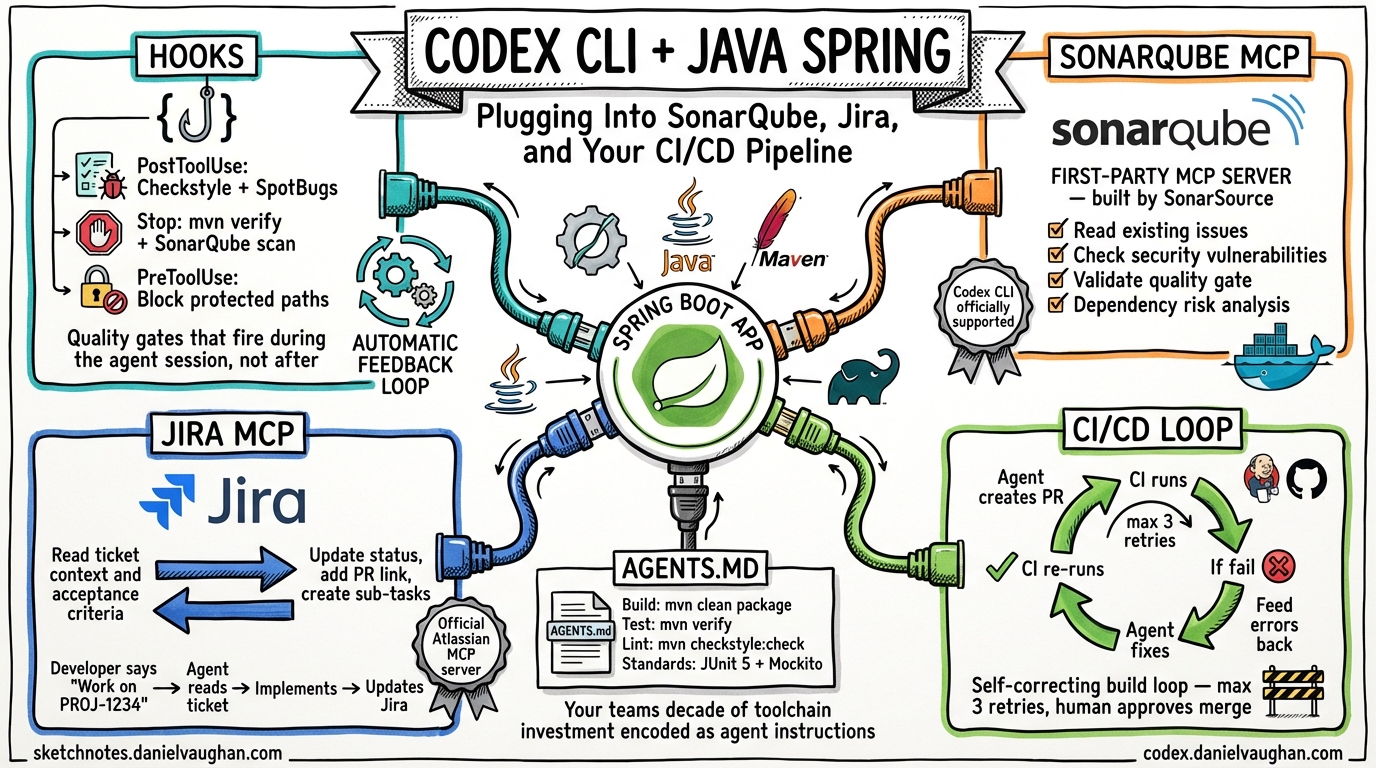
Most Codex CLI content assumes you are starting fresh with a JavaScript or Python project. Enterprise Java Spring teams do not start fresh. They have Checkstyle configurations that took two years to agree on, SonarQube quality gates that block every merge, Jira boards with 15 custom fields, and Jenkins pipelines that nobody dares touch. These are not obstacles to AI coding adoption — they are the infrastructure that makes adoption safe.
This guide shows how Codex CLI plugs into the toolchain your Java Spring team already has, rather than asking you to replace it.
The Integration Architecture
Codex CLI connects to enterprise Java toolchains through three mechanisms:
- Hooks — Lifecycle events that fire before and after agent actions, running your existing linting, static analysis, and test commands
- MCP Servers — Protocol-based connections to SonarQube, Jira, and other tools that give the agent read/write access to your existing systems
- AGENTS.md — Instruction files that encode your team’s build commands, coding standards, and architectural decisions as machine-readable context
Together, these turn Codex CLI from a standalone coding tool into a node in your existing engineering ecosystem.
Hooks: Running Checkstyle, SpotBugs, and PMD After Every Agent Change
Codex CLI hooks are lifecycle events that fire at defined points during an agent session1. Enable them in your codex.toml:
[features]
codex_hooks = true
Then create a hooks file at <repo>/.codex/hooks.json. Five lifecycle events are available:
| Event | When It Fires | Java Use Case |
|---|---|---|
SessionStart |
Session begins | Verify Maven/Gradle build is clean |
UserPromptSubmit |
User sends a prompt | Log prompt for audit |
PreToolUse |
Before tool execution | Block writes to protected paths |
PostToolUse |
After tool completion | Run static analysis on changed files |
Stop |
Conversation turn ends | Run full test suite, report coverage |
The most powerful hook for Java teams is PostToolUse. Every time the agent modifies a file, this hook fires. Wire it to your static analysis toolchain:
{
  "hooks": {
    "PostToolUse": [
      {
        "matcher": "*.java",
        "hooks": [
          {
            "type": "command",
            "command": "./scripts/codex-quality-gate.sh",
            "timeout": 300
          }
        ]
      }
    ]
  }
}
The quality gate script runs your existing tools:
#!/bin/bash
# scripts/codex-quality-gate.sh
# Runs after every agent code change

# Fast feedback: Checkstyle + SpotBugs + PMD
mvn checkstyle:check spotbugs:check pmd:check -q 2>&1

if [ $? -ne 0 ]; then
  # Return violations as a system message for the agent to fix
  echo '{"continue": true, "systemMessage": "Static analysis violations detected. Fix all Checkstyle, SpotBugs, and PMD violations before proceeding."}'
else
  echo '{"continue": true}'
fi
The hook receives JSON on stdin with session_id, cwd, hook_event_name, and model. It can return JSON with continue (whether to proceed), stopReason (halt the agent), or systemMessage (inject context back into the conversation)1. This creates a feedback loop: the agent writes code, the hook runs your linting, violations are injected back as instructions, the agent fixes them — all without human intervention.
Two-Tier Quality Gates
For Spring teams with extensive test suites, use a two-tier approach:
Fast feedback (< 2 minutes) — Runs on PostToolUse:
- Checkstyle (coding standards)
- SpotBugs (bug patterns)
- PMD (code quality)
- Compilation check (
mvn compile -q)
Comprehensive validation (< 15 minutes) — Runs on Stop:
- Full test suite (
mvn verify) - Integration tests
- Coverage analysis (JaCoCo)
- SonarQube scan
{
  "hooks": {
    "PostToolUse": [
      {
        "matcher": "*.java",
        "hooks": [
          {
            "type": "command",
            "command": "./scripts/fast-quality-gate.sh",
            "timeout": 120
          }
        ]
      }
    ],
    "Stop": [
      {
        "hooks": [
          {
            "type": "command",
            "command": "./scripts/full-validation.sh",
            "timeout": 900
          }
        ]
      }
    ]
  }
}
This mirrors what your CI/CD pipeline already does — but it happens during the agent session, not after the PR is raised. The agent gets immediate feedback and can fix violations before the code ever reaches your pipeline.
SonarQube: First-Party MCP Support for Codex CLI
SonarSource ships an official MCP server that explicitly lists Codex CLI as a supported agent2. This is not a community hack — it is a first-party integration.
Setup
The SonarQube MCP server runs via Docker or as a local Java process:
# Docker
docker run -e SONARQUBE_TOKEN=squ_xxx \
           -e SONARQUBE_URL=https://sonar.yourcompany.com \
           -e SONARQUBE_PROJECT_KEY=your-spring-app \
           mcp/sonarqube

# Or local Java execution
java -jar sonarqube-mcp-server.jar
Add the MCP server to your Codex CLI configuration:
# codex.toml
[mcp_servers.sonarqube]
command = "docker"
args = ["run", "--rm", "-i",
        "-e", "SONARQUBE_TOKEN=squ_xxx",
        "-e", "SONARQUBE_URL=https://sonar.yourcompany.com",
        "-e", "SONARQUBE_PROJECT_KEY=your-spring-app",
        "mcp/sonarqube"]
What This Enables
With SonarQube connected via MCP, the agent can:
- Read existing quality issues before making changes — “What are the current code smells in this module?”
- Check security vulnerabilities in the code it is about to modify
- Validate that its changes do not introduce new issues by querying SonarQube after each edit
- Access dependency risk data (requires SonarQube Server 2025.4 Enterprise)
The practical workflow becomes:
- Developer: “Refactor the UserService to reduce complexity”
- Agent queries SonarQube: finds 12 existing code smells, 2 security hotspots
- Agent refactors the service, fixing existing issues along the way
PostToolUsehook runsmvn sonar:sonarto verify quality gate passes- Agent’s PR arrives at code review with fewer SonarQube issues than it started with
This is what “harness engineering” looks like in practice — quality standards encoded as machine-readable policy gates rather than human guidelines.
Jira: Reading Ticket Context, Updating Status
Atlassian provides an official remote MCP server covering Jira, Confluence, and Compass3. Several mature community alternatives also exist, with sooperset/mcp-atlassian offering 72 tools across Jira and Confluence4.
Setup
# codex.toml — using the community server (most tools)
[mcp_servers.jira]
command = "uvx"
args = ["mcp-atlassian",
        "--jira-url", "https://yourcompany.atlassian.net",
        "--jira-username", "agent@yourcompany.com",
        "--jira-token", "ATATT3x..."]
The Jira-Driven Agent Workflow
With Jira connected, the agent session becomes ticket-aware:
Reading context:
Developer: "Work on PROJ-1234"
Agent: [reads Jira ticket via MCP] "PROJ-1234: Add pagination to
       the /api/users endpoint. Acceptance criteria: page size
       configurable, default 20, cursor-based navigation. Linked
       to PROJ-1200 (API performance epic)."
Agent: [reads linked tickets, checks existing patterns in codebase]
Agent: [implements pagination following existing patterns]
Updating status:
Agent: [after generating PR] Updates PROJ-1234 status to "In Review"
Agent: [adds comment with PR link and implementation summary]
Creating sub-tasks:
Developer: "Implement the REST API redesign from PROJ-5000"
Agent: [reads epic, breaks into sub-tasks via MCP]
Agent: [creates PROJ-5001: "Add pagination to /api/users"]
Agent: [creates PROJ-5002: "Add filtering to /api/orders"]
Agent: [implements each in sequence, updating status as it goes]
AGENTS.md as the Bridge
Your AGENTS.md ties the Jira context to coding standards:
# AGENTS.md

## Jira Integration
- Before implementing any change, read the Jira ticket for acceptance criteria
- After creating a PR, update the Jira ticket status to "In Review"
- Add a comment to the ticket with the PR link

## Java Standards
- Follow existing patterns in the codebase
- All new endpoints must include OpenAPI annotations
- All new services must have corresponding unit tests (JUnit 5 + Mockito)
- Run `mvn checkstyle:check` before committing

## Build Commands
- Build: `mvn clean package -DskipTests`
- Test: `mvn verify`
- Lint: `mvn checkstyle:check spotbugs:check`
- Format: `mvn spotless:apply`
CI/CD Pipeline Integration: The Self-Correcting Loop
The most mature pattern for CI/CD integration is the self-correcting build loop, documented by Elastic’s engineering team for their monorepo5:
- Agent generates code and creates a PR
- CI pipeline runs (Jenkins, GitHub Actions, GitLab CI)
- If the build fails, error logs are fed back to the agent
- The agent reads the failure, applies a fix, pushes a new commit
- CI re-runs — loop continues until green or a human intervenes
GitHub Actions Implementation
For teams using GitHub Actions, this is relatively straightforward:
# .github/workflows/codex-fix.yml
name: Agent Self-Correction
on:
  check_suite:
    types: [completed]

jobs:
  auto-fix:
    if: github.event.check_suite.conclusion == 'failure'
      && startsWith(github.event.check_suite.head_branch, 'codex/')
    runs-on: ubuntu-latest
    steps:
      - uses: actions/checkout@v4
      - name: Get failure logs
        run: |
          gh run view $ --log-failed > /tmp/failure.log
      - name: Agent fix
        run: |
          codex --profile ci \
            "The CI build failed. Read /tmp/failure.log and fix the issue. \
             Run 'mvn verify' to confirm the fix works."
      - name: Push fix
        run: |
          git add -A && git commit -m "fix: CI failure auto-correction" && git push
Jenkins Implementation
Jenkins lacks native agent integration, but the pattern works via a post-build step:
// Jenkinsfile
pipeline {
    agent any
    stages {
        stage('Build') {
            steps {
                sh 'mvn clean verify'
            }
        }
    }
    post {
        failure {
            script {
                if (env.BRANCH_NAME.startsWith('codex/')) {
                    sh '''
                        mvn verify 2>&1 | tail -100 > /tmp/build-failure.log
                        codex --profile ci \
                          "CI build failed. Read /tmp/build-failure.log and fix the issue. \
                           Run 'mvn verify' to confirm."
                        git add -A && git commit -m "fix: CI auto-correction" && git push
                    '''
                }
            }
        }
    }
}
Safety Rails
The self-correcting loop requires guardrails:
- Max retry limit — Cap at 3 attempts before escalating to a human
- Branch prefix — Only auto-correct on
codex/*branches, never onmainordevelop - Auto-merge disabled — The agent fixes the build, but a human must approve the merge5
- Audit log — Record every agent fix attempt with timestamp, failure reason, and fix applied
Maven and Gradle: The Setup Reality
Gradle works more smoothly with Codex CLI. Temporal’s engineering team documented their successful use of Codex with a Gradle-based Java SDK, including ./gradlew spotlessApply for formatting and ./gradlew test for verification6.
Maven requires extra setup:
- Maven is not pre-installed in the Codex sandbox environment. You need to either install it in your setup script or use a custom Docker image7.
- Dependency resolution fails in sandboxed mode because Maven needs network access to download from Maven Central. Pre-populate
~/.m2/repositorywith your dependencies, or run Codex infull-automode with network access8. - SSL certificates may need configuration for organisations using corporate proxies9.
A practical AGENTS.md for a Maven Spring Boot project:
## Environment Setup
- Java: OpenJDK 21 (installed via SDKMAN)
- Build: Maven 3.9.x
- Dependencies: Pre-cached in ~/.m2/repository

## Build Commands
- Full build: `mvn clean package`
- Tests only: `mvn test`
- Single module: `mvn -pl module-name test`
- Spring Boot run: `mvn spring-boot:run -pl app`

## Common Gotchas
- Do NOT run `mvn dependency:resolve` — dependencies are pre-cached
- Do NOT modify pom.xml dependency versions without explicit instruction
- Always run `mvn checkstyle:check` before committing
- Integration tests require Docker: `mvn verify -P integration`
Putting It All Together: The Enterprise Java Agent Workflow
Here is what a complete Codex CLI integration looks like in an established Spring team:
flowchart TD
    A["Developer: 'Work on PROJ-1234'"] --> B

    B["Codex CLI reads AGENTS.md\n→ Build commands, coding standards, patterns"] --> C

    C["MCP Servers\n→ Jira: Read ticket, acceptance criteria\n→ SonarQube: Read existing issues\n→ Confluence: Read architecture docs"] --> D

    D["Agent implements the change\n\nPostToolUse hook fires after each file change:\n→ mvn checkstyle:check spotbugs:check pmd:check\n→ Violations injected back as systemMessage\n→ Agent fixes violations immediately"] --> E

    E["Stop hook fires at end of session:\n→ mvn verify — full test suite\n→ mvn sonar:sonar — quality gate check\n→ JaCoCo coverage threshold"] --> F

    F["Agent creates PR\n→ Jira: Updates PROJ-1234 to 'In Review'\n→ CI/CD pipeline triggers\n→ If CI fails → self-correcting loop — max 3"] --> G

    G["Human reviews PR\n→ SonarQube gate already passed\n→ All tests already green\n→ Jira ticket already updated\n→ Review focuses on design, not mechanics"]
Every step uses tools the team already has. Codex CLI does not replace the toolchain — it wires into it.
What Is Missing: The Plugin Opportunity
Three integrations would transform Codex CLI for enterprise Java teams but do not yet exist as turnkey solutions:
1. A codex-sonar-hook package — A pre-built hook that runs SonarQube analysis after agent changes and injects violations back as agent context. Today, you write this yourself. It should be an npm install or pip install.
2. A bidirectional Jira workflow plugin — Today’s MCP servers let the agent read and update tickets. What is missing: automatically creating a Codex CLI session from a Jira ticket transition (e.g., moving a ticket to “In Progress” triggers codex --profile dev "Implement PROJ-1234").
3. Maven sandbox support — Codex CLI’s sandbox blocks network access, which breaks Maven dependency resolution. A pre-populated Maven cache or an allow-list for Maven Central would solve this without compromising sandbox security78.
These are engineering problems, not architectural ones. The integration points exist. The plumbing just needs building.
From McAgile to Working Code
In “McAgile: The McDonaldization of SAFe,” we argued that enterprise frameworks need to be de-McDonaldized — replacing ceremony with craft, approval chains with trust boundaries, and story-driven development with spec-driven development.
This article is what that looks like in practice for a Java Spring team. The trust boundary is your codex.toml profile with approval_policy = "auto-edit" and writable_paths = ["src/", "tests/"]. The quality gate is your existing Checkstyle and SonarQube configuration, enforced by hooks. The spec is your Jira ticket, read by the agent via MCP. The ceremony — the sprint review, the PI demo, the story-point estimation — is replaced by the agent’s PR, which arrives with tests passing, linting clean, SonarQube gate satisfied, and Jira ticket updated.
Your team’s decade of investment in toolchain maturity is not a barrier to AI adoption. It is the foundation that makes it safe.
Citations
-
OpenAI, Codex CLI Hooks Documentation. Five lifecycle events: SessionStart, UserPromptSubmit, PreToolUse, PostToolUse, Stop. JSON stdin/stdout protocol. Enable via
codex_hooks = truein codex.toml. ↩ ↩2 -
SonarSource, SonarQube MCP Server. First-party MCP server. Explicitly lists Codex CLI as supported agent. Code quality, security analysis, dependency risk. Docker or local Java execution. Docs. ↩
-
Atlassian, Atlassian Remote MCP Server. Official server covering Jira, Confluence, Compass. OAuth 2.1 or API token auth. Respects existing Jira user permissions. Product page. ↩
-
sooperset, mcp-atlassian. Community MCP server with 72 tools for Jira + Confluence. Cloud and Server/Data Center support. Issue search/create/update, sprint management, bulk operations. Available on PyPI. ↩
-
Elastic Engineering, How We Use AI Agents in CI Pipelines. Self-correcting build loop in Elastic’s monorepo. Buildkite CI + Claude Code. Auto-merge explicitly disabled. Fixes logged with timestamps to
claude-actions.log. ↩ ↩2 -
Temporal Engineering, Improving the Java SDK with Codex. Gradle-based Java SDK. AGENTS.md documents build commands.
./gradlew spotlessApplyfor formatting,./gradlew testfor verification. Engineers kicked off multiple Codex tasks from backlog. ↩ -
openai/codex-universal, Issue #66: Add Maven support. Maven not included in default Codex sandbox environment. Java and Gradle are available but Maven requires manual installation. ↩ ↩2
-
OpenAI Community Forum, Codex unable to access Java Maven repository. Sandboxed mode blocks Maven Central access. Workarounds: pre-populate ~/.m2/repository or use full-auto mode with network access. ↩ ↩2
-
Luke Thompson, Setup for Vibe Coding: AWS Corretto JDK 24 + Maven with OpenAI Codex. SSL certificate configuration for corporate proxy environments. ↩