The Codex CLI Notification Pipeline: OSC 9, Notify Hooks, and Never Missing an Agent Event
The Codex CLI Notification Pipeline: OSC 9, Notify Hooks, and Never Missing an Agent Event
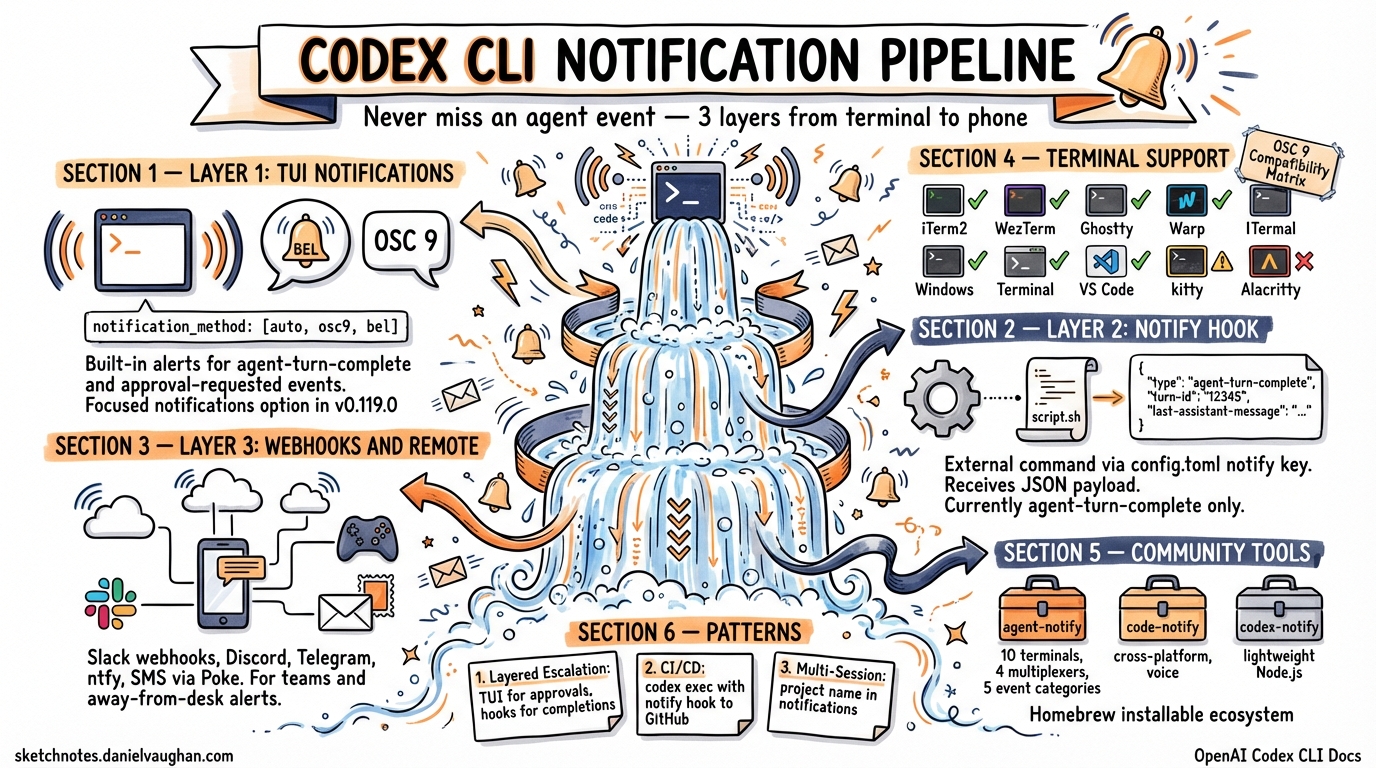
Agentic coding sessions routinely run for minutes — sometimes hours. You fire off a complex refactoring task, switch to a browser tab, and fifteen minutes later wonder whether Codex is still working, waiting for approval, or finished. The notification pipeline is how you solve that problem without polling.
Codex CLI ships a three-layer notification architecture: built-in TUI notifications for in-terminal alerts, OSC 9 escape sequences for desktop notifications via supported terminals, and an external notify hook for arbitrary side-channel alerting. This article covers all three layers, the configuration that wires them together, the JSON payload format, community tooling, and practical patterns for teams.
The Three Notification Layers
flowchart TD
    A[Codex Agent Event] --> B{Event Type}
    B -->|agent-turn-complete| C[TUI Notification]
    B -->|approval-requested| C
    B -->|agent-turn-complete| D[External notify Hook]
    C --> E[OSC 9 / BEL]
    D --> F[Custom Script]
    F --> G[Desktop Toast]
    F --> H[Webhook - Slack/Discord]
    F --> I[SMS / iMessage]
    F --> J[Sound Alert]
    E --> K[Terminal Desktop Notification]
The layers are complementary, not competing. The TUI layer handles both agent-turn-complete and approval-requested events natively1. The external notify hook currently fires only for agent-turn-complete2 — a limitation tracked in Issues #11808 and #148133. Using both together gives you the broadest coverage.
Layer 1: Built-in TUI Notifications
The [tui] section in config.toml controls the built-in notification behaviour:
[tui]
notifications = ["agent-turn-complete", "approval-requested"]
notification_method = "osc9"
Notification Method
The tui.notification_method key accepts three values4:
| Value | Behaviour |
|---|---|
auto |
Probes terminal capabilities; prefers OSC 9, falls back to BEL |
osc9 |
Emits an OSC 9 escape sequence (\e]9;<message>\a) |
bel |
Emits a terminal bell character (\x07) |
The default is auto, which works well for most setups. If you know your terminal supports OSC 9, setting it explicitly avoids the probe overhead.
Event Filtering
The notifications key accepts either a boolean (true to enable all events) or an array of event type strings1. As of v0.120.0, the two supported event types are:
agent-turn-complete— the agent has finished its response and is idleapproval-requested— the agent is blocked waiting for you to approve a command or file edit
Focused-Window Notifications
v0.119.0 added an opt-in mode for notifications even when the terminal is focused (PRs #17174 and #17175)5. Previously, Codex suppressed notifications if the terminal was in the foreground — reasonable for casual use, but problematic when you have multiple panes open and are not watching the Codex session. The focused_notifications setting controls this behaviour:
[tui]
notifications = true
notification_method = "osc9"
focused_notifications = true
Warp OSC 9 Support
Warp gained OSC 9 support in early 20266. If you use Warp, set notification_method = "osc9" explicitly — the auto probe may not detect Warp’s support reliably in all configurations.
Layer 2: The External notify Hook
The notify key is a root-level config entry (not inside any table) that points to an external command7. Codex invokes it whenever an agent-turn-complete event fires, passing a JSON payload as the first argument.
notify = ["/bin/bash", "/Users/you/.codex/hooks/notify.sh"]

[tui]
notifications = ["approval-requested"]
notification_method = "osc9"
TOML ordering matters: root-level keys like
notifymust appear before any[table]headers in the file.
JSON Payload Format
The hook receives a single JSON argument with the following structure2:
{
  "type": "agent-turn-complete",
  "turn-id": "abc123",
  "input-messages": ["Run the test suite and fix any failures"],
  "last-assistant-message": "All 47 tests now pass. I fixed the off-by-one error in pagination.rs."
}
Key fields:
| Field | Description |
|---|---|
type |
Event name (currently always agent-turn-complete) |
turn-id |
Unique identifier for the completed turn |
input-messages |
Array of the user messages that triggered this turn |
last-assistant-message |
The agent’s final response text — useful for notification previews |
A Minimal Notify Script
Here is a basic macOS notification script using terminal-notifier8:
#!/bin/bash
# ~/.codex/hooks/notify.sh
# Requires: brew install terminal-notifier

JSON="$1"
MESSAGE=$(echo "$JSON" | jq -r '.["last-assistant-message"]' 2>/dev/null)

# Sanitise: strip leading hyphens, trim to 220 chars
MESSAGE="${MESSAGE#-}"
MESSAGE="${MESSAGE:0:220}"

if [ -z "$MESSAGE" ]; then
  MESSAGE="Turn complete"
fi

terminal-notifier \
  -title "Codex CLI" \
  -message "$MESSAGE" \
  -sound default \
  -activate "com.googlecode.iterm2"
Make it executable:
chmod +x ~/.codex/hooks/notify.sh
An OSC 9 Forwarding Script
If you want the notify hook to emit an OSC 9 sequence (useful when running Codex over SSH where the TUI’s built-in OSC 9 may not reach the local terminal):
#!/bin/bash
# ~/.codex/hooks/notify-osc9.sh

JSON="$1"
MSG=$(echo "$JSON" | jq -r '.["last-assistant-message"]' 2>/dev/null \
  | tr '\n' ' ' | cut -c1-50)

[ -z "$MSG" ] && MSG="Turn complete"

printf '\e]9;Codex: %s\e\\' "$MSG" > /dev/tty
The > /dev/tty redirect is essential — without it, the escape sequence goes to stdout, which Codex may not pass through to the terminal9.
Layer 3: Webhook and Remote Alerting
For teams or developers who step away from the terminal entirely, the notify hook can forward events to external services.
Slack Webhook Example
#!/bin/bash
# ~/.codex/hooks/notify-slack.sh

JSON="$1"
MSG=$(echo "$JSON" | jq -r '.["last-assistant-message"]' 2>/dev/null \
  | head -c 500)
TURN=$(echo "$JSON" | jq -r '.["turn-id"]' 2>/dev/null)

curl -s -X POST "$CODEX_SLACK_WEBHOOK_URL" \
  -H 'Content-Type: application/json' \
  -d "$(jq -n --arg text ":white_check_mark: *Codex turn complete* (\`$TURN\`)\n$MSG" '{text: $text}')"
Set CODEX_SLACK_WEBHOOK_URL in your environment or hardcode the URL. The same pattern works for Discord (different payload shape), Telegram (via Bot API), and ntfy (plain POST to a topic URL).
SMS/iMessage via Poke
The Poke service provides a REST API that forwards to SMS or iMessage10. A two-line addition to any notify script:
curl -s "https://api.pokepush.com/v1/push?token=$POKE_TOKEN&message=Codex+done:+${MSG:0:100}"
Terminal Compatibility Matrix
Not all terminals handle OSC 9 identically. Here is the current state as of April 2026:
| Terminal | OSC 9 | BEL | Click-to-Focus | Notes |
|---|---|---|---|---|
| iTerm2 | ✅ | ✅ | ✅ | Enable in Settings → Profiles → Terminal → Notifications8 |
| WezTerm | ✅ | ✅ | ✅ | Works out of the box |
| Windows Terminal | ✅ | ✅ | ❌ | Toast notifications, no focus redirect |
| Ghostty | ✅ | ✅ | ✅ | Supported since v1.111 |
| Warp | ✅ | ✅ | ✅ | Requires Warp 2026.1+ for OSC 96 |
| kitty | ⚠️ | ✅ | ✅ | Uses its own notification protocol; OSC 9 partial |
| Alacritty | ❌ | ✅ | ❌ | No native notification support; use notify hook |
| VS Code Terminal | ✅ | ✅ | ✅ | Via “Terminal Notification” extension9 |
Test your terminal’s OSC 9 support with:
printf '\e]9;OSC9 test notification\a'
If you see a desktop notification, you are good to go. If not, fall back to bel or use the external notify hook with terminal-notifier or equivalent.
Community Notification Tools
The limitation of the built-in notification system — particularly the notify hook’s restriction to agent-turn-complete — has spawned a healthy ecosystem of community tools:
agent-notify
The most comprehensive option. Supports Codex CLI, Claude Code, and Gemini CLI with auto-detection of 10 terminals and 4 multiplexers (tmux, zellij, kitty, WezTerm)11. Five event categories with distinct sounds, plus rich webhook support for Slack, Discord, Telegram, and ntfy. Installs via Homebrew:
brew tap paultendo/agent-notify https://github.com/paultendo/agent-notify
brew install agent-notify
agent-notify --setup
The --setup command auto-detects your terminal and configures the notify entry in config.toml.
code-notify
A cross-platform tool (macOS, Linux, Windows) supporting Codex, Claude Code, and Gemini CLI12. Installs via Homebrew, npm, or shell script. Includes voice announcements on macOS and Windows, and per-project configuration via scoped settings files.
brew install mylee04/tools/code-notify
codex-notify
A lightweight Node.js handler that pops a native macOS notification via osascript, plays a sound, and logs every payload to payload-log.jsonl for debugging13:
git clone https://github.com/heydong1/codex-notify.git ~/codex-notify
cd ~/codex-notify && pnpm install
notify = ["node", "/Users/you/codex-notify/notify.ts"]
Practical Patterns
Pattern 1: Layered Alert Escalation
Use TUI notifications for approval prompts (you are probably nearby), and the notify hook for turn completions (you might have context-switched):
notify = ["bash", "/Users/you/.codex/hooks/notify-slack.sh"]

[tui]
notifications = ["approval-requested"]
notification_method = "osc9"
This avoids notification fatigue from double-alerting on turn completions whilst ensuring you never miss an approval prompt.
Pattern 2: CI/CD Pipeline Notifications
In codex exec pipelines, the TUI is absent. Use the notify hook to post completion status to a Slack channel or update a GitHub check:
notify = ["bash", "/opt/ci/codex-notify-github.sh"]
The script can use the turn-id from the payload to correlate with the pipeline run and post a status update.
Pattern 3: Multi-Session Monitoring
When running parallel Codex sessions across worktrees, configure each session’s notify hook to include the project name:
#!/bin/bash
PROJECT=$(basename "$(pwd)")
MSG=$(echo "$1" | jq -r '.["last-assistant-message"]' | head -c 100)
terminal-notifier -title "Codex: $PROJECT" -message "$MSG" -sound default
This gives you at-a-glance context about which session completed.
Known Limitations
- The external
notifyhook fires only foragent-turn-completeevents — notapproval-requested(Issues #11808, #14813)3. The TUI layer handles approvals, but external webhook consumers cannot currently react to them. - On WSL2, the
notifyhook can fail for approval-adjacent events due to Windows/Linux IPC boundaries (Issue #8189)14. ⚠️ The Windows-native toast backend requested in that issue has not yet landed. - There is no built-in rate limiting or deduplication — rapid sub-agent completions can produce a burst of notifications. Community tools like agent-notify include throttling; roll-your-own scripts should add a cooldown.
- ⚠️ The
focused_notificationssetting mentioned in the v0.119.0 release notes (PRs #17174, #17175) may not be documented in all configuration references yet. Verify withcodex config get tui.focused_notificationsif unsure.
What’s Coming
The community has been vocal about extending the notify hook to cover approval-requested events3. Given that the TUI layer already supports this event type, it seems likely the external hook will follow. Issue #14813 has received attention from maintainers, suggesting this is on the roadmap.
A broader event taxonomy — including error, session-limit, authentication-required — would align Codex with what agent-notify already categorises on the consumer side11. Whether OpenAI implements this natively or the community continues to bridge the gap remains to be seen.
Citations
-
OpenAI, “Advanced Configuration – Codex,” developers.openai.com, 2026. https://developers.openai.com/codex/config-advanced ↩ ↩2
-
@samwize, “Setup Codex CLI notifications on macOS (iTerm2 + terminal-notifier),” samwize.com, February 2026. https://samwize.com/2026/02/05/setup-codex-cli-notifications-on-macos-iterm2-terminal-notifier/ ↩ ↩2
-
“Run
notifyhook for approval-request events,” GitHub Issue #11808 and “Expose approval-requested event to external notify hook,” GitHub Issue #14813, openai/codex. https://github.com/openai/codex/issues/11808 ↩ ↩2 ↩3 -
OpenAI, “Configuration Reference – Codex,” developers.openai.com, 2026. https://developers.openai.com/codex/config-reference ↩
-
OpenAI, “Release 0.119.0,” GitHub, April 2026. PRs #17174 and #17175. https://github.com/openai/codex/releases/tag/rust-v0.119.0 ↩
-
Warp, “Desktop notifications,” docs.warp.dev, 2026. https://docs.warp.dev/terminal/more-features/notifications ↩ ↩2
-
Simon Alford, “My setup for Claude Code + Codex Notifications in iTerm2 and VS Code,” Substack, 2026. https://simonalford.substack.com/p/my-setup-for-claude-code-codex-notifications ↩
-
Apple, “terminal-notifier,” via Homebrew; iTerm2 notification setup. https://samwize.com/2026/02/05/setup-codex-cli-notifications-on-macos-iterm2-terminal-notifier/ ↩ ↩2
-
Simon Alford, “My setup for Claude Code + Codex Notifications in iTerm2 and VS Code,” Substack, 2026. https://simonalford.substack.com/p/my-setup-for-claude-code-codex-notifications ↩ ↩2
-
JP Caparas, “Get SMS (or iMessage) alerts from Codex CLI via Poke,” Reading.sh, 2026. https://reading.sh/get-sms-or-imessage-alerts-from-codex-cli-via-poke-797dd95b61fa ↩
-
paultendo, “agent-notify: macOS notifications for Codex with VSCode activation,” GitHub, 2026. https://github.com/paultendo/agent-notify ↩ ↩2 ↩3
-
mylee04, “code-notify: Cross-platform desktop notifications for Claude Code, Codex, and Gemini CLI,” GitHub, 2026. https://github.com/mylee04/code-notify ↩
-
heydong1, “codex-notify: macOS desktop notification helper for Codex CLI’s notify hook,” GitHub, 2026. https://github.com/heydong1/codex-notify ↩
-
“WSL2: notifications/notify hook often fails for approval prompts,” GitHub Issue #8189, openai/codex. https://github.com/openai/codex/issues/8189 ↩