Codex CLI Session Persistence: Resume, Fork, and Analytics
Codex CLI Session Persistence: Resume, Fork, and Analytics
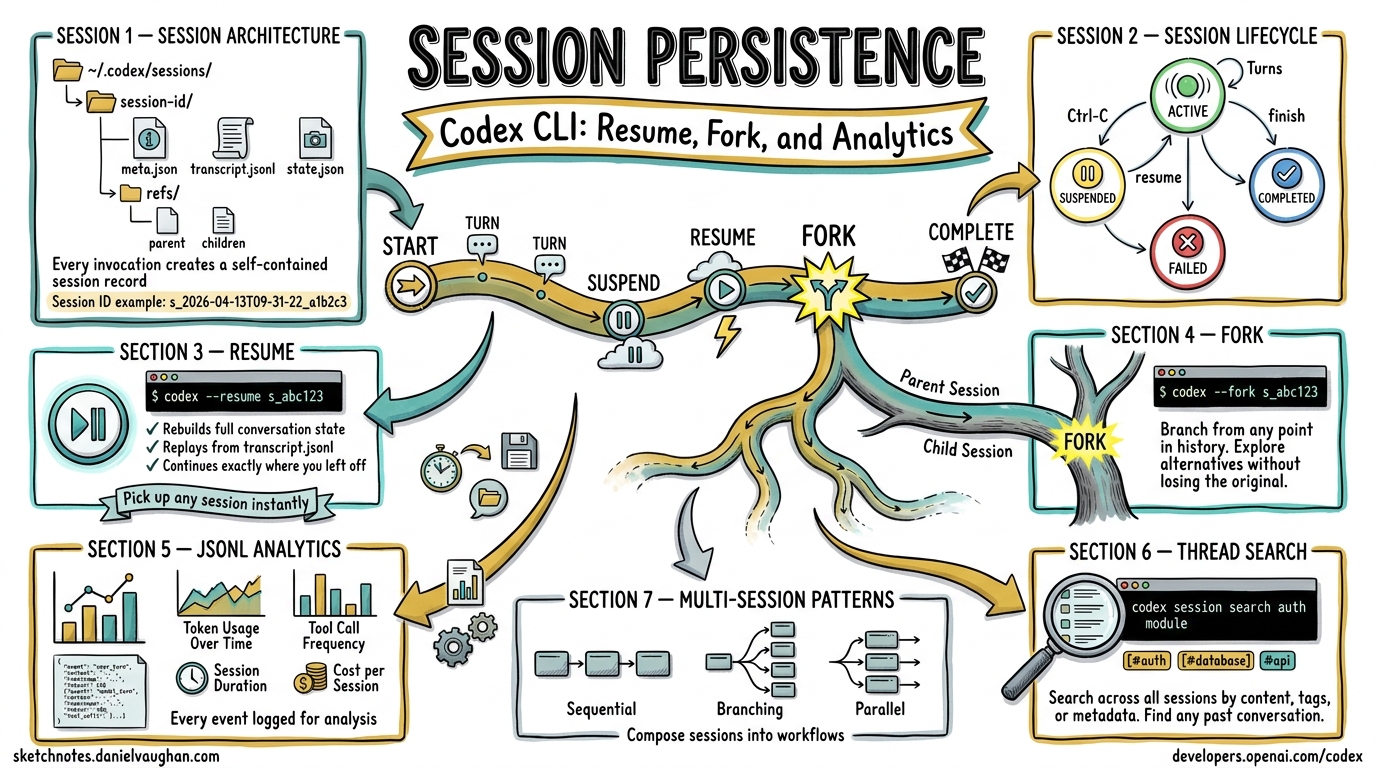
Consolidated reference – this article unifies coverage previously spread across five separate pieces on thread management, session analytics, thread search, session lifecycle, and session transcripts. It is the single authoritative source for Codex CLI session management.
Table of Contents
- Session Architecture
- Resume Semantics
- Fork Workflows
- JSONL Analytics
- Thread Search
- Multi-Session Patterns
- Configuration Reference
- Troubleshooting
Session Architecture
Every Codex CLI invocation creates a session – a self-contained record of the conversation between the user and the agent. Sessions are the fundamental unit of persistence.
Storage Layout
Sessions are stored under the Codex data directory ($CODEX_DATA_HOME,
defaulting to ~/.codex/):
~/.codex/
  sessions/
    <session-id>/
      meta.json          # session metadata
      transcript.jsonl   # ordered event log
      state.json         # last-known agent state snapshot
      refs/
        parent           # pointer to parent session (if forked)
        children/        # symlinks to child sessions
Each session is identified by a session ID – a URL-safe, time-sortable
string (e.g., s_2026-04-13T09-31-22_a1b2c3).
Session Metadata (meta.json)
| Field | Type | Description |
|---|---|---|
id |
string | Unique session identifier |
created_at |
ISO 8601 | Timestamp of session creation |
updated_at |
ISO 8601 | Timestamp of last activity |
status |
enum | active, completed, suspended, failed |
parent_id |
string? | ID of the parent session (null if root) |
fork_point |
int? | Event index in parent where this fork diverges |
model |
string | Model used (e.g., claude-opus-4-6) |
cwd |
string | Working directory at session start |
title |
string? | Auto-generated or user-supplied session title |
tags |
string[] | User-defined labels |
token_usage |
object | { prompt, completion, total } token counts |
tool_calls |
int | Number of tool invocations |
duration_s |
float | Wall-clock duration in seconds |
Session Lifecycle
stateDiagram-v2
    [*] --> Active : codex "prompt"
    Active --> Active : user ↔ agent turns
    Active --> Suspended : Ctrl-C / codex session suspend
    Active --> Completed : agent finishes
    Active --> Failed : unrecoverable error

    Suspended --> Active : codex --resume <id>
    Suspended --> Active : codex --fork <id>

    Completed --> Active : codex --fork <id>
    Failed --> Active : codex --fork <id>
    Failed --> Active : codex --resume <id> (retry)
A session transitions through well-defined states. The key insight is that resume re-enters the same session while fork creates a new session rooted at a point in the original.
Transcript Format
The transcript.jsonl file contains one JSON object per line. Each object is
an event in the session:
{"seq":0,"ts":"2026-04-13T09:31:22Z","type":"user","content":"Refactor the auth module"}
{"seq":1,"ts":"2026-04-13T09:31:24Z","type":"assistant","content":"I'll start by reading the current auth module..."}
{"seq":2,"ts":"2026-04-13T09:31:25Z","type":"tool_call","tool":"Read","params":{"file_path":"/src/auth.ts"},"call_id":"tc_001"}
{"seq":3,"ts":"2026-04-13T09:31:25Z","type":"tool_result","call_id":"tc_001","status":"ok","content":"...file contents..."}
{"seq":4,"ts":"2026-04-13T09:31:28Z","type":"assistant","content":"The auth module has three main areas to refactor..."}
Event types:
| Type | Description |
|---|---|
user |
User message |
assistant |
Agent response |
tool_call |
Tool invocation request |
tool_result |
Tool invocation result |
system |
System-level event (config change, etc.) |
error |
Error event |
checkpoint |
State snapshot marker |
Resume Semantics
Resuming a session continues the conversation from where it left off. This is the primary mechanism for returning to interrupted work.
Basic Resume
# Resume the most recent session
codex --resume

# Resume a specific session by ID
codex --resume s_2026-04-13T09-31-22_a1b2c3

# Resume with an additional prompt
codex --resume s_2026-04-13T09-31-22_a1b2c3 "now add unit tests"
How Resume Works
- State reconstruction – Codex loads
state.jsonto restore the agent’s last-known state (file context, conversation history, pending operations). - Transcript replay – If
state.jsonis missing or stale, Codex replaystranscript.jsonlto rebuild state from events. - Context window management – The full transcript is loaded into the model’s context. If the transcript exceeds the context window, Codex applies smart truncation: it keeps the first exchange (for task framing), the most recent N exchanges, and any exchanges containing tool calls that modified files still present on disk.
- Continuation – The session status returns to
activeand the user can issue new prompts.
sequenceDiagram
    participant User
    participant CLI as Codex CLI
    participant Store as Session Store
    participant Model

    User->>CLI: codex --resume <id>
    CLI->>Store: load meta.json + state.json
    Store-->>CLI: session state
    CLI->>CLI: validate state consistency
    CLI->>Model: reconstruct context window
    Model-->>CLI: ready
    CLI->>User: "Resumed session <id>"
    User->>CLI: "now add unit tests"
    CLI->>Model: append user message
    Model-->>CLI: agent response
    CLI->>Store: append events to transcript.jsonl
Resume Edge Cases
| Scenario | Behavior |
|---|---|
| Session completed normally | Resumes with a note that the session was previously finished |
| Session failed with error | Retries from the last successful checkpoint |
| Working directory deleted | Prompts user for a new cwd; logs a warning |
| Model no longer available | Falls back to default model; logs a warning |
| Transcript exceeds context | Applies smart truncation (see above) |
| Concurrent resume attempts | Second attempt blocked with lock error |
Resume with Checkpoint Rollback
If a session reached a bad state, you can resume from an earlier checkpoint:
# List checkpoints in a session
codex session checkpoints s_2026-04-13T09-31-22_a1b2c3

# Resume from a specific checkpoint
codex --resume s_2026-04-13T09-31-22_a1b2c3 --from-checkpoint 3
Checkpoints are created automatically at key moments (after significant file edits, before destructive operations, at user-defined intervals).
Fork Workflows
Forking creates a new session that branches from an existing one. The
original session is unmodified. This is the session equivalent of git branch.
Basic Fork
# Fork from the end of a session
codex --fork s_2026-04-13T09-31-22_a1b2c3

# Fork from a specific event index
codex --fork s_2026-04-13T09-31-22_a1b2c3 --at 4

# Fork from a checkpoint
codex --fork s_2026-04-13T09-31-22_a1b2c3 --from-checkpoint 2

# Fork with a new prompt
codex --fork s_2026-04-13T09-31-22_a1b2c3 "try a different approach using dependency injection"
Fork Mechanics
gitGraph
    commit id: "s_parent seq:0 user prompt"
    commit id: "s_parent seq:1 assistant response"
    commit id: "s_parent seq:2 tool call"
    commit id: "s_parent seq:3 tool result"
    commit id: "s_parent seq:4 assistant response"
    branch fork-at-seq-2
    commit id: "s_child seq:0 (diverge)"
    commit id: "s_child seq:1 new direction"
When forking:
- A new session is created with a fresh
id. meta.jsonrecords theparent_idandfork_point.- Events up to the fork point are copied into the new session’s
transcript.jsonl(not symlinked – the child is fully self-contained). - A symlink is created in the parent’s
refs/children/directory. - The new session enters
activestatus.
Fork vs. Resume Comparison
| Aspect | Resume | Fork |
|---|---|---|
| Session identity | Same session continues | New session created |
| Original preserved | Modified (new events appended) | Unmodified |
| Branch point | Always from the end | Any event index or checkpoint |
| Use case | Continue interrupted work | Explore alternatives |
| Parent-child link | N/A | Recorded in both sessions’ metadata |
| Transcript | Appended in-place | Copied up to fork point, then new |
Practical Fork Patterns
Pattern 1: A/B testing approaches
# Original session tried approach A
codex --fork s_original "try approach B: use an event-driven architecture"

# Compare results
codex session diff s_original s_fork_b
Pattern 2: Checkpoint recovery
# Session went wrong after checkpoint 3
codex --fork s_original --from-checkpoint 3 "undo the database migration approach, use file storage instead"
Pattern 3: Team handoff
# Export a session for a teammate
codex session export s_original --format bundle > session-bundle.tar.gz

# Teammate imports and forks
codex session import session-bundle.tar.gz
codex --fork s_original "continue from where Alice left off"
JSONL Analytics
The JSONL transcript format enables powerful analytics over session data. Codex CLI ships with built-in analytics commands and supports export to external tools.
Built-in Analytics
# Summary statistics for a session
codex session stats s_2026-04-13T09-31-22_a1b2c3
Example output:
Session: s_2026-04-13T09-31-22_a1b2c3
Status:  completed
Duration: 12m 34s

Events:    47
  user:        8
  assistant:  14
  tool_call:  12
  tool_result: 12
  checkpoint:  1

Tokens:
  prompt:     42,318
  completion: 11,204
  total:      53,522

Tools used:
  Read:       6 calls
  Edit:       4 calls
  Bash:       2 calls

Files touched:
  /src/auth.ts         (read 3x, edited 2x)
  /src/auth.test.ts    (created, edited 1x)
  /src/types.ts        (read 1x)
Aggregate Analytics
# Analytics across all sessions in the last 7 days
codex session analytics --since 7d

# Filter by tag
codex session analytics --tag refactoring

# Output as JSON for external processing
codex session analytics --since 30d --format json > analytics.json
Aggregate output includes:
| Metric | Description |
|---|---|
total_sessions |
Number of sessions in the time range |
total_duration_s |
Cumulative wall-clock time |
total_tokens |
Total token usage (prompt + completion) |
avg_tokens_per_session |
Mean token usage per session |
tool_call_distribution |
Breakdown of tool usage across all sessions |
completion_rate |
Fraction of sessions reaching completed |
avg_turns |
Mean number of user-agent turn pairs |
top_files |
Most frequently read/edited files |
sessions_by_status |
Count of sessions by status |
JSONL Processing with External Tools
The transcript format is designed for interoperability with standard UNIX tools and data pipelines.
Count tool calls per session:
cat ~/.codex/sessions/s_*/transcript.jsonl \
  | jq -r 'select(.type == "tool_call") | .tool' \
  | sort | uniq -c | sort -rn
Extract all file paths touched:
jq -r 'select(.type == "tool_call") | .params.file_path // empty' \
  ~/.codex/sessions/s_*/transcript.jsonl \
  | sort -u
Token usage over time (for graphing):
for dir in ~/.codex/sessions/s_*/; do
  jq -r '[.created_at, .token_usage.total] | @csv' "$dir/meta.json"
done | sort > token_usage_over_time.csv
Export to SQLite for deeper analysis:
codex session export --format sqlite --since 30d > sessions.db

# Then query with sqlite3
sqlite3 sessions.db "
  SELECT date(created_at) as day, count(*) as sessions, sum(token_usage_total) as tokens
  FROM sessions
  GROUP BY day
  ORDER BY day
"
JSONL Rollout History
The JSONL transcript format was introduced through a phased rollout:
| Phase | Date Range | Scope |
|---|---|---|
| Alpha | 2026-03-15 – 03-22 | Internal dogfooding, schema iteration |
| Beta | 2026-03-23 – 03-29 | Opt-in via --enable-transcripts |
| GA | 2026-03-30+ | On by default; opt-out via config |
The schema stabilized at v2 during the beta phase. Key changes from v1:
- Added
seqfield for deterministic ordering - Added
call_idlinkingtool_callandtool_resultevents - Added
checkpointevent type - Moved token counts from per-event to session-level metadata
To check your transcript schema version:
codex session info s_<id> | grep schema_version
Thread Search
Thread search lets you find and filter past sessions using full-text search, metadata queries, and semantic similarity.
Text Search
# Search session transcripts for a string
codex session search "auth module"

# Search with regex
codex session search --regex "refactor.*(auth|login)"

# Limit to recent sessions
codex session search "database migration" --since 7d

# Search only in user messages
codex session search "auth module" --type user
Metadata Queries
# List sessions by status
codex session list --status completed

# List sessions by tag
codex session list --tag refactoring

# List sessions for a specific directory
codex session list --cwd /projects/myapp

# List sessions using a specific model
codex session list --model claude-opus-4-6

# Combined filters
codex session list --status completed --tag refactoring --since 14d
Session List Output
codex session list --since 7d
ID                                    Created              Status     Duration  Title
s_2026-04-13T09-31-22_a1b2c3         2026-04-13 09:31     completed  12m 34s   Refactor auth module
s_2026-04-12T14-02-11_d4e5f6         2026-04-12 14:02     completed   8m 12s   Add user settings API
s_2026-04-12T10-15-33_g7h8i9         2026-04-12 10:15     suspended   3m 45s   Debug flaky test
s_2026-04-11T16-44-09_j0k1l2         2026-04-11 16:44     completed  22m 01s   Migrate to new ORM
Semantic Search
When configured with an embedding provider, Codex supports semantic search across session transcripts:
# Find sessions conceptually related to a query
codex session search --semantic "handling authentication errors gracefully"
Semantic search indexes session content at the turn level, allowing it to surface relevant sessions even when the exact wording differs.
Search Result Interaction
Search results can feed directly into resume or fork operations:
# Search and then resume the first match
codex --resume $(codex session search "auth module" --limit 1 --id-only)

# Interactive session picker
codex session search "database" --interactive
Multi-Session Patterns
Complex tasks often span multiple sessions. Codex provides patterns and tooling for managing session relationships.
Session Trees
Forks create a tree structure. You can visualize it:
codex session tree s_root_session
s_2026-04-11T09-00-00_root
  Refactor auth module
  ├── s_2026-04-11T10-30-00_fork1
  │     Try approach A: middleware pattern
  ├── s_2026-04-11T10-35-00_fork2
  │     Try approach B: decorator pattern
  │     └── s_2026-04-12T09-00-00_fork2a
  │           Refine decorator + add tests
  └── s_2026-04-12T14-00-00_fork3
        Try approach C: event-driven
Session Chains (Sequential Work)
For tasks that span multiple sittings but should be logically connected:
# Start a new session linked to a previous one (not a fork -- fresh context)
codex --continue-from s_previous "continue the API migration"
This creates a new session with a continues relationship (distinct from
parent/fork). The new session starts with a summary of the previous session
rather than its full transcript, keeping context manageable.
Session Groups
Tag-based grouping for organizing related sessions:
# Tag sessions
codex session tag s_abc123 "project:myapp" "sprint:42"
codex session tag s_def456 "project:myapp" "sprint:42"

# List the group
codex session list --tag "project:myapp" --tag "sprint:42"

# Aggregate analytics for the group
codex session analytics --tag "project:myapp"
Diff Between Sessions
Compare what two sessions did differently:
codex session diff s_fork1 s_fork2
Divergence point: seq 4 in parent s_root

Session s_fork1 (approach A):
  + Created /src/middleware/auth.ts
  + Edited /src/server.ts (added middleware chain)
  + 3 tool calls, 4,200 tokens after fork

Session s_fork2 (approach B):
  + Created /src/decorators/auth.ts
  + Edited /src/auth.ts (added decorator usage)
  + Edited /src/types.ts (added decorator types)
  + 5 tool calls, 6,100 tokens after fork
Session Export and Sharing
# Export a single session as a readable transcript
codex session export s_abc123 --format markdown > session-transcript.md

# Export as a self-contained bundle (metadata + transcript + state)
codex session export s_abc123 --format bundle > session.tar.gz

# Export a session tree (parent + all forks)
codex session export s_root --format bundle --include-forks > session-tree.tar.gz

# Import a session bundle
codex session import session.tar.gz
Session Cleanup
# Delete a single session
codex session delete s_abc123

# Delete sessions older than 30 days
codex session prune --older-than 30d

# Delete sessions by status
codex session prune --status failed --older-than 7d

# Dry run to see what would be deleted
codex session prune --older-than 30d --dry-run
Configuration Reference
Session behavior is controlled via ~/.codex/config.toml or environment
variables.
[sessions]
# Where to store sessions (default: ~/.codex/sessions)
data_dir = "~/.codex/sessions"

# Whether to record transcripts (default: true since GA rollout)
enable_transcripts = true

# Transcript schema version (default: 2)
transcript_schema_version = 2

# Auto-checkpoint interval: create a checkpoint every N tool calls
auto_checkpoint_interval = 5

# Maximum transcript size before smart truncation on resume (in events)
max_transcript_events = 500

# Session title generation (auto, manual, off)
auto_title = "auto"

# Default analytics time range
default_analytics_range = "7d"

[sessions.search]
# Enable semantic search (requires embedding provider config)
semantic_search = false

# Embedding provider for semantic search
embedding_provider = "openai"
embedding_model = "text-embedding-3-small"
Environment variable overrides (prefixed with CODEX_):
| Variable | Equivalent config key |
|---|---|
CODEX_SESSIONS_DATA_DIR |
sessions.data_dir |
CODEX_ENABLE_TRANSCRIPTS |
sessions.enable_transcripts |
CODEX_AUTO_CHECKPOINT_INTERVAL |
sessions.auto_checkpoint_interval |
Troubleshooting
“Session not found” on resume
The session may have been pruned or the data directory may have changed. Check:
# Verify the session exists
ls ~/.codex/sessions/s_<id>/

# Check your configured data directory
codex config get sessions.data_dir
“Lock held by another process” on resume
Another Codex process has the session open. Either terminate it or wait:
# See which process holds the lock
cat ~/.codex/sessions/s_<id>/.lock

# Force-release (use with caution)
codex session unlock s_<id>
Transcript too large for context window
If resuming a session with a very long transcript, Codex applies smart truncation automatically. To control this:
# Resume with explicit truncation
codex --resume s_<id> --max-context-events 100

# Or fork from a recent checkpoint to start with less history
codex --fork s_<id> --from-checkpoint latest
Missing tool results in transcript
If a session was interrupted during a tool call (e.g., power loss), the
transcript may contain a tool_call without a matching tool_result. On
resume, Codex detects this and:
- Logs a warning about the orphaned tool call.
- Inserts a synthetic
tool_resultwithstatus: "interrupted". - Informs the agent so it can decide whether to retry.
This article consolidates and supersedes the following sources:
- Thread Management: Fork and Resume (2026-03-28)
- Session Analytics JSONL Rollout (2026-03-30)
- Thread Search and Session Management (2026-03-30)
- Session Lifecycle: Resume, Fork, Rollouts (2026-04-11)
- Session Management: Resume, Fork, Transcripts (2026-04-13)