Codex CLI v0.129 Session Workflow Upgrades: The Redesigned Resume Picker, Raw Scrollback, and Workspace-Aware /diff
Codex CLI v0.129 Session Workflow Upgrades: The Redesigned Resume Picker, Raw Scrollback, and Workspace-Aware /diff
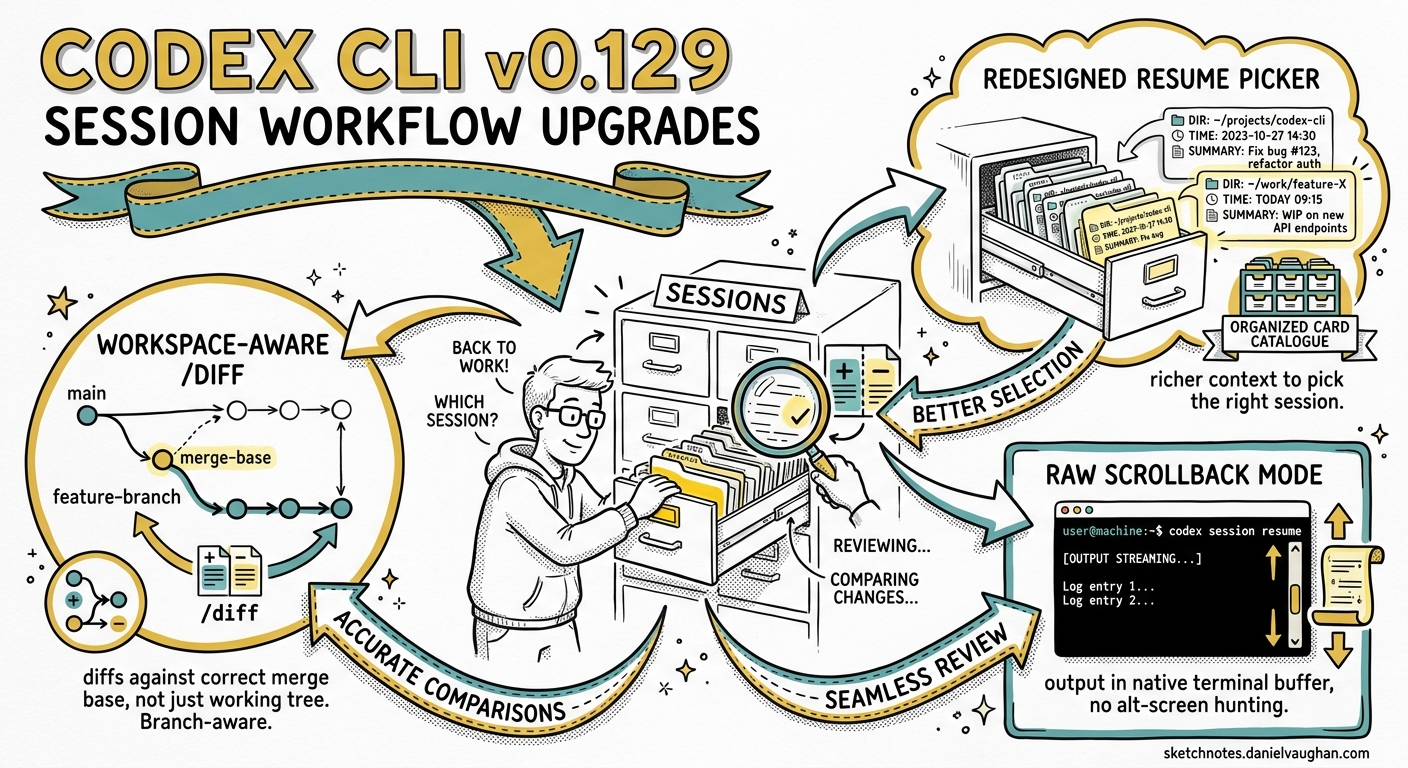
Codex CLI v0.129.0, released on 7 May 2026, is a feature-dense release spanning Vim editing, plugin marketplace upgrades, and compaction hooks1. Buried beneath those headline items is a quieter set of changes that affect every interactive session: a redesigned resume/fork picker, a raw scrollback mode for terminal-native output review, and a workspace-aware /diff command that understands your branch topology. Individually they are quality-of-life improvements. Together they reshape how experienced practitioners navigate multi-session workflows.
This article unpacks each change, shows the configuration knobs, and maps them into the daily rhythms of a developer who runs multiple Codex sessions across feature branches.
The Session Problem v0.129 Solves
Before v0.129, resuming a Codex session meant choosing between two extremes. codex resume --last jumped straight to the most recent session, which was fast but brittle — it often selected a stale session from the wrong directory2. The full picker (codex resume) listed every session without enough context to distinguish them at a glance. And once you resumed, reviewing what the agent had actually done required scrolling through the alternate-screen TUI or hunting through ~/.codex/sessions/ JSONL files manually.
The v0.129 improvements address three points on this workflow:
- Picking the right session — the redesigned resume/fork picker now shows richer metadata per session.
- Reviewing what happened — raw scrollback mode renders session output in your terminal’s native scrollback buffer.
- Understanding what changed — workspace-aware
/diffcomputes diffs against the correct merge base, not just the working tree.
flowchart LR
    A[Developer Returns] --> B{Which session?}
    B --> C[Resume Picker v0.129]
    C --> D[Session Summary + Metadata]
    D --> E{Review changes?}
    E -->|Raw scrollback| F[Native Terminal Scroll]
    E -->|/diff| G[Workspace-Aware Diff]
    G --> H[Merge-Base Comparison]
    F --> I[Continue or Fork]
    H --> I
The Redesigned Resume/Fork Picker
What Changed
The session picker in v0.129 is a full-screen TUI panel rather than the earlier minimal list1. Each entry now displays:
- Session title (auto-generated or user-set via
/title) - Working directory at session creation
- Timestamp of last activity
- Turn count and approximate token usage
- Session summary visible on highlight without opening the session
This means you can distinguish a “refactor auth middleware” session from a “fix CSS regression” session without resuming either.
Usage Patterns
From the command line:
# Open the full picker
codex resume

# Skip the picker — resume last session from current directory
codex resume --last

# Show sessions from all directories, not just cwd
codex resume --all

# Target a specific session by ID
codex resume abc123-def456
From within an active session, the /resume slash command opens the same picker without exiting the TUI3. The /fork command creates a new thread that inherits the parent’s history but diverges from a chosen point4. In v0.129 the fork picker now lets you walk back through the transcript using Esc (pressed twice with an empty composer) and select any earlier turn as the fork point1.
Practical Tip: Directory-Scoped Sessions
By default, codex resume filters sessions to the current working directory. This is the right behaviour for monorepos where each package has its own Codex workflow. If you work from a single root, codex resume --all gives a global view. Configure this per-profile if you want different defaults:
# ~/.codex/config.toml
[profiles.monorepo]
# No config key exists yet to change the default —
# use --all as a CLI flag or alias:
# alias cra='codex resume --all'
Raw Scrollback Mode
The Alternate-Screen Trade-Off
Codex CLI runs in the terminal’s alternate screen buffer by default5. This gives a clean full-screen experience but means your terminal’s native scrollback is empty when Codex exits — the output vanishes. Terminal multiplexers like tmux preserve the alternate buffer, but Zellij and VS Code’s integrated terminal handle it inconsistently67.
What Raw Scrollback Does
Raw scrollback mode, introduced in v0.129, renders session output into the terminal’s main buffer instead of the alternate screen1. When the session ends or you scroll up, the content is in your terminal’s native scrollback — selectable, searchable, and persistent until the buffer wraps.
This is controlled by the existing tui.alternate_screen configuration key:
# ~/.codex/config.toml
[tui]
# "auto" — skip alternate screen in Zellij; use it elsewhere
# "always" — always use alternate screen (clean but no scrollback)
# "never" — raw scrollback mode; output stays in main buffer
alternate_screen = "never"
You can also force it per-session with the --no-alt-screen CLI flag5:
codex --no-alt-screen "refactor the auth module"
When to Use It
| Scenario | Recommended Mode |
|---|---|
| Quick exploratory session you want to scroll back through | never (raw scrollback) |
| Long multi-turn session where TUI layout matters | always or auto |
| Running inside Zellij | auto (detects Zellij and skips alternate screen) |
| Running inside tmux | always (tmux preserves alternate buffer natively) |
| VS Code integrated terminal | never (avoids xterm.js alternate-screen quirks)7 |
| Piping output or running in CI | Use codex exec instead |
Limitation: Full-Screen Redraws
Raw scrollback works well for reviewing completed output, but the TUI still performs cursor-addressed redraws for interactive elements (approval prompts, plan mode, progress indicators). In terminals that do not handle in-place updates gracefully, you may see rendering artefacts in the scrollback6. The v0.129 release tightened this by “bounding terminal probes” and “clearing the first inline viewport render”1, but it remains an area of active development.
Workspace-Aware /diff
Before v0.129
The /diff slash command existed before v0.129, showing staged, unstaged, and untracked changes with syntax highlighting3. But it operated on the working tree only — it did not know which branch you were on or what the merge base was. For feature-branch workflows, this meant the diff included upstream changes that had been merged into your branch, making it noisy and unhelpful for pre-review checks.
The v0.129 Upgrade
Workspace-aware /diff now understands your branch topology1. When you run /diff, it:
- Detects your current branch
- Finds the merge base against its upstream tracking branch
- Computes a diff that shows only your changes since the branch point
This is the same merge-base logic that /review uses when you select “Review against a base branch”8, but /diff gives you the raw diff without the AI commentary — a quick sanity check before committing or before running /review.
gitGraph
    commit id: "main"
    commit id: "main-2"
    branch feature/auth
    commit id: "auth-1"
    commit id: "auth-2"
    checkout main
    commit id: "main-3"
    checkout feature/auth
    commit id: "auth-3" type: HIGHLIGHT
In this graph, running /diff on feature/auth shows only the changes in auth-1, auth-2, and auth-3 — not main-3. The merge base is main-2.
Combining /diff and /review
A typical pre-PR workflow in v0.129 now looks like:
- Run
/diff— scan the raw diff for obvious issues (forgotten debug statements, accidental file inclusions) - Run
/reviewand select “Review against a base branch” — get AI-powered risk analysis of the same changes - Address findings in-session
- Run
/diffagain to confirm the fixes
This two-pass pattern catches different classes of issues: /diff is instant and deterministic; /review is slower but catches semantic problems like race conditions or missing error handling8.
Theme-Aware Status Line with Branch Context
v0.129 also upgraded the TUI status line to show theme-aware colours and optional PR and branch-change summaries1. The status line is configured as an ordered array of item identifiers:
# ~/.codex/config.toml
[tui]
status_line = ["model", "sandbox", "branch", "tokens"]
The branch item — new in v0.129 — displays your current Git branch and, when available, a summary of pending changes relative to the upstream. Combined with theme-aware colours, the status line now adapts to your chosen syntax theme (configured via tui.theme)9.
The /statusline slash command lets you reconfigure these fields interactively without editing config.toml, and /title does the same for the terminal window title3.
/keymap debug: Diagnosing Key Binding Issues
A smaller but valuable v0.129 addition is /keymap debug, which enters a mode where every keypress is displayed as its raw terminal escape sequence1. This is invaluable when:
- Custom keymaps do not trigger as expected
- Terminal multiplexers swallow or remap keys (common with Alt+key combinations in tmux)
- You need to verify that your terminal sends the correct sequences for Vim-mode bindings
Run /keymap debug, press the problematic key combination, note the escape sequence, then press Esc to exit. You can then map that exact sequence in your keymap configuration.
Putting It Together: A Multi-Branch Workflow
Here is how these v0.129 features compose in a real development session:
sequenceDiagram
    participant Dev as Developer
    participant CLI as Codex CLI v0.129
    participant Git as Git Repository

    Dev->>CLI: codex resume (open picker)
    CLI-->>Dev: Show sessions with metadata
    Dev->>CLI: Select "auth-refactor" session
    CLI->>Git: Detect branch: feature/auth
    Dev->>CLI: /diff
    CLI->>Git: Compute merge-base diff
    CLI-->>Dev: Show only feature/auth changes
    Dev->>CLI: "Fix the token refresh race condition"
    CLI->>Git: Apply patch
    Dev->>CLI: /review (base branch)
    CLI-->>Dev: AI review of changes
    Dev->>CLI: /fork (start CSS fix branch)
    CLI-->>Dev: New thread, inherited context
The session picker gets you to the right context fast. /diff shows you exactly what you have changed on this branch. /review catches what you missed. And /fork lets you branch off without losing your place.
Configuration Summary
| Key | Type | Default | Purpose |
|---|---|---|---|
tui.alternate_screen |
auto \| always \| never |
auto |
Controls scrollback mode5 |
tui.status_line |
array<string> \| null |
(built-in default) | Status line items9 |
tui.terminal_title |
array<string> \| null |
["spinner", "project"] |
Terminal title items9 |
history.persistence |
save-all \| none |
save-all |
Whether sessions are saved9 |
What Is Still Missing
These improvements are welcome, but gaps remain:
- Session tagging and search — the picker shows metadata but cannot filter by tag, date range, or keyword across session contents. Community tools like
agent-sessions10 fill this gap with a separate UI. - Cross-surface resume — sessions created in the Codex desktop app or IDE extension cannot always be resumed in the CLI and vice versa, though the app-server protocol is converging towards full interoperability11.
- Scrollback in Zellij — while
automode disables the alternate screen in Zellij, full-screen redraws still interfere with clean scrollback in some configurations6. ⚠️ This is a known limitation as of v0.129.
Conclusion
The session workflow upgrades in Codex CLI v0.129 are the kind of changes that disappear into muscle memory within a week. The redesigned picker removes the guesswork from codex resume. Raw scrollback mode lets your terminal do what terminals do best — scroll. And workspace-aware /diff ensures you review your changes, not the entire branch history. None of these are headline features, but together they make the difference between a tool you tolerate and one you trust.
Citations
-
Codex CLI v0.129.0 release notes. https://github.com/openai/codex/releases/tag/rust-v0.129.0 ↩ ↩2 ↩3 ↩4 ↩5 ↩6 ↩7 ↩8
-
GitHub Issue #17302 —
codex resume --lastcan start a fresh session even when picker can continue. https://github.com/openai/codex/issues/17302 ↩ -
Codex CLI Slash Commands documentation. https://developers.openai.com/codex/cli/slash-commands ↩ ↩2 ↩3
-
Codex CLI Features documentation — session resume and fork. https://developers.openai.com/codex/cli/features ↩
-
Codex CLI TUI Alternate Screen documentation. https://github.com/openai/codex/blob/main/docs/tui-alternate-screen.md ↩ ↩2 ↩3
-
GitHub Issue #10331 — Zellij scrollback broken with –no-alt-screen. https://github.com/openai/codex/issues/10331 ↩ ↩2 ↩3
-
GitHub Issue #14277 — –no-alt-screen does not preserve scrollback in xterm.js terminals. https://github.com/openai/codex/issues/14277 ↩ ↩2
-
Codex CLI Features documentation — /review and base branch review. https://developers.openai.com/codex/cli/features ↩ ↩2
-
Codex CLI Configuration Reference. https://developers.openai.com/codex/config-reference ↩ ↩2 ↩3 ↩4
-
agent-sessions — session browser for Codex CLI, Claude Code, and other agents. https://github.com/jazzyalex/agent-sessions ↩
-
Codex CLI App Server documentation. https://developers.openai.com/codex/app-server ↩