Permission Profiles End-to-End: Governed Repo Mode and Enterprise Security Posture
Permission Profiles End-to-End: Governed Repo Mode and Enterprise Security Posture
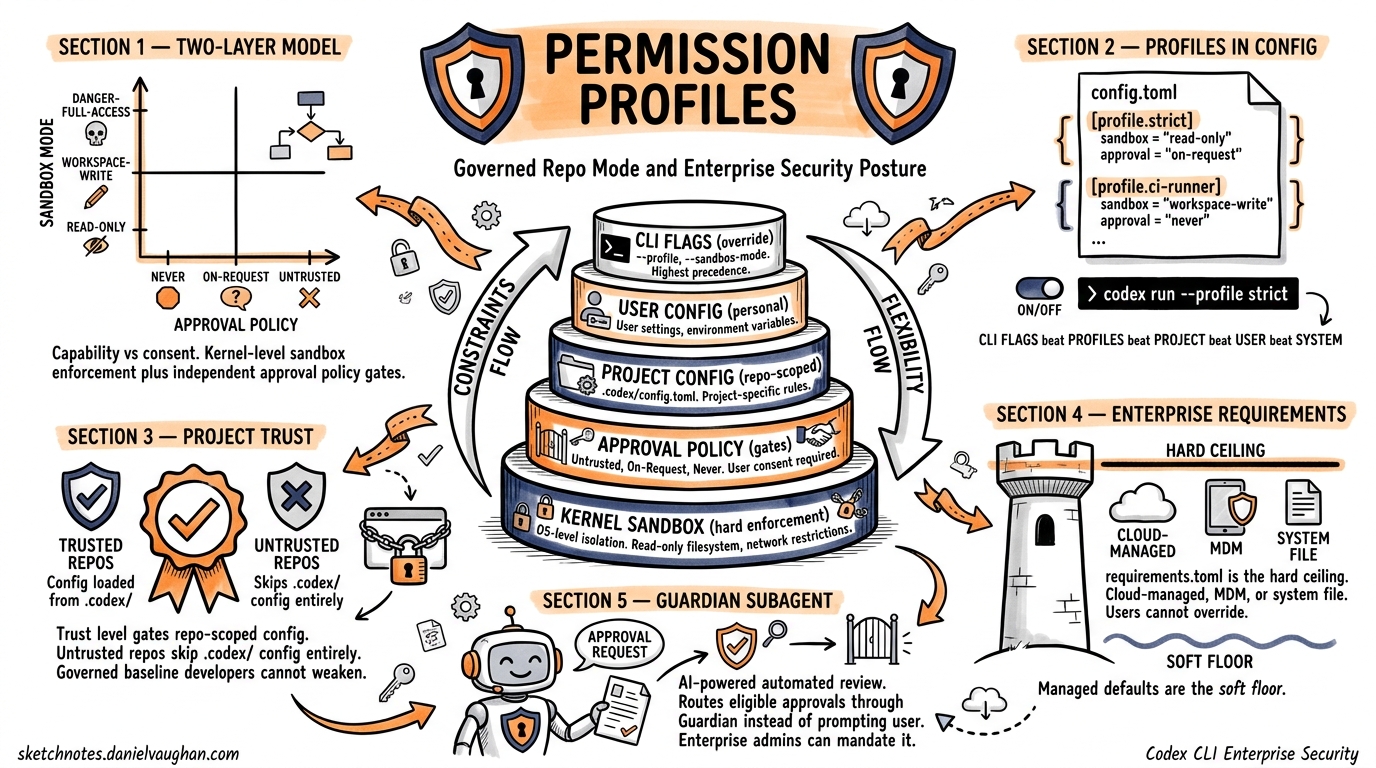
Codex CLI’s security model has matured from a simple --full-auto toggle into a layered enterprise security posture system. Permission profiles, granular approval policies, managed configuration enforcement, and project trust levels now form a coherent pipeline that lets organisations lock down agent behaviour without sacrificing developer velocity. This article walks through the full stack — from profile definition to cloud-enforced requirements — with practical configuration for production teams.
The Two-Layer Security Model
Codex separates capability from consent1. Two orthogonal axes govern every agent action:
| Layer | Controls | Settings |
|---|---|---|
| Sandbox mode | What the agent can technically do | read-only, workspace-write, danger-full-access |
| Approval policy | When the agent must ask first | untrusted, on-request, never |
Sandbox enforcement happens at the kernel level — Seatbelt on macOS, Landlock plus seccomp on Linux2. This is not application-level sandboxing; the kernel rejects disallowed syscalls before Codex even sees them. The approval policy layer is independent: both must align to achieve the desired security posture.
graph TD
    A[Agent Action Request] --> B{Sandbox Mode Check}
    B -->|Allowed| C{Approval Policy Check}
    B -->|Blocked| D[Kernel Rejects Syscall]
    C -->|Auto-approved| E[Execute Action]
    C -->|Requires consent| F[Prompt User / Guardian]
    F -->|Approved| E
    F -->|Rejected| G[Action Denied]
Protected Paths
Even in workspace-write mode, certain paths remain read-only3:
.gitdirectories and gitdir pointers.agents/and.codex/directories
This prevents the agent from tampering with its own configuration or corrupting version control state.
Permission Profiles in config.toml
Profiles let you save named sets of configuration values and switch between them from the CLI4. Define them under [profiles.<name>] in your config.toml:
# ~/.codex/config.toml
model = "gpt-5.4"
approval_policy = "on-request"
sandbox_mode = "workspace-write"

[profiles.strict]
model = "gpt-5.4"
approval_policy = "untrusted"
sandbox_mode = "read-only"

[profiles.ci-runner]
approval_policy = "never"
sandbox_mode = "workspace-write"
model_reasoning_effort = "low"
Activate a profile with codex --profile strict "review this PR" or -p ci-runner5. You can also set a default profile at the top level:
profile = "strict"
The Resolution Chain
When multiple configuration layers exist, Codex resolves values with a clear precedence hierarchy6:
graph LR
    A["CLI Flags<br/>(highest)"] --> B["Profile Values"]
    B --> C["Project .codex/config.toml<br/>(closest dir wins)"]
    C --> D["User ~/.codex/config.toml"]
    D --> E["System /etc/codex/config.toml"]
    E --> F["Built-in Defaults<br/>(lowest)"]
CLI arguments always win. Profile values override global settings but yield to explicit flags. Project-scoped configuration only loads when the project is trusted7 — untrusted projects skip .codex/ layers entirely, falling back to user, system, and built-in defaults.
Project Trust and Governed Repositories
Project trust is the gatekeeper for repository-scoped configuration. You declare trust explicitly in your user-level config8:
# ~/.codex/config.toml
[projects."/home/dev/my-secure-repo"]
trust_level = "trusted"

[projects."/home/dev/untrusted-fork"]
trust_level = "untrusted"
When trust_level = "untrusted", Codex ignores any .codex/config.toml in that repository. This is the foundation of governed repo mode: administrators classify repositories and enforce different security postures accordingly2. A sensitive production repository can mandate read-only sandbox mode regardless of user defaults, whilst a personal playground can run with workspace-write.
Teams check their shared configuration into the repository under .codex/config.toml:
# .codex/config.toml (committed to repo)
approval_policy = "on-request"
sandbox_mode = "workspace-write"

[sandbox_mode.workspace-write]
network_access = false
exclude_slash_tmp = true

[shell_environment_policy]
inherit = "core"
include_only = ["PATH", "HOME", "LANG"]
Codex automatically picks up these settings when a developer opens the repository9, provided they have marked it as trusted. This creates a governed baseline that individual developers cannot weaken without explicitly overriding via CLI flags — and even CLI overrides can be constrained by enterprise requirements.
Granular Approval Policies
The binary on-request / never split is too coarse for many teams. Granular approval policies let you selectively enable approval categories whilst auto-rejecting others10:
approval_policy = { granular = {
  sandbox_approval = true,
  rules = true,
  mcp_elicitations = true,
  request_permissions = false,
  skill_approval = false
} }
| Category | What It Gates |
|---|---|
sandbox_approval |
Sandbox escalation requests (e.g. requesting network access) |
rules |
Execution policy prompts from command rules |
mcp_elicitations |
MCP tool invocation requests |
request_permissions |
Permission expansion prompts |
skill_approval |
Skill-script execution approvals |
The Guardian Subagent
For teams that want automated review without fully disabling approvals, Codex offers the Guardian subagent11. Set approvals_reviewer = "guardian_subagent" to route eligible approval reviews through an AI reviewer instead of prompting the user directly:
approval_policy = "on-request"
approvals_reviewer = "guardian_subagent"
Guardian inherits sandbox and network settings from its parent session. Enterprise admins can constrain this with allowed_approvals_reviewers in their requirements to prevent users from bypassing Guardian review11.
Enterprise Managed Configuration
Enterprise security posture in Codex operates through two mechanisms12:
- Requirements (
requirements.toml) — admin-enforced constraints users cannot override - Managed defaults (
managed_config.toml) — starting values users can modify during sessions
Requirements: The Hard Ceiling
Requirements constrain security-sensitive settings. They are applied in this precedence order (earliest wins per field)12:
- Cloud-managed requirements (ChatGPT Business/Enterprise, configured at
chatgpt.com/codex/settings/managed-configs) - macOS managed preferences via MDM (
com.openai.codex:requirements_toml_base64) - System
requirements.toml(/etc/codex/on Unix)
# /etc/codex/requirements.toml
allowed_approval_policies = ["on-request"]
allowed_sandbox_modes = ["read-only", "workspace-write"]
allowed_web_search_modes = ["cached"]
enforce_residency = true

[rules]
prefix_rules = [
  { pattern = [{ token = "rm" }], decision = "forbidden" },
  { pattern = [{ token = "curl" }], decision = "prompt" }
]

[mcp_servers.internal-docs]
identity = { command = "codex-mcp" }
This example prevents any user from selecting danger-full-access or never approval modes, forbids rm commands entirely, and forces a prompt before any curl invocation12.
Managed Defaults: The Soft Floor
Managed defaults live at /etc/codex/managed_config.toml and provide organisational starting values12. Unlike requirements, users can override these during sessions:
# /etc/codex/managed_config.toml
approval_policy = "on-request"
sandbox_mode = "workspace-write"

[sandbox_mode.workspace-write]
network_access = false

[otel]
exporter = "https://telemetry.internal.corp/v1/traces"
log_user_prompt = false
graph TD
    A[Cloud Requirements<br/>ChatGPT Enterprise] --> D{Merge &<br/>Validate}
    B[MDM / System<br/>requirements.toml] --> D
    C[Managed Defaults<br/>managed_config.toml] --> D
    D --> E[User config.toml]
    E --> F[Project .codex/config.toml]
    F --> G[CLI Flags]
    G --> H[Final Resolved Config]
    D -.->|"Constraints applied<br/>after merge"| H
The key insight: requirements act as a constraint filter applied after all layers merge13. A user can set sandbox_mode = "danger-full-access" in their config, but if requirements restrict to ["read-only", "workspace-write"], the final resolved configuration silently downgrades.
macOS MDM Integration
For fleet management, Codex reads two preference keys under the com.openai.codex domain12:
config_toml_base64— managed defaults as base64-encoded TOMLrequirements_toml_base64— requirements as base64-encoded TOML
This integrates with standard MDM tools (Jamf, Mosyle, Kandji) for zero-touch enterprise deployment.
MCP Sandbox Integration
MCP (Model Context Protocol) servers operate within the same sandbox boundary as the parent Codex session. The mcp_servers allowlist in requirements controls which MCP tools are available12:
# Only allow approved MCP servers
[mcp_servers.docs]
identity = { command = "codex-mcp" }

[mcp_servers.jira]
identity = { command = "jira-mcp-server" }
MCP elicitation prompts — requests from MCP tools for additional permissions — are governed by the mcp_elicitations category in granular approval policies10. This prevents a compromised or misconfigured MCP server from escalating permissions without either user consent or Guardian review.
Practical Deployment: A Recommended Enterprise Posture
For a team rolling out Codex across an engineering organisation, here is a recommended layered configuration:
System requirements (/etc/codex/requirements.toml):
allowed_approval_policies = ["untrusted", "on-request"]
allowed_sandbox_modes = ["read-only", "workspace-write"]
allowed_web_search_modes = ["cached"]
allowed_approvals_reviewers = ["user", "guardian_subagent"]
Managed defaults (/etc/codex/managed_config.toml):
approval_policy = "on-request"
sandbox_mode = "workspace-write"
approvals_reviewer = "guardian_subagent"

[sandbox_mode.workspace-write]
network_access = false
exclude_slash_tmp = true
Repository governed config (.codex/config.toml, committed):
[shell_environment_policy]
inherit = "core"
include_only = ["PATH", "HOME", "LANG", "EDITOR"]
This setup ensures no developer can run in danger-full-access or disable approvals entirely, defaults everyone to Guardian-reviewed workspace-write, and lets individual repositories tighten further with shell environment restrictions.
Key Takeaways
Permission profiles transform Codex CLI from a developer tool into an enterprise-governed agent platform. The architecture is deliberately layered: kernel-level sandbox enforcement provides the hard security boundary, approval policies add consent gates, profiles offer per-context switching, project trust governs repository-scoped configuration loading, and managed requirements give administrators an unbreakable ceiling. The result is a system where security teams can sleep at night whilst developers retain the flexibility to configure their workflows within approved boundaries.
Citations
-
[Agent approvals & security – Codex OpenAI Developers](https://developers.openai.com/codex/agent-approvals-security) -
Codex CLI: The Definitive Technical Reference - Blake Crosley ↩ ↩2
-
[Agent approvals & security – Codex OpenAI Developers](https://developers.openai.com/codex/agent-approvals-security) -
[Advanced Configuration – Codex OpenAI Developers](https://developers.openai.com/codex/config-advanced) -
[Command line options – Codex CLI OpenAI Developers](https://developers.openai.com/codex/cli/reference) -
[Config basics – Codex OpenAI Developers](https://developers.openai.com/codex/config-basic) -
[Config basics – Codex OpenAI Developers](https://developers.openai.com/codex/config-basic) -
[Configuration Reference – Codex OpenAI Developers](https://developers.openai.com/codex/config-reference) -
[Admin Setup – Codex OpenAI Developers](https://developers.openai.com/codex/enterprise/admin-setup) -
[Configuration Reference – Codex OpenAI Developers](https://developers.openai.com/codex/config-reference) -
[Configuration System openai/codex DeepWiki](https://deepwiki.com/openai/codex/2.2-configuration-system) -
[Managed configuration – Codex OpenAI Developers](https://developers.openai.com/codex/enterprise/managed-configuration) -
[Configuration System openai/codex DeepWiki](https://deepwiki.com/openai/codex/2.2-configuration-system)