Codex CLI MITM Hooks: HTTPS Request Interception, Header Mutation, and Network-Level Policy Enforcement
Codex CLI MITM Hooks: HTTPS Request Interception, Header Mutation, and Network-Level Policy Enforcement
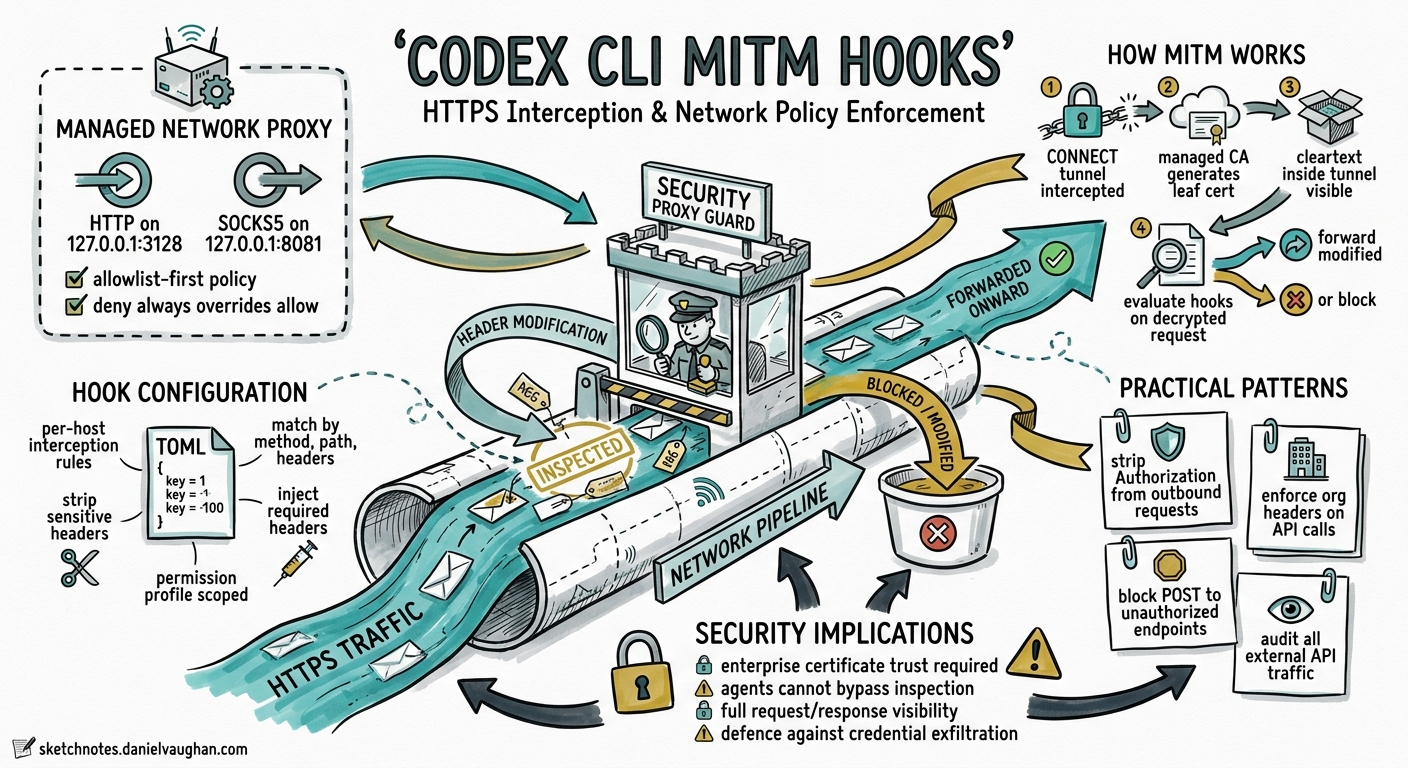
Codex CLI’s sandbox has always controlled what an agent can do on disk and whether it can reach the network. But controlling how it talks to the network — which headers it sends, which API endpoints it can POST to, which credentials leak into outbound requests — required teams to bolt on external proxies or accept coarse-grained allow/deny rules.
That changed on 20 May 2026, when three PRs landed in the openai/codex repository introducing MITM hooks: a declarative, per-host HTTPS interception system built into the managed network proxy 123. MITM hooks let you intercept HTTPS traffic after TLS termination, match requests by method, path, query parameters, and headers, then mutate or strip headers before forwarding — all configured in your existing config.toml permission profile.
This article covers the architecture, configuration surface, practical patterns, and security implications for teams adopting MITM hooks in their Codex CLI deployments.
How the Managed Network Proxy Works
Every sandboxed Codex CLI session routes outbound traffic through codex-network-proxy, a local policy enforcement engine written in Rust 4. The proxy binds two listeners by default:
- HTTP proxy on
127.0.0.1:3128 - SOCKS5 proxy on
127.0.0.1:8081
It enforces an allowlist-first domain policy: if no allow entries are configured, all requests are blocked. Deny rules always override allow rules. In limited mode, only GET, HEAD, and OPTIONS methods are permitted 4.
The challenge with HTTPS traffic is that the proxy cannot inspect the HTTP method, path, or headers inside an encrypted CONNECT tunnel without terminating TLS. This is where MITM comes in.
sequenceDiagram
    participant Agent as Agent Process
    participant Proxy as codex-network-proxy
    participant CA as Managed CA
    participant Target as api.github.com

    Agent->>Proxy: CONNECT api.github.com:443
    Proxy->>CA: Generate leaf cert for api.github.com
    CA-->>Proxy: Signed leaf certificate
    Proxy-->>Agent: 200 Connection Established (TLS with leaf cert)
    Agent->>Proxy: POST /repos/openai/codex/issues (cleartext inside tunnel)
    Note over Proxy: Evaluate MITM hooks
    alt Hook matches
        Proxy->>Proxy: Strip/inject headers per actions
        Proxy->>Target: Forwarded request (modified)
    else No hook matches hooked host
        Proxy-->>Agent: 403 blocked-by-policy
    end
    Target-->>Agent: Response (re-encrypted via leaf cert)
MITM Hook Architecture
MITM hooks operate at a layer below the existing lifecycle hooks (PreToolUse, PostToolUse). Where lifecycle hooks intercept tool invocations at the agent level, MITM hooks intercept raw HTTPS requests at the transport level 1.
The proxy generates and manages a local Certificate Authority under $CODEX_HOME/proxy/ (ca.pem and ca.key). When MITM is enabled — either because mode = "limited" or because MITM hooks are configured — the proxy terminates TLS using per-host leaf certificates signed by this CA, giving it visibility into request method, path, headers, and query parameters 4.
Evaluation Flow
When a request arrives for a host with configured hooks:
- The proxy normalises the hostname and looks up the hook list.
- Each hook is evaluated in declaration order against method, path prefix, query, and header constraints.
- First match wins — the matched hook’s actions are applied.
- If hooks exist for the host but none match, the request is blocked with
blocked-by-policy2. - If no hooks exist for the host, normal allow/deny policy applies.
This default-deny behaviour for hooked hosts is a deliberate security choice: once you declare interest in inspecting traffic to a host, all unmatched traffic to that host is blocked.
Configuration
MITM hooks live inside the permission profile’s network.mitm section in config.toml. The user-facing TOML shape uses named hooks and reusable action blocks 3:
[permissions.workspace.network.mitm]
enabled = true

[permissions.workspace.network.mitm.hooks.github_write]
host = "api.github.com"
methods = ["POST", "PUT"]
path_prefixes = ["/repos/openai/"]
action = ["strip_auth"]

[permissions.workspace.network.mitm.actions.strip_auth]
strip_request_headers = ["authorization"]
Hook Fields
| Field | Type | Description |
|---|---|---|
host |
string | Target hostname (exact match, normalised to lowercase) |
methods |
string array | HTTP methods to match (e.g. ["POST", "PUT", "DELETE"]) |
path_prefixes |
string array | Path prefix matchers; supports literal: and pattern: glob syntax |
action |
string array | References to named action blocks |
Matcher Fields (Advanced)
Beyond method and path, hooks support fine-grained matching 1:
| Matcher | Syntax | Example |
|---|---|---|
query |
{ "param_name" = ["value1", "pattern:v*"] } |
Match specific query parameters |
headers |
{ "x-custom" = ["literal:expected"] } |
Match request header values |
body |
Reserved | Not yet supported; config validation rejects body matchers |
Value matchers support two prefixes:
literal:value— exact string matchpattern:glob*— glob pattern match via compiledGlobMatcher
Plain strings without a prefix are treated as exact matches.
Action Blocks
Actions define what happens to matched requests before forwarding 1:
[permissions.workspace.network.mitm.actions.inject_service_token]
strip_request_headers = ["authorization", "x-api-key"]

[[permissions.workspace.network.mitm.actions.inject_service_token.inject_request_headers]]
name = "authorization"
secret_env_var = "CODEX_GITHUB_TOKEN"
prefix = "Bearer "

[[permissions.workspace.network.mitm.actions.inject_service_token.inject_request_headers]]
name = "x-audit-source"
secret_file = "/etc/codex/audit-key"
| Action | Description |
|---|---|
strip_request_headers |
Remove listed headers from the request before forwarding |
inject_request_headers |
Add headers with values resolved from environment variables or files |
Injected headers resolve secrets at proxy startup via two sources 1:
secret_env_var— reads the value from an environment variablesecret_file— reads and trims a file on disk
An optional prefix field prepends a string (e.g. "Bearer ") to the resolved secret value.
Practical Patterns
Pattern 1: Stripping Leaked Credentials
The most immediate use case is preventing agent-generated code from accidentally forwarding ambient credentials to APIs:
[permissions.ci.network.mitm.hooks.strip_all_auth]
host = "api.github.com"
methods = ["POST", "PUT", "PATCH", "DELETE"]
path_prefixes = ["/"]
action = ["strip_credentials"]

[permissions.ci.network.mitm.actions.strip_credentials]
strip_request_headers = ["authorization", "x-api-key", "cookie"]
This ensures that even if agent-generated curl commands include an Authorization header sourced from the shell environment, the proxy strips it before the request reaches GitHub.
Pattern 2: Credential Rotation via Injection
For CI/CD pipelines where the agent needs controlled API access, combine stripping with injection:
[permissions.ci.network.mitm.hooks.github_controlled_access]
host = "api.github.com"
methods = ["GET", "POST", "PUT"]
path_prefixes = ["/repos/myorg/"]
action = ["rotate_github_token"]

[permissions.ci.network.mitm.actions.rotate_github_token]
strip_request_headers = ["authorization"]

[[permissions.ci.network.mitm.actions.rotate_github_token.inject_request_headers]]
name = "authorization"
secret_env_var = "CI_GITHUB_TOKEN"
prefix = "Bearer "
The agent can make requests to api.github.com within /repos/myorg/, but the authorisation header is always the CI-scoped token — never whatever the agent might have found in the environment.
Pattern 3: Write-Blocking Internal APIs
Prevent the agent from making mutations to sensitive internal services while allowing reads:
[permissions.workspace.network.mitm.hooks.internal_read_only]
host = "internal-api.company.com"
methods = ["GET", "HEAD", "OPTIONS"]
path_prefixes = ["/"]
action = ["allow_reads"]

[permissions.workspace.network.mitm.actions.allow_reads]
# No strip or inject — just allow the matched request through
Because hooked hosts default-deny unmatched requests, POST, PUT, DELETE, and PATCH requests to internal-api.company.com are automatically blocked without needing explicit deny rules.
Pattern 4: Path-Scoped API Access
Restrict agent access to specific API endpoints, not just entire hosts:
[permissions.workspace.network.mitm.hooks.registry_read]
host = "registry.npmjs.org"
methods = ["GET"]
path_prefixes = ["/"]
action = ["pass_through"]

[permissions.workspace.network.mitm.hooks.registry_publish]
host = "registry.npmjs.org"
methods = ["PUT"]
path_prefixes = ["/-/package/"]
action = ["inject_publish_token"]

[permissions.workspace.network.mitm.actions.pass_through]
# Empty action — allows matched requests through unmodified

[permissions.workspace.network.mitm.actions.inject_publish_token]
strip_request_headers = ["authorization"]

[[permissions.workspace.network.mitm.actions.inject_publish_token.inject_request_headers]]
name = "authorization"
secret_env_var = "NPM_PUBLISH_TOKEN"
prefix = "Bearer "
Enterprise Enforcement via requirements.toml
MITM hooks configured in permission profiles can be enforced at the enterprise level through requirements.toml, OpenAI’s managed configuration delivery mechanism 5. Enterprise administrators can mandate specific MITM policies across all developer workstations, ensuring that:
- All outbound requests to production APIs are credential-stripped
- Only approved CI tokens reach sensitive endpoints
- OTEL audit events capture every policy decision for compliance
The proxy emits structured OpenTelemetry events (codex.network_proxy.policy_decision) for every allow, deny, and hook-matched decision, including host, port, method, and policy source — enabling integration with existing SIEM infrastructure 4.
Relationship to Existing Security Layers
MITM hooks complement rather than replace Codex CLI’s existing defence-in-depth model:
graph TD
    A[Agent Prompt] --> B[AGENTS.md Constraints]
    B --> C[Lifecycle Hooks<br/>PreToolUse / PostToolUse]
    C --> D[Execution Policy Rules<br/>Starlark .rules files]
    D --> E[Sandbox<br/>Filesystem / Process Isolation]
    E --> F[Network Proxy<br/>Domain Allow/Deny]
    F --> G[MITM Hooks<br/>Request-Level Policy]
    G --> H[External Network]

    style G fill:#e6f3ff,stroke:#0066cc,stroke-width:3px
| Layer | Controls | Granularity |
|---|---|---|
| AGENTS.md | Agent behaviour guidance | Intent-level |
| Lifecycle hooks | Tool invocation gating | Tool-level |
| Execution policy | Shell command governance | Command-level |
| Sandbox | Filesystem and process isolation | OS-level |
| Domain policy | Network host access | Host-level |
| MITM hooks | Request method, path, headers | Request-level |
MITM hooks are the finest-grained network control available, operating on individual HTTPS requests after TLS termination.
Limitations and Caveats
- Body matching is reserved. The config model includes a
bodyfield, but validation currently rejects it with “reserved for a future release” 1. Request body inspection is not yet supported. - No response interception. MITM hooks operate on outbound requests only. Response headers and bodies pass through unmodified.
- CA trust required. Applications running inside the sandbox must trust the managed CA certificate. Most language runtimes respect
SSL_CERT_FILE, but some (notably Java, Electron) need explicit configuration 6. - Performance overhead. TLS termination and re-encryption adds latency to every HTTPS request through a hooked host. For high-throughput workloads, profile the impact.
- macOS and Linux only. The managed proxy is not yet available on Windows sandboxed sessions, though the Windows sandbox has its own network policy layer 4.
- SOCKS5 and MITM. SOCKS5 traffic remains blocked in limited mode and does not support MITM hook evaluation.
Getting Started
To enable MITM hooks on an existing Codex CLI installation (v0.133+):
- Add the
[permissions.<profile>.network.mitm]section to your~/.codex/config.toml - Define at least one hook with a host, methods, and path_prefixes
- Define at least one action block referenced by your hook
- Start a new session — the proxy will automatically generate the CA and enable MITM
Verify the proxy is active with codex doctor, which reports network proxy status as part of its diagnostic output 7.
Citations
-
GitHub PR #18868 — “Add MITM hook config model”, openai/codex, 20 May 2026. https://github.com/openai/codex/pull/18868 ↩ ↩2 ↩3 ↩4 ↩5 ↩6
-
GitHub PR #20659 — “Wire MITM hooks into runtime enforcement”, openai/codex, 20 May 2026. https://github.com/openai/codex/pull/20659 ↩ ↩2
-
GitHub PR #18240 — “Use named MITM permissions config”, openai/codex, 20 May 2026. https://github.com/openai/codex/pull/18240 ↩ ↩2
-
codex-network-proxy README, openai/codex repository, main branch. https://github.com/openai/codex/tree/main/codex-rs/network-proxy ↩ ↩2 ↩3 ↩4 ↩5
-
OpenAI Codex Managed Configuration documentation. https://developers.openai.com/codex/config-advanced ↩
-
OpenAI Codex CLI — “Behind TLS-Inspecting Proxies” configuration guide. https://developers.openai.com/codex/config-basic ↩
-
OpenAI Codex CLI Features documentation — codex doctor. https://developers.openai.com/codex/cli/features ↩