How to Make Codex CLI and Claude Code Work Together
How to Make Codex CLI and Claude Code Work Together
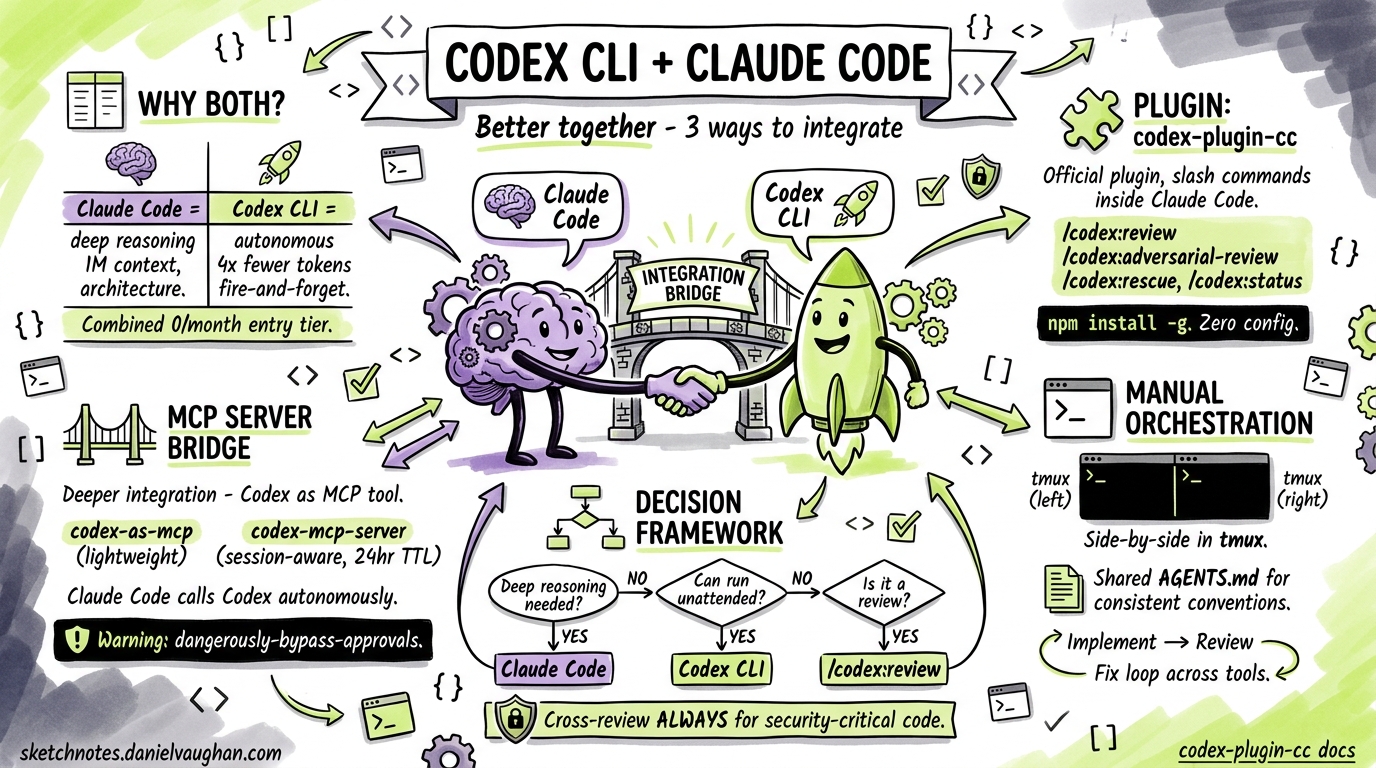
The most productive AI-assisted developers in 2026 are not picking sides between Codex CLI and Claude Code — they are running both. Claude Code excels at deep reasoning across large codebases and architecture decisions; Codex CLI dominates autonomous execution, background tasks, and code review1. The question is not which tool to use, but how to make them collaborate effectively.
This article covers three practical integration approaches — from a zero-config official plugin to full MCP bridging — and the workflow patterns that emerge from each.
Why Both Tools?
Each tool has a distinct personality shaped by its underlying model and execution model:
| Dimension | Claude Code | Codex CLI |
|---|---|---|
| Context window | ~1M tokens2 | ~192K tokens3 |
| Execution style | Collaborative, step-by-step | Autonomous, fire-and-forget |
| Sweet spot | Architecture, debugging, frontend | Background tasks, reviews, CI/CD |
| Token efficiency | Higher consumption | ~4× fewer tokens per task1 |
| SWE-bench | 80.9% (Agent Teams)2 | 69.1% (standalone)4 |
Running both at a combined $40/month entry tier gives you complementary coverage: Claude Code for tasks that need deep reasoning and high first-pass accuracy, Codex CLI for volume and autonomy1.
Approach 1: The Official Plugin (codex-plugin-cc)
OpenAI released codex-plugin-cc — an official Claude Code plugin that wraps the Codex CLI app server and exposes it as a set of slash commands inside Claude Code sessions5.
Installation
# Prerequisites: Node.js 18.18+, Codex CLI installed globally
npm install -g @openai/codex

# Install the plugin into Claude Code
claude plugin add openai/codex-plugin-cc
Run /codex:setup inside a Claude Code session to verify that Codex is reachable. If Codex is not installed, the setup command can install it for you automatically5.
Authentication
You need either a ChatGPT subscription (Free tier or above) or an OpenAI API key. If you have not authenticated Codex before:
codex login
This stores credentials in ~/.codex/config.toml6.
Available Commands
The plugin exposes four primary commands5:
/codex:review — Standard code review. Runs Codex against your current working tree and returns findings.
/codex:review --base main
Supports --background to run asynchronously and --wait to block until complete.
/codex:adversarial-review — Pressure-tests implementation decisions around authentication, data loss, and race conditions. Read-only — it flags issues but does not modify code5.
/codex:adversarial-review
/codex:rescue — Hands a task to Codex entirely, spawning it as a subagent. Useful when Claude Code is stuck or you want a second opinion from a different model5.
/codex:rescue "investigate why the auth middleware is rejecting valid JWTs"
Supports --resume to continue the latest rescue thread and --fresh to start a new one.
/codex:status and /codex:result — Check on background jobs and retrieve their output.
Configuration
To override the default model or reasoning effort, add settings to your Codex config.toml6:
# ~/.codex/config.toml
model = "o3"
model_reasoning_effort = "high"
Project-level overrides go in .codex/config.toml within the repository root7.
Approach 2: MCP Server Bridge
For deeper integration — where Claude Code can invoke Codex programmatically as a tool rather than via slash commands — you can run Codex as an MCP server. Several implementations exist; the two most mature are codex-as-mcp and tuannvm/codex-mcp-server89.
codex-as-mcp (Lightweight)
This exposes Codex as a pair of MCP tools that Claude Code can call autonomously during its reasoning loop8.
{
  "mcpServers": {
    "codex-subagent": {
      "type": "stdio",
      "command": "uvx",
      "args": ["codex-as-mcp@latest"],
      "env": {
        "OPENAI_API_KEY": "sk-..."
      }
    }
  }
}
Add this to your Claude Code MCP configuration (typically ~/.claude/mcp.json or project-level .mcp.json).
⚠️ Security note: codex-as-mcp runs with --dangerously-bypass-approvals-and-sandbox by default. Only use this in repositories you trust8.
codex-mcp-server (Session-Aware)
The tuannvm/codex-mcp-server adds session management with 24-hour TTL and up to 100 concurrent sessions, making it suitable for multi-turn workflows9:
{
  "mcpServers": {
    "codex": {
      "type": "stdio",
      "command": "npx",
      "args": ["-y", "codex-mcp-server@latest"],
      "env": {
        "OPENAI_API_KEY": "sk-..."
      }
    }
  }
}
If you encounter timeouts on longer tasks, increase the tool timeout in your Codex config8:
# ~/.codex/config.toml
tool_timeout_sec = 300
The conversationId Gotcha
When Codex runs as an MCP server, it exposes codex() to start a conversation and codex-reply() to continue one. Historically, codex() did not return the conversationId needed by codex-reply(), breaking multi-turn flows10. The codex-mcp-server works around this with its own session management layer. If you use the raw codex mcp-server command, check the latest release notes — this bug has been partially addressed but may still surface in edge cases.
Approach 3: Manual Orchestration Patterns
Even without plugins or MCP bridges, you can orchestrate both tools effectively using terminal multiplexing and shared file conventions.
Side-by-Side with tmux
# Left pane: Claude Code for architecture and implementation
claude

# Right pane: Codex CLI for review and background tasks
codex
The key workflow: implement in Claude Code, then switch to the Codex pane for review:
# In Codex pane — review what Claude Code just wrote
codex "review the changes in the last commit for security issues, \
focusing on auth and data validation"
Shared AGENTS.md
Both tools read AGENTS.md files for project conventions11. A single AGENTS.md ensures consistent behaviour regardless of which tool you are using:
# AGENTS.md

## Code Style
- Use TypeScript strict mode
- All public functions require JSDoc comments
- Error handling: use Result types, never throw

## Testing
- Unit tests alongside source files (*.test.ts)
- Integration tests in __tests__/integration/
- Minimum 80% coverage for new code

## Review Checklist
- No secrets in code
- SQL queries use parameterised statements
- All user input validated at API boundary
The Implement-Review-Fix Loop
The most effective cross-tool pattern follows a simple cycle:
graph LR
    A[Claude Code: Implement] --> B[Codex CLI: Review]
    B --> C{Issues Found?}
    C -->|Yes| D[Claude Code: Fix]
    C -->|No| E[Commit]
    D --> B
- Implement in Claude Code — leverage its large context window for multi-file changes
- Review with Codex CLI — either via the plugin (
/codex:review) or in a separate terminal - Fix flagged issues back in Claude Code
- Commit when the review passes
This cross-provider review catches errors that a single model would miss, because Claude and GPT-series models have different blind spots5.
Decision Framework: Which Tool for Which Task?
flowchart TD
    T[New Task] --> Q1{Needs deep reasoning<br/>across many files?}
    Q1 -->|Yes| CC[Use Claude Code]
    Q1 -->|No| Q2{Can run unattended?}
    Q2 -->|Yes| CX[Use Codex CLI]
    Q2 -->|No| Q3{Is it a review?}
    Q3 -->|Yes| CXR[Use /codex:review<br/>from Claude Code]
    Q3 -->|No| CC
    CC --> REV[Review with Codex]
    CX --> REVCC[Review with Claude Code]
Claude Code first for: architecture decisions, complex debugging, large refactors, frontend components, anything requiring >192K tokens of context1.
Codex CLI first for: test generation, documentation, dependency updates, CI pipeline tasks, infrastructure scripts, background batch processing1.
Cross-review always for: security-sensitive code, production deployments, any change touching authentication or payment flows.
Cost Management
Running both tools requires some cost awareness:
| Scenario | Estimated Monthly Cost |
|---|---|
| Light use (either tool) | $20 (single subscription)1 |
| Combined daily use | $40 (both subscriptions)1 |
| Heavy API use (MCP bridge) | Variable — monitor via codex usage |
To keep MCP bridge costs down, set a lower default reasoning effort for routine tasks and reserve high or xhigh for complex reviews7:
# ~/.codex/config.toml — project-level override for routine work
model_reasoning_effort = "low"

# Override per-task when needed
# codex -c model_reasoning_effort="high" "review auth module"
Practical Tips
-
Start with the plugin. If you already use Claude Code,
codex-plugin-ccis the lowest-friction path. Install it, run/codex:setup, and start with/codex:reviewon your next PR. -
Graduate to MCP when you need autonomy. The plugin requires you to invoke commands manually. MCP bridges let Claude Code decide when to call Codex based on the task — useful for automated pipelines.
-
Keep
AGENTS.mdas the single source of truth. Both tools respect it, so your conventions stay consistent regardless of which agent is executing. -
Use adversarial review for security-critical code. The
/codex:adversarial-reviewcommand specifically targets auth, data loss, and race conditions — run it before any security-sensitive merge5. -
Watch for context window limits. If Claude Code is working with a large codebase (>192K tokens), do not delegate the same task to Codex via MCP — it will not have the same context and may produce incomplete results3.
-
Check the
conversationIdfix status. If you rely on multi-turn MCP sessions, verify that your Codex version has the conversation tracking fix before depending oncodex-reply()10.
Citations
-
Claude Code vs Codex CLI: Which AI Coding Agent Should You Use in 2026? — SupaLaunch, 2026. ↩ ↩2 ↩3 ↩4 ↩5 ↩6 ↩7
-
Claude Code vs Codex CLI vs Gemini CLI (2026 Comparison) — DeployHQ, 2026. ↩ ↩2
-
Codex CLI vs Claude Code in 2026: Architecture Deep Dive — Blake Crosley, 2026. ↩ ↩2
-
Codex CLI SWE-Bench Scores Explained — OpenAI GitHub, 2026. ↩
-
Introducing Codex Plugin for Claude Code — OpenAI Developer Community, 2026. ↩ ↩2 ↩3 ↩4 ↩5 ↩6 ↩7
-
Config basics – Codex — OpenAI Developers, 2026. ↩ ↩2
-
Configuration Reference – Codex — OpenAI Developers, 2026. ↩ ↩2
-
codex-as-mcp: Convert Codex CLI to an MCP server — GitHub, 2026. ↩ ↩2 ↩3 ↩4
-
codex-mcp-server: MCP server wrapper for OpenAI Codex CLI — GitHub, 2026. ↩ ↩2
-
Claude Code ↔ Codex CLI in Practice: Session Handoffs, Community Bridges and Known Gotchas — Codex Resources, 2026. ↩ ↩2
-
Codex Plugin for Claude Code README — OpenAI GitHub, 2026. ↩