Building Custom MCP Servers for Codex CLI: A Practical Guide in TypeScript and Python
Building Custom MCP Servers for Codex CLI: A Practical Guide in TypeScript and Python
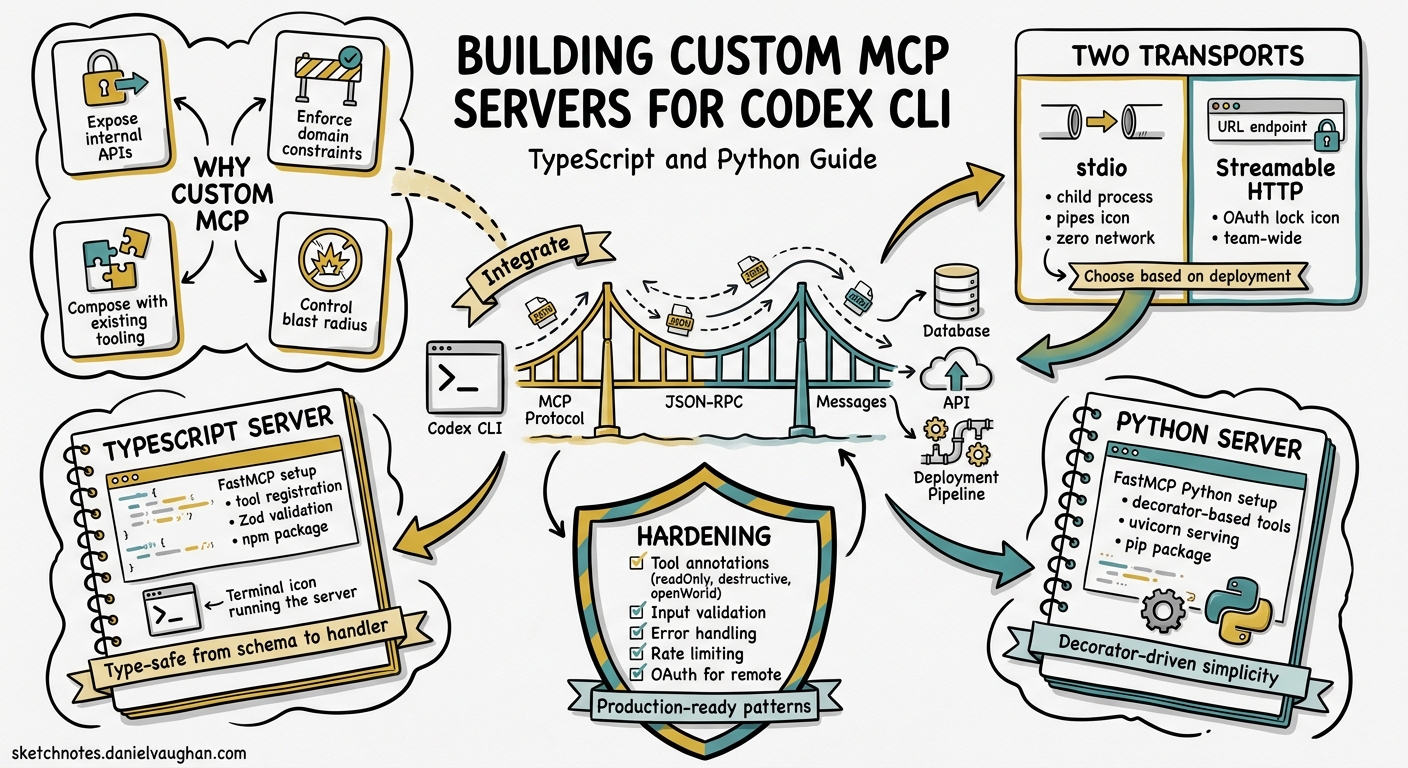
Codex CLI ships with powerful built-in tools — shell execution, file editing via apply_patch, and web search — but production workflows inevitably demand domain-specific capabilities: querying internal APIs, running proprietary linters, fetching data from bespoke databases, or orchestrating custom deployment pipelines. The Model Context Protocol (MCP) gives you a standardised way to expose these capabilities as tools that Codex CLI discovers and invokes automatically 1. This article walks through building, registering, and hardening custom MCP servers in both TypeScript and Python, with Codex CLI as the consuming host.
Why Build a Custom MCP Server?
Codex CLI’s mcp_servers configuration already supports a growing catalogue of third-party servers — GitHub, Sentry, Playwright, Chromatic, and dozens more 2. But off-the-shelf servers cannot cover every internal system. A custom MCP server lets you:
- Expose internal APIs as agent-callable tools without modifying Codex CLI itself.
- Enforce domain constraints — validate inputs, rate-limit calls, redact sensitive fields — before the agent sees the result.
- Compose with existing tooling — wrap CLI utilities, database clients, or HTTP services behind a typed tool interface.
- Control the blast radius — MCP tool annotations declare whether a tool is read-only, destructive, or open-world, letting Codex CLI’s approval system make informed decisions 3.
MCP Architecture in 30 Seconds
sequenceDiagram
    participant User
    participant Codex as Codex CLI
    participant MCP as MCP Server
    participant Backend as Internal API / DB

    User->>Codex: Prompt: "Check deploy status for staging"
    Codex->>MCP: tools/call { name: "get_deploy_status", args: { env: "staging" } }
    MCP->>Backend: GET /api/deploys?env=staging
    Backend-->>MCP: { status: "healthy", version: "3.14.1" }
    MCP-->>Codex: Tool result (text content)
    Codex->>User: "Staging is healthy, running v3.14.1"
The protocol uses JSON-RPC 2.0 over two transport families 4:
| Transport | When to use |
|---|---|
| stdio | Local servers spawned as child processes. Zero network setup. Best for single-developer workflows. |
| Streamable HTTP | Remote or shared servers accessed via URL. Supports OAuth 2.1 authentication. Best for team-wide or cloud-hosted tools. |
Building a Stdio Server in TypeScript
The official @modelcontextprotocol/sdk package (v1.x) provides a high-level McpServer class 5. The following example exposes a single tool that queries a hypothetical internal deployment API.
Project Setup
mkdir deploy-mcp-server && cd deploy-mcp-server
npm init -y
npm install @modelcontextprotocol/sdk zod
npm install -D typescript @types/node
npx tsc --init --target ES2022 --module NodeNext --moduleResolution NodeNext --outDir dist
Set "type": "module" in package.json and add a bin entry:
{
  "type": "module",
  "bin": { "deploy-mcp-server": "./dist/index.js" }
}
Server Implementation
#!/usr/bin/env node
// src/index.ts
import { McpServer } from "@modelcontextprotocol/sdk/server/mcp.js";
import { StdioServerTransport } from "@modelcontextprotocol/sdk/server/stdio.js";
import { z } from "zod";

const server = new McpServer({
  name: "deploy-status",
  version: "1.0.0",
});

// Define a tool with typed input schema
server.tool(
  "get_deploy_status",
  "Returns the current deployment status for a given environment",
  {
    environment: z.enum(["staging", "production", "preview"]).describe(
      "Target deployment environment"
    ),
  },
  async ({ environment }) => {
    const res = await fetch(
      `${process.env.DEPLOY_API_URL}/api/deploys?env=${environment}`,
      { headers: { Authorization: `Bearer ${process.env.DEPLOY_API_KEY}` } }
    );

    if (!res.ok) {
      return {
        content: [{ type: "text", text: `API error: ${res.status} ${res.statusText}` }],
        isError: true,
      };
    }

    const data = await res.json();
    return {
      content: [{ type: "text", text: JSON.stringify(data, null, 2) }],
    };
  }
);

const transport = new StdioServerTransport();
await server.connect(transport);
Key points:
- Zod schemas define the
inputSchemathat Codex CLI presents to the model. The richer the descriptions, the better the model’s tool selection 6. - Error handling returns
isError: trueso the agent loop can distinguish tool failures from empty results. - Secrets come from environment variables, never hardcoded — Codex CLI’s
envandenv_varsconfiguration forwards them to the child process.
Registering with Codex CLI
Add the server to ~/.codex/config.toml (or .codex/config.toml at project level):
[mcp_servers.deploy-status]
command = "npx"
args = ["deploy-mcp-server"]
env = { DEPLOY_API_URL = "https://internal.example.com" }
env_vars = ["DEPLOY_API_KEY"]  # forwarded from your shell environment
startup_timeout_sec = 15
tool_timeout_sec = 30
Or use the CLI shorthand:
codex mcp add deploy-status \
  --command npx \
  --args deploy-mcp-server \
  --env DEPLOY_API_URL=https://internal.example.com \
  --env-var DEPLOY_API_KEY
Verify registration with the /mcp TUI command — the server should appear with its tool listed 7.
Building a Streamable HTTP Server in Python
For team-shared servers or cloud-hosted tools, the Python SDK’s FastMCP class provides a streamable HTTP transport out of the box 8.
Project Setup
mkdir ticket-mcp-server && cd ticket-mcp-server
python -m venv .venv && source .venv/bin/activate
pip install "mcp[cli]" httpx
Server Implementation
# server.py
from mcp.server.fastmcp import FastMCP
import httpx
import os

mcp = FastMCP(
    name="ticket-lookup",
    instructions="Query internal ticket system for issue details and status.",
)

TICKET_API = os.environ.get("TICKET_API_URL", "https://tickets.internal.example.com")
TICKET_TOKEN = os.environ.get("TICKET_API_TOKEN", "")


@mcp.tool(
    annotations={
        "readOnlyHint": True,
        "openWorldHint": False,
    }
)
async def get_ticket(ticket_id: str) -> str:
    """Fetch details for a ticket by its ID (e.g. PROJ-1234).

    Returns the ticket title, status, assignee, and description.
    """
    async with httpx.AsyncClient() as client:
        resp = await client.get(
            f"{TICKET_API}/api/tickets/{ticket_id}",
            headers={"Authorization": f"Bearer {TICKET_TOKEN}"},
            timeout=10.0,
        )
        resp.raise_for_status()
        data = resp.json()
        return (
            f"**{data['id']}**: {data['title']}\n"
            f"Status: {data['status']} | Assignee: {data.get('assignee', 'Unassigned')}\n"
            f"Description: {data.get('description', 'No description')}"
        )


@mcp.tool(
    annotations={
        "readOnlyHint": False,
        "destructiveHint": False,
        "openWorldHint": False,
    }
)
async def add_ticket_comment(ticket_id: str, comment: str) -> str:
    """Add a comment to an existing ticket.

    Use this to leave notes, status updates, or questions on a ticket.
    """
    async with httpx.AsyncClient() as client:
        resp = await client.post(
            f"{TICKET_API}/api/tickets/{ticket_id}/comments",
            json={"body": comment},
            headers={"Authorization": f"Bearer {TICKET_TOKEN}"},
            timeout=10.0,
        )
        resp.raise_for_status()
        return f"Comment added to {ticket_id}."


if __name__ == "__main__":
    mcp.run(transport="streamable-http", host="0.0.0.0", port=8080)
Tool Annotations Matter
The annotations dictionary tells Codex CLI’s approval system how to classify the tool 3:
| Annotation | Effect on Codex CLI |
|---|---|
readOnlyHint: True |
Tool may be auto-approved under :workspace profile |
destructiveHint: True |
Forces approval prompt even in permissive profiles |
openWorldHint: True |
Signals network/external access; triggers network approval |
Without annotations, Codex CLI defaults to treating every MCP tool call as potentially write-capable, which means more approval prompts for your users.
Registering a Remote Server
[mcp_servers.ticket-lookup]
url = "http://localhost:8080/mcp"
bearer_token_env_var = "TICKET_MCP_TOKEN"
tool_timeout_sec = 15
For production deployments behind an identity provider, use OAuth 2.1:
codex mcp login ticket-lookup
Codex CLI opens the browser, completes the PKCE flow, and stores the token in the platform keyring 9.
Testing Your Server
Before connecting to Codex CLI, validate your server independently:
# TypeScript stdio server — use the MCP Inspector
npx @modelcontextprotocol/inspector npx deploy-mcp-server

# Python HTTP server — curl the tool listing
curl -X POST http://localhost:8080/mcp \
  -H "Content-Type: application/json" \
  -d '{"jsonrpc":"2.0","id":1,"method":"tools/list"}'
The MCP Inspector provides a browser-based UI for calling tools interactively and inspecting JSON-RPC messages 10. It is invaluable for debugging schema mismatches before the model gets involved.
Production Hardening
Input Validation
Zod (TypeScript) and Pydantic/type hints (Python) handle schema validation at the MCP layer, but add domain validation too:
// Reject ticket IDs that don't match the expected format
if (!/^[A-Z]+-\d+$/.test(ticketId)) {
  return { content: [{ type: "text", text: "Invalid ticket ID format" }], isError: true };
}
Rate Limiting
Wrap tool handlers with a simple token-bucket or sliding-window limiter. Codex CLI’s agent loop can call tools in rapid succession during multi-step reasoning, and an unprotected internal API will feel it 11.
Timeout Configuration
Set tool_timeout_sec in config.toml to match your API’s expected latency. The default of 60 seconds is generous — tighten it to surface slow backends early rather than letting the agent wait silently.
Logging
For stdio servers, write logs to stderr (not stdout) — stdout carries JSON-RPC messages and any stray output corrupts the protocol 5. For HTTP servers, standard logging libraries work normally.
// Safe logging for stdio servers
console.error("[deploy-mcp] Fetching status for:", environment);
Configuration Patterns
Per-Project Scoping
Place MCP configuration in .codex/config.toml at the repository root to scope servers to specific projects. This keeps internal tools out of unrelated sessions:
# .codex/config.toml (project-scoped, trusted projects only)
[mcp_servers.project-db]
command = "python"
args = ["tools/db-mcp-server.py"]
env = { DB_URL = "postgresql://localhost:5432/myapp" }
enabled_tools = ["query_schema", "list_tables"]
Tool Allow/Deny Lists
Use enabled_tools or disabled_tools to control which tools from a server are exposed to the agent:
[mcp_servers.ticket-lookup]
url = "http://localhost:8080/mcp"
enabled_tools = ["get_ticket"]  # expose read-only tool only
This is particularly useful when a server exposes both read and write tools but you want read-only access in certain profiles 7.
Profile-Based Server Selection
Combine MCP server configuration with Codex CLI named profiles to switch tool sets by context:
[profile.review]
model = "gpt-5.5"
[profile.review.mcp_servers.ticket-lookup]
url = "http://localhost:8080/mcp"
enabled_tools = ["get_ticket"]

[profile.deploy]
model = "gpt-5-codex"
[profile.deploy.mcp_servers.deploy-status]
command = "npx"
args = ["deploy-mcp-server"]
codex --profile review "Summarise the open tickets for this sprint"
codex --profile deploy "Check staging health before the release"
Decision Framework
flowchart TD
    A[Need custom tool in Codex CLI?] -->|Yes| B{Single developer or team?}
    B -->|Single dev| C[stdio server<br/>TypeScript or Python]
    B -->|Team-wide| D{Authentication needed?}
    D -->|No| E[Streamable HTTP<br/>internal network]
    D -->|Yes| F[Streamable HTTP<br/>+ OAuth 2.1]
    C --> G[Register in ~/.codex/config.toml]
    E --> G
    F --> H[Register + codex mcp login]
    G --> I[Add tool annotations]
    H --> I
    I --> J[Test with MCP Inspector]
    J --> K[Deploy to production]
Current Limitations
- outputSchema support is partial — Codex CLI v0.129 alpha adds typed tool declarations with MCP
outputSchemadetails, but structured result parsing is not yet stable 12. For now, return well-formatted text or JSON strings. --output-schemaand MCP conflict — thecodex execflag--output-schemais silently ignored when MCP servers are active 13. Extract structured results via marker-based output instead.- Hooks coverage gap —
PreToolUseandPostToolUsehooks fire reliably for shell calls but not consistently for MCP tool calls as of v0.128 14. Do not rely on hooks for MCP-level gating; enforce constraints inside the server itself. - No hot reload — changing a stdio server’s code requires restarting the Codex CLI session. During development, use
/mcpthen restart with/clear.
Summary
Building a custom MCP server is the cleanest way to extend Codex CLI with domain-specific tools. The protocol handles discovery, schema negotiation, and transport; your code handles the business logic. Start with a stdio server for local development, graduate to streamable HTTP when the team needs shared access, and annotate every tool so Codex CLI’s approval system can make sensible decisions without pestering the developer.
Citations
-
Model Context Protocol, “Introduction,” modelcontextprotocol.io, 2026. ↩
-
OpenAI, “Model Context Protocol — Codex,” developers.openai.com/codex/mcp, 2026. ↩
-
Model Context Protocol, “Tools — Annotations,” modelcontextprotocol.io/specification/2025-06-18/server/tools, 2025. ↩ ↩2
-
Model Context Protocol, “Transports,” modelcontextprotocol.io/docs/learn/transports, 2026. ↩
-
Model Context Protocol, “Build an MCP Server,” modelcontextprotocol.io/docs/develop/build-server, 2026. ↩ ↩2
-
OpenAI, “Best Practices — Codex,” developers.openai.com/codex/learn/best-practices, 2026. ↩
-
OpenAI, “Configuration Reference — Codex,” developers.openai.com/codex/config-reference, 2026. ↩ ↩2
-
Model Context Protocol, “Python SDK — FastMCP,” github.com/modelcontextprotocol/python-sdk, 2026. ↩
-
OpenAI, “MCP OAuth — Codex CLI,” developers.openai.com/codex/mcp, 2026. ↩
-
Model Context Protocol, “MCP Inspector,” github.com/modelcontextprotocol/inspector, 2026. ↩
-
Lushbinary, “MCP Developer Guide 2026,” lushbinary.com/blog/mcp-model-context-protocol-developer-guide-2026, 2026. ↩
-
OpenAI, “Codex Changelog — v0.129 alpha,” developers.openai.com/codex/changelog, May 2026. ↩
-
GitHub Issue #15451, “–json and –output-schema are silently ignored when tools/MCP servers are active,” github.com/openai/codex/issues/15451, 2026. ↩
-
GitHub Issue #19385, “Support additionalContext in PreToolUse hooks or clarify Claude-style hook parity,” github.com/openai/codex/issues/19385, 2026. ↩