Codex CLI vs Codex Cloud: When to Use Each
Codex CLI vs Codex Cloud: When to Use Each
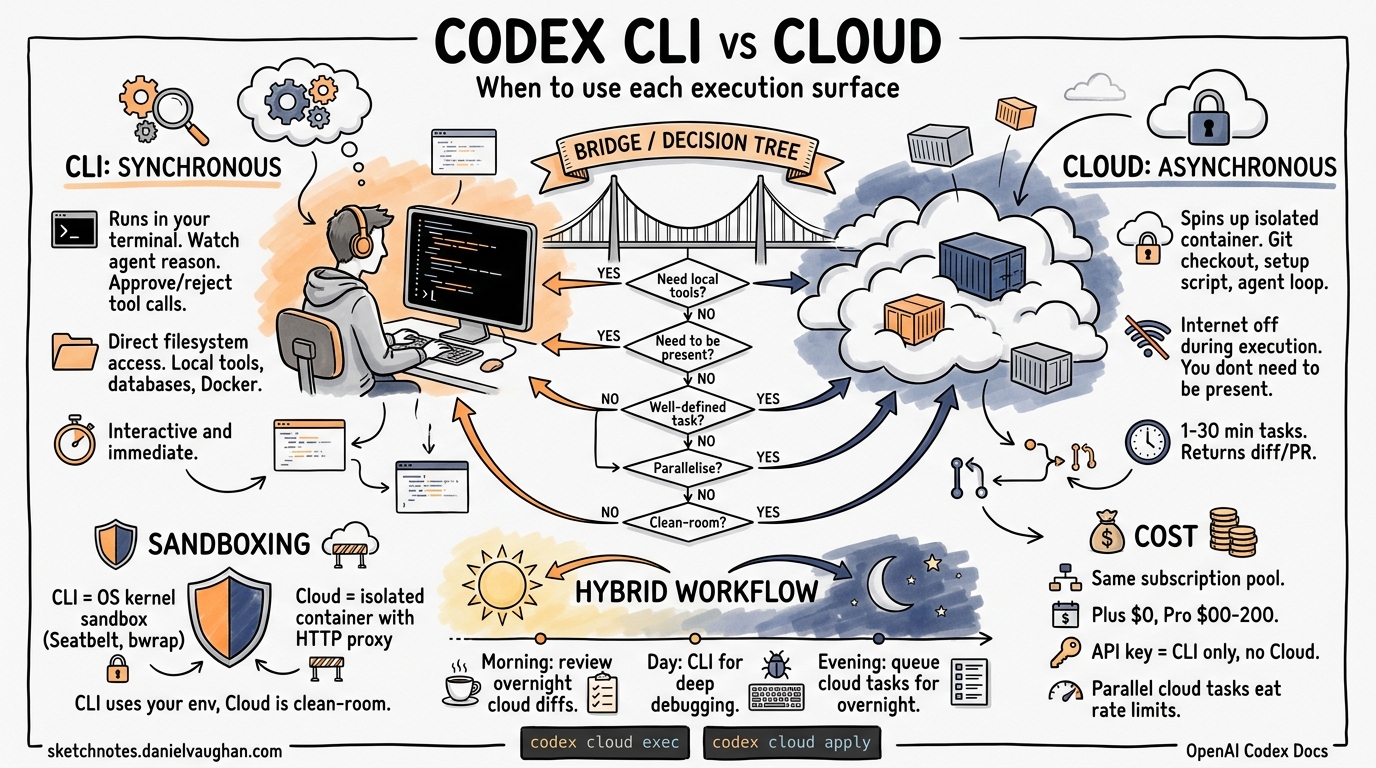
OpenAI ships two distinct execution surfaces under the Codex brand: Codex CLI, a Rust-based terminal agent that runs on your machine, and Codex Cloud (also called “Codex Web”), a managed cloud agent that works asynchronously inside isolated containers12. They share the same model catalogue — GPT-5.4, GPT-5.3-Codex, and GPT-5.4-mini — but differ fundamentally in execution model, sandboxing, network behaviour, and integration surface3. Choosing the wrong one for a given task wastes either time or money. This article provides a concrete decision framework.
Architecture at a Glance
flowchart LR
    subgraph Local["Codex CLI (Local)"]
        A[Developer Terminal] --> B[Rust Agent]
        B --> C[OS-level Sandbox]
        C --> D[Local Filesystem]
        C --> E[Local Tools & Tests]
    end

    subgraph Cloud["Codex Cloud (Remote)"]
        F[Web UI / IDE / CLI] --> G[Cloud Agent]
        G --> H[Isolated Container]
        H --> I[Git Checkout]
        H --> J[Setup Script]
        H --> K[Agent Execution]
        K --> L[PR / Diff Output]
    end

    A -.->|codex cloud exec| F
Execution Model
Codex CLI: Synchronous, Interactive
Codex CLI runs in your terminal session. You watch the agent reason, approve or reject tool calls via the approval policy, and the agent writes directly to your working tree1. It supports three approval modes:
- untrusted — confirms every non-trusted command
- on-request — autonomous within sandbox boundaries, asks when exceeding them
- never — no prompts at all (full-auto)4
The agent has access to your local filesystem, your installed toolchains, and your running services. This makes it ideal for tasks requiring tight feedback loops: debugging a test failure you can reproduce locally, exploring an unfamiliar codebase, or iterating on a design with screenshots attached.
Codex Cloud: Asynchronous, Delegated
Codex Cloud spins up a container, checks out your repository at a specified branch or commit SHA, runs a setup script, then executes the agent in a loop2. Internet access is disabled during agent execution by default5. When the task completes — typically 1 to 30 minutes later — you review the diff and optionally open a PR2.
The key insight: you do not need to be present. Cloud tasks run in the background while you work on something else, sleep, or take a walk. You can launch multiple tasks in parallel across different repositories6.
Sandboxing Comparison
The two surfaces enforce safety at different layers of the stack.
| Dimension | Codex CLI | Codex Cloud |
|---|---|---|
| Sandbox mechanism | OS kernel — Seatbelt (macOS), bubblewrap (Linux), Windows Sandbox (PowerShell)4 | Isolated cloud container with HTTP/HTTPS proxy5 |
| Filesystem scope | Your working directory plus configurable writable roots4 | Fresh git checkout per task5 |
| Network | Configurable domain-level allowlists via managed network profiles4 | Internet off by default during agent phase; available during setup5 |
| Persistence | Writes to your local disk directly | Container cached up to 12 hours; diffs returned as patches5 |
| Secret handling | Inherits your shell environment | Encrypted secrets, decrypted only during execution, removed before agent phase5 |
The practical consequence: CLI lets the agent use whatever is on your machine (databases, Docker, local APIs), while Cloud guarantees a clean-room environment at the cost of needing explicit setup scripts for every dependency.
Cost and Rate Limits
Both surfaces draw from the same ChatGPT subscription tier3:
| Plan | Monthly Cost | CLI Messages (5h window) | Cloud Tasks |
|---|---|---|---|
| Plus | $20 | 20–100 (GPT-5.4) | Included |
| Pro 5× | $100 | 100–500 | Included |
| Pro 20× | $200+ | 400–2000 | Included |
| API Key | Pay-per-token | Unlimited (billed) | Not available |
A critical distinction: API key users cannot use Cloud features3. If your workflow depends on codex cloud exec in CI pipelines, you need a seat-based plan, not a raw API key.
Cloud tasks consume from the same rate-limit pool as interactive sessions. Running five parallel cloud tasks during a heavy CLI session can exhaust your 5-hour window quickly3.
The Decision Framework
flowchart TD
    A[New Task] --> B{Need local tools,<br/>databases, or services?}
    B -->|Yes| C[Use CLI]
    B -->|No| D{Need to be present<br/>during execution?}
    D -->|Yes| C
    D -->|No| E{Task is well-defined<br/>with clear acceptance criteria?}
    E -->|No| C
    E -->|Yes| F{Multiple tasks<br/>to parallelise?}
    F -->|Yes| G[Use Cloud]
    F -->|No| H{Want a clean-room<br/>guarantee?}
    H -->|Yes| G
    H -->|No| C
Use CLI When
- Debugging locally reproducible issues. The agent can hit your running database, invoke your local Docker stack, or attach to a debugger. Cloud cannot do this.
- Exploring unfamiliar code. Interactive mode lets you steer the agent’s investigation in real time, ask follow-up questions, and attach screenshots of UI behaviour1.
- Rapid iteration on a single task. The overhead of container setup and teardown makes Cloud slower for quick, focused changes.
- You need MCP tool integration. CLI supports Model Context Protocol servers for third-party tools — Jira, Slack, custom APIs — running on your local machine1.
- Using an API key. Cloud features are unavailable on the pay-per-token plan3.
Use Cloud When
- Batch processing across repositories. Tag
@codexon multiple GitHub issues and let the agent work through them overnight2. - Tasks with clear, testable acceptance criteria. “Add input validation to all API endpoints and ensure existing tests pass” is a good cloud task. “Help me figure out why this is slow” is not.
- You want a clean-room environment. Cloud’s isolated container guarantees no contamination from local state — useful for reproducible refactors or compliance-sensitive work5.
- Parallelising independent work. Spin up multiple cloud tasks that each operate on separate branches, then review the resulting PRs in batch6.
- Automated scheduling. Codex supports recurring task automations that land results in a review queue without manual re-prompting6.
Bridging Both: The Hybrid Workflow
The most effective pattern uses both surfaces together. The codex cloud command in the CLI lets you launch, monitor, and apply cloud tasks without leaving your terminal1:
# Launch a cloud task from the CLI
codex cloud exec --env my-env "Add retry logic to all HTTP client calls"

# Browse active and finished cloud tasks interactively
codex cloud

# Apply a cloud task's diff to your local working tree
codex cloud apply <task-id>
A practical hybrid workflow:
- Morning triage — review overnight cloud task results, apply clean diffs, send back tasks that need rework.
- Deep work — use CLI interactively for complex debugging, architecture decisions, or exploratory coding that requires steering.
- End of day — queue up well-defined tasks (test coverage, documentation, mechanical refactors) as cloud tasks to run overnight.
sequenceDiagram
    participant Dev as Developer
    participant CLI as Codex CLI
    participant Cloud as Codex Cloud

    Dev->>Cloud: Queue overnight tasks (batch refactors, test gaps)
    Note over Cloud: Runs asynchronously in containers
    Cloud-->>Dev: Morning: diffs ready for review
    Dev->>CLI: Interactive debugging session
    CLI->>Dev: Real-time feedback loop
    Dev->>Cloud: Queue end-of-day tasks
    Note over Cloud: Cycle repeats
Configuration Differences
CLI Configuration
CLI behaviour is controlled via ~/.codex/config.toml or per-project codex.toml7:
[defaults]
model = "gpt-5.4"
approval-policy = "on-request"

[sandbox]
writable-roots = ["/tmp", "~/projects/shared-libs"]

[network]
allow-domains = ["registry.npmjs.org", "pypi.org"]
Cloud Environment Configuration
Cloud environments are configured through the Codex web dashboard or API, specifying5:
- Repository — which GitHub repo to check out
- Setup script — dependency installation commands
- Maintenance script — runs when resuming a cached container
- Environment variables and secrets — injected at runtime
- Internet access — toggle for the agent phase (off by default)
The AGENTS.md file in your repository root works across both surfaces, providing project-specific instructions that the agent reads during execution2.
When Neither Is Right
Some scenarios call for the Codex SDK instead8. If you are building a product that embeds Codex capabilities — a custom code review bot, an internal developer tool, a CI integration beyond what codex exec offers — the SDK gives you programmatic control over agent sessions, tool definitions, and output schemas without the constraints of either the CLI’s interactive model or Cloud’s opinionated container workflow.
Summary
| Factor | CLI | Cloud |
|---|---|---|
| Latency | Immediate | Minutes (container setup) |
| Presence required | Yes | No |
| Local tool access | Full | None |
| Clean-room guarantee | No (uses your environment) | Yes |
| Parallelism | One session per terminal | Multiple concurrent tasks |
| API key compatible | Yes | No |
| Best for | Debugging, exploration, steering | Batch work, delegation, scheduling |
The simplest heuristic: if you need to watch and steer, use CLI. If you can write the task description and walk away, use Cloud.