OpenAI Codex CLI Official Documentation Guide (2026)
OpenAI Codex CLI Official Documentation Guide (2026)
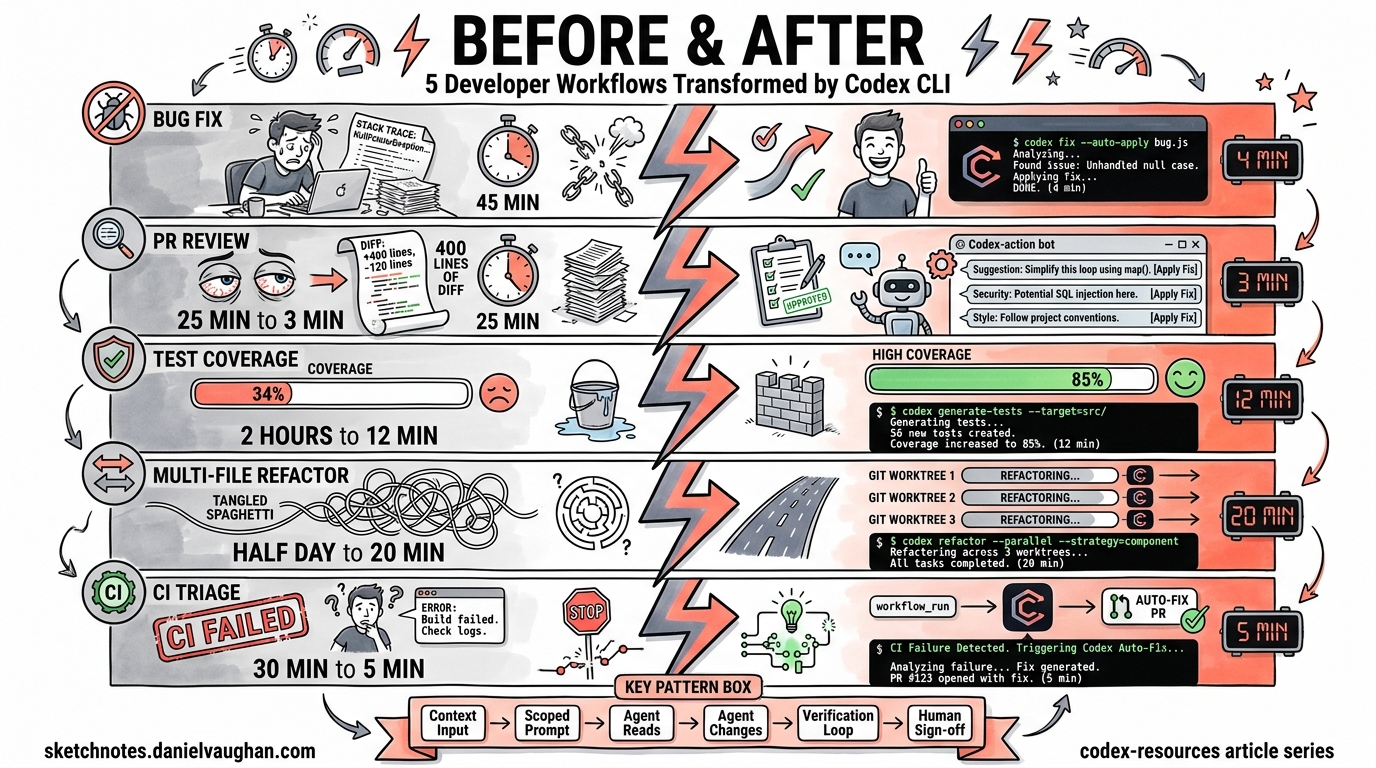
The official Codex CLI documentation has grown considerably since the tool’s open-source debut in mid-2025. What was once a single README and a handful of GitHub docs pages is now a structured documentation site spanning installation, configuration, model selection, features, MCP integration, and an ever-expanding changelog. This guide maps the documentation landscape so you can find exactly what you need without trawling through dozens of pages.
Documentation Architecture
The official docs live at developers.openai.com/codex/ and are organised into several distinct sections1. Understanding this structure saves time:
graph TD
    A[developers.openai.com/codex] --> B[Quickstart]
    A --> C[CLI]
    A --> D[Configuration]
    A --> E[Guides]
    A --> F[Models]
    A --> G[Changelog]
    C --> C1[Overview]
    C --> C2[Features]
    C --> C3[Command Reference]
    D --> D1[Config Basics]
    D --> D2[Config Reference]
    D --> D3[Config Sample]
    D --> D4[Advanced Config]
    E --> E1[AGENTS.md]
    E --> E2[Best Practices]
    E --> E3[MCP]
In addition to the official developer docs, the open-source repository at github.com/openai/codex contains supplementary documentation in its docs/ directory, including getting-started.md and config.md2.
Getting Started: The Quickstart Path
The quickstart guide at developers.openai.com/codex/quickstart covers four deployment options: desktop application, IDE extension, CLI, and cloud3. For CLI users specifically, installation is straightforward:
# Via npm
npm i -g @openai/codex

# Via Homebrew
brew install codex

# Verify installation
codex --version
The CLI is fully supported on macOS and Linux1. Windows support remains experimental — the docs recommend running Codex inside a WSL2 workspace for a reliable experience1.
Authentication
First-time authentication offers two paths3:
- ChatGPT account — full functionality including cloud threads and web search
- OpenAI API key — works for local CLI usage, though some features like cloud threads may be unavailable
# Interactive login (opens browser)
codex login

# Device code flow (headless environments)
codex login --device-auth

# API key via stdin
echo "$OPENAI_API_KEY" | codex login --with-api-key
ChatGPT Plus, Pro, Business, Edu, and Enterprise plans all include Codex access1.
Model Selection Reference
The models documentation at developers.openai.com/codex/models details the current lineup4:
| Model | Role | When to Use |
|---|---|---|
gpt-5.4 |
Flagship frontier model | Most tasks — combines coding strength with enhanced reasoning and agentic capabilities |
gpt-5.4-mini |
Fast, efficient mini model | Lighter coding tasks, subagent operations, cost-sensitive workflows |
gpt-5.3-codex |
Industry-leading coding model | Complex software engineering requiring deep code understanding |
gpt-5.3-codex-spark |
Research preview (Pro only) | Near-instant, real-time coding iteration |
gpt-5.2 |
Previous general-purpose model | Hard debugging tasks benefiting from deeper deliberation |
The documentation recommends starting with gpt-5.4 for most workflows4. You can switch models at launch or mid-session:
# At launch
codex --model gpt-5.4-mini "refactor the auth module"

# Mid-session (slash command in TUI)
/model gpt-5.4
Command Line Reference
The command reference at developers.openai.com/codex/cli/reference is the most information-dense page in the docs5. Key subcommands:
Interactive TUI
# Launch interactive session
codex

# With initial prompt
codex "explain the test failures in src/auth"

# Attach images for visual context
codex -i screenshot.png "fix the layout issues shown here"
Non-Interactive Execution
The exec subcommand (aliased as e) drives CI/CD and automation workflows5:
# Basic execution
codex exec "add unit tests for the payment module"

# Machine-readable output for pipelines
codex exec --json --output-last-message result.md "generate migration script"

# Ephemeral run (no session persistence)
codex exec --ephemeral "lint and fix all TypeScript errors"
Session Management
# Resume last session
codex resume --last

# Resume specific session
codex resume <session-id>
Key Global Flags
The reference documents the full flag set. The most commonly needed5:
| Flag | Purpose |
|---|---|
--model, -m |
Override configured model |
--ask-for-approval, -a |
Set approval policy: untrusted, on-request, never |
--sandbox, -s |
Sandbox policy: read-only, workspace-write, danger-full-access |
--full-auto |
Shortcut for --ask-for-approval on-request |
--profile, -p |
Load named configuration profile |
--add-dir |
Grant write access to additional directories |
--oss |
Use local open-source provider (requires Ollama) |
--search |
Enable live web search |
⚠️ The --dangerously-bypass-approvals-and-sandbox flag (aliased --yolo) should only be used inside dedicated sandbox VMs. The docs explicitly warn against combining it with --full-auto in production environments5.
Configuration System
Configuration is documented across four pages, reflecting its layered design67.
File Locations and Precedence
The configuration cascade, from highest to lowest priority6:
- CLI flags and
--configoverrides - Profile values (
--profile <name>) - Project config files (
.codex/config.toml, closest to working directory wins) - User config (
~/.codex/config.toml) - System config (
/etc/codex/config.toml, Unix only) - Built-in defaults
Essential Configuration Keys
# ~/.codex/config.toml

model = "gpt-5.4"
approval_policy = "on-request"
sandbox_mode = "workspace-write"
web_search = "cached"
model_reasoning_effort = "high"
personality = "friendly"

[features]
shell_snapshot = true    # Speed up repeated commands
memories = false         # Enable persistent memories
multi_agent = true       # Subagent collaboration
undo = false             # Per-turn git snapshots

[shell_environment_policy]
include_only = ["PATH", "HOME", "EDITOR"]
Profiles
Named profiles allow switching between configurations for different contexts6:
[profiles.ci]
model = "gpt-5.4-mini"
approval_policy = "never"
sandbox_mode = "read-only"

[profiles.exploration]
model = "gpt-5.4"
model_reasoning_effort = "high"
web_search = "live"
codex --profile ci exec "run the test suite and report failures"
Features Documentation
The features page at developers.openai.com/codex/cli/features covers the CLI’s capabilities in depth8:
Code Review
The /review command provides inline code review without modifying the working tree — useful as a pre-commit check8:
# In TUI session
/review
Web Search
Enabled by default in cached mode. Switch to live search with --search or configure globally8:
web_search = "live"
Multi-Agent Workflows
Subagent support allows task parallelisation, though the docs note that subagents “consume more tokens than comparable single-agent runs”8. Enable or disable via the multi_agent feature flag.
Image Capabilities
Attach screenshots, design specifications, or diagrams to prompts using the -i flag8. The $imagegen skill generates images within sessions.
AGENTS.md Guide
The custom instructions guide at developers.openai.com/codex/guides/agents-md explains how to configure project-level and global agent behaviour9.
graph TD
    A[Codex starts session] --> B{AGENTS.override.md exists<br/>in CODEX_HOME?}
    B -->|Yes| C[Read AGENTS.override.md]
    B -->|No| D{AGENTS.md exists<br/>in CODEX_HOME?}
    D -->|Yes| E[Read AGENTS.md]
    D -->|No| F[No global instructions]
    C --> G[Walk directory tree<br/>from project root to cwd]
    E --> G
    F --> G
    G --> H[Read nearest AGENTS.md<br/>per directory level]
    H --> I[Merge: closest file wins]
Key points from the documentation9:
- Global defaults go in
~/.codex/AGENTS.md(orAGENTS.override.mdto take precedence) - Project-level instructions live in
AGENTS.mdat the repo root - Subdirectory overrides — place
AGENTS.mdin any package directory; the nearest file takes precedence - Content should cover project structure, architecture, commit conventions, security constraints, and deployment steps
The AGENTS.md format is now stewarded by the Agentic AI Foundation under the Linux Foundation10, making it a cross-tool standard rather than a Codex-specific convention.
MCP Integration
The MCP (Model Context Protocol) documentation at developers.openai.com/codex/mcp covers connecting external tools11:
# Add an MCP server via CLI
codex mcp add context7 -- npx -y @upstash/context7-mcp

# Add with environment variables
codex mcp add github --env GITHUB_TOKEN=ghp_xxx -- npx @modelcontextprotocol/server-github

# List configured servers
codex mcp list

# Authenticate OAuth-based servers
codex mcp login figma
Or configure directly in TOML11:
# STDIO server
[mcp_servers.context7]
command = "npx"
args = ["-y", "@upstash/context7-mcp"]

# HTTP server with auth
[mcp_servers.figma]
url = "https://mcp.figma.com/mcp"
bearer_token_env_var = "FIGMA_OAUTH_TOKEN"
Popular MCP integrations documented include Context7 (documentation lookup), Figma, Playwright, Chrome DevTools, GitHub, and Sentry11.
Changelog and Release Tracking
The changelog at developers.openai.com/codex/changelog tracks both platform and CLI releases12. As of April 2026, the CLI is at version 0.121.012. Notable recent additions:
- 0.121.0 (15 April 2026) — Marketplace installations from GitHub/git URLs, TUI prompt history with reverse search, memory mode controls, namespaced MCP registration, devcontainer profile with bubblewrap support12
- 0.120.0 (11 April 2026) — Realtime V2 streaming for background agent progress, live hook activity display, MCP output schema in code-mode tools12
- 0.119.0 (10 April 2026) — Realtime voice sessions via WebRTC, MCP resource reads, remote egress WebSocket transport12
For granular release-by-release detail, the GitHub releases page at github.com/openai/codex/releases provides the most complete record2.
Supplementary Documentation Sources
Beyond the official docs, several community resources maintain accurate, up-to-date coverage:
| Resource | URL | Focus |
|---|---|---|
| GitHub repo docs | github.com/openai/codex/blob/main/docs/ |
Source-level configuration and getting-started guides |
| OpenAI Cookbook | cookbook.openai.com |
Practical examples and integration patterns |
| Blake Crosley’s Reference | blakecrosley.com/guides/codex |
Comprehensive third-party technical reference |
| SmartScope Guide | smartscope.blog |
Setup guide with practical walkthrough |
Quick Reference: Documentation URL Map
For fast navigation, bookmark these paths:
| Need | URL |
|---|---|
| Installation | developers.openai.com/codex/quickstart |
| CLI overview | developers.openai.com/codex/cli |
| All CLI flags | developers.openai.com/codex/cli/reference |
| Feature details | developers.openai.com/codex/cli/features |
| Model comparison | developers.openai.com/codex/models |
| config.toml basics | developers.openai.com/codex/config-basic |
| Full config reference | developers.openai.com/codex/config-reference |
| Sample config | developers.openai.com/codex/config-sample |
| Advanced config | developers.openai.com/codex/config-advanced |
| AGENTS.md guide | developers.openai.com/codex/guides/agents-md |
| MCP setup | developers.openai.com/codex/mcp |
| Changelog | developers.openai.com/codex/changelog |
| Best practices | developers.openai.com/codex/learn/best-practices |
Citations
-
[CLI – Codex OpenAI Developers](https://developers.openai.com/codex/cli) -
[Quickstart – Codex OpenAI Developers](https://developers.openai.com/codex/quickstart) -
[Models – Codex OpenAI Developers](https://developers.openai.com/codex/models) -
[Command line options – Codex CLI OpenAI Developers](https://developers.openai.com/codex/cli/reference) -
[Config basics – Codex OpenAI Developers](https://developers.openai.com/codex/config-basic) -
[Configuration Reference – Codex OpenAI Developers](https://developers.openai.com/codex/config-reference) -
[Features – Codex CLI OpenAI Developers](https://developers.openai.com/codex/cli/features) -
[Custom instructions with AGENTS.md – Codex OpenAI Developers](https://developers.openai.com/codex/guides/agents-md) -
[Model Context Protocol – Codex OpenAI Developers](https://developers.openai.com/codex/mcp) -
[Changelog – Codex OpenAI Developers](https://developers.openai.com/codex/changelog)