What Happens When You Type codex: The Complete Startup Sequence from Binary to First Model Call
What Happens When You Type codex: The Complete Startup Sequence from Binary to First Model Call
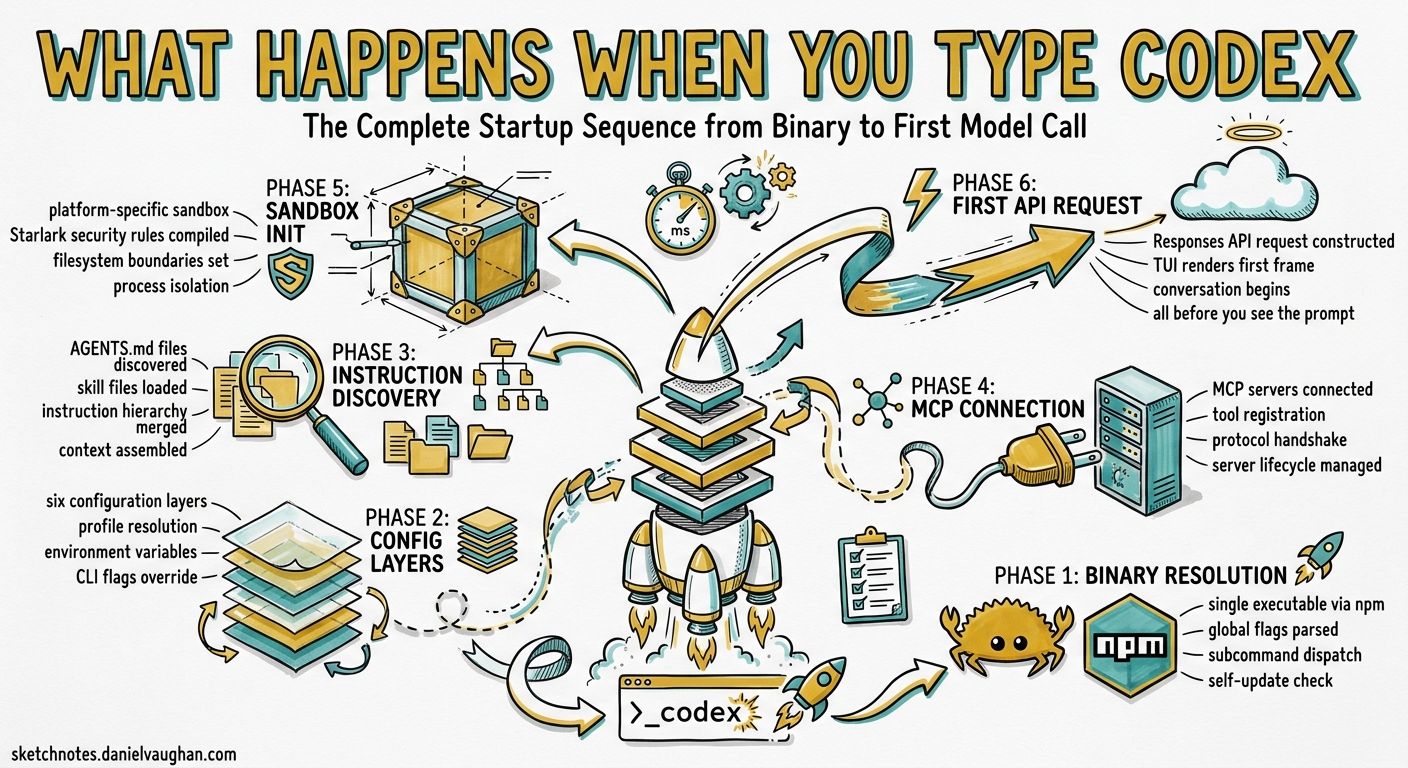
Every Codex CLI session begins the same way: you type codex and press Enter. What follows is a carefully orchestrated startup sequence that resolves configuration from six layers, discovers instruction files, connects to MCP servers, compiles Starlark security rules, initialises a platform-specific sandbox, and constructs the first Responses API request — all before the TUI renders its first frame. Understanding this sequence is essential for diagnosing slow starts, debugging configuration conflicts, and building reliable automation around the CLI.
Phase 1: Binary Resolution and Self-Update Check
The Rust binary ships as a single executable installed via npm install -g @openai/codex1. On launch, it parses global flags (--model, --profile, --sandbox, --config) before dispatching to the appropriate subcommand — interactive TUI by default, or exec, resume, fork, cloud, sandbox, or remote-control for alternative entry points2.
Unless check_for_update_on_startup is set to false in config.toml, the binary performs a non-blocking version check against the npm registry3. This runs asynchronously and never delays the main startup path.
Phase 2: Configuration Layer Resolution
Codex resolves configuration through a strict six-level precedence hierarchy, evaluated top-down with the first match winning4:
graph TD
    A["CLI flags & --config overrides"] --> B["Named profile values"]
    B --> C["Project .codex/config.toml<br/>(closest to CWD wins)"]
    C --> D["User ~/.codex/config.toml"]
    D --> E["System /etc/codex/config.toml"]
    E --> F["Built-in defaults"]
    style A fill:#e8f5e9
    style F fill:#fff3e0
Project-level configuration files walk from the Git repository root down to the current working directory, with the closest file taking precedence4. Crucially, project config only loads when the project’s .codex/ directory is trusted — untrusted projects skip all project-scoped layers, including hooks and rules5.
Named profiles defined under [profiles.<name>] in config.toml bundle model, approval policy, sandbox mode, and provider settings into reusable presets activated via codex --profile <name>6.
Phase 3: Authentication
Codex checks for valid credentials using the resolved provider configuration. Three authentication methods are supported7:
| Method | Trigger | Token Storage |
|---|---|---|
| ChatGPT OAuth | codex login (default) |
~/.codex/ or keyring |
| API key | OPENAI_API_KEY env var |
Environment variable |
| Amazon Bedrock | model_provider = "amazon-bedrock" |
AWS credential chain |
For custom providers, the env_key field specifies which environment variable holds the API key, and the optional [auth] block supports command-backed token retrieval with configurable refresh intervals6.
If authentication fails at this stage, the CLI exits with a clear error rather than proceeding to model calls that would fail.
Phase 4: Instruction Chain Assembly
Codex builds its instruction chain once per session by discovering and concatenating AGENTS.md files8. The discovery walks two scopes:
Global scope ($CODEX_HOME, defaulting to ~/.codex/):
- Check for
AGENTS.override.md— if present, skipAGENTS.md - Fall back to
AGENTS.md
Project scope (Git root → current working directory):
- At each directory level, check
AGENTS.override.mdthenAGENTS.md - Check any filenames listed in
project_doc_fallback_filenames - Include at most one file per directory
Files concatenate root-to-leaf with blank-line separators. Since language models weight recent context more heavily, deeper (more specific) files naturally take precedence8. The combined content is capped at project_doc_max_bytes (32 KiB by default) — exceeding this silently drops later-discovered files8.
Each discovered file becomes its own user-role message prefixed with # AGENTS.md instructions for <directory>9.
Phase 5: Skills Discovery
Skills use a progressive-disclosure loading strategy to conserve context budget10:
- Scan — Codex locates skill directories across repository, user, admin, and system roots
- Index — Read
SKILL.mdfrontmatter (nameanddescriptiononly) from each skill - Inject — Prepend the skill index into the system prompt, capped at ~2% of the model context window or 8,000 characters10
- Defer — Full
SKILL.mdinstructions load only when the model selects a skill during conversation
This means skills add minimal startup overhead. A repository with fifty installed skills still contributes only a compact index to the initial prompt.
Phase 6: MCP Server Initialisation
Codex reads [mcp_servers.<name>] blocks from the merged configuration and spawns STDIO servers or connects to HTTP endpoints11:
[mcp_servers.example]
command = "npx"
args = ["-y", "@example/mcp-server"]
startup_timeout_sec = 10    # default
tool_timeout_sec = 60       # default
required = false            # default
enabled = true              # default
Each server follows the MCP handshake protocol: initialize request with client metadata, then initialized notification11. Servers that exceed startup_timeout_sec are logged as warnings and skipped — unless required = true, which causes startup to abort11.
After handshake, tool discovery occurs: the server advertises its available tools, and Codex filters them through enabled_tools (allowlist) and disabled_tools (denylist)11. The resulting tool definitions join the model’s tool schema for the session.
sequenceDiagram
    participant CLI as Codex CLI
    participant MCP as MCP Server
    CLI->>MCP: initialize (client metadata)
    MCP-->>CLI: initialize response (capabilities)
    CLI->>MCP: initialized
    CLI->>MCP: tools/list
    MCP-->>CLI: Tool definitions
    Note over CLI: Filter via enabled_tools / disabled_tools
Phase 7: Rules Compilation
Codex scans rules/ directories under every active config layer12:
- Team/managed config locations (enterprise)
- User layer:
~/.codex/rules/ - Project-local:
<repo>/.codex/rules/(trusted projects only)
All *.rules files are parsed using Starlark — a Python-like language designed for safe, side-effect-free evaluation12. Each rule file can include inline unit tests (match and not_match examples) that Codex validates at load time, catching misconfigured rules before they silently allow or deny commands12.
The compiled rules feed into the execpolicy engine, which evaluates every shell command against the rule set before execution. You can test rules offline with codex execpolicy check --rules <file>12.
Phase 8: Sandbox Initialisation
The sandbox manager translates the resolved sandbox_mode into platform-specific enforcement13:
| Platform | Mechanism | Key Constraint |
|---|---|---|
| macOS | Apple Seatbelt (sandbox-exec) |
Profile-based filesystem/network deny rules |
| Linux | Landlock + seccomp | Kernel ≥ 5.13 required; filesystem + syscall filtering |
| Windows | Unelevated DACL sandbox | Desktop runtime binary cache access (v0.130.0+) |
In workspace-write mode, the sandbox grants write access to the working directory plus any paths in writable_roots, blocks network access by default (unless network_access = true), and optionally excludes $TMPDIR or /tmp14. The shell_environment_policy controls which environment variables are visible to spawned processes — with inherit = "none" stripping everything except explicitly set keys14.
Phase 9: TUI Rendering and First-Prompt Dispatch
With all layers initialised, the TUI launches in alternate-screen mode (unless --no-alt-screen is set)2. The status line renders the active model, remaining context budget, and current directory — configurable via [tui].status_line3.
If a prompt was passed as a CLI argument (codex "Fix the failing test"), it skips the composer and dispatches immediately. Otherwise, the composer waits for user input.
Phase 10: First Model Request
The first model call assembles a Responses API request containing915:
- System instructions — developer instructions, AGENTS.md chain, skill index
- User message — the prompt, plus any
--imageattachments - Tool definitions — built-in tools (
apply_patch,shell_command,update_plan,web_search) plus all MCP-discovered tools - Configuration —
model_reasoning_effort,model_reasoning_summary,service_tier, andpersonalitymode
The model, tool definitions, and system instructions are kept identical and consistently ordered across requests to maximise prompt-cache hit rates — cached inputs cost 90% less than uncached ones16.
Diagnosing Startup Issues
| Symptom | Likely Phase | Investigation |
|---|---|---|
| “No credentials found” | Phase 3 | Run codex login or set OPENAI_API_KEY |
| MCP server timeout | Phase 6 | Increase startup_timeout_sec; check required flag |
| AGENTS.md instructions missing | Phase 4 | Verify trust status; check project_doc_max_bytes |
| Rules not applying | Phase 7 | Run codex execpolicy check; verify trust |
| Sandbox permission denied | Phase 8 | Check kernel version (Linux); review writable_roots |
| Slow startup | Phase 6 | Profile MCP server init times; reduce server count |
Conclusion
The startup sequence is deterministic: config → auth → instructions → skills → MCP → rules → sandbox → TUI → model. Each phase has clear failure modes and configuration levers. Understanding this pipeline turns mysterious “it’s not working” moments into diagnosable, fixable problems — and understanding the prompt-cache implications of instruction ordering can materially reduce your API costs.
Citations
-
Codex CLI Installation — OpenAI Developers documentation, accessed May 2026. ↩
-
Codex CLI Command Line Reference — OpenAI Developers documentation, accessed May 2026. ↩ ↩2
-
Codex Configuration Sample — OpenAI Developers documentation, accessed May 2026. ↩ ↩2
-
Codex Config Basics — OpenAI Developers documentation, accessed May 2026. ↩ ↩2
-
Codex Advanced Configuration — OpenAI Developers documentation, accessed May 2026. ↩
-
Codex Configuration Reference — OpenAI Developers documentation, accessed May 2026. ↩ ↩2
-
Codex CLI Authentication Flows — OpenAI Developers CLI documentation, accessed May 2026. ↩
-
Custom Instructions with AGENTS.md — OpenAI Developers documentation, accessed May 2026. ↩ ↩2 ↩3
-
Codex Prompting Guide — OpenAI Cookbook, accessed May 2026. ↩ ↩2
-
Agent Skills — OpenAI Developers documentation, accessed May 2026. ↩ ↩2
-
Model Context Protocol — OpenAI Developers documentation, accessed May 2026. ↩ ↩2 ↩3 ↩4
-
Rules — OpenAI Developers documentation, accessed May 2026. ↩ ↩2 ↩3 ↩4
-
Agent Approvals & Security — OpenAI Developers documentation, accessed May 2026. ↩
-
Codex Sandbox Internals — OpenAI Developers Advanced Configuration, accessed May 2026. ↩ ↩2
-
Codex CLI Features — OpenAI Developers documentation, accessed May 2026. ↩
-
Prompt Caching 201 — OpenAI Cookbook, accessed May 2026. ↩