Routing Codex CLI Through AI Gateways: Multi-Provider Access, Cost Control, and Failover
Routing Codex CLI Through AI Gateways: Multi-Provider Access, Cost Control, and Failover
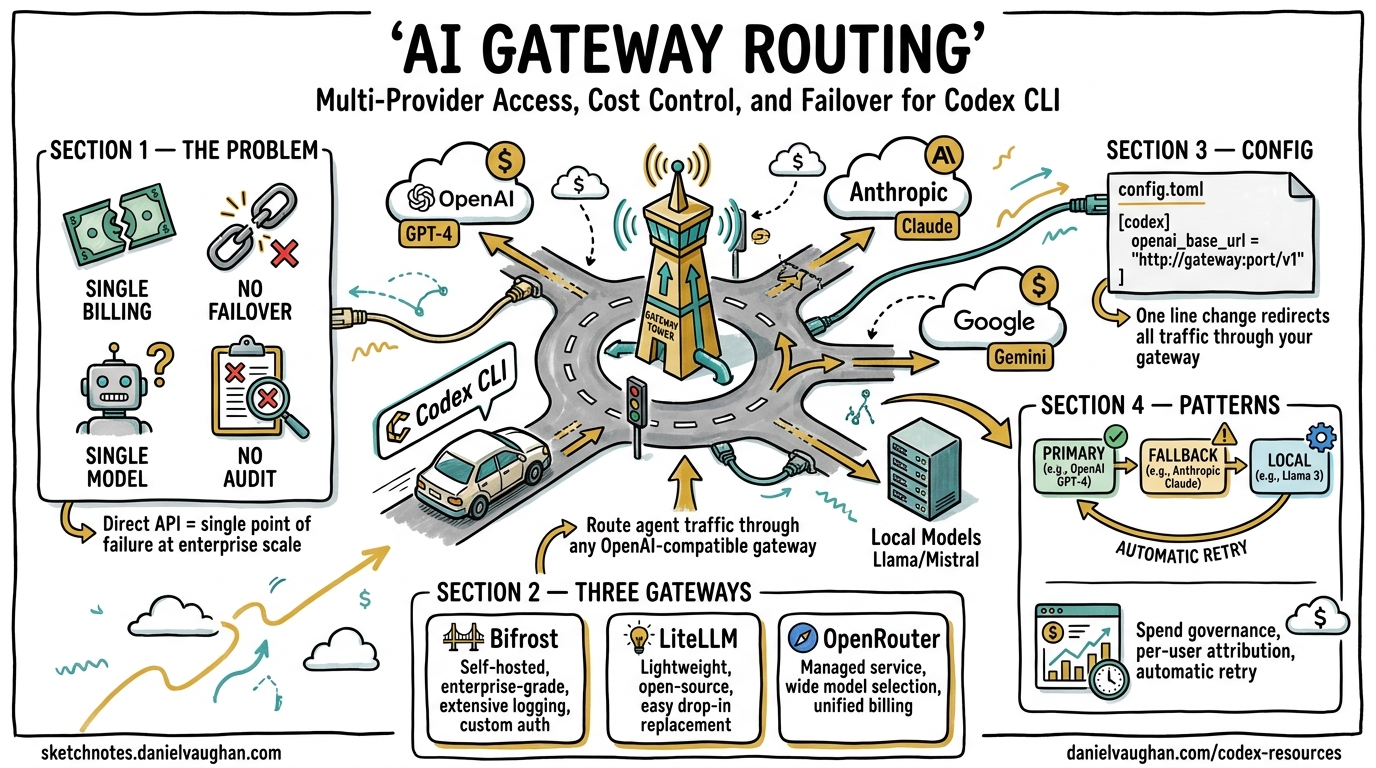
Codex CLI ships with first-class support for OpenAI models, but production teams rarely want a single point of failure, a single billing dimension, or a single model family. AI gateways sit between Codex CLI and the upstream provider, adding failover chains, spend governance, observability, and access to 100+ models from a single config.toml change. This article covers the provider configuration primitives Codex exposes, the three leading gateway options, and concrete patterns for teams routing agent traffic at scale.
Why Gateway Routing Matters
Out of the box, Codex CLI sends every request directly to OpenAI’s API using two environment variables (OPENAI_API_KEY and optionally OPENAI_BASE_URL)1. This works for individual developers, but creates several governance gaps at team and enterprise scale:
- No per-user spend attribution — costs aggregate into a single API key with no breakdown by developer, project, or session2.
- No provider failover — if OpenAI’s API degrades during a long agentic session, the session stalls with no automatic retry to an alternative provider2.
- Single-model constraint — Codex defaults to OpenAI models, but some tasks benefit from Anthropic’s extended thinking, Google’s grounding, or local models for air-gapped environments3.
- Missing compliance logging — regulated industries need immutable audit trails of every request and response flowing through agent tooling2.
An AI gateway solves all four by intercepting Codex’s OpenAI-compatible API calls and adding routing, budgeting, and observability transparently.
Codex CLI Provider Configuration Primitives
Before choosing a gateway, understand the three configuration mechanisms Codex provides natively.
1. The openai_base_url Override
The simplest approach — redirect the built-in OpenAI provider to any OpenAI-compatible endpoint without defining a new provider:
# ~/.codex/config.toml
openai_base_url = "https://your-gateway.example.com/v1"
Alternatively, set the environment variable for a single session:
export OPENAI_BASE_URL="https://your-gateway.example.com/v1"
codex
This preserves the openai provider ID and all its defaults1. Use this when your gateway presents an OpenAI-compatible interface and you want minimal configuration change.
2. Custom Provider Definitions
For non-OpenAI providers or gateways requiring distinct authentication, define a named provider in config.toml:
model = "claude-sonnet-4-5"
model_provider = "anthropic_via_gateway"

[model_providers.anthropic_via_gateway]
name = "Anthropic via Bifrost"
base_url = "http://localhost:8080/anthropic/v1"
env_key = "BIFROST_VIRTUAL_KEY"
wire_api = "responses"
The wire_api key must be set to "responses" for providers that support the OpenAI Responses API wire format4. Three provider IDs are reserved and cannot be overridden: openai, ollama, and lmstudio4.
3. Command-Based Authentication
Enterprise environments often use short-lived tokens from credential helpers rather than static API keys. Codex supports this natively:
[model_providers.corp_gateway]
name = "Corporate AI Gateway"
base_url = "https://ai-gateway.corp.internal/v1"
wire_api = "responses"

[model_providers.corp_gateway.auth]
command = "/usr/local/bin/fetch-codex-token"
args = ["--audience", "codex-cli"]
timeout_ms = 5000
refresh_interval_ms = 300000
The auth command receives no stdin and must write the bearer token to stdout. Codex refreshes the token automatically at the configured interval4. This integrates cleanly with HashiCorp Vault, AWS IAM, and Azure Managed Identity workflows.
flowchart LR
    subgraph Developer Machine
        A[Codex CLI] -->|API Request| B[config.toml<br/>base_url → gateway]
    end
    subgraph AI Gateway
        B --> C{Router}
        C -->|Primary| D[OpenAI API]
        C -->|Fallback 1| E[Anthropic API]
        C -->|Fallback 2| F[Google AI]
        C -->|Local| G[Ollama]
    end
    subgraph Governance
        C --> H[Budget Enforcement]
        C --> I[Audit Logging]
        C --> J[Rate Limiting]
    end
Gateway Option 1: Bifrost
Bifrost is a high-performance, open-source AI gateway written in Go by Maxim AI. It connects to 20+ LLM providers through a single OpenAI-compatible API and adds only 11 microseconds of overhead at 5,000 requests per second2.
Quick Setup
# Terminal 1 — start the gateway
npx -y @maximhq/bifrost

# Terminal 2 — interactive CLI configures Codex automatically
npx -y @maximhq/bifrost-cli
The Bifrost CLI detects installed coding agents (Codex CLI, Claude Code, Gemini CLI) and configures environment variables and config.toml entries automatically5.
Manual Configuration
# ~/.codex/config.toml
model = "anthropic/claude-sonnet-4-5-20250929"
model_provider = "bifrost"

[model_providers.bifrost]
name = "Bifrost Gateway"
base_url = "http://localhost:8080/openai/v1"
env_key = "BIFROST_VIRTUAL_KEY"
wire_api = "responses"
Key Capabilities
| Feature | Detail |
|---|---|
| Virtual keys | Per-user keys encoding model restrictions, dollar-based spend caps (daily/weekly/monthly), and rate limits2 |
| Hierarchical budgets | Individual → team → organisation enforcement tiers2 |
| Automatic failover | Define fallback chains; Bifrost retries transparently when the primary provider fails5 |
| Observability | Prometheus metrics, OpenTelemetry trace export to Datadog/New Relic/Honeycomb2 |
| Compliance | Immutable audit logs, SOC 2 / GDPR support, Vault integration for secrets2 |
| Deployment | In-VPC deployment for data residency requirements2 |
A critical constraint: non-OpenAI models must support tool use for Codex to function correctly, since the agent loop relies heavily on tool calls5.
Switching Models Mid-Session
With Bifrost routing, you can switch models during a TUI session using the /model slash command:
/model anthropic/claude-sonnet-4-5-20250929
/model gemini/gemini-2.5-pro
/model openai/gpt-5.3-codex
This lets you use a cheaper model for scaffolding and switch to a frontier model for complex reasoning — all within the same session5.
Gateway Option 2: LiteLLM
LiteLLM is a Python-based open-source proxy supporting 100+ providers through a unified OpenAI-compatible interface6. It is the most widely adopted gateway in Python-heavy development environments.
Setup
# Install and start the proxy
pip install litellm
litellm --config litellm_config.yaml
Define model routing in litellm_config.yaml:
model_list:
  - model_name: gpt-5.3-codex
    litellm_params:
      model: openai/gpt-5.3-codex
      api_key: "${OPENAI_API_KEY}"

  - model_name: claude-sonnet
    litellm_params:
      model: anthropic/claude-sonnet-4-5
      api_key: "${ANTHROPIC_API_KEY}"

  - model_name: gemini-pro
    litellm_params:
      model: gemini/gemini-2.5-pro
      api_key: "${GOOGLE_API_KEY}"
Point Codex at the proxy:
export OPENAI_BASE_URL=http://localhost:4000
export OPENAI_API_KEY="$YOUR_LITELLM_KEY"
codex --model claude-sonnet
Key Capabilities
- Virtual keys with per-key spend tracking and budget limits6
- Fallback routing — define ordered provider lists per model alias
- Semantic caching — reduces cost and latency for repeated prompts
- Spend dashboards — built-in UI for usage analytics
- SSO integration — OIDC, Okta, Azure AD for enterprise key management
⚠️ LiteLLM requires version 1.66.3.dev5 or higher for full Codex CLI compatibility with the Responses API wire format6.
Gateway Option 3: OpenRouter
OpenRouter is a hosted routing service requiring no self-hosted infrastructure. It routes requests across multiple providers with automatic failover3.
Setup
# ~/.codex/config.toml
model = "openai/gpt-5.3-codex"
model_provider = "openrouter"

[model_providers.openrouter]
name = "OpenRouter"
base_url = "https://openrouter.ai/api/v1"
env_key = "OPENROUTER_API_KEY"
export OPENROUTER_API_KEY="$YOUR_OPENROUTER_KEY"
codex
Key Capabilities
- Zero infrastructure — fully hosted, no gateway to deploy3
- Provider failover — automatic rerouting when a provider is unavailable
- Team controls — centralised budget management via the OpenRouter dashboard3
- Usage tracking — real-time visibility through the Activity Dashboard
- Model flexibility — access any model on the OpenRouter catalogue without reconfiguration
Limitations
OpenRouter does not support advanced provider routing features like weighted load balancing or custom fallback chain definitions from within Codex CLI’s configuration3. For teams needing fine-grained routing control, a self-hosted gateway (Bifrost or LiteLLM) provides more flexibility.
Gateway Comparison
quadrantChart
    title Gateway Selection: Control vs Operational Overhead
    x-axis "Low Ops Overhead" --> "High Ops Overhead"
    y-axis "Low Control" --> "High Control"
    quadrant-1 "Enterprise Self-Hosted"
    quadrant-2 "Ideal Zone"
    quadrant-3 "Quick Start"
    quadrant-4 "Over-Engineered"
    "OpenRouter": [0.15, 0.35]
    "Bifrost": [0.55, 0.85]
    "LiteLLM": [0.65, 0.75]
    "Direct OpenAI": [0.05, 0.15]
| Criterion | OpenRouter | Bifrost | LiteLLM |
|---|---|---|---|
| Deployment | Hosted SaaS | Self-hosted (Go binary) | Self-hosted (Python) |
| Provider count | 200+ | 20+ | 100+ |
| Latency overhead | Variable (network hop) | 11µs at 5K RPS2 | ~1–5ms typical |
| Virtual keys | ✅ | ✅ | ✅ |
| Custom fallback chains | ❌ | ✅ | ✅ |
| Semantic caching | ❌ | ✅ | ✅ |
| OTEL export | ❌ | ✅ | ✅ |
| Data residency | ❌ (US-hosted) | ✅ (in-VPC) | ✅ (self-hosted) |
| Setup time | 5 minutes | 15 minutes | 20 minutes |
Production Patterns
Pattern 1: Two-Tier Model Routing
Route planning and critical reasoning to a frontier model while sending narrower tasks to a faster, cheaper model:
# Primary profile — frontier model for complex work
model = "openai/gpt-5.4"
model_provider = "gateway"

[model_providers.gateway]
name = "Bifrost"
base_url = "http://gateway.internal:8080/openai/v1"
env_key = "BIFROST_KEY"
wire_api = "responses"
Configure the gateway’s routing rules to map model aliases to providers:
# Bifrost routing config
routes:
  - alias: "openai/gpt-5.4"
    primary: "openai"
    fallback: ["azure-openai-eastus", "azure-openai-westeu"]
  - alias: "fast-codex"
    primary: "cerebras/gpt-5.3-codex-spark"
    fallback: ["groq/llama-4-maverick"]
Codex CLI’s built-in two-tier routing sends planning work to GPT-5.4 and supporting tasks to GPT-5.4 mini7. A gateway extends this by adding cross-provider fallback to each tier.
Pattern 2: Regional Failover for Global Teams
# LiteLLM config for regional routing
model_list:
  - model_name: codex-primary
    litellm_params:
      model: openai/gpt-5.3-codex
      api_base: https://us.api.openai.com/v1
      api_key: "${OPENAI_API_KEY}"
    model_info:
      region: us-east

  - model_name: codex-primary
    litellm_params:
      model: openai/gpt-5.3-codex
      api_base: https://eu.api.openai.com/v1
      api_key: "${OPENAI_API_KEY_EU}"
    model_info:
      region: eu-west

router_settings:
  routing_strategy: "latency-based-routing"
LiteLLM routes each request to the lowest-latency deployment, providing both performance and data residency compliance6.
Pattern 3: Budget Enforcement with Virtual Keys
Prevent runaway agentic sessions from exhausting monthly budgets:
# Create a virtual key with daily spend cap
curl -X POST http://gateway.internal:8080/key/generate \
  -H "Authorization: Bearer $ADMIN_KEY" \
  -d '{
    "models": ["gpt-5.3-codex", "gpt-5.4-mini"],
    "max_budget": 50.00,
    "budget_duration": "daily",
    "metadata": {"team": "platform", "user": "dev-alice"}
  }'
Distribute virtual keys to each developer. The gateway enforces limits and returns a 429 when the budget is exhausted, which Codex CLI surfaces as a clear error rather than silently failing2.
Pattern 4: Air-Gapped Local Fallback
For environments where internet connectivity is intermittent, configure a local model as the final fallback:
model = "gpt-5.3-codex"
model_provider = "gateway"

[model_providers.gateway]
name = "Gateway with local fallback"
base_url = "http://localhost:8080/openai/v1"
env_key = "GATEWAY_KEY"
wire_api = "responses"

[model_providers.local_ollama]
name = "Ollama (offline fallback)"
base_url = "http://localhost:11434/v1"
The gateway routes to OpenAI when available, falls back to Ollama with a capable local model (e.g., Llama 4 Maverick) when connectivity drops. This complements the patterns described in the Codex CLI offline mode guide.
Azure Configuration
For teams on Azure OpenAI, Codex supports direct Azure provider configuration without a gateway:
model = "gpt-5.3-codex"
model_provider = "azure"

[model_providers.azure]
name = "Azure OpenAI"
base_url = "https://YOUR_PROJECT.openai.azure.com/openai"
env_key = "AZURE_OPENAI_API_KEY"
query_params = { api-version = "2025-04-01-preview" }
wire_api = "responses"
request_max_retries = 4
stream_max_retries = 10
stream_idle_timeout_ms = 300000
However, adding a gateway in front of Azure provides failover to direct OpenAI or other providers when Azure capacity is constrained4.
Observability Through the Gateway
A gateway becomes the single instrumentation point for all agent traffic. Key metrics to capture:
- Token consumption per session — identify runaway agents before they exhaust budgets
- Cache hit rate — measure how effectively prompt caching reduces costs (Codex’s append-only prompt architecture already achieves high cache hit rates with the same provider8)
- Latency percentiles — detect provider degradation before sessions stall
- Error rates by provider — validate that failover chains are actually activating
- Model distribution — track which models your team uses most to negotiate volume pricing
Both Bifrost and LiteLLM export these via OpenTelemetry, integrating directly with existing Grafana, Datadog, or New Relic dashboards26.
Security Considerations
Routing agent traffic through a gateway introduces a new component in the trust chain:
- Transport encryption — ensure TLS between Codex CLI and the gateway, not just between the gateway and upstream providers.
- Credential isolation — upstream API keys should live only in the gateway’s secret store, never in developer environments. Developers receive virtual keys with limited scope2.
- Request logging — gateways that log prompts and responses must comply with your data handling policy. Disable prompt logging for sensitive codebases.
- Gateway availability — a self-hosted gateway is now a single point of failure. Run it with redundancy (at minimum two replicas behind a load balancer) or accept the trade-off of falling back to direct API access.
Getting Started
For a solo developer wanting multi-provider access with minimal setup:
# OpenRouter — 5-minute path
export OPENROUTER_API_KEY="$YOUR_OPENROUTER_KEY"
# Add [model_providers.openrouter] to config.toml and start coding
For a team wanting cost governance and failover:
# Bifrost — 15-minute path
npx -y @maximhq/bifrost          # Start gateway
npx -y @maximhq/bifrost-cli      # Configure Codex automatically
For a platform team wanting maximum control:
# LiteLLM — deploy as infrastructure
docker run -p 4000:4000 \
  -v ./litellm_config.yaml:/app/config.yaml \
  ghcr.io/berriai/litellm:main-latest \
  --config /app/config.yaml
The gateway pattern is not mandatory for productive Codex CLI usage, but it becomes essential once you have more than a handful of developers running agentic sessions daily. Start with the simplest option that meets your constraints and add complexity only when the governance data demands it.
Citations
-
[Advanced Configuration – Codex CLI OpenAI Developers](https://developers.openai.com/codex/config-advanced) -
Bifrost AI Gateway for Codex CLI: Governance, Cost Control, and Provider Flexibility at Scale ↩ ↩2 ↩3 ↩4 ↩5 ↩6 ↩7 ↩8 ↩9 ↩10 ↩11 ↩12 ↩13
-
[Integration with Codex CLI OpenRouter Documentation](https://openrouter.ai/docs/guides/coding-agents/codex-cli) -
[Configuration Reference – Codex CLI OpenAI Developers](https://developers.openai.com/codex/config-reference) -
Using OpenAI Codex CLI with Multiple Model Providers Using Bifrost ↩ ↩2 ↩3 ↩4
-
Codex CLI Prompt Caching: Maximise Cache Hits and Cost Reduction ↩