Codex CLI Custom Model Providers: The Complete Configuration Guide
Codex CLI Custom Model Providers: The Complete Configuration Guide
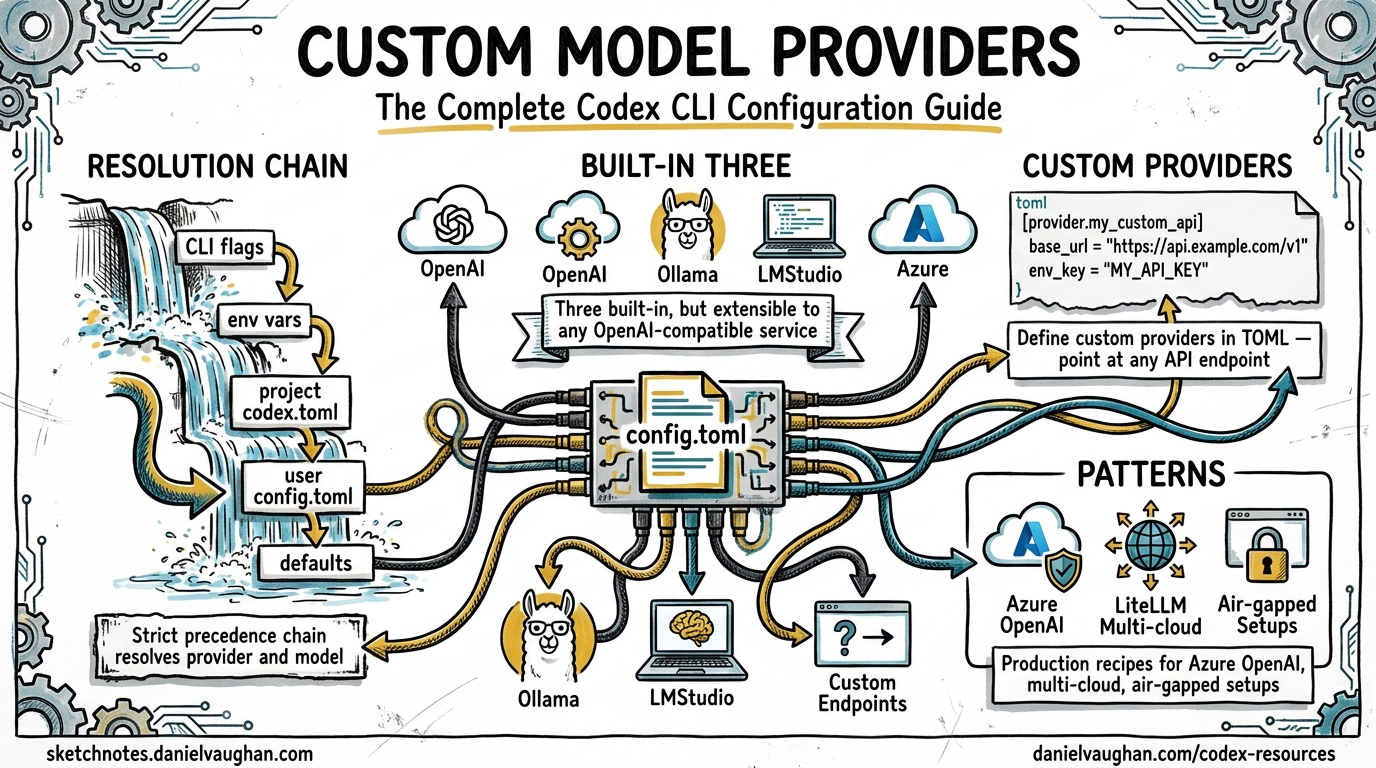
Codex CLI ships with three built-in providers, openai, ollama and lmstudio, but the real power is in its extensible provider framework1. You can point Codex at any model service that speaks the Responses API2 by adding a block to config.toml. This guide covers every configuration key, authentication pattern and production-ready provider recipe.
Wire protocol change (February 2026): Codex originally supported both the Chat Completions API (
wire_api = "chat") and the Responses API (wire_api = "responses"). Chat Completions support has been removed3. All providers, including third-party and open-source endpoints, must now use the Responses API. If you find older guides recommendingwire_api = "chat", they are out of date.
How provider resolution works
When Codex starts it resolves the active model and provider through a strict precedence chain: CLI flags override profile values, which override project-level .codex/config.toml, which overrides user-level ~/.codex/config.toml, which overrides system-level /etc/codex/config.toml, which overrides built-in defaults4.
flowchart TD
    A[CLI flags: --model, --provider] --> B{Resolved?}
    B -- No --> C[Profile values]
    C --> D{Resolved?}
    D -- No --> E["Project .codex/config.toml"]
    E --> F{Resolved?}
    F -- No --> G["User ~/.codex/config.toml"]
    G --> H{Resolved?}
    H -- No --> I["System /etc/codex/config.toml"]
    I --> J{Resolved?}
    J -- No --> K["Default: openai / gpt-5.5"]
    B -- Yes --> L[Use resolved provider]
    D -- Yes --> L
    F -- Yes --> L
    H -- Yes --> L
    J -- Yes --> L
Two top-level keys control model selection5:
model = "gpt-5.5"
model_provider = "proxy"
The model_provider value must match either a built-in ID or a key under [model_providers.<id>]. Custom providers cannot reuse the reserved IDs openai, ollama or lmstudio1.
Anatomy of a custom provider
Every custom provider lives under [model_providers.<id>] in your config.toml. The complete set of configuration keys51:
| Key | Type | Description |
|---|---|---|
name |
string | Human-readable display name |
base_url |
string | API endpoint base URL |
env_key |
string | Environment variable holding the API key |
env_key_instructions |
string | Setup guidance shown when the key is missing |
wire_api |
string | Protocol: responses (the only supported value since February 2026) |
http_headers |
table | Static HTTP headers sent with every request |
env_http_headers |
table | Headers populated from environment variables |
query_params |
table | Extra query parameters appended to requests |
request_max_retries |
integer | HTTP retry count (default: 4) |
stream_max_retries |
integer | Streaming interruption retries (default: 5) |
stream_idle_timeout_ms |
integer | SSE idle timeout in ms (default: 300,000) |
supports_websockets |
boolean | Whether the provider supports WebSocket transport |
requires_openai_auth |
boolean | Whether to use OpenAI authentication flow |
Wire API
The wire_api key sets the API protocol Codex uses1. Since February 2026 the only supported value is responses, the OpenAI Responses API3. The previous chat option (Chat Completions API) has been removed.
Third-party providers must support the Responses API to work with Codex directly. Providers that only speak Chat Completions need a translation proxy such as LiteLLM (see below). If your provider returns 404 errors, confirm that it exposes the Responses API endpoint format.
Authentication patterns
Static API key via environment variable
The simplest pattern. Codex reads the named environment variable at runtime and sends it as a Bearer token1:
[model_providers.mistral]
name = "Mistral AI"
base_url = "https://api.mistral.ai/v1"
env_key = "MISTRAL_API_KEY"
wire_api = "responses"
Never place API keys directly in config.toml. An experimental_bearer_token field exists but is explicitly discouraged5.
Command-based authentication
For providers that need dynamic tokens, whether OAuth flows, short-lived service account credentials or secrets-manager integration, Codex supports command-backed auth1:
[model_providers.internal.auth]
command = "/usr/local/bin/fetch-codex-token"
args = ["--audience", "codex"]
timeout_ms = 5000
refresh_interval_ms = 300000
The contract: the command receives no stdin, writes the token to stdout (whitespace is trimmed) and exits. Codex calls it proactively at the refresh_interval_ms cadence rather than waiting for a 4011.
This mechanism is mutually exclusive with env_key, experimental_bearer_token and requires_openai_auth5.
Google Cloud ADC for Vertex AI
Command-based auth is how you wire up Google Cloud Application Default Credentials. Issue #1106 tracks first-class Vertex AI support6, but you can already configure it as a custom provider using gcloud as the token source:
model = "gemini-2.5-pro"
model_provider = "vertex"

[model_providers.vertex]
name = "Google Vertex AI"
base_url = "https://us-central1-aiplatform.googleapis.com/v1/projects/YOUR_PROJECT/locations/us-central1/publishers/google/models"
wire_api = "responses"

[model_providers.vertex.auth]
command = "gcloud"
args = ["auth", "print-access-token"]
timeout_ms = 5000
refresh_interval_ms = 300000
Run gcloud auth application-default login and enable the Vertex AI API in your project first6. Set GOOGLE_CLOUD_PROJECT and GOOGLE_CLOUD_LOCATION in your shell for consistency.
Vertex AI is not yet a first-class built-in provider. The base URL path structure varies by model family and API version. Test with a single completion before committing to a workflow.
Production-ready provider recipes
Azure OpenAI
Azure uses the Responses API but needs an API version query parameter1:
model = "gpt-5.5"
model_provider = "azure"

[model_providers.azure]
name = "Azure OpenAI"
base_url = "https://YOUR_RESOURCE.openai.azure.com/openai"
env_key = "AZURE_OPENAI_API_KEY"
query_params = { api-version = "2025-04-01-preview" }
wire_api = "responses"
request_max_retries = 4
stream_max_retries = 10
stream_idle_timeout_ms = 300000
The higher stream_max_retries value compensates for Azure’s occasional mid-stream disconnections in high-traffic regions.
Amazon Bedrock
Bedrock is a built-in provider with AWS SigV4 signing7. You do not need to define it manually. Set model_provider = "amazon-bedrock" and configure your AWS profile:
export AWS_PROFILE=codex-dev
export AWS_REGION=us-east-1
codex --model us.anthropic.claude-sonnet-4-20250514 --provider amazon-bedrock
OpenAI data residency
For organisations with data residency requirements, override the default OpenAI endpoint with a region-specific URL1. OpenAI supports residency in the EU, US, UK, Canada, Japan, South Korea, Singapore, India, Australia and the UAE:
model_provider = "openaidr"

[model_providers.openaidr]
name = "OpenAI Data Residency"
base_url = "https://eu.api.openai.com/v1"
wire_api = "responses"
Replace the eu prefix with your designated region.
LiteLLM proxy for multi-provider routing
LiteLLM (third-party, open-source) acts as a unified gateway, translating Codex requests to any supported backend: Anthropic, Google AI Studio, Mistral, Cohere and dozens more8. This matters now that Codex requires the Responses API, because LiteLLM can translate Responses API requests into the native protocol of backends that do not yet support it.
Start the proxy:
docker run -v $(pwd)/litellm_config.yaml:/app/config.yaml \
  -p 4000:4000 \
  docker.litellm.ai/berriai/litellm:main-latest \
  --config /app/config.yaml
With a routing config:
model_list:
  - model_name: claude-sonnet
    litellm_params:
      model: anthropic/claude-sonnet-4-20250514
      api_key: os.environ/ANTHROPIC_API_KEY
  - model_name: gemini-flash
    litellm_params:
      model: gemini/gemini-2.5-flash
      api_key: os.environ/GEMINI_API_KEY

litellm_settings:
  drop_params: true
Then point Codex at it:
model = "claude-sonnet"
model_provider = "litellm"

[model_providers.litellm]
name = "LiteLLM Gateway"
base_url = "http://localhost:4000"
env_key = "LITELLM_API_KEY"
wire_api = "responses"
The drop_params: true setting in LiteLLM is critical. It filters out request parameters the target provider does not recognise, preventing API errors when Codex sends OpenAI-specific fields8.
Provider configuration flow
flowchart LR
    subgraph Config ["config.toml"]
        A["model_provider = 'xyz'"]
        B["[model_providers.xyz]"]
    end
    subgraph Auth ["Authentication"]
        C["env_key → Bearer token"]
        D["auth.command → Dynamic token"]
    end
    subgraph Transport ["Wire Protocol"]
        E["wire_api = 'responses'"]
    end
    A --> B
    B --> C
    B --> D
    B --> E
    E --> G["All endpoints (Responses API)"]
Debugging provider issues
When a custom provider misbehaves, work through this checklist:
- Verify
wire_api— must beresponses. If your provider only supports Chat Completions, route through a translation proxy such as LiteLLM. - Check the base URL — some providers need a
/v1suffix; others do not. Trailing slashes matter. - Inspect auth — run your
auth.commandmanually and verify the token output. Check thatenv_keypoints to a set variable. - Enable verbose logging — run
codex --log-level debugto see the full request/response cycle, including headers and endpoint URLs. - Test streaming — some providers support completions but fail on SSE streaming. Increase
stream_idle_timeout_msor adjust retry counts. - Confirm model name — the
modelvalue inconfig.tomlis passed directly to the provider. Azure uses deployment names; Vertex uses full model paths.
Enterprise considerations
For teams deploying Codex across an organisation:
- Profile-scoped providers — use
[profiles.<name>]sections to define per-environment provider overrides, letting developers switch between staging and production endpoints5. - Credentials store — set
cli_auth_credentials_store = "keyring"to store tokens in the system keychain rather than plain files5. - Forced login method — restrict authentication to a specific flow with
forced_login_method = "chatgpt"or"api"to enforce corporate SSO paths5. - Custom headers for audit — use
http_headersorenv_http_headersto inject correlation IDs, tenant identifiers or compliance tags into every request1.
Citations
-
Advanced Configuration, Codex CLI, OpenAI Developers ↩ ↩2 ↩3 ↩4 ↩5 ↩6 ↩7 ↩8 ↩9 ↩10
-
Deprecating chat/completions support in Codex, Discussion #7782, openai/codex ↩ ↩2
-
Configuration Reference, Codex CLI, OpenAI Developers ↩ ↩2 ↩3 ↩4 ↩5 ↩6 ↩7
-
Feature: Implement Extensible Provider Framework and Add Google Vertex AI Support with ADC, Issue #1106, openai/codex ↩ ↩2