Codex CLI for Django and FastAPI Teams: AGENTS.md Templates, Sandbox Configuration, and Python Web Development Workflows
Codex CLI for Django and FastAPI Teams: AGENTS.md Templates, Sandbox Configuration, and Python Web Development Workflows
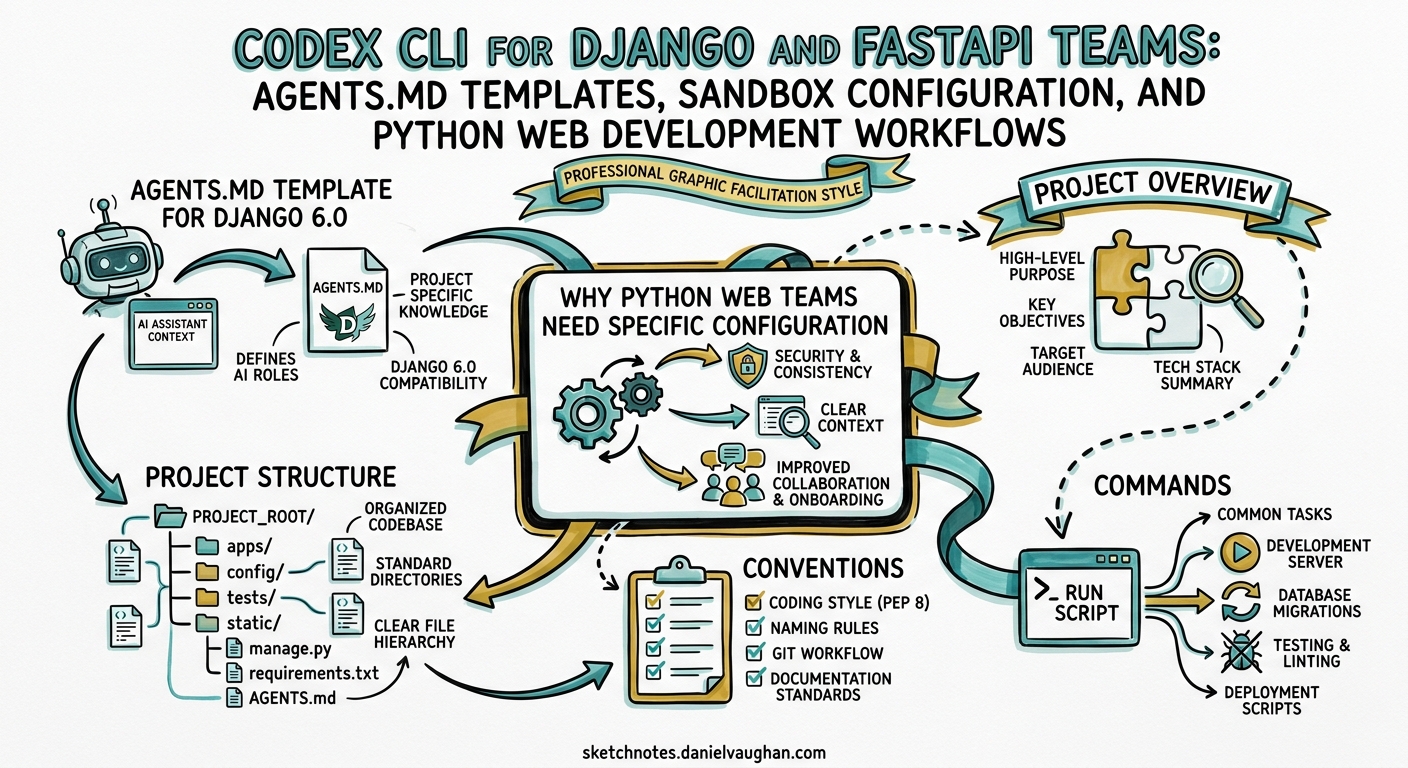
Python web frameworks remain the backbone of backend development for millions of teams, yet Codex CLI’s documentation and community guides lean heavily toward JavaScript/TypeScript ecosystems. Django 6.0 shipped built-in background tasks and native CSP support in December 20251, whilst FastAPI crossed 0.136.x with strict Content-Type enforcement and Python 3.10+ as a baseline2. Both frameworks have patterns that interact with Codex CLI’s sandbox model in non-obvious ways — migration commands need database access, manage.py runserver binds ports, and pip install requires network connectivity that the default sandbox blocks.
This guide covers AGENTS.md templates, sandbox configuration, testing workflows, and CI integration for teams running Django 6.0+ or FastAPI 0.130+ with Codex CLI v0.125.
Why Python Web Teams Need Specific Configuration
Codex CLI’s workspace-write sandbox mode blocks network access by default and restricts filesystem writes to the project directory3. For a typical Django project, this means:
python manage.py migratefails — it needs a running databasepip install -r requirements.txtfails — it needs network access to PyPIpython manage.py runserverfails — it binds a network port
Rather than reaching for danger-full-access, a calibrated configuration profile solves each constraint whilst preserving sandbox safety.
AGENTS.md Template for Django 6.0
A well-structured AGENTS.md eliminates the most common navigation failures that plague coding agents4. Here is a template tailored for Django 6.0 projects:
# AGENTS.md

## Project Overview
- **Framework:** Django 6.0 with Django REST Framework 3.15
- **Python:** 3.12+ (managed via pyenv or uv)
- **Database:** PostgreSQL 16 via psycopg 3
- **Task queue:** Django's built-in Tasks framework (not Celery)
- **Package manager:** uv (preferred) or pip with pip-tools

## Project Structure
myproject/ manage.py config/ # Project settings (base.py, local.py, production.py) apps/ core/ # Shared models, mixins, utilities users/ # Authentication, profiles api/ # DRF viewsets, serializers, permissions templates/ # Global templates and partials static/ # Static assets tests/ # Top-level test directory conftest.py # Shared pytest fixtures factories/ # Factory Boy model factories
## Conventions
- Use class-based views for CRUD; function-based views for simple endpoints
- All models inherit from `core.models.TimeStampedModel`
- Serializers live alongside their viewsets in each app
- Settings split: `config/base.py` → `config/local.py` → `config/production.py`
- Environment variables loaded via `django-environ` from `.env`

## Commands
- **Tests:** `pytest --reuse-db -x -q`
- **Type check:** `mypy . --config-file pyproject.toml`
- **Lint:** `ruff check . --fix`
- **Format:** `ruff format .`
- **Migrations:** `python manage.py makemigrations && python manage.py migrate`
- **Dev server:** `python manage.py runserver 8000`

## Rules
- NEVER modify migration files directly — always use `makemigrations`
- NEVER commit `.env` files or expose secrets in code
- All new endpoints must have corresponding pytest tests
- Use `select_related()` / `prefetch_related()` to avoid N+1 queries
- Django 6.0's Tasks framework replaces Celery for new background work
AGENTS.md Template for FastAPI
FastAPI projects benefit from a different emphasis — async patterns, Pydantic v2 models, and dependency injection:
# AGENTS.md

## Project Overview
- **Framework:** FastAPI 0.136+ with Pydantic v2
- **Python:** 3.12+ (requires 3.10 minimum)
- **Database:** SQLAlchemy 2.0 async with asyncpg
- **Migrations:** Alembic
- **Package manager:** uv

## Project Structure
app/ main.py # FastAPI application factory core/ config.py # Pydantic Settings database.py # Async engine and session security.py # OAuth2, JWT utilities models/ # SQLAlchemy ORM models schemas/ # Pydantic v2 request/response schemas api/ v1/ # Versioned route modules deps.py # Dependency injection functions services/ # Business logic layer tests/ conftest.py # Async fixtures, test client test_api/ # Route-level tests test_services/ # Unit tests for business logic
## Conventions
- Schemas and models are separate — never use ORM models in API responses
- All route handlers are async; use `asyncio.to_thread()` for blocking I/O
- Dependency injection via `Depends()` for DB sessions, auth, and pagination
- Strict Content-Type enforcement is enabled by default in FastAPI 0.136+

## Commands
- **Tests:** `pytest -x -q --asyncio-mode=auto`
- **Type check:** `mypy app/ --strict`
- **Lint:** `ruff check . --fix`
- **Format:** `ruff format .`
- **Migrations:** `alembic upgrade head`
- **Dev server:** `uvicorn app.main:app --reload --port 8000`

## Rules
- NEVER use synchronous database calls in async route handlers
- All Pydantic models use `model_config = ConfigDict(strict=True)`
- Alembic migration files are auto-generated then reviewed — never hand-edit
- Use `httpx.AsyncClient` for test fixtures, not the sync `TestClient`
Sandbox Configuration for Python Web Projects
The default workspace-write sandbox blocks network access entirely3. Python web projects typically need network access during dependency installation and database interactions. Create a dedicated permission profile in ~/.codex/config.toml:
[profiles.python-web]
model = "gpt-5.5"
approval_mode = "auto-edit"

[profiles.python-web.sandbox_workspace_write]
network_access = true

[profiles.python-web.permissions.workspace.filesystem]
":project_roots" = {
  "." = "write",
  "**/*.env" = "none",
  "**/.env.*" = "none",
  "**/secrets/**" = "none"
}
Key decisions in this profile:
network_access = true— enablespip install, database connections, anduvicornbinding3"**/*.env" = "none"— denies read access to environment files containing secrets, preventing the agent from leaking credentials5approval_mode = "auto-edit"— lets Codex edit files freely but requires approval for shell commands, a sensible middle ground for web projects
Activate the profile when working on your project:
codex --profile python-web
Network Domain Restrictions
For tighter control, configure the managed network proxy to allowlist only the domains your project needs:
[profiles.python-web.sandbox_workspace_write]
network_access = true

[profiles.python-web.sandbox_workspace_write.network]
allowed_domains = [
  "pypi.org",
  "files.pythonhosted.org",
  "localhost",
  "127.0.0.1"
]
This permits PyPI package downloads and local database connections whilst blocking all other outbound traffic6.
Testing Workflows
Django: pytest-django with Database Reuse
The fastest feedback loop for Django uses pytest-django with --reuse-db to avoid recreating the test database on every run7:
codex "Fix the failing test in tests/test_api/test_users.py. \
  Run pytest tests/test_api/test_users.py --reuse-db -x -v \
  to verify the fix. Do not modify any migration files."
For migration testing, use django-test-migrations to verify that both forward and reverse migrations work:
codex "Add a new field 'display_name' to the User model. \
  Create the migration with makemigrations. \
  Write a test using django-test-migrations to verify \
  the migration applies and rolls back cleanly."
FastAPI: Async Test Patterns
FastAPI testing requires httpx.AsyncClient with pytest-asyncio8:
codex "Write tests for the /api/v1/items endpoint. \
  Use httpx.AsyncClient with app dependency overrides \
  for the database session. Run pytest tests/test_api/ \
  --asyncio-mode=auto -x -v to verify."
The Test-Outside Pattern
sequenceDiagram
    participant Dev as Developer
    participant Codex as Codex CLI
    participant Tests as pytest
    participant DB as Test Database

    Dev->>Codex: "Fix the N+1 query in OrderListView"
    Codex->>Codex: Read AGENTS.md, identify conventions
    Codex->>Codex: Add select_related() to queryset
    Codex->>Tests: pytest tests/test_api/test_orders.py --reuse-db -x
    Tests->>DB: Run queries with assertion counting
    Tests-->>Codex: PASSED (query count: 2, was 47)
    Codex-->>Dev: Fix applied, tests pass, N+1 eliminated
The test-outside pattern — where Codex modifies application code and runs existing tests to validate — works exceptionally well for Django and FastAPI because both frameworks have mature test toolchains with fast feedback loops9.
Migration Safety Patterns
Database migrations are the highest-risk operations an agent can perform in a Python web project. The following AGENTS.md rules constrain Codex appropriately:
## Migration Safety
- Run `python manage.py makemigrations --dry-run` before creating migrations
- Never edit existing migration files — create new ones
- Always test migrations against a disposable database copy
- For data migrations, use RunPython with a reverse function
- Check for missing migrations: `python manage.py makemigrations --check`
For teams using Alembic with FastAPI, equivalent constraints apply:
## Alembic Safety
- Always auto-generate migrations: `alembic revision --autogenerate -m "description"`
- Review generated migrations before committing — autogenerate misses some changes
- Test downgrade path: `alembic downgrade -1` after every `alembic upgrade head`
- Never modify the `alembic_version` table directly
CI Integration with codex exec
For automated CI pipelines, codex exec can run non-interactively with structured output10. Here is a GitHub Actions workflow that uses Codex to auto-fix failing Django tests:
name: Codex Auto-Fix
on:
  workflow_run:
    workflows: ["Django CI"]
    types: [completed]

jobs:
  autofix:
    if: ${{ github.event.workflow_run.conclusion == 'failure' }}
    runs-on: ubuntu-latest
    steps:
      - uses: actions/checkout@v4

      - name: Set up Python
        uses: actions/setup-python@v5
        with:
          python-version: "3.12"

      - name: Install dependencies
        run: |
          pip install uv
          uv pip install -r requirements.txt --system

      - name: Run Codex auto-fix
        uses: openai/codex-action@v1
        with:
          prompt: |
            The Django CI pipeline failed. Diagnose the failure
            from the test output, fix the minimal code change needed,
            and verify with: pytest --reuse-db -x -q
            Do NOT modify migration files or test assertions
            unless the test itself is wrong.
          model: gpt-5.5
          approval_mode: auto-edit
        env:
          OPENAI_API_KEY: ${{ secrets.OPENAI_API_KEY }}
          DATABASE_URL: postgresql://test:test@localhost:5432/testdb
Common Pitfalls and Solutions
Virtual Environment Confusion
Codex CLI does not activate virtual environments automatically. If your project uses venv or pyenv, specify the Python path explicitly in AGENTS.md:
## Environment
- Python binary: `.venv/bin/python`
- Always prefix commands: `.venv/bin/python manage.py ...`
- Or activate first: `source .venv/bin/activate && pytest`
Teams using uv avoid this entirely — uv run pytest handles environment resolution without activation11.
Django Settings Module
The DJANGO_SETTINGS_MODULE environment variable must be set for any Django command to work. Add this to your AGENTS.md:
## Environment Variables (non-secret)
- `DJANGO_SETTINGS_MODULE=config.local`
- `PYTHONPATH=.`
Database in Sandbox
If you use SQLite for development, Codex can create and migrate the database without network access. For PostgreSQL, you need the network-enabled profile above and a running database:
# For local PostgreSQL development
[profiles.python-web.sandbox_workspace_write]
network_access = true
⚠️ There is currently no way to allowlist only localhost network access whilst blocking all external traffic in the open-source Codex CLI sandbox — network_access is binary on/off for the standard sandbox modes3. The managed network proxy with domain allowlists provides finer control but requires additional configuration.
Model Selection for Python Web Work
For Python web development, the choice of model matters less for correctness and more for speed and cost:
| Task | Recommended Model | Reasoning |
|---|---|---|
| Bug fixes and small features | gpt-5.4-mini-codex |
Fast, cheap, handles Django/FastAPI patterns well |
| Complex refactoring | gpt-5.5 |
Larger context window for cross-file changes12 |
| Migration generation | gpt-5.5 at medium effort |
Needs full model understanding |
| Test generation | gpt-5.4-mini-codex |
Formulaic patterns, speed matters |
| Code review | gpt-5.5 at high effort |
Needs deep reasoning for architecture review |
Configure a two-tier routing profile:
[profiles.python-web-fast]
model = "gpt-5.4-mini-codex"
approval_mode = "auto-edit"

[profiles.python-web-deep]
model = "gpt-5.5"
reasoning_effort = "high"
approval_mode = "suggest"
Conclusion
Python web teams get the most from Codex CLI when they invest in three things: a framework-specific AGENTS.md that encodes project conventions and navigation hints, a sandbox profile that grants exactly the access needed (network for PyPI and databases, deny-read for secrets), and a testing workflow that validates every agent-generated change against the existing test suite. The patterns above apply to Django 6.0 and FastAPI 0.136+ as of April 2026, though the underlying principles — constrain the sandbox, encode conventions, verify with tests — apply regardless of framework version.
Citations
-
Django Project, “Django 6.0 release notes,” December 2025. https://docs.djangoproject.com/en/6.0/releases/6.0/ ↩
-
FastAPI Releases, GitHub. https://github.com/fastapi/fastapi/releases ↩
-
OpenAI, “Agent approvals & security — Codex,” 2026. https://developers.openai.com/codex/agent-approvals-security ↩ ↩2 ↩3 ↩4
-
Kim et al., “The Amazing Agent Race,” arXiv:2604.10261, April 2026. Navigation errors account for 27–52% of agent failures. ↩
-
OpenAI, “Codex CLI Filesystem Security — deny-read policies,” 2026. https://developers.openai.com/codex/agent-approvals-security ↩
-
OpenAI, “Configuration Reference — Codex CLI,” 2026. https://developers.openai.com/codex/config-reference ↩
-
pytest-django documentation, “Database access — –reuse-db.” https://pytest-django.readthedocs.io/en/latest/database.html ↩
-
FastAPI documentation, “Testing — AsyncClient.” https://fastapi.tiangolo.com/advanced/async-tests/ ↩
-
OpenAI, “Best practices — Codex,” 2026. https://developers.openai.com/codex/learn/best-practices ↩
-
OpenAI, “Non-interactive mode — codex exec,” 2026. https://developers.openai.com/codex/noninteractive ↩
-
Astral, “uv — Python packaging,” 2026. https://docs.astral.sh/uv/ ↩
-
OpenAI, “GPT-5.5 announcement — 1M token context window,” April 2026. https://openai.com/index/gpt-5-5/ ↩