Codex CLI for PHP and Laravel Teams: Boost MCP, Pest Workflows, and Composer Sandbox Patterns
Codex CLI for PHP and Laravel Teams: Boost MCP, Pest Workflows, and Composer Sandbox Patterns
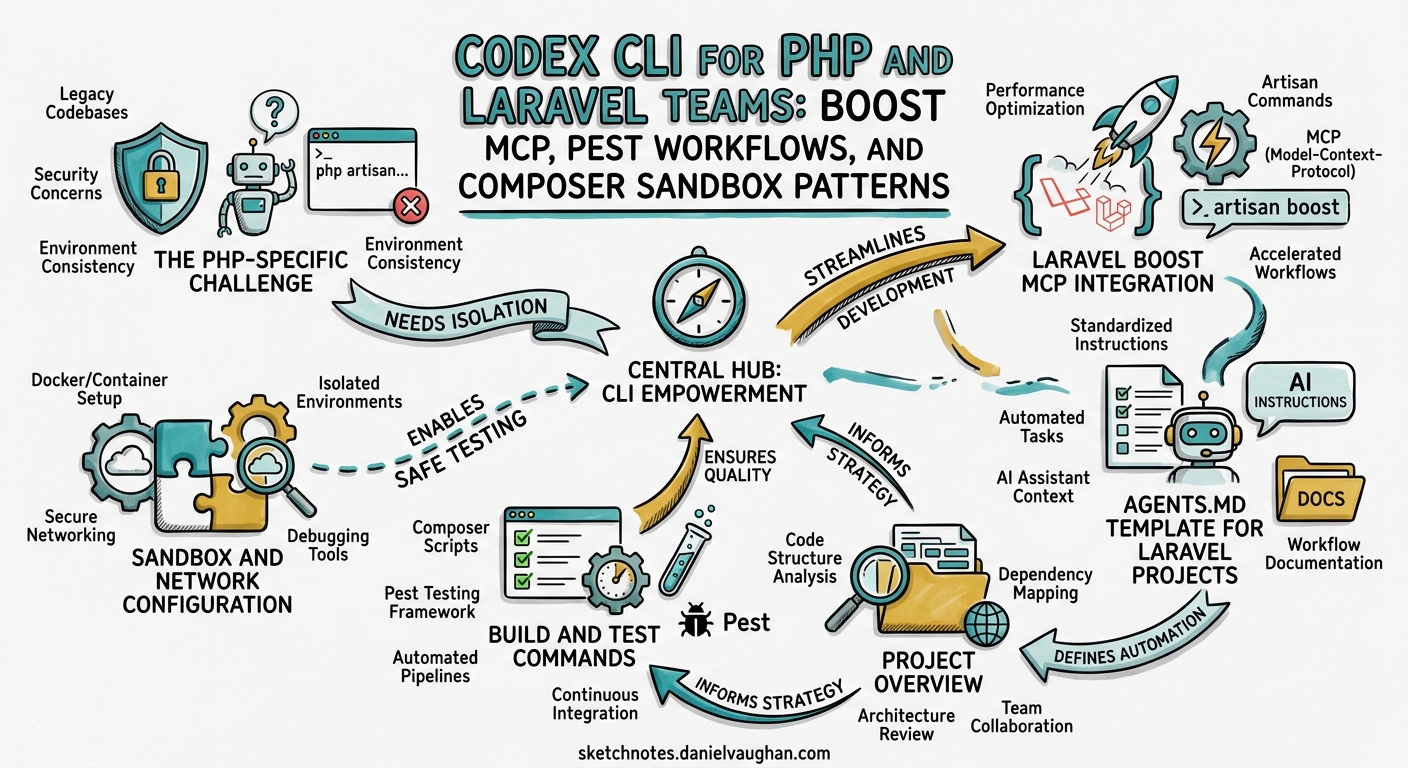
PHP powers roughly 75% of websites with a known server-side language1, and Laravel remains the dominant framework — Laravel 13 shipped on 17 March 2026 with first-class AI-assisted development2. Yet most Codex CLI guidance targets JavaScript, Python, or Go teams. This article fills that gap: configuring Codex CLI for PHP projects, from Composer sandbox workarounds to Laravel Boost MCP, Pest testing loops, and AGENTS.md templates.
The PHP-Specific Challenge
Codex CLI’s sandbox runs commands inside a restricted environment with filtered network access and no pre-installed PHP runtime on the default Linux sandbox3. PHP teams hit three friction points that JavaScript teams never encounter:
- Composer needs network access —
composer installfetches packages from Packagist over HTTPS, which the sandbox blocks by default4. - No PHP binary in the sandbox — unlike Node.js (bundled with the Codex binary), PHP must be available on the host or installed explicitly3.
- Framework artisan commands need a database — Laravel’s
php artisancommands frequently require a database connection, which complicates sandbox isolation.
The solutions below address each of these systematically.
Sandbox and Network Configuration
Enabling Composer in the Sandbox
The simplest approach: run composer install before launching Codex so vendor/ is populated. For workflows requiring Composer during a session, configure network access explicitly:
# ~/.codex/config.toml — or project-level .codex/config.toml

[sandbox_workspace_write]
network_access = true
Alternatively, pass it as a flag:
codex --sandbox workspace-write \
  -c 'sandbox_workspace_write.network_access=true' \
  "Add spatie/laravel-permission and configure it"
For tighter control, use the network_allowlist to restrict traffic to Packagist and your private registry5:
[sandbox_workspace_write]
network_access = true
network_allowlist = [
  "repo.packagist.org",
  "packagist.org",
  "getcomposer.org",
  "packages.your-company.com",
]
Private Composer Packages
For private packages, use deny_read to protect credential files from agent access, and supply COMPOSER_AUTH as an environment variable6:
deny_read = ["auth.json", ".env", ".env.local"]
export COMPOSER_AUTH='{"github-oauth":{"github.com":"ghp_YOUR_TOKEN"}}'
codex "Upgrade spatie/laravel-permission to v7"
Laravel Boost MCP Integration
Laravel Boost is the framework’s first-party MCP server with 15+ specialised tools and over 17,000 indexed pieces of Laravel ecosystem knowledge7. It gives Codex awareness of your database schema, routes, configuration, and installed package versions.
Installation
composer require laravel/boost --dev
php artisan boost:install
The interactive installer auto-detects your IDE and AI agents, generating configuration files for each7.
Registering Boost with Codex CLI
codex mcp add laravel-boost -- php artisan boost:mcp
This registers the server globally. For project-scoped configuration, add to .codex/config.toml at the repository root8:
[mcp_servers.laravel-boost]
command = "php"
args = ["artisan", "boost:mcp"]
Available Tools
Once registered, Codex gains access to these tools during every session7:
| Tool | Purpose |
|---|---|
application-info |
PHP/Laravel versions, installed packages, Eloquent models |
database-schema |
Full schema inspection without raw SQL |
database-query |
Read-only queries for understanding data shape |
database-connections |
Inspect available connections and defaults |
search-docs |
Semantic search across 17,000+ Laravel docs |
last-error |
Latest application log entry |
read-log-entries |
Last N log entries for debugging |
browser-logs |
Console errors from frontend tooling |
get-absolute-url |
Convert relative paths to absolute URLs |
AI Guidelines and Skills
Boost auto-generates version-aware guidelines for every installed package (Livewire 4.x, Inertia 3.x, Pest 4.x, Tailwind CSS 4.x)7, ensuring generated code follows current API surfaces. Agent skills load on demand via progressive disclosure9 — Boost ships skills for Livewire, Inertia, Pest, Tailwind CSS, Volt, Wayfinder, and Flux UI7.
flowchart TD
    A["codex session starts"] --> B["Boost MCP server launches"]
    B --> C["Guidelines loaded\n(version-aware)"]
    B --> D["Skills registered\n(progressive disclosure)"]
    C --> E["Agent knows Laravel 13\nPest 4, Livewire 4 APIs"]
    D --> F["Skills load on demand\nwhen topic is relevant"]
    E --> G["Generates idiomatic\nLaravel code"]
    F --> G
AGENTS.md Template for Laravel Projects
A well-crafted AGENTS.md dramatically improves Codex’s output quality. The critical sections for PHP projects:
# AGENTS.md

## Project Overview
Laravel 13 application using PHP 8.4, Pest 4 for testing, PHPStan level 8,
and Laravel Pint for code formatting.

## Build and Test Commands
- Install dependencies: `composer install && composer dump-autoload`
- Run tests: `./vendor/bin/pest`
- Static analysis: `./vendor/bin/phpstan analyse`
- Format: `./vendor/bin/pint`
- Clear caches: `php artisan optimize:clear`

## Code Conventions
- PSR-12 enforced by Pint; PHP 8.4 features (property hooks, `#[Override]`)
- Type everything — no `mixed` unless genuinely polymorphic
- Thin controllers delegating to action classes
- Form Requests for validation; Resources for API responses

## Testing Standards
- Pest tests with `describe()` blocks; `RefreshDatabase` for DB tests
- Mock external APIs with `Http::fake()`

## Do NOT
- Add packages without approval; never run `composer update`
- Modify `.env` files or use raw SQL
Add project-specific Laravel guidelines in .ai/guidelines/ — Boost auto-discovers these alongside its own version-aware guidelines7.
Testing Workflows with Pest
Pest is the dominant testing framework in the Laravel ecosystem as of 2026, with Pest 4 introducing parallel execution, type-safe expectations, and improved architecture testing10.
The Test-Driven Loop
The most effective Codex CLI pattern for PHP is the same test-driven workflow used in other languages, adapted for Pest:
codex "Write Pest tests for the OrderService::calculateTotal method,
covering standard orders, discount codes, and tax-exempt customers.
Then implement the method to make all tests pass.
Run: ./vendor/bin/pest --filter=OrderService"
Codex will iterate: write tests, run them (they fail), write the implementation, run them again (they pass), then run PHPStan to verify type safety.
PAO: Agent-Optimised Output for PHP Tools
PAO (nunomaduro/pao) is a Composer package that intercepts output from PHPUnit, Pest, PHPStan, and Laravel Artisan when running inside an AI agent, replacing verbose terminal formatting with compact structured JSON11.
composer require nunomaduro/pao --dev
The token savings are significant11:
| Tool | Standard output | PAO output | Reduction |
|---|---|---|---|
| PHPUnit (pass) | ~402 tokens | ~21 tokens | 95% |
| Pest (pass) | ~277 tokens | ~21 tokens | 93% |
| PHPStan (errors) | ~250 tokens | ~100 tokens | 60% |
Artisan about |
~528 tokens | ~134 tokens | 74% |
PAO requires PHP 8.3+ and activates automatically when it detects an AI agent environment11. ⚠️ PAO does not yet detect Codex CLI explicitly — verify activation by checking whether test output appears as JSON during a session.
Static Analysis Integration
PHPStan at level 8 catches type errors and API misuse that Codex might introduce. Use --error-format=json for machine-readable output that Codex parses more reliably than the default table format. Combined with PAO, PHPStan runs cost approximately 100 tokens per invocation11. Pair with ./vendor/bin/pint --test as a formatting gate.
CI Integration with codex exec
Use codex exec for non-interactive PHP automation in CI pipelines:
codex exec --full-auto \
  "Create a migration that adds a 'subscription_tier' enum column
   to the users table with values: free, pro, enterprise.
   Default to 'free'. Add an index.
   Run: php artisan migrate --pretend to verify SQL."
For GitHub Actions, pair shivammathur/setup-php@v2 with openai/codex-action@v1 to run automated Laravel code reviews on pull requests.
Model Selection
GPT-5.5 (the current default) handles Laravel’s conventions well with Boost guidelines providing context12. Adjust reasoning effort by task complexity:
# Quick migration — low reasoning effort
codex -c reasoning_effort=low \
  "Create a migration adding a polymorphic comments system"

# Complex refactoring — high reasoning effort
codex -c reasoning_effort=high \
  "Refactor the payment module to action classes"
Common Pitfalls
Composer autoload drift. After Codex creates new classes, the autoloader may not find them until composer dump-autoload runs. Include this in your AGENTS.md build commands.
Artisan cache. Codex may see stale behaviour if cached routes, config, or views exist. Add php artisan optimize:clear to AGENTS.md.
Database state. Always use RefreshDatabase in Pest tests to prevent state leaking between Codex-driven test runs.
Blade templates. Codex cannot render Blade directly — use /review for template changes, or pair with the Chrome DevTools MCP13.
Citations
-
W3Techs, “Usage of server-side programming languages for websites,” https://w3techs.com/technologies/overview/programming_language — accessed April 2026. ↩
-
Laravel, “AI Assisted Development — Laravel 13.x,” https://laravel.com/docs/13.x/ai — accessed April 2026. ↩
-
OpenAI, “Sandbox — Codex Concepts,” https://developers.openai.com/codex/concepts/sandboxing — accessed April 2026. ↩ ↩2
-
GitHub Issue #16242, “codex-network-proxy doesn’t work with exec and interactive mode,” https://github.com/openai/codex/issues/16242 — accessed April 2026. ↩
-
OpenAI, “Agent approvals and security — Codex,” https://developers.openai.com/codex/agent-approvals-security — accessed April 2026. ↩
-
OpenAI, “Codex CLI filesystem security — deny-read policies,” https://developers.openai.com/codex/agent-approvals-security — accessed April 2026. ↩
-
Laravel, “Laravel Boost — Laravel 13.x Documentation,” https://laravel.com/docs/13.x/boost — accessed April 2026. ↩ ↩2 ↩3 ↩4 ↩5 ↩6
-
OpenAI, “MCP configuration — Codex CLI,” https://developers.openai.com/codex/mcp — accessed April 2026. ↩
-
OpenAI, “Agent Skills — Codex,” https://developers.openai.com/codex/skills — accessed April 2026. ↩
-
Pest PHP, “Pest 4 Documentation,” https://pestphp.com/docs — accessed April 2026. ↩
-
Nuno Maduro, “PAO — Agent-Optimized PHP Output,” https://github.com/nunomaduro/pao — accessed April 2026. ↩ ↩2 ↩3 ↩4
-
OpenAI, “Models — Codex,” https://developers.openai.com/codex/models — accessed April 2026. ↩
-
OpenAI, “Features — Codex CLI,” https://developers.openai.com/codex/cli/features — accessed April 2026. ↩