Codebase Onboarding with Codex CLI: Using AI Agents to Ramp Up on Unfamiliar Projects
Codebase Onboarding with Codex CLI: Using AI Agents to Ramp Up on Unfamiliar Projects
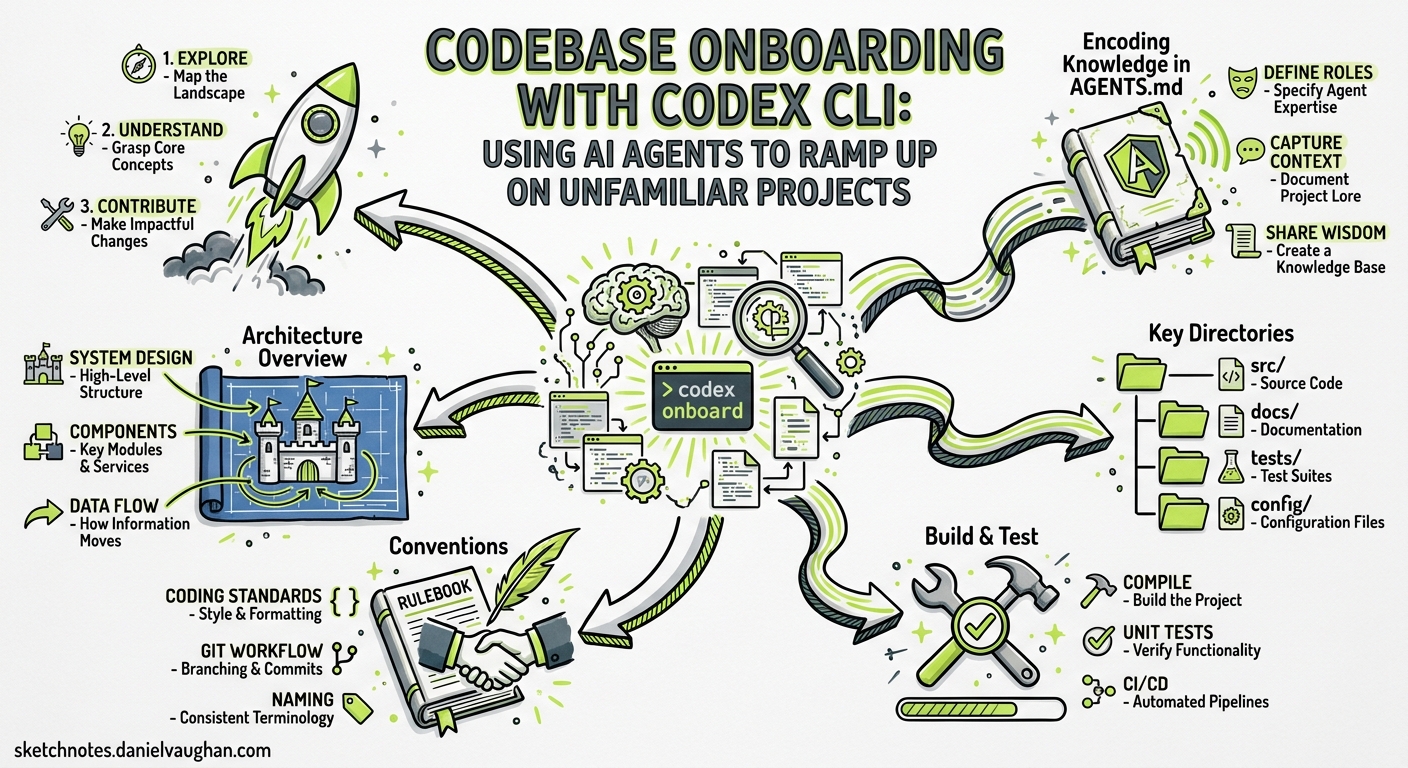
Every developer knows the feeling: you join a new team, clone a repository with 800 files across 40 directories, and spend the next fortnight piecing together how it all fits. Traditional onboarding — reading READMEs, grepping for entry points, asking colleagues — works, but it scales poorly and relies on tribal knowledge that may not be documented.
Codex CLI turns codebase onboarding from a passive reading exercise into an interactive, agent-assisted exploration1. GPT-5.5’s 400K-token context window in Codex sessions2 is enough to hold the entire directory structure, key configuration files, and several critical source files simultaneously — enabling whole-codebase reasoning that was impractical with smaller context windows. The core bottleneck in onboarding is knowing what to read and in what order; Codex provides exactly that guided tour1.
The Three-Phase Onboarding Workflow
flowchart TD
    A[Clone Repository] --> B[Phase 1: Reconnaissance]
    B --> C[Phase 2: Guided Exploration]
    C --> D[Phase 3: First Contribution]

    B --> B1[Broad structure scan]
    B --> B2[Framework fingerprinting]
    B --> B3[Dependency mapping]

    C --> C1[Request flow tracing]
    C --> C2[Module ownership mapping]
    C --> C3[Side-thread deep dives]

    D --> D1[First change with context]
    D --> D2[Test verification]
    D --> D3[Review readiness]
Phase 1: Reconnaissance
Start with a broad sweep. The official Codex onboarding use case recommends opening with a simple, unconstrained prompt1:
codex "Explain this repo to me"
This gives Codex freedom to scan the directory tree, read key files (package manifests, configuration, entry points), and produce a high-level summary. For a more structured output, use the four-part prompt pattern from OpenAI’s best practices3:
codex "I'm a new developer joining this project.
Goal: Understand the architecture and key modules.
Context: @README.md @package.json @src/
Constraints: Focus on runtime architecture, not build tooling.
Done: Produce a numbered list of the 10 most important files I should read, in order."
The @-mention syntax triggers Codex’s fuzzy file search, pulling specific files into context4. For monorepos, scope the exploration with --cd:
codex --cd ./services/payments "Explain this service's architecture"
Phase 2: Guided Exploration
Once you have the lay of the land, dive deeper with targeted prompts. The official onboarding guide suggests tracing request flows1:
codex "Trace how an HTTP request to POST /api/orders flows through the codebase.
Include: which modules own what, where data is validated,
where side effects happen, and top gotchas before making changes.
End with the files I should read next."
Use /side for tangential questions that should not pollute your main exploration thread5:
/side What ORM does this project use and how are migrations managed?
The /side command spawns an ephemeral fork — Codex answers the question with full context from the current session but discards the side-thread afterwards, keeping your main thread focused5.
For deeper architectural dives, use /fork to create a persistent branch you can return to:
/fork Let me explore the authentication subsystem separately
Phase 3: First Contribution
With a mental model in place, make your first change with Codex as a safety net:
codex "Add a rate limiter middleware to the /api/orders endpoint.
Before making any changes, explain which files will be affected
and what tests I should run to verify the change."
Codex will identify affected modules, propose the change, and — critically — tell you which existing tests cover the area and what new tests might be needed3.
Encoding Onboarding Knowledge in AGENTS.md
The most impactful long-term investment is encoding onboarding guidance in AGENTS.md so that every new developer (and every Codex session) starts with the same context6. A well-crafted AGENTS.md acts as the guided tour that a senior colleague would give:
# AGENTS.md

## Architecture Overview
This is a Go microservice using Chi router with PostgreSQL via sqlc.
Entry point: `cmd/server/main.go` → `internal/server/server.go`.

## Key Directories
- `internal/handler/` — HTTP handlers, one file per resource
- `internal/service/` — Business logic layer, no HTTP imports allowed
- `internal/repository/` — Database access via sqlc-generated code
- `migrations/` — SQL migrations managed by golang-migrate

## Conventions
- All handlers return `(response, error)` tuples
- Tests live alongside source files as `*_test.go`
- Integration tests require `TEST_DB_URL` environment variable

## Build & Test
- `make build` — compile
- `make test` — unit tests
- `make test-integration` — requires running PostgreSQL

## Common Gotchas
- The `internal/auth/` middleware caches JWKs for 5 minutes
- sqlc regeneration: run `make generate` after changing `query.sql`
- The `internal/events/` package uses a fan-out pattern; adding
  subscribers requires updating `events/registry.go`
OpenAI’s best practices are clear: “a short, accurate AGENTS.md is more useful than a long file full of vague rules”3. Update it when Codex makes the same mistake twice — ask for a retrospective and fold the lesson back in3. For monorepos, use hierarchical AGENTS.md files; Codex reads the nearest file in the directory tree, so each subdirectory carries its own context6.
Onboarding Skills and MCP Tools
The codebase-onboarding Skill
The community codebase-onboarding skill automates the reconnaissance phase7. Install it via the built-in skill installer:
$skill-installer install codebase-onboarding
Once installed, invoke it with:
$codebase-onboarding
The skill runs a fast recon phase — scanning package manifests, framework fingerprints, entry points, directory structure, configuration, and test layout — then produces a structured onboarding document with an architecture map, key entry points, conventions, and a prioritised reading checklist7.
GitNexus: Knowledge Graph for Structural Awareness
For larger codebases where understanding dependency relationships is critical, GitNexus provides an MCP-native knowledge graph that indexes the entire repository8. It maps every function call, import, class inheritance, and execution flow, then exposes that graph to Codex through seven MCP tools8.
Configure GitNexus in your config.toml:
[mcp_servers.gitnexus]
command = "npx"
args = ["-y", "gitnexus", "--mcp"]
Key tools for onboarding:
| Tool | Purpose |
|---|---|
generate_map |
Auto-generates Mermaid architecture diagrams from the knowledge graph8 |
detect_changes |
Pre-commit risk analysis showing blast radius of proposed changes8 |
rename |
Coordinated multi-file symbol renames with dependency awareness8 |
With GitNexus active, you can ask Codex questions like:
What functions depend on UserRepository.findById()
and what would break if I changed its return type?
GitNexus returns a confidence-scored blast radius in a single tool call, rather than requiring Codex to chain multiple file reads8.
Understand-Anything: Interactive Dashboards
The Understand-Anything skill analyses your codebase with a multi-agent pipeline, builds a JSON knowledge graph, and serves an interactive React dashboard9. The /understand-onboard command generates a guided onboarding tour that can be handed directly to new team members9.
Configuration for Onboarding Sessions
Onboarding sessions are read-heavy. Configure Codex accordingly:
# ~/.codex/config.toml — onboarding profile
model = "gpt-5.5"
approval_policy = "unless-allow-listed"

[reasoning]
effort = "medium"
Use medium reasoning effort — it provides good analysis without the token overhead of high or xhigh10. For zero-risk exploration, use the read-only sandbox mode11:
codex --sandbox read-only "Explain the authentication flow in this repo"
Anti-Patterns to Avoid
Trusting summaries blindly. Verify architectural claims by reading the actual files Codex references3.
Skipping AGENTS.md. Even a 20-line AGENTS.md dramatically improves onboarding for subsequent developers6.
Over-scoping prompts. “Explain everything about this repo” produces vague output. Scope to specific features or flows1.
Ignoring the token budget. Use --cd and @ mentions to focus context on the relevant subsystem2.
Putting It All Together
A practical first-day onboarding script:
#!/usr/bin/env bash
# onboard.sh — AI-assisted developer onboarding

REPO_DIR="${1:-.}"

echo "=== Phase 1: Reconnaissance ==="
codex --cd "$REPO_DIR" --sandbox read-only \
  "Analyse this repository and produce:
   1. Technology stack summary
   2. Architecture diagram (Mermaid)
   3. Top 10 files to read, in order
   4. Build and test commands
   5. Common gotchas for new developers"

echo "=== Phase 2: Generate AGENTS.md (if missing) ==="
if [ ! -f "$REPO_DIR/AGENTS.md" ]; then
  codex --cd "$REPO_DIR" \
    "Generate an AGENTS.md for this repository following OpenAI's
     recommended format. Include architecture overview, key directories,
     conventions, build/test commands, and common gotchas."
fi
Run this on day one, then deepen understanding through /side explorations and /fork branches for each subsystem. By the end of the first week, you will have a mental model that would traditionally take a fortnight to build — and an AGENTS.md that makes the next person’s onboarding even faster.
Citations
-
OpenAI, “Understand large codebases — Codex use cases,” https://developers.openai.com/codex/use-cases/codebase-onboarding ↩ ↩2 ↩3 ↩4 ↩5
-
OpenAI, “GPT-5.5’s Million-Token Context Window,” April 2026. 400K tokens in Codex sessions, 1M via direct API. ↩ ↩2
-
OpenAI, “Best practices — Codex,” https://developers.openai.com/codex/learn/best-practices ↩ ↩2 ↩3 ↩4 ↩5
-
OpenAI, “Features — Codex CLI,” https://developers.openai.com/codex/cli/features ↩
-
OpenAI, “Codex CLI slash commands,” https://developers.openai.com/codex/cli/slash-commands ↩ ↩2
-
OpenAI, “Custom instructions with AGENTS.md,” https://developers.openai.com/codex/guides/agents-md ↩ ↩2 ↩3
-
Community codebase-onboarding skill, https://lobehub.com/skills/sehoon787-my-codex-codebase-onboarding ↩ ↩2
-
Abhigyan Patwari, “GitNexus,” https://github.com/abhigyanpatwari/GitNexus. 28K+ GitHub stars as of April 2026. ↩ ↩2 ↩3 ↩4 ↩5 ↩6
-
Lum1104, “Understand-Anything,” https://github.com/Lum1104/Understand-Anything ↩ ↩2
-
OpenAI, “Codex CLI models and reasoning effort,” https://developers.openai.com/codex/models ↩
-
OpenAI, “Agent approvals & security,” https://developers.openai.com/codex/agent-approvals-security ↩