Safe Database Schema Refactoring with Codex CLI and Neon Branching
Safe Database Schema Refactoring with Codex CLI and Neon Branching
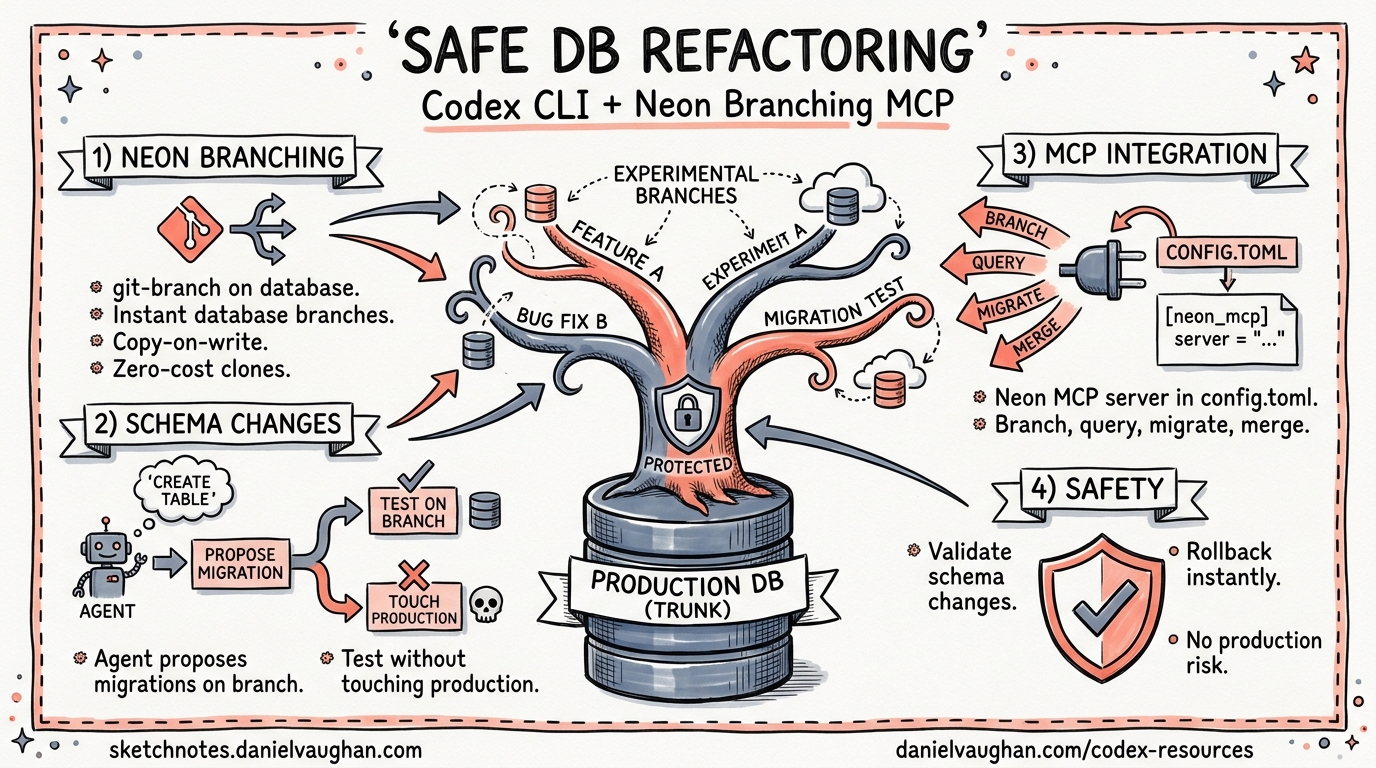
Schema migrations remain one of the riskiest operations in a production system. A dropped column, a mistyped constraint, or a subtly wrong data transformation can take down an application in seconds. Coding agents make the problem worse: they generate migration files quickly and confidently, but they cannot undo a destructive DDL statement that has already hit your production database.
Neon’s copy-on-write branching gives Codex CLI a safety net that changes the equation entirely. Instead of running generated migrations against a shared development database — or, worse, staging — the agent creates an instant, isolated branch, executes every migration there, verifies the result, and only then presents a validated changeset for human review 1.
This article walks through the architecture, configuration, and practical workflows for pairing Codex CLI with Neon Postgres via MCP.
Why Branch-Based Migration Matters for Agents
Traditional migration workflows assume a human reviews the SQL before it runs. With an agentic workflow, the agent writes and executes DDL in a tight loop — analyse schema, generate migration, apply, verify, iterate. If the target database is shared, every iteration risks side effects.
Neon’s branching model addresses this through copy-on-write semantics at the storage layer 2:
- No data copying: a branch is a metadata pointer into the parent’s WAL history. Creation is instant regardless of database size 2.
- Full isolation: writes on the branch never propagate to the parent. A botched
ALTER TABLEaffects nothing beyond the ephemeral branch. - Snapshot checkpoints: snapshots capture exact database state and can be restored to any branch endpoint, enabling versioned rollback for agent-driven changes 3.
sequenceDiagram
    participant Dev as Developer
    participant Codex as Codex CLI
    participant Neon as Neon MCP Server
    participant Branch as Neon Branch

    Dev->>Codex: "Normalise address fields into a separate table"
    Codex->>Neon: create_branch(parent=main)
    Neon-->>Codex: branch-id, connection-string
    Codex->>Branch: Run generated Drizzle migrations
    Branch-->>Codex: Migration result (success/failure)
    alt Migration failed
        Codex->>Codex: Analyse error, regenerate migration
        Codex->>Branch: Re-run corrected migration
    end
    Codex->>Branch: SELECT queries to verify schema
    Codex-->>Dev: PR with validated migration files
    Dev->>Neon: delete_branch (cleanup)
Setting Up the Neon MCP Server
There are two paths to connect Codex CLI to Neon: the official plugin (recommended for Codex App users) and manual MCP configuration (recommended for CLI-only or CI workflows).
Option A: Official Neon Plugin
Since April 17, 2026, the Neon Postgres plugin is available in the Codex plugin marketplace 4. It bundles three components:
- Neon Postgres App — MCP-backed tools for project, branch, and database management, SQL execution, and connection validation.
- Neon Postgres Skill — Guided workflows for ORM setup, branching strategies, autoscaling, and Neon Auth.
- Neon Postgres Egress Optimiser Skill — Diagnostics for reducing data transfer costs.
Installation is straightforward:
codex
# Inside the TUI:
/plugins
# Search for "Neon Postgres" → Install
Option B: Manual MCP Configuration
For CI pipelines or environments where plugin installation is impractical, configure the MCP server directly in your project-level .codex/config.toml 5:
[mcp_servers.neon]
url = "https://mcp.neon.tech/mcp"
bearer_token_env_var = "NEON_API_KEY"
Alternatively, use the local stdio transport if you prefer running the MCP server as a child process 6:
[mcp_servers.neon]
command = "npx"
args = ["--yes", "@neondatabase/mcp-server-neon", "start"]
env = { NEON_API_KEY = "${NEON_API_KEY}" }
Either way, export your Neon API key before launching Codex:
export NEON_API_KEY="neon_apikey_..."
codex
You can generate a project-scoped API key from the Neon console under Organisation Settings → API Keys 1.
Setting Project Context
For the Neon CLI (and by extension the MCP server) to know which project to operate on, set context in your repository root 1:
neon set-context --project-id <your-project-id> --org-id <your-org-id>
This writes a .neon file that the MCP server reads automatically.
The Refactoring Workflow
With the MCP server connected, the end-to-end workflow looks like this:
Step 1: Describe the Change
Normalise the users table. Extract street, city, state, and postcode
into a new user_addresses table with a foreign key back to users.
Use Drizzle ORM for the migration. Create a Neon branch first so
we don't touch the main database.
Codex will call the MCP server’s create_branch tool, receive a connection string for the new branch, and proceed to generate migration files 1.
Step 2: Agent-Driven Migration Loop
Codex analyses the current schema by querying the branch, generates Drizzle migration files, and applies them:
flowchart TD
    A[Analyse current schema on branch] --> B[Generate Drizzle migration]
    B --> C[Apply migration to branch]
    C --> D{Migration succeeded?}
    D -->|No| E[Read error, adjust migration]
    E --> B
    D -->|Yes| F[Run verification queries]
    F --> G{Schema correct?}
    G -->|No| E
    G -->|Yes| H[Commit migration files to PR]
Because the branch is fully isolated, each iteration is safe. If Codex generates a migration that fails — a missing NOT NULL default, a circular foreign key — it reads the Postgres error, adjusts the migration, and tries again. No production data is ever at risk 2.
Step 3: Verify Locally
Retrieve the branch connection string and point your local application at it:
neon connection-string <branch-name>
# Returns: postgres://user:pass@ep-xxx.region.aws.neon.tech/dbname
Run your application test suite against this connection to confirm the migration works with your ORM layer and application code.
Step 4: Review and Merge
Codex produces a pull request containing:
- The Drizzle migration files (e.g.,
drizzle/0042_normalise_addresses.sql) - Updated Drizzle schema definitions
- Any modified queries or repository methods
Review the PR as you would any migration. The key difference: you know the SQL has already been executed successfully against a branch containing production-equivalent data 1.
Step 5: Clean Up
After merging, delete the ephemeral branch:
neon branches delete <branch-name>
Or prompt Codex directly: “Delete the Neon branch you created for this task.”
Snapshots for Agent Checkpointing
For longer, multi-step refactoring sessions, Neon snapshots add an extra layer of safety 3. Snapshots are logical and instant — they reference existing data using copy-on-write storage rather than copying files.
A practical pattern for complex migrations:
# In your AGENTS.md or skill file
## Database Migration Rules
- Before each migration step, create a Neon snapshot
- Name snapshots with the migration step: "pre-step-03-add-indexes"
- If a step fails, restore the previous snapshot before retrying
- Record all snapshot IDs in the PR description for audit
This gives you granular rollback within a branch session. If step three of a five-step migration breaks, the agent restores the step-two snapshot and re-attempts — without needing to recreate the entire branch.
CI Pipeline Integration
For automated migration validation in CI, combine codex exec with the Neon MCP server:
#!/bin/bash
# ci/validate-migrations.sh

export NEON_API_KEY="${NEON_API_KEY}"

codex exec \
  --model o4-mini \
  --approval-policy never \
  --sandbox-permissions read-only \
  "Create a Neon branch from main. Apply all pending Drizzle migrations
   in drizzle/migrations/. Run the test suite against the branch.
   Report pass/fail status. Delete the branch when done." \
  --json | jq '.result'
This gives every pull request an automated migration dry-run against a branch containing real data shapes, catching issues that purely structural checks (like drizzle-kit check) would miss 7.
Security Considerations
When connecting Codex to a database — even via an isolated branch — consider the following:
| Concern | Mitigation |
|---|---|
| API key exposure | Use bearer_token_env_var or env in config.toml — never hard-code keys 5 |
| Agent reads sensitive data | Use project-scoped API keys with minimal permissions; consider column-level masking on the parent branch |
| Agent writes to production | The MCP server only operates on branches by default; production writes require explicit branch promotion |
| Sandbox escaping | Run Codex with sandbox_permissions = "read-only" when the agent only needs to verify, not execute 8 |
Comparison with Other Approaches
| Approach | Isolation | Data Fidelity | Setup Overhead | Agent-Friendly |
|---|---|---|---|---|
| Local SQLite mock | Full | Low | Minimal | Yes |
| Docker Postgres | Full | Medium | Moderate | Somewhat |
| Shared dev database | None | High | Minimal | No |
| Neon branch | Full | High | Low | Yes |
| PlanetScale branch (MySQL) | Full | High | Low | Yes |
Neon branching’s key advantage over containerised databases is data fidelity: the branch contains an exact copy-on-write replica of production data, including edge cases and distribution patterns that synthetic test data cannot replicate 2.
Limitations and Caveats
- Neon-only: This workflow requires Neon Postgres. Self-hosted Postgres or other managed providers do not offer equivalent copy-on-write branching. ⚠️
- Branch compute costs: While storage is shared via copy-on-write, active branches consume compute. Monitor branch lifetimes in CI to avoid unexpected charges 9.
- ORM coupling: The examples use Drizzle ORM. The pattern works equally well with Prisma, TypeORM, or raw SQL migrations — adjust the AGENTS.md instructions accordingly.
- Large data volumes: For databases exceeding Neon’s free-tier limits, branch creation remains instant but compute startup may add latency. ⚠️
Citations
-
Neon, “Safe AI-powered schema refactoring with OpenAI Codex and Neon,” https://neon.com/guides/openai-codex-neon-mcp, accessed April 2026. ↩ ↩2 ↩3 ↩4 ↩5
-
Neon, “Practical Guide to Database Branching,” https://neon.com/blog/practical-guide-to-database-branching, accessed April 2026. ↩ ↩2 ↩3 ↩4
-
Neon, “Build versioning / checkpoints for your agent — Neon Branching,” https://neon.com/branching/branching-for-agents, accessed April 2026. ↩ ↩2
-
Neon, “Neon is now available as an OpenAI Codex Plugin,” https://neon.com/blog/neon-codex-plugin, April 17, 2026. ↩
-
OpenAI, “Config basics — Codex,” https://developers.openai.com/codex/config-basic, accessed April 2026. ↩ ↩2
-
Neon, “Connect MCP clients to Neon,” https://neon.com/docs/ai/connect-mcp-clients-to-neon, accessed April 2026. ↩
-
OpenAI, “Non-interactive mode — Codex,” https://developers.openai.com/codex/noninteractive, accessed April 2026. ↩
-
OpenAI, “Agent approvals & security — Codex,” https://developers.openai.com/codex/agent-approvals-security, accessed April 2026. ↩
-
Neon, “Neon Serverless Postgres Pricing,” https://neon.com/pricing, accessed April 2026. ↩