Codex CLI for Release Engineering: Automated Changelogs, Semantic Versioning, and Release Note Generation
Codex CLI for Release Engineering: Automated Changelogs, Semantic Versioning, and Release Note Generation
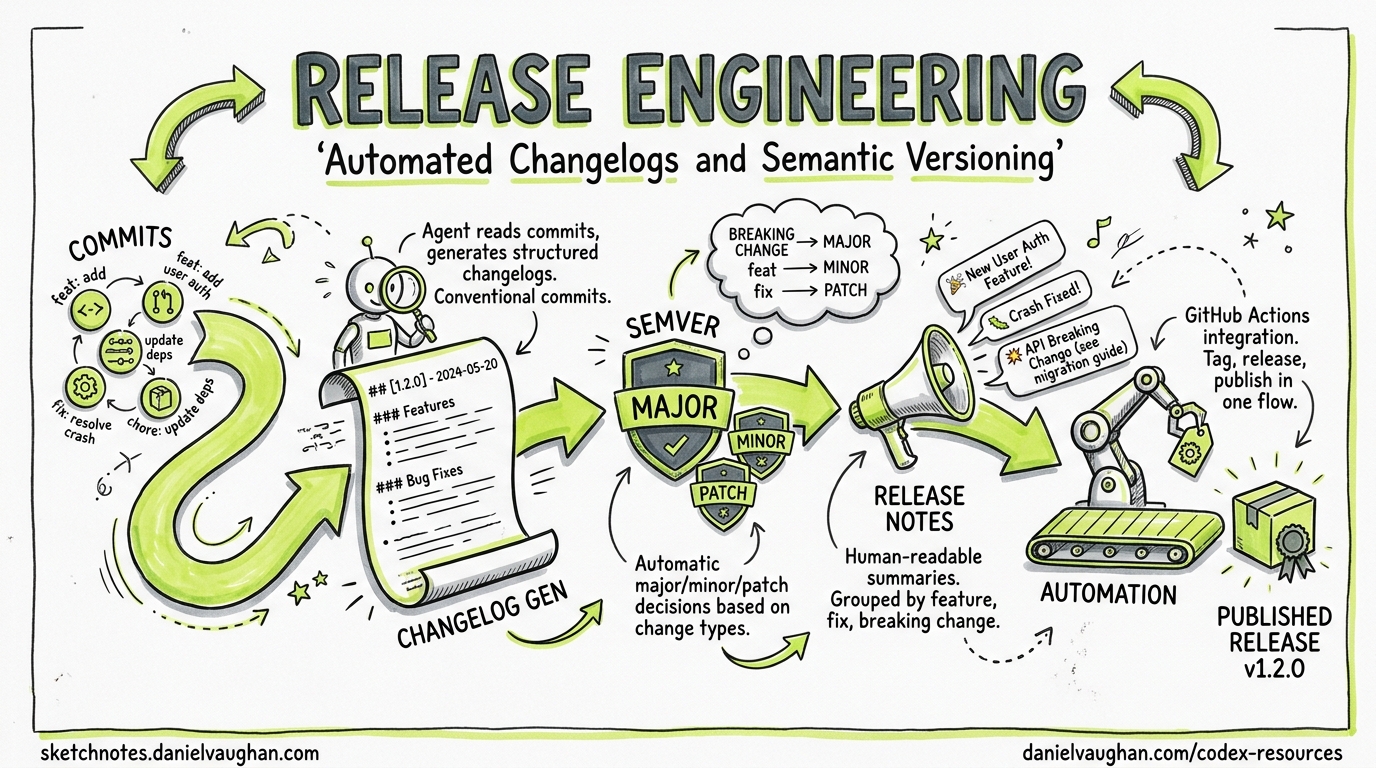
Release engineering is one of those disciplines that every team acknowledges as important yet few invest in properly. Version bumps are manual, changelogs are either auto-generated walls of commit hashes or hand-curated afterthoughts, and release notes aimed at end-users are written at 11 pm on a Friday. Codex CLI changes this by bringing agentic reasoning to the release pipeline — it can read your git history, understand the intent behind changes, and produce structured, audience-appropriate release artefacts.
This article covers five concrete patterns for integrating Codex CLI into your release workflow: changelog generation from git history, semantic version determination, user-facing release note authorship, release validation gates, and fully automated release pipelines via GitHub Actions.
Why Agents Beat Templates for Release Engineering
Traditional changelog tools like conventional-changelog, standard-version, and semantic-release parse commit messages against the Conventional Commits specification1 and map prefixes (feat:, fix:, chore:) to version bumps and changelog sections. They work well when every contributor writes perfect commit messages. In practice, they don’t.
A 2026 study of 500 open-source repositories found that only 34% of projects using Conventional Commits achieved >90% compliance across all contributors2. The remaining 66% produced changelogs with orphaned entries, miscategorised fixes, and missing breaking-change annotations. An agent can do what a regex cannot: read the diff, understand the change, and classify it correctly regardless of what the commit message says.
Pattern 1: Changelog Generation with codex exec
The simplest integration pipes git log into codex exec and captures the output:
git log --oneline v1.4.0..HEAD | \
  codex exec "Generate a changelog in Keep a Changelog format. \
  Group entries under Added, Changed, Deprecated, Removed, Fixed, Security. \
  Omit chore/CI-only commits. Use past tense." \
  -o changelog-draft.md
This produces a human-readable changelog draft, but the agent is working from commit messages alone. For higher accuracy, give it the diffs:
git log --format='%H %s' v1.4.0..HEAD | while read hash msg; do
  echo "## $msg"
  git diff "$hash^" "$hash" --stat
  echo ""
done | codex exec "Generate a changelog in Keep a Changelog format. \
  Use the diff stats to verify commit message accuracy. \
  Flag any commit where the message doesn't match the actual changes." \
  -o changelog-draft.md
For large repositories, you may hit context limits. The --model gpt-5.5 flag gives you access to the 400K-token Codex context window3, but for truly massive release cycles, pre-filter with git log --no-merges --first-parent.
Pattern 2: Semantic Version Determination with --output-schema
The --output-schema flag forces Codex to return structured JSON conforming to a schema you define4. This is ideal for version determination in CI pipelines where downstream steps need machine-readable output.
Create a schema file:
{
  "$schema": "https://json-schema.org/draft/2020-12/schema",
  "type": "object",
  "properties": {
    "bump_type": {
      "type": "string",
      "enum": ["major", "minor", "patch", "none"]
    },
    "new_version": { "type": "string" },
    "breaking_changes": {
      "type": "array",
      "items": { "type": "string" }
    },
    "reasoning": { "type": "string" }
  },
  "required": ["bump_type", "new_version", "breaking_changes", "reasoning"]
}
Then run:
CURRENT_VERSION=$(git describe --tags --abbrev=0)
git log --format='%s%n%b' "$CURRENT_VERSION"..HEAD | \
  codex exec "Given these commits since $CURRENT_VERSION, determine the \
  semantic version bump following semver.org rules. A BREAKING CHANGE \
  in any commit body or a ! after the type means major. New features \
  mean minor. Bug fixes mean patch. Return the result." \
  --output-schema ./version-schema.json \
  -o version-result.json
The output is guaranteed to match your schema, so jq .new_version version-result.json always works in your pipeline4.
Pattern 3: User-Facing Release Notes
Changelogs are for developers. Release notes are for users. The distinction matters, and Codex handles it well because you can provide audience context:
codex exec "Read CHANGELOG.md and generate user-facing release notes for \
  version 2.5.0. Target audience: product managers and non-technical \
  stakeholders. Lead with the most impactful user-visible changes. \
  Omit internal refactors and dependency bumps. Use bullet points. \
  Include a one-sentence summary at the top." \
  --full-auto \
  -o release-notes-2.5.0.md
For projects with multiple audiences, chain codex exec calls:
# Technical release notes
codex exec "Generate technical release notes from CHANGELOG.md for v2.5.0. \
  Include API changes, migration steps, and deprecation notices." \
  -o release-notes-technical.md

# User-facing release notes
codex exec "Generate user-facing release notes from CHANGELOG.md for v2.5.0. \
  Focus on new capabilities and fixed issues. No jargon." \
  -o release-notes-user.md
Pattern 4: Pre-Release Validation Gate
Before tagging a release, Codex can verify that the codebase is actually ready. This pattern uses hooks and codex exec to run a pre-release checklist:
codex exec "Perform a pre-release audit for version 2.5.0: \
  1. Check that CHANGELOG.md has an entry for 2.5.0 \
  2. Verify package.json/Cargo.toml/pyproject.toml version matches 2.5.0 \
  3. Confirm no TODO or FIXME comments reference 2.5.0 blockers \
  4. Check that all public API changes have documentation updates \
  5. Verify no console.log/print statements in production code paths \
  Report pass/fail for each check with file:line references for failures." \
  --full-auto \
  --output-schema ./audit-schema.json \
  -o audit-result.json
The structured output lets your CI pipeline gate on the result:
PASS_COUNT=$(jq '[.checks[] | select(.status == "pass")] | length' audit-result.json)
TOTAL=$(jq '.checks | length' audit-result.json)
if [ "$PASS_COUNT" -ne "$TOTAL" ]; then
  echo "Pre-release audit failed: $PASS_COUNT/$TOTAL checks passed"
  exit 1
fi
Pattern 5: Full Release Pipeline in GitHub Actions
The following workflow combines all four patterns into a single GitHub Actions pipeline triggered by a workflow_dispatch event:
name: Automated Release
on:
  workflow_dispatch:
    inputs:
      dry_run:
        description: 'Dry run (no tag/publish)'
        type: boolean
        default: true

jobs:
  release:
    runs-on: ubuntu-latest
    permissions:
      contents: write
    steps:
      - uses: actions/checkout@v4
        with:
          fetch-depth: 0

      - uses: openai/codex-action@v1
        with:
          codex_api_key: ${{ secrets.CODEX_API_KEY }}

      - name: Determine version
        run: |
          CURRENT=$(git describe --tags --abbrev=0 2>/dev/null || echo "v0.0.0")
          git log --format='%s%n%b' "$CURRENT"..HEAD | \
            codex exec "Determine semantic version bump from $CURRENT. \
            Follow semver.org strictly." \
            --output-schema ./ci/version-schema.json \
            -o version.json
          echo "NEW_VERSION=$(jq -r .new_version version.json)" >> "$GITHUB_ENV"

      - name: Generate changelog
        run: |
          CURRENT=$(git describe --tags --abbrev=0 2>/dev/null || echo "v0.0.0")
          git log --oneline "$CURRENT"..HEAD | \
            codex exec "Generate a Keep a Changelog entry for $NEW_VERSION." \
            -o changelog-entry.md

      - name: Pre-release audit
        run: |
          codex exec "Audit codebase readiness for $NEW_VERSION release. \
            Check version strings, changelog, docs, and code quality." \
            --full-auto \
            --output-schema ./ci/audit-schema.json \
            -o audit.json
          jq -e '[.checks[] | select(.status == "fail")] | length == 0' audit.json

      - name: Generate release notes
        run: |
          codex exec "Write user-facing release notes for $NEW_VERSION \
            from changelog-entry.md. One summary sentence, then bullets." \
            -o release-notes.md

      - name: Tag and publish
        if: ${{ !inputs.dry_run }}
        run: |
          git tag -a "$NEW_VERSION" -m "Release $NEW_VERSION"
          git push origin "$NEW_VERSION"
          gh release create "$NEW_VERSION" \
            --title "$NEW_VERSION" \
            --notes-file release-notes.md
AGENTS.md Template for Release Repositories
Add a release-specific section to your project’s AGENTS.md:
## Release Engineering

### Versioning
- This project follows Semantic Versioning 2.0.0 (semver.org)
- Commit messages follow Conventional Commits 1.0.0
- Version source of truth: package.json (Node) / Cargo.toml (Rust) / pyproject.toml (Python)

### Changelog
- Format: Keep a Changelog (keepachangelog.com)
- File: CHANGELOG.md at repository root
- Every user-visible change MUST have a changelog entry
- Group under: Added, Changed, Deprecated, Removed, Fixed, Security

### Release Checklist
- All version strings updated consistently
- CHANGELOG.md entry present for the new version
- No FIXME/TODO referencing release blockers
- Public API changes documented
- Migration guide written for breaking changes

### Prohibited
- Never skip the changelog for a release
- Never use a version number that doesn't follow semver
- Never tag a release without passing CI
Architecture: Where Codex Fits in the Release Flow
flowchart TD
    A[Developer merges PR] --> B[CI triggers release workflow]
    B --> C[codex exec: Analyse commits]
    C --> D{Breaking changes?}
    D -->|Yes| E[Major bump]
    D -->|No| F{New features?}
    F -->|Yes| G[Minor bump]
    F -->|No| H[Patch bump]
    E --> I[codex exec: Generate changelog]
    G --> I
    H --> I
    I --> J[codex exec: Pre-release audit]
    J -->|Fail| K[Block release + notify]
    J -->|Pass| L[codex exec: Generate release notes]
    L --> M[git tag + gh release create]
    M --> N[Publish artefacts]
Cost and Performance Considerations
Release engineering tasks are infrequent and low-volume compared to coding tasks, making them ideal candidates for higher reasoning effort. A typical release pipeline with all five patterns uses approximately 15,000-30,000 input tokens and 3,000-5,000 output tokens per run5. At GPT-5.5 pricing, that’s roughly $0.15-0.30 per release — negligible compared to the engineering time saved.
For projects with very large commit histories between releases (>500 commits), consider:
- Pre-filtering: Use
git log --no-merges --first-parentto reduce noise - Chunked processing: Split the commit list and process in batches with
codex exec resume - Model selection: Use
gpt-5.5for version determination (needs reasoning) ando4-minifor changelog formatting (needs speed)6
Combining with Existing Tools
Codex CLI doesn’t replace your entire release toolchain — it augments it. The sweet spot is using Codex for the judgement-intensive parts (version determination, changelog writing, release note authorship) whilst keeping deterministic tools for the mechanical parts (tagging, publishing, artefact building).
A practical hybrid stack:
| Task | Tool | Rationale |
|---|---|---|
| Version determination | codex exec + --output-schema |
Handles non-compliant commits |
| Changelog generation | codex exec |
Understands intent, not just prefixes |
| Release note authorship | codex exec |
Audience-aware writing |
| Git tagging | git tag / gh release |
Deterministic, auditable |
| Package publishing | npm publish / cargo publish |
Ecosystem-specific tooling |
| Notification | Slack webhook / email | Existing infrastructure |
Known Limitations
- Commit message hallucination: Codex may infer intent that doesn’t match the actual change. Always review generated changelogs before publishing. The
--sandbox read-onlydefault forcodex execprevents the agent from modifying files unless explicitly permitted4. - Version string updates:
codex exec --full-autocan update version strings inpackage.jsonorCargo.toml, but this requires careful scoping. Use hooks to validate that only expected files were modified. - Large monorepo releases: For monorepos with independent package versions, you’ll need per-package
codex execinvocations. The--cdflag or--add-dircan scope each run appropriately7.
Citations
-
Flori.dev — Generating CHANGELOG.md from Conventional Commits — analysis of commit compliance rates across open-source projects. ↩
-
OpenAI GPT-5.5 Announcement — confirms 1M API context window, 400K in Codex. ↩
-
OpenAI Codex Non-Interactive Mode Documentation — covers
codex exec,--output-schema,-o, and sandbox defaults. ↩ ↩2 ↩3 -
Token estimates based on typical release pipelines processing 50-200 commits with diff stats. Actual usage varies. Codex CLI v0.125 reports reasoning-token usage via
codex exec --jsonfor precise measurement. ↩ -
OpenAI Codex Models Page — model selection guidance for different task profiles. ↩
-
OpenAI Codex CLI Reference — Command Line Options —
--cdand--add-dirflags for multi-directory scoping. ↩