Scripting the Issue-to-PR Pipeline: Automating the Complete GitHub Workflow with Codex CLI
Scripting the Issue-to-PR Pipeline: Automating the Complete GitHub Workflow with Codex CLI
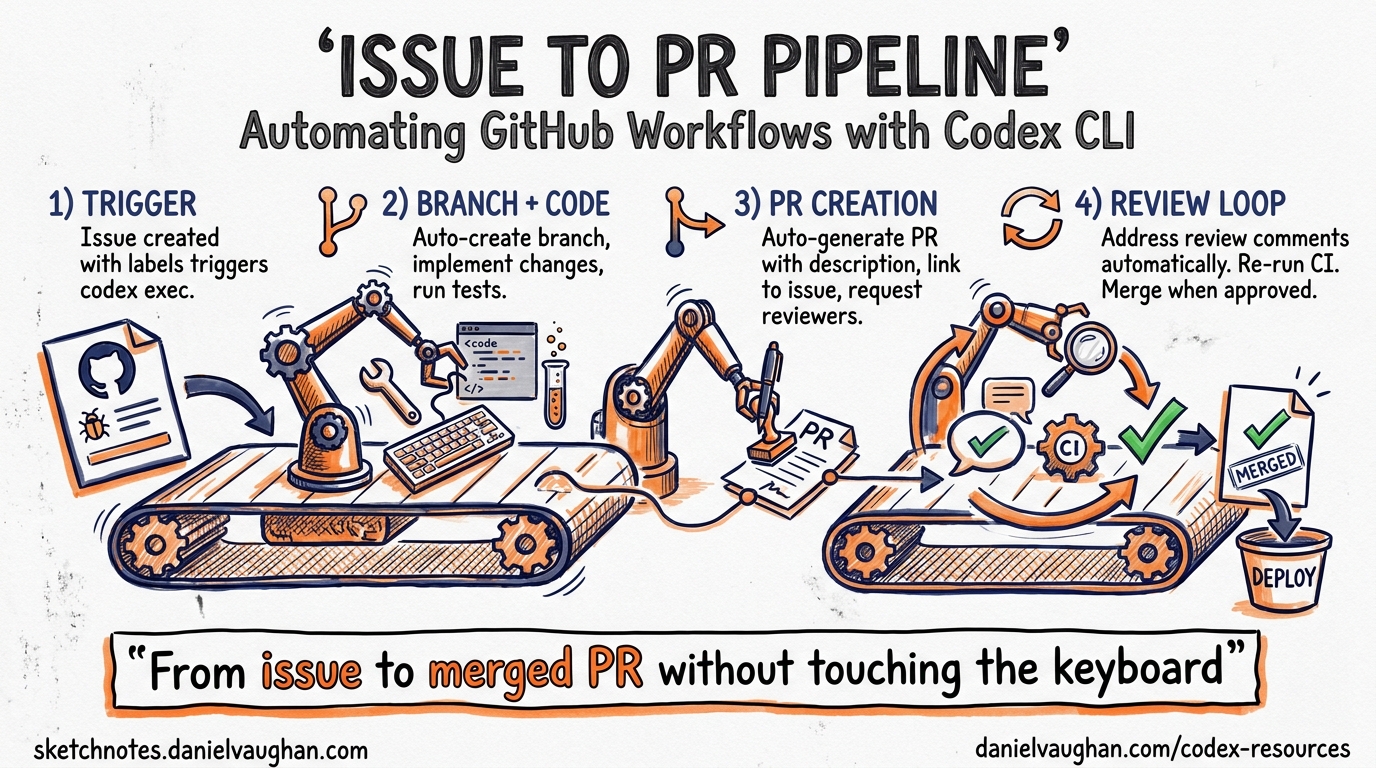
GPT-5.5 landed yesterday with a 60% hallucination reduction and an 82.7% score on Terminal-Bench 2.0 1. That accuracy improvement changes the economics of a question every team asks: how much of the issue-to-merged-PR lifecycle can you safely hand to an agent?
The answer in April 2026 is: most of it — if you script it properly. This article walks through a complete codex exec-based pipeline that reads a GitHub issue, creates a branch, implements the fix, validates it against tests, and opens a pull request, all from a single shell script or GitHub Actions workflow.
The Pipeline Architecture
The pipeline has five discrete stages. Each stage uses codex exec non-interactively, with the output of one feeding into the next 2.
flowchart LR
    A[Read Issue] --> B[Create Branch]
    B --> C[Implement Fix]
    C --> D[Validate Tests]
    D --> E{Tests Pass?}
    E -->|Yes| F[Open PR]
    E -->|No| G[Resume & Fix]
    G --> D
The critical design principle: Codex handles code edits; shell scripting handles Git and GitHub operations. The gh CLI cannot run inside Codex’s sandbox because network access to the GitHub API is blocked by default 3. Splitting responsibilities this way keeps the sandbox tight and the pipeline predictable.
Stage 1: Read the Issue and Extract Context
Start by pulling the issue body and comments into a structured prompt. The gh CLI does the heavy lifting outside the sandbox:
#!/usr/bin/env bash
set -euo pipefail

ISSUE_NUMBER="${1:?Usage: fix-issue.sh <issue-number>}"
REPO="${2:-$(gh repo view --json nameWithOwner -q .nameWithOwner)}"

# Fetch issue context
ISSUE_BODY=$(gh issue view "$ISSUE_NUMBER" --json title,body,comments \
  --jq '{title: .title, body: .body, comments: [.comments[].body]}')

ISSUE_TITLE=$(echo "$ISSUE_BODY" | jq -r .title)
BRANCH_NAME="fix/issue-${ISSUE_NUMBER}-$(echo "$ISSUE_TITLE" | \
  tr '[:upper:]' '[:lower:]' | tr ' ' '-' | head -c 40)"
This extracts the issue title, body, and all comments into a JSON structure that Codex can consume as stdin 2.
Stage 2: Branch Creation
Create the branch before Codex touches anything. This is pure Git — no agent involvement needed:
git fetch origin main
git checkout -b "$BRANCH_NAME" origin/main
Stage 3: Implementation with codex exec
Here is where the agent does its work. Pipe the issue context into codex exec with a tightly scoped prompt:
echo "$ISSUE_BODY" | codex exec \
  --full-auto \
  --sandbox workspace-write \
  --model gpt-5.5 \
  --ephemeral \
  "You are fixing GitHub issue #${ISSUE_NUMBER}.

The issue details are provided via stdin as JSON with title, body, and comments fields.

Instructions:
1. Read and understand the issue.
2. Identify the minimal code change needed.
3. Implement ONLY that change — no unrelated refactoring.
4. Do not modify test files unless the issue explicitly requires it.
5. Stop when the fix is complete."
Key flags explained:
--full-autoenables the low-friction preset:on-requestapproval policy withworkspace-writesandbox 4. The agent can edit files in the working directory but cannot escape it.--sandbox workspace-writeexplicitly sets the sandbox boundary — the agent can read and write within the repo but cannot install packages or access the network 4.--ephemeralprevents session files from accumulating on disk during CI runs 2.--model gpt-5.5targets the new frontier model. For cost-sensitive pipelines,gpt-5.4-miniworks for simpler fixes at lower credit cost 5.
Stage 4: Test Validation
Run your test suite outside Codex to get deterministic, trusted results:
TEST_OUTPUT=$(npm test 2>&1) || true
TEST_EXIT_CODE=$?

if [ "$TEST_EXIT_CODE" -ne 0 ]; then
  echo "Tests failed. Attempting recovery..."

  echo "$TEST_OUTPUT" | codex exec \
    --full-auto \
    --sandbox workspace-write \
    --model gpt-5.5 \
    --ephemeral \
    "The tests failed after implementing a fix for issue #${ISSUE_NUMBER}.
     The test output is provided via stdin.
     Fix the implementation (not the tests) to make all tests pass.
     Make the minimal change necessary."

  # Re-run tests after recovery attempt
  npm test
fi
This pattern — run tests externally, pipe failures back in, let Codex iterate — avoids the common anti-pattern of letting the agent run its own tests inside the sandbox, where it might modify tests to make them pass 6.
Session Resumption for Complex Fixes
For multi-step fixes that need context continuity, use codex exec resume instead of a fresh session:
# Initial implementation
codex exec --full-auto --sandbox workspace-write \
  "Fix issue #${ISSUE_NUMBER}: ${ISSUE_TITLE}"

# If tests fail, resume with the failure context
echo "$TEST_OUTPUT" | codex exec resume --last \
  "Tests failed. The output is provided via stdin. Fix the implementation."
The resumed session retains the original transcript, plan history, and approval state, so Codex understands what it already tried 7.
Stage 5: PR Creation with Structured Output
Extract a structured summary from Codex for the PR body, then use gh to create the pull request:
cat > /tmp/pr-schema.json << 'SCHEMA'
{
  "type": "object",
  "properties": {
    "summary": { "type": "string" },
    "changes": {
      "type": "array",
      "items": { "type": "string" }
    },
    "risk_level": {
      "type": "string",
      "enum": ["low", "medium", "high"]
    }
  },
  "required": ["summary", "changes", "risk_level"],
  "additionalProperties": false
}
SCHEMA

codex exec \
  --full-auto \
  --sandbox read-only \
  --output-schema /tmp/pr-schema.json \
  -o /tmp/pr-output.json \
  --ephemeral \
  "Review the git diff (staged and unstaged) in this repository.
   Produce a concise summary of what changed, a list of specific
   file-level changes, and a risk assessment."

PR_SUMMARY=$(jq -r .summary /tmp/pr-output.json)
PR_CHANGES=$(jq -r '.changes | map("- " + .) | join("\n")' /tmp/pr-output.json)
PR_RISK=$(jq -r .risk_level /tmp/pr-output.json)

git add -A
git commit -m "fix: resolve #${ISSUE_NUMBER} — ${ISSUE_TITLE}

Co-Authored-By: Codex CLI <noreply@openai.com>"

git push -u origin "$BRANCH_NAME"

gh pr create \
  --title "fix: ${ISSUE_TITLE}" \
  --body "$(cat <<EOF
Fixes #${ISSUE_NUMBER}

## Summary
${PR_SUMMARY}

## Changes
${PR_CHANGES}

## Risk Level
**${PR_RISK}**

---
*Automated by Codex CLI with GPT-5.5*
EOF
)"
The --output-schema flag enforces a JSON Schema on the final response 2. Downstream tooling receives validated, predictable data — no parsing fragile prose.
Moving This to GitHub Actions
The same pipeline translates directly into a GitHub Actions workflow triggered by issue labels:
name: Codex Autofix
on:
  issues:
    types: [labeled]

jobs:
  fix:
    if: github.event.label.name == 'autofix'
    runs-on: ubuntu-latest
    permissions:
      contents: write
      pull-requests: write
      issues: read
    steps:
      - uses: actions/checkout@v4
      - uses: actions/setup-node@v4
        with:
          node-version: '22'
      - run: npm ci
      - run: npm install -g @openai/codex
        env:
          CODEX_API_KEY: ${{ secrets.OPENAI_API_KEY }}
      - name: Run Codex fix pipeline
        run: ./scripts/fix-issue.sh ${{ github.event.issue.number }}
        env:
          CODEX_API_KEY: ${{ secrets.OPENAI_API_KEY }}
          GH_TOKEN: ${{ secrets.GITHUB_TOKEN }}
Alternatively, the openai/codex-action@v1 GitHub Action handles CLI installation and authentication automatically 8, reducing the boilerplate.
Safety Considerations
Three guardrails keep this pipeline trustworthy:
-
Sandbox boundaries.
workspace-writeprevents the agent from installing packages, modifying global state, or making network requests 4. TheghCLI runs outside the sandbox, so credential exposure is impossible. -
Test-outside pattern. Running tests in the outer shell script — not inside Codex — means the agent cannot game the validation step 6. If tests fail, the agent gets the output as read-only stdin and must fix the implementation, not the tests.
-
Structured output validation. The
--output-schemaflag rejects malformed responses at the harness level 2. If Codex returns something that does not match the schema, the pipeline fails closed rather than creating a broken PR.
For enterprise environments, requirements.toml can enforce these constraints at the organisational level, preventing individual developers from relaxing the sandbox 9.
When to Use This Pattern
This pipeline works best for well-defined, test-covered issues: bug fixes with reproduction steps, dependency bumps, configuration changes, and small feature additions where acceptance criteria are clear. It is not suitable for architectural decisions, security-sensitive changes, or issues where the acceptance criteria are ambiguous — those still need a human in the loop before the agent starts writing code 10.
With GPT-5.5’s improved accuracy and the stable hooks in v0.124 11, the sweet spot has shifted. Tasks that required suggest mode six months ago can now run safely in --full-auto with a test-outside validation loop. The bottleneck is no longer agent capability — it is test coverage.
Citations
-
OpenAI. “Introducing GPT-5.5.” openai.com/index/introducing-gpt-5-5/, April 23, 2026. ↩
-
OpenAI. “Non-interactive mode — Codex.” developers.openai.com/codex/noninteractive. ↩ ↩2 ↩3 ↩4 ↩5
-
SmartScope. “Why
ghCLI won’t run in Codex and how to handle it.” smartscope.blog, 2026. ↩ -
OpenAI. “Command line options — Codex CLI.” developers.openai.com/codex/cli/reference. ↩ ↩2 ↩3
-
OpenAI. “Models — Codex.” developers.openai.com/codex/models. ↩
-
OpenAI. “Best practices — Codex CLI.” developers.openai.com/codex/cli/features. “Tests create an external source of truth that stays accurate regardless of session length.” ↩ ↩2
-
OpenAI. “Non-interactive mode — codex exec resume.” developers.openai.com/codex/noninteractive. “The session keeps the original transcript, plan history, and approvals.” ↩
-
OpenAI. “Codex GitHub Action.” github.com/openai/codex-action. ↩
-
OpenAI. “Managed configuration — Codex.” developers.openai.com/codex/enterprise/managed-configuration. ↩
-
OpenAI. “Auto-fix CI failures with Codex.” developers.openai.com/codex/guides/autofix-ci/. ↩
-
OpenAI. “Codex CLI v0.124.0 Changelog.” developers.openai.com/codex/changelog. Hooks graduated from experimental to stable. ↩