Semantic Code Search for Codex CLI: CocoIndex, SymDex, and GitNexus for Better Agent Navigation
Semantic Code Search for Codex CLI: CocoIndex, SymDex, and GitNexus for Better Agent Navigation
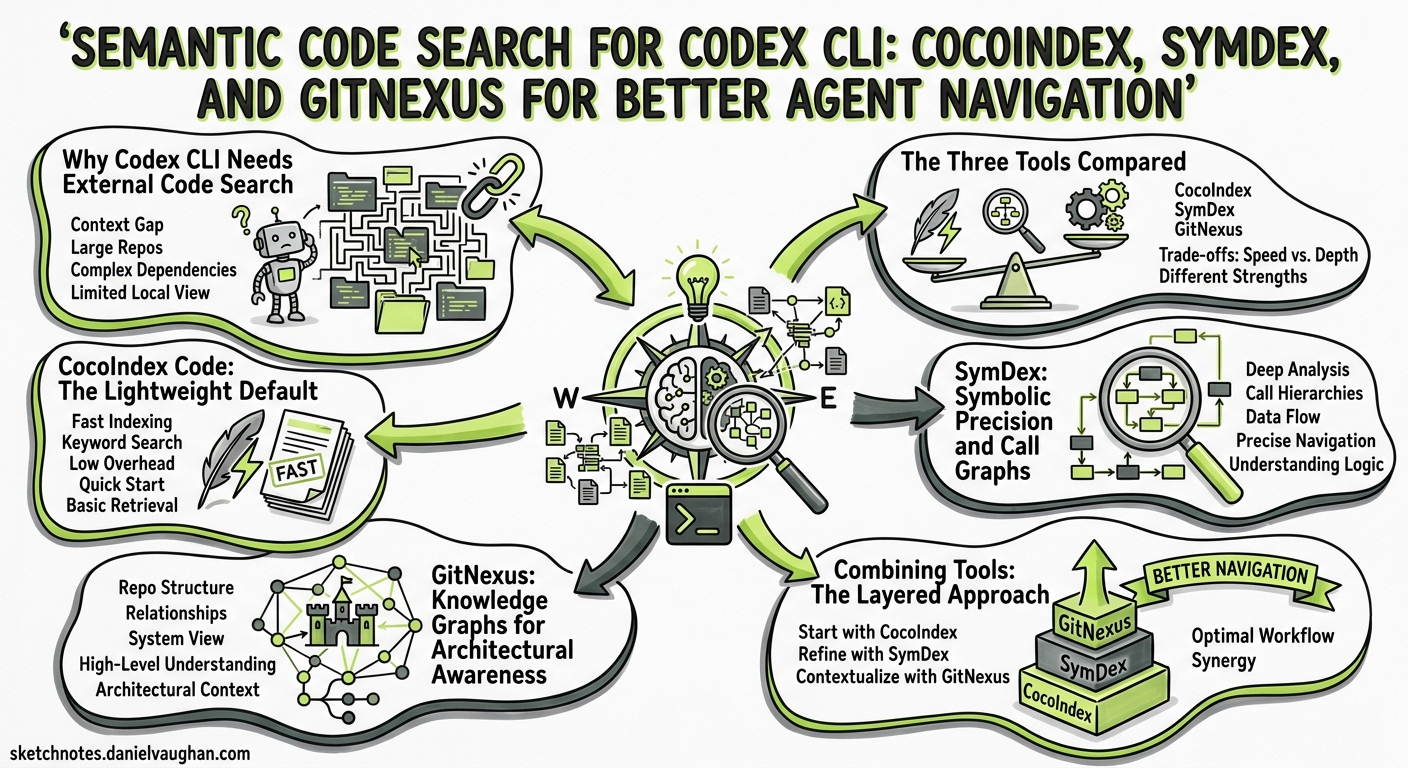
Codex CLI excels at local agentic coding, but it struggles with a fundamental limitation: reliably finding the right code in medium-to-large codebases. The agent’s default strategy — scanning directory trees, grepping for patterns, and reading entire files — wastes an estimated 70% of token budget on irrelevant content1. Two long-standing feature requests (Issues #5181 and #609) have accumulated over 50 combined thumbs-up reactions asking for native semantic indexing, yet OpenAI has not committed to a timeline2.
The community has responded with three distinct tools that plug this gap through MCP servers and CLI integration: CocoIndex Code (AST-based semantic search), SymDex (symbolic indexing with call graphs), and GitNexus (knowledge-graph structural analysis). This article evaluates each tool, shows how to integrate them with Codex CLI, and offers a decision framework for choosing between them.
Why Codex CLI Needs External Code Search
When you prompt Codex to fix a bug or refactor a module, the agent loop follows a predictable pattern: discover files, read them, reason about changes, execute tools, and validate. Research from the April 2026 “Amazing Agent Race” study found that navigation errors dominate agent failures at 27–52% of trials, whilst tool-use errors remain below 17%3. The bottleneck is not reasoning — it is finding the right code to reason about.
Codex CLI’s built-in tools — read_file, list_dir, grep — are lexical. They cannot answer questions like “where is email validation handled?” or “what calls the payment service?” without the developer explicitly naming files or patterns. On a 500-file codebase this is manageable; on a 5,000-file monorepo it becomes the dominant cost driver.
flowchart LR
    A[Developer Prompt] --> B[Agent Loop]
    B --> C{Find Relevant Code}
    C -->|Lexical grep| D[Scan hundreds of files]
    C -->|Semantic search| E[Retrieve 3-5 precise chunks]
    D --> F[70% wasted tokens]
    E --> G[Targeted reasoning]
    G --> H[Faster, cheaper result]
    F --> I[Slow, expensive result]
The Three Tools Compared
| Feature | CocoIndex Code | SymDex | GitNexus |
|---|---|---|---|
| Approach | AST-based semantic vector search | Symbolic index + semantic search | Knowledge graph + Graph RAG |
| Languages | 40+ via Tree-sitter1 | 21 via Tree-sitter4 | 14 (8 with deep semantic analysis)5 |
| Integration | CLI (ccc) + MCP server |
CLI + MCP server (21 tools) | MCP server (7 tools + 2 prompts) |
| Embedding | Local (SentenceTransformers) or cloud (LiteLLM) | Local or cloud (Voyage, OpenAI, Gemini) | Built-in with Tree-sitter AST |
| Unique strength | Zero-config, 70% token reduction | Call graphs, route extraction, context packs | Impact analysis, rename coordination, Mermaid diagrams |
| GitHub stars | ~1,5001 | ~1744 | Trending #1 (April 2026)5 |
| Install | pipx install 'cocoindex-code[full]' |
pip install symdex |
npx gitnexus@latest |
CocoIndex Code: The Lightweight Default
CocoIndex Code is the most straightforward option. It parses source files using Tree-sitter into AST-aware chunks — functions, classes, methods, type definitions — then embeds them locally using SentenceTransformers (no API key required with the full edition)1. The index lives in a local SQLite database, and re-indexing only processes changed files, achieving 80–90% cache hits on subsequent runs6.
Setup for Codex CLI
Install the tool and configure it as an MCP server in your Codex config.toml:
pipx install 'cocoindex-code[full]'
cd /path/to/your/repo
ccc init    # Interactive setup, defaults to snowflake-arctic-embed-xs
ccc index   # Build the initial index
# ~/.config/codex/config.toml
[mcp_servers.cocoindex-code]
command = "ccc"
args = ["mcp"]
Once configured, Codex can call the search tool automatically when it needs to find relevant code. A typical interaction:
codex "Find and fix the email validation bug in the user registration flow"
# Agent calls cocoindex-code.search("email validation user registration")
# Returns 3-5 precise function chunks instead of scanning the entire codebase
When to Choose CocoIndex
- You want the simplest possible setup with no external dependencies
- Your codebase is primarily a single language or a standard polyglot mix
- Token cost reduction is your primary concern
- You prefer local-only embedding (no API keys, no data leaving your machine)
SymDex: Symbolic Precision and Call Graphs
SymDex takes a different approach: rather than just searching for semantically similar code, it builds a full symbolic index with byte-offset precision for every function, class, and method4. Its 21 MCP tools include capabilities that go well beyond text search — call graph traversal, HTTP route extraction across 9 frameworks, and token-budgeted context packs.
Setup for Codex CLI
pip install symdex
symdex index ./myproject --repo myproject
# ~/.config/codex/config.toml
[mcp_servers.symdex]
command = "symdex"
args = ["serve"]
SymDex also ships as an installable skill:
npx skills add https://github.com/husnainpk/SymDex --skill symdex-code-search --yes --global
Key Differentiators
Call graph analysis answers questions CocoIndex cannot: “What functions call processPayment?” or “Show me the circular dependencies in the auth module.” This is invaluable for refactoring tasks where understanding the blast radius of a change matters more than finding the change target.
Route extraction across Flask, FastAPI, Express, Spring, Laravel, Rails, Phoenix, ASP.NET, and Actix means SymDex can answer “which endpoint handles /api/v2/users?” directly4.
Context packs assemble evidence bundles within a specified token budget — effectively letting you ask “give me everything relevant to this query in under 4,000 tokens.” This maps naturally to Codex CLI’s context window management concerns.
flowchart TD
    A[Developer Prompt] --> B[Codex Agent Loop]
    B --> C[SymDex MCP Server]
    C --> D{Query Type}
    D -->|Symbol lookup| E[search_symbols]
    D -->|Conceptual question| F[semantic_search]
    D -->|Impact analysis| G[get_callers / get_callees]
    D -->|API endpoint| H[search_routes]
    E --> I[Byte-offset results]
    F --> I
    G --> I
    H --> I
    I --> J[Token-budgeted context pack]
    J --> B
When to Choose SymDex
- You need call graph analysis for refactoring or impact assessment
- Your project uses HTTP frameworks and you want route-level queries
- You want fine-grained control over token budgets via context packs
- You work across multiple languages (21 supported) and need consistent coverage
GitNexus: Knowledge Graphs for Architectural Awareness
GitNexus takes the most ambitious approach: it builds a full knowledge graph of your codebase, mapping every function call, import, class inheritance, and execution flow5. Rather than returning code snippets, it gives the agent structural understanding of how the codebase fits together.
Setup for Codex CLI
npx gitnexus@latest analyze # Index the current repository
# ~/.config/codex/config.toml
[mcp_servers.gitnexus]
command = "npx"
args = ["-y", "gitnexus@latest", "mcp"]
Key Differentiators
Impact analysis with confidence scoring: the detect_changes tool evaluates pre-commit risk by traversing the knowledge graph to identify everything affected by a change5. This is a higher-level capability than SymDex’s call graph — it considers inheritance, interface implementation, and transitive dependencies.
Coordinated rename: the rename tool performs multi-file symbol renames by tracing all references through the graph5. Where Codex might miss a reference in a distant test file, GitNexus has already indexed the relationship.
Auto-generated architecture diagrams: the generate_map tool produces Mermaid diagrams directly from the knowledge graph5, useful for onboarding or verifying that a refactoring preserved the expected module boundaries.
When to Choose GitNexus
- You need architectural-level understanding, not just code search
- Impact analysis before risky changes is a priority
- You want automated architecture diagrams for documentation or review
- Your codebase has complex inheritance or cross-module dependencies
Combining Tools: The Layered Approach
These tools are not mutually exclusive. A pragmatic setup for a large codebase layers them:
# ~/.config/codex/config.toml

# Fast semantic search for everyday code finding
[mcp_servers.cocoindex-code]
command = "ccc"
args = ["mcp"]

# Symbolic precision for refactoring tasks
[mcp_servers.symdex]
command = "symdex"
args = ["serve"]

# Architectural awareness for design reviews
[mcp_servers.gitnexus]
command = "npx"
args = ["-y", "gitnexus@latest", "mcp"]
Guide the agent’s tool selection through AGENTS.md:
## Code Search Strategy

- For finding relevant code: use cocoindex-code search
- For understanding call chains and dependencies: use symdex get_callers/get_callees
- For impact analysis before large refactors: use gitnexus detect_changes
- Always search before reading entire files
- Prefer context packs over raw file reads for large files
⚠️ Running all three MCP servers adds schema overhead to every prompt turn. The MCP schema bloat tax can consume 2,000–4,000 tokens per server7. On cost-sensitive workflows, pick one or two rather than all three.
Performance and Cost Considerations
| Metric | CocoIndex Code | SymDex | GitNexus |
|---|---|---|---|
| Initial index time (10K files) | 2–5 min | 3–8 min | 5–15 min |
| Re-index (incremental) | Seconds (changed files only) | Seconds | Minutes (full re-analysis) |
| MCP tools exposed | 3–5 | 21 | 7 + 2 prompts |
| Schema overhead | Low | High | Medium |
| Embedding requirement | Yes (local or cloud) | Optional (enhances semantic search) | No (AST-only) |
| Storage | ~50 MB per 10K files | ~100 MB per 10K files | ~200 MB per 10K files |
For most teams, CocoIndex Code offers the best cost-to-value ratio. Its 70% token reduction claim1 is backed by AST-aware chunking that returns coherent code units rather than arbitrary line ranges. SymDex adds value when you need structural queries, and GitNexus shines for architectural governance.
The Road Ahead: Native Semantic Search
The community demand for built-in semantic search is clear: Issue #5181 has 36 thumbs-up reactions and proposes codex index and codex search commands using OpenAI embeddings with a local FAISS vector store2. A complementary proposal (Issue #609) suggests vector-space code indexing with incremental updates8. Neither has received an official OpenAI response.
Until native support lands, the MCP-based tools described here are the production-ready answer. They transform Codex CLI from a tool that searches blindly to one that navigates with intent — and the token savings alone justify the setup time.
Citations
-
CocoIndex Code GitHub repository — github.com/cocoindex-io/cocoindex-code ↩ ↩2 ↩3 ↩4 ↩5
-
“Semantic codebase indexing and search” — GitHub Issue #5181, openai/codex — github.com/openai/codex/issues/5181 ↩ ↩2
-
Kim et al., “The Amazing Agent Race,” arXiv:2604.10261, April 2026 ↩
-
SymDex GitHub repository — github.com/husnainpk/SymDex ↩ ↩2 ↩3 ↩4
-
GitNexus — MarkTechPost coverage, April 24 2026 — marktechpost.com ↩ ↩2 ↩3 ↩4 ↩5 ↩6
-
CocoIndex blog, “We Launched a Code Search CLI for AI Agents” — cocoindexio.substack.com ↩
-
“MCP Schema Bloat and System Prompt Tax,” codex.danielvaughan.com, April 2026 ↩
-
“feat: add vector-space code indexing and semantic search support” — GitHub Issue #609, openai/codex — github.com/openai/codex/issues/609 ↩