Codex CLI for Automated API Documentation: OpenAPI Generation, SDK Scaffolding, and Doc-Code Sync
Codex CLI for Automated API Documentation: OpenAPI Generation, SDK Scaffolding, and Doc-Code Sync
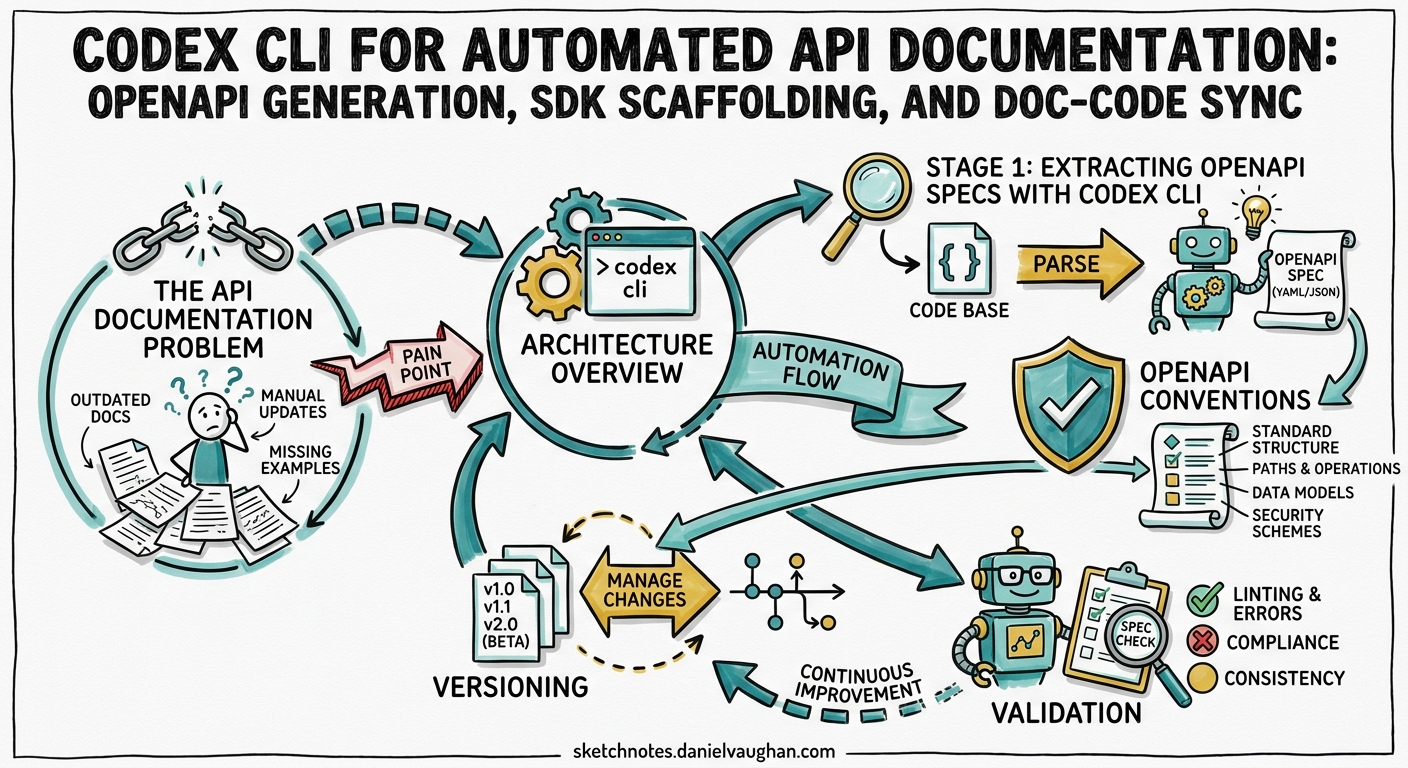
API documentation is the contract between your service and its consumers. When it drifts from the implementation — and it always does — developer experience degrades, integration bugs multiply, and support tickets spike. Codex CLI, particularly through codex exec and the emerging ecosystem of OpenAPI-focused MCP servers and agent skills, can close the gap between code and docs by automating spec extraction, SDK generation, and continuous synchronisation.
This article presents a practical, end-to-end pipeline for API documentation automation using Codex CLI v0.125, GPT-5.5, and the latest tooling available in April 2026.
The API Documentation Problem
Most teams face three recurring failures:
- Spec drift — The OpenAPI spec was accurate at launch but hasn’t kept pace with six months of endpoint changes 1.
- SDK staleness — Client libraries are hand-maintained or generated once and never regenerated after spec updates.
- Doc rot — Prose documentation (guides, tutorials, changelogs) describes behaviour from two versions ago.
AI-powered documentation tools now reduce documentation time by up to 70% 2, but the real leverage comes from wiring extraction, generation, and validation into a single automated pipeline.
Architecture Overview
flowchart LR
    A[Source Code] -->|codex exec| B[OpenAPI Spec]
    B -->|Speakeasy / openapi-generator| C[Client SDKs]
    B -->|Mintlify / Fern| D[Documentation Site]
    B -->|openapi-mcp-generator| E[MCP Server]
    A -->|PostToolUse hook| F[Drift Detector]
    F -->|PR on drift| B
The pipeline has four stages: Extract an OpenAPI spec from source code, Generate SDKs and documentation from the spec, Serve the API as an MCP server for agent consumption, and Guard against drift with hooks and CI gates.
Stage 1: Extracting OpenAPI Specs with Codex CLI
Interactive Extraction
For a one-off extraction from an existing codebase, use the interactive TUI:
codex --model gpt-5.5 --approval-mode auto-edit
Then prompt:
Analyse all route handlers in src/api/ and generate a complete OpenAPI 3.1 specification. Include request/response schemas derived from TypeScript types, path parameters, query parameters, authentication requirements, and example values. Output to docs/openapi.yaml.
Codex reads the source files, infers schemas from types and validation logic, and writes a spec file 3.
Headless Extraction with codex exec
For CI pipelines, use codex exec with --output-schema to produce structured, machine-parseable output:
codex exec \
  --model gpt-5.5 \
  --approval-mode full-auto \
  -o docs/openapi.yaml \
  "Extract the OpenAPI 3.1 specification from src/api/. \
   Include all endpoints, request/response schemas, auth, \
   and examples. Output valid YAML only."
For structured metadata alongside the spec, define a JSON schema:
{
  "$schema": "https://json-schema.org/draft/2020-12/schema",
  "type": "object",
  "properties": {
    "spec_version": { "type": "string" },
    "endpoint_count": { "type": "integer" },
    "breaking_changes": {
      "type": "array",
      "items": { "type": "string" }
    },
    "warnings": {
      "type": "array",
      "items": { "type": "string" }
    }
  },
  "required": ["spec_version", "endpoint_count", "breaking_changes"]
}
codex exec \
  --model gpt-5.5 \
  --approval-mode full-auto \
  --output-schema ./schemas/api-extract-meta.json \
  "Extract the OpenAPI spec to docs/openapi.yaml. \
   Then return metadata about the extraction."
The structured output provides a machine-readable summary for downstream pipeline steps 4.
AGENTS.md for API Projects
Encode your API documentation standards in AGENTS.md so every Codex session respects them:
# API Documentation Standards

## OpenAPI Conventions
- All endpoints MUST have `summary`, `description`, and `operationId`
- Request bodies MUST use `$ref` to named schemas in `components/schemas`
- Every endpoint MUST include at least one example response
- Authentication requirements MUST be declared per-endpoint via `security`
- Use `tags` to group endpoints by resource (users, orders, payments)

## Versioning
- Spec version follows SemVer: bump MINOR for new endpoints, MAJOR for breaking changes
- Include `x-changelog` extension with date and description for each change

## Validation
- Run `npx @redocly/cli lint docs/openapi.yaml` after any spec changes
- Run `npx oasdiff breaking docs/openapi-prev.yaml docs/openapi.yaml` before merging
Stage 2: SDK Generation from OpenAPI
Once you have a validated spec, SDK generation becomes deterministic. Two approaches work well with Codex CLI.
Speakeasy Agent Skills
Speakeasy provides 21 agent skills covering the full API development lifecycle, from spec authoring to SDK generation across seven languages 5. Install them:
npx skills add speakeasy-api/skills
These skills load into Codex CLI’s context through metadata triggers 5. When you prompt Codex to generate an SDK, the relevant Speakeasy skill activates automatically, providing language-specific conventions and best practices.
codex exec \
  --model gpt-5.5 \
  --approval-mode full-auto \
  "Using the Speakeasy skills, generate a TypeScript SDK \
   from docs/openapi.yaml into sdk/typescript/. \
   Include typed request/response objects, error handling, \
   and pagination helpers."
OpenAPI Generator with Codex Orchestration
For teams using OpenAPI Generator 6, Codex CLI can orchestrate the entire generation and customisation workflow:
codex exec \
  --approval-mode full-auto \
  "Run openapi-generator-cli generate \
   -i docs/openapi.yaml \
   -g typescript-axios \
   -o sdk/typescript/ \
   --additional-properties=supportsES6=true,npmName=@myorg/api-sdk. \
   Then review the generated code for any issues and fix them."
Codex executes the generator, reviews the output, and applies fixes — a pattern that combines deterministic code generation with intelligent post-processing 3.
Stage 3: OpenAPI-to-MCP for Agent Consumption
A compelling recent development is converting OpenAPI specifications into MCP servers, enabling any MCP-aware agent (including Codex CLI itself) to interact with your API programmatically.
openapi-mcp-generator
The openapi-mcp-generator tool converts OpenAPI specs into fully functional MCP servers 7:
npx openapi-mcp-generator \
  --input docs/openapi.yaml \
  --output mcp-server/ \
  --language python
Cloudflare Code Mode MCP
For APIs with large surface areas (hundreds of endpoints), Cloudflare’s Code Mode MCP server reduces token overhead by exposing only two tools — search() and execute() — backed by a type-aware SDK that compiles agent plans into code snippets against the OpenAPI spec 8. This approach addresses the MCP schema bloat problem documented in earlier articles.
Configuring in Codex CLI
Add the generated MCP server to your config.toml:
[mcp_servers.my-api]
command = "node"
args = ["./mcp-server/dist/index.js"]
env = { API_BASE_URL = "https://api.staging.example.com" }
Now Codex CLI can call your API endpoints as tools during development sessions — useful for testing, debugging, and building integration examples 9.
Stage 4: Continuous Doc-Code Sync
PostToolUse Hooks for Drift Detection
With hooks now stable in v0.124+ 10, you can enforce documentation updates whenever API source code changes:
[[hooks]]
event = "post_tool_use"
tool_name = "apply_patch"

[hooks.command]
program = "bash"
args = ["-c", """
  changed=$(echo "$CODEX_TOOL_INPUT" | grep -c 'src/api/')
  if [ "$changed" -gt 0 ]; then
    echo "API source changed — run 'npm run generate:openapi' to update spec"
    echo "action: notify"
  fi
"""]
This hook fires after every file edit and warns if API source files changed without a corresponding spec update 10.
CI Pipeline: Extract, Validate, Gate
# .github/workflows/api-docs-sync.yml
name: API Documentation Sync
on:
  pull_request:
    paths: ['src/api/**']

jobs:
  validate-spec:
    runs-on: ubuntu-latest
    steps:
      - uses: actions/checkout@v4

      - name: Extract OpenAPI spec
        uses: openai/codex-action@v1
        with:
          codex-args: >
            --approval-mode full-auto
            --model gpt-5.5
          prompt: |
            Extract the OpenAPI 3.1 spec from src/api/ to
            docs/openapi.yaml. Preserve existing x-changelog entries.

      - name: Lint spec
        run: npx @redocly/cli lint docs/openapi.yaml

      - name: Check for breaking changes
        run: |
          npx oasdiff breaking \
            docs/openapi-main.yaml docs/openapi.yaml \
            --fail-on ERR

      - name: Regenerate SDKs
        run: |
          npx openapi-generator-cli generate \
            -i docs/openapi.yaml \
            -g typescript-axios \
            -o sdk/typescript/

      - name: Commit updates
        run: |
          git add docs/openapi.yaml sdk/
          git diff --cached --quiet || \
            git commit -m "docs: sync OpenAPI spec and SDKs"
This pipeline runs on every PR that touches API source code, extracting a fresh spec, linting it, checking for breaking changes, and regenerating SDKs automatically 11.
Documentation Platform Integration
Both Mintlify and Fern can consume OpenAPI specs and auto-generate documentation sites:
- Mintlify auto-generates API playgrounds, request/response samples, and SDK code snippets from OpenAPI specs. Its GitHub App detects changes in PRs and automatically updates documentation 12.
- Fern generates SDKs alongside documentation, ensuring type definitions in client libraries match the published docs. Fern’s MCP servers turn documentation into structured, queryable resources for AI agents 13.
Model Selection
| Task | Recommended Model | Reasoning |
|---|---|---|
| Spec extraction from complex codebases | GPT-5.5 (high effort) | Needs deep code comprehension |
| Spec linting and validation | GPT-5.3-Codex-Spark | Fast, low-cost validation |
| SDK post-processing and fixes | GPT-5.5 (medium effort) | Balances quality and cost |
| Breaking change detection | Deterministic tooling | Use oasdiff, not an LLM |
| Documentation prose generation | GPT-5.5 (medium effort) | Natural language quality matters |
For cost-sensitive pipelines, use a two-tier routing strategy: Spark for validation and simple extraction tasks, GPT-5.5 for complex spec generation and prose 14.
Common Pitfalls
Hallucinated Endpoints
Codex may infer endpoints that don’t exist, particularly from test files or commented-out code. Mitigate by:
- Adding explicit instructions in AGENTS.md: “Only document endpoints with active route registrations”
- Using
--output-schemato force structured output and validate against actual routes - Running the generated spec through a contract test suite
Schema Over-Specification
LLMs tend to generate overly specific schemas with enum values derived from test data rather than the actual domain. Review generated components/schemas for artificial constraints.
Breaking Change False Positives
Reordering properties or adding optional fields can trigger false positives in breaking-change detectors. Configure oasdiff’s severity levels appropriately and include suppression comments for known-safe changes.
Security Considerations
API specs may expose internal implementation details. Use deny-read policies to prevent Codex from accessing sensitive configuration:
[sandbox]
deny_read = [
  ".env*",
  "config/secrets/**",
  "src/api/internal/**"
]
For specs that include authentication examples, ensure tokens and API keys use placeholder values. Add a hook to reject any spec containing patterns matching real credential formats 15.
Putting It All Together
The complete pipeline — from source code to published documentation — can run in under five minutes for a typical REST API with 50–100 endpoints. The key is treating the OpenAPI specification as a build artefact: extracted from code, validated automatically, and consumed by downstream generators.
sequenceDiagram
    participant Dev as Developer
    participant PR as Pull Request
    participant CI as CI Pipeline
    participant Codex as codex exec
    participant Lint as Redocly/oasdiff
    participant Gen as SDK Generator
    participant Docs as Mintlify/Fern

    Dev->>PR: Push API changes
    PR->>CI: Trigger workflow
    CI->>Codex: Extract OpenAPI spec
    Codex->>CI: Return spec + metadata
    CI->>Lint: Validate and check breaking changes
    Lint->>CI: Pass/fail
    CI->>Gen: Regenerate SDKs
    Gen->>CI: Updated SDK code
    CI->>Docs: Publish updated docs
    CI->>PR: Commit spec + SDK changes
By wiring Codex CLI into this pipeline, you get documentation that tracks the code with every commit — not just when someone remembers to update it.
Citations
-
Fern, “API design best practices guide (March 2026),” https://buildwithfern.com/post/api-design-best-practices-guide ↩
-
DigitalAPI, “AI-Powered API Docs: What makes it critical for every industry in 2026?,” https://www.digitalapi.ai/blogs/ai-powered-api-docs-what-makes-it-critical-for-every-industry-in-2026 ↩
-
OpenAI, “Features — Codex CLI,” https://developers.openai.com/codex/cli/features ↩ ↩2
-
OpenAI, “Non-interactive mode — Codex,” https://developers.openai.com/codex/noninteractive ↩
-
Speakeasy, “Agent skills for OpenAPI and SDK generation,” https://www.speakeasy.com/blog/release-agent-skills ↩ ↩2
-
OpenAPI Generator, “OpenAPI Generator documentation,” https://openapi-generator.tech/ ↩
-
harsha-iiiv, “openapi-mcp-generator — Convert OpenAPI specs to MCP servers,” https://github.com/harsha-iiiv/openapi-mcp-generator ↩
-
InfoQ, “Cloudflare Launches Code Mode MCP Server to Optimize Token Usage for AI Agents,” https://www.infoq.com/news/2026/04/cloudflare-code-mode-mcp-server/ ↩
-
OpenAI, “Model Context Protocol — Codex,” https://developers.openai.com/api/docs/mcp ↩
-
OpenAI, “Codex CLI v0.124.0 changelog,” https://developers.openai.com/codex/changelog ↩ ↩2
-
OpenAI, “GitHub Action — Codex,” https://developers.openai.com/codex/github-action ↩
-
Mintlify, “Autogenerating API documentation from OpenAPI,” https://www.mintlify.com/blog/steps-to-autogenerate ↩
-
Fern, “MCP Servers for Documentation Sites,” https://buildwithfern.com/post/mcp-servers-documentation-sites ↩
-
OpenAI, “Codex models and pricing,” https://developers.openai.com/codex/cli ↩
-
OpenAI, “Agent approvals and security — Codex,” https://developers.openai.com/codex/agent-approvals-security ↩