Codex CLI for Next.js Teams: App Router, Server Components, DevTools MCP, and Agent-Driven Full-Stack Workflows
Codex CLI for Next.js Teams: App Router, Server Components, DevTools MCP, and Agent-Driven Full-Stack Workflows
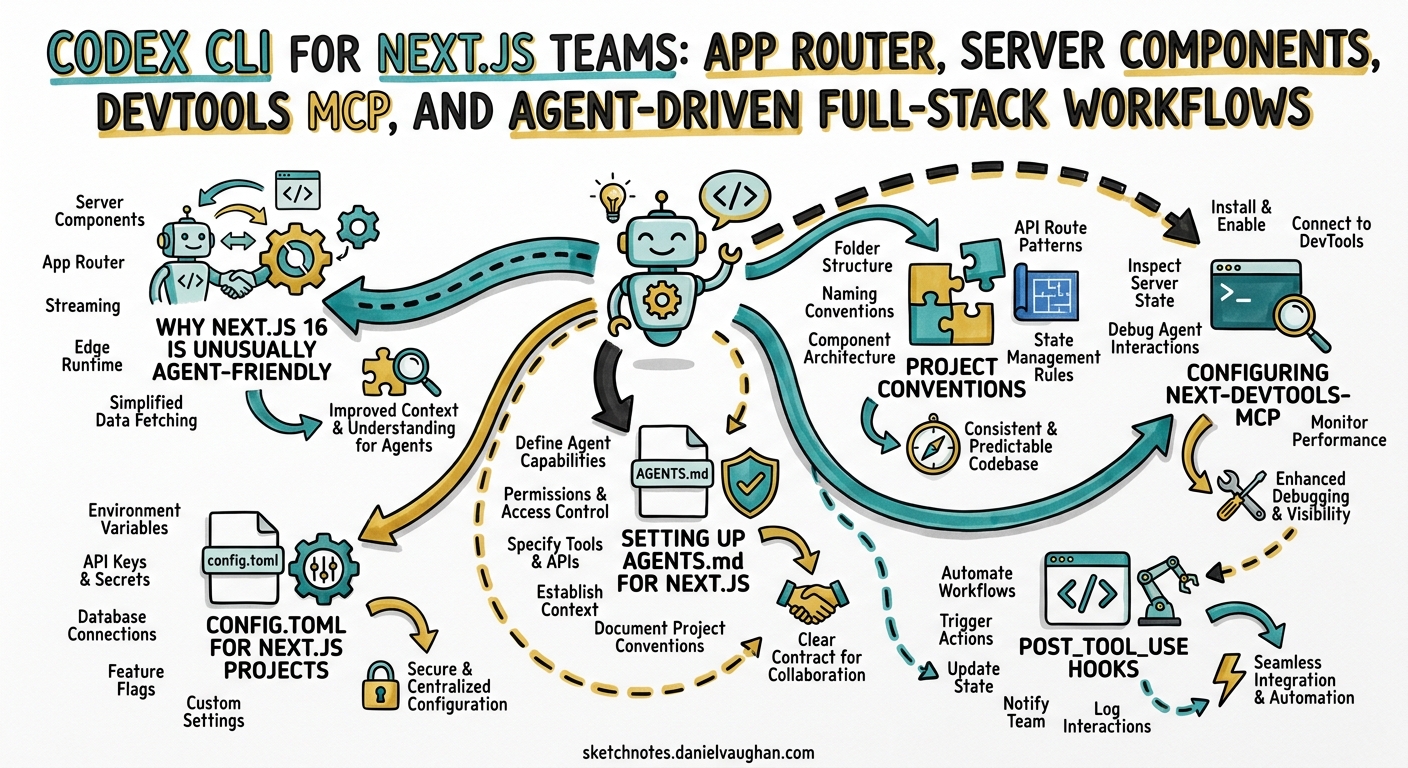
Next.js 16 is the first major framework release built with AI coding agents as a first-class concern. Version-matched documentation ships inside node_modules, create-next-app generates an AGENTS.md by default, and a dedicated MCP server exposes live application state to any connected agent1. For teams already running Codex CLI, this means the gap between “ask the agent to build a page” and “the page actually works” has narrowed considerably. This article covers the complete setup: AGENTS.md configuration, the next-devtools-mcp integration, config.toml profiles, post-tool-use hooks, and practical workflow patterns for Server Components, Server Actions, and the App Router.
Why Next.js 16 Is Unusually Agent-Friendly
Three properties make Next.js 16 stand out from other frameworks when paired with a coding agent:
-
Bundled documentation. Installing
nextplaces the full Next.js docs atnode_modules/next/dist/docs/, matching your exact installed version1. Agents read these instead of relying on stale training data — a pattern no other major framework has shipped natively. -
Convention-heavy file system routing. The App Router enforces
page.tsx,layout.tsx,loading.tsx,error.tsx, androute.tsconventions2. Agents benefit from strong structural constraints: there is exactly one correct place for each concern. -
Built-in MCP endpoint. Next.js 16+ exposes
/_next/mcpon the dev server, allowing agents to query live errors, routes, page metadata, and Server Action definitions without leaving the terminal3.
graph LR
    A[Codex CLI] -->|reads| B[AGENTS.md]
    A -->|reads| C[node_modules/next/dist/docs/]
    A -->|MCP calls| D[next-devtools-mcp]
    D -->|HTTP| E["/_next/mcp endpoint"]
    E -->|returns| F[errors, routes, metadata]
    A -->|writes| G[App Router files]
    G -->|triggers| H[Turbopack HMR]
    H -->|updates| E
Setting Up AGENTS.md for Next.js
New Projects
create-next-app on Next.js 16.2+ generates AGENTS.md and CLAUDE.md automatically1:
npx create-next-app@canary my-app
Pass --no-agents-md to skip generation. The generated file contains a single, focused instruction within delimited markers:
<!-- BEGIN:nextjs-agent-rules -->

# Next.js: ALWAYS read docs before coding

Before any Next.js work, find and read the relevant doc in
`node_modules/next/dist/docs/`. Your training data is outdated
-- the docs are the source of truth.

<!-- END:nextjs-agent-rules -->
Existing Projects
For projects on Next.js 16.1 or earlier, run the codemod:
npx @next/codemod@latest agents-md
This outputs bundled docs to .next-docs/ and generates agent files pointing there1.
Enriching AGENTS.md with Project-Specific Rules
The <!-- BEGIN/END --> markers delimit the Next.js-managed section. Add your own rules outside these markers. A production-ready addition for a typical Next.js 16 project:
<!-- BEGIN:nextjs-agent-rules -->
# Next.js: ALWAYS read docs before coding
Before any Next.js work, find and read the relevant doc in
`node_modules/next/dist/docs/`. Your training data is outdated
-- the docs are the source of truth.
<!-- END:nextjs-agent-rules -->

## Project conventions

- Use the App Router exclusively. Never create files under `pages/`.
- All data fetching happens in Server Components via `async` functions.
  Never use `useEffect` for data fetching.
- Server Actions live in dedicated `actions.ts` files with `'use server'`
  at the top. Never inline `'use server'` inside component bodies.
- Use `next/image` for all images. Never use raw `<img>` tags.
- Styles use Tailwind CSS v4. Never create CSS modules.
- Tests use Vitest + Testing Library. Run `pnpm test` after changes.
- TypeScript strict mode is enabled. Never use `any` or `@ts-ignore`.
Codex CLI discovers AGENTS.md from the repository root and merges it with any global instructions in ~/.codex/AGENTS.md4. Root-level instructions appear first; directory-level overrides appear later and take precedence.
Configuring next-devtools-mcp
The next-devtools-mcp package bridges Codex CLI to your running dev server via the Model Context Protocol3.
Installation
Add to .mcp.json at the project root:
{
  "mcpServers": {
    "next-devtools": {
      "command": "npx",
      "args": ["-y", "next-devtools-mcp@latest"]
    }
  }
}
Or register via the CLI:
codex mcp add next-devtools -- npx next-devtools-mcp@latest
Available Tools
| Tool | Purpose |
|---|---|
get_errors |
Retrieves build errors, runtime errors, and type errors from the dev server3 |
get_logs |
Returns the path to the dev log file containing browser console and server output3 |
get_page_metadata |
Queries routes, components, and rendering information for a specific page3 |
get_project_metadata |
Returns project structure, configuration, and dev server URL3 |
get_routes |
Lists all routes grouped by router type (appRouter, pagesRouter), including dynamic segments3 |
get_server_action_by_id |
Looks up Server Actions by ID to find source file and function name3 |
The MCP server automatically discovers Next.js instances on different ports and forwards tool calls to the appropriate dev server3. This means Codex can work with multiple Next.js services in a microservices setup simultaneously.
Verification
After starting your dev server, confirm the MCP connection within a Codex session:
/mcp verbose
You should see next-devtools listed with six available tools. If the connection fails, ensure you are on Next.js 16+ and that the dev server is running before starting Codex3.
config.toml for Next.js Projects
Create a profile tailored to Next.js development:
# ~/.codex/config.toml

model = "gpt-5.5"
approval_policy = "on-request"

[profiles.nextjs]
model = "gpt-5.5"
model_reasoning_effort = "high"
sandbox_mode = "workspace-write"

[profiles.nextjs-review]
model = "o4-mini"
model_reasoning_effort = "medium"
sandbox_mode = "read-only"
Launch with:
codex --profile nextjs
The nextjs profile uses GPT-5.5 at high reasoning effort for implementation tasks — Server Components, complex data fetching patterns, and Server Action chains benefit from deeper reasoning5. The nextjs-review profile uses o4-mini in read-only mode for code review passes, keeping costs lower while still catching structural issues.
post_tool_use Hooks
Hooks run automatically after every tool invocation, catching errors before they compound. For a Next.js 16 project with Turbopack:
# .codex/config.toml (project-level)

[[hooks.post_tool_use]]
trigger = "on_file_change"
match_files = ["**/*.ts", "**/*.tsx"]
command = "npx tsc --noEmit --pretty 2>&1 | head -30"
timeout_ms = 15000

[[hooks.post_tool_use]]
trigger = "on_file_change"
match_files = ["**/*.ts", "**/*.tsx", "**/*.css"]
command = "npx next lint --quiet 2>&1 | head -20"
timeout_ms = 10000
These hooks ensure that every file edit triggers a type check and lint pass. Codex reads the hook output and self-corrects before proceeding to the next change6. With Turbopack’s filesystem caching in Next.js 16.1+, incremental type checks typically complete in under five seconds7.
Workflow Patterns
Server Component Feature Development
The most common workflow for adding a feature to a Next.js 16 App Router project:
sequenceDiagram
    participant Dev as Developer
    participant Codex as Codex CLI
    participant MCP as next-devtools-mcp
    participant Next as Next.js Dev Server

    Dev->>Codex: "Add a /dashboard page showing user stats"
    Codex->>Codex: Reads AGENTS.md + bundled docs
    Codex->>MCP: get_routes()
    MCP->>Next: /_next/mcp
    Next-->>MCP: Route list
    MCP-->>Codex: Existing routes
    Codex->>Codex: Creates app/dashboard/page.tsx (Server Component)
    Codex->>Codex: Creates app/dashboard/loading.tsx (Suspense)
    Note over Codex: post_tool_use hook runs tsc
    Codex->>MCP: get_errors()
    MCP-->>Codex: No errors
    Codex-->>Dev: Feature complete, 3 files created
Key principle: Codex creates Server Components by default for data-fetching pages. The bundled docs reinforce that Server Components are the default in the App Router — no 'use client' directive unless interactivity is genuinely required2.
Client Component Extraction
When Codex needs to add interactivity (event handlers, hooks, browser APIs), it should extract the interactive portion into a separate Client Component:
Prompt: "Add a search filter to /dashboard that filters the stats table
client-side"
Codex will:
- Keep
app/dashboard/page.tsxas a Server Component for data fetching - Create
app/dashboard/stats-filter.tsxwith'use client'at the top - Import the Client Component into the Server Component
- Pass server-fetched data as serialisable props
This pattern — server-first with surgical client extraction — is exactly what the App Router documentation prescribes2, and agents following the bundled docs naturally adopt it.
Server Actions for Mutations
Server Actions replace traditional API routes for form submissions and mutations in the App Router2. Direct Codex to create them in dedicated files:
Prompt: "Add a Server Action to update user preferences. Put it in
app/dashboard/actions.ts"
The AGENTS.md rule about dedicated actions.ts files prevents the common anti-pattern of inlining 'use server' inside component bodies, which creates maintenance headaches and makes the action harder to test independently.
Route Handler Generation
For cases where Server Actions are insufficient (webhooks, third-party API callbacks, streaming responses), Codex generates Route Handlers:
Prompt: "Create a webhook handler at /api/stripe/webhook that verifies
the Stripe signature and processes checkout.session.completed events"
Codex creates app/api/stripe/webhook/route.ts with the correct POST export, following the App Router convention of named HTTP method exports2.
Model Selection
| Task | Recommended Model | Reasoning Effort | Rationale |
|---|---|---|---|
| Feature implementation | GPT-5.5 | high | Complex Server Component/Action patterns benefit from deep reasoning5 |
| Bug fixing | GPT-5.5 | medium | Targeted fixes need less exploration |
| Code review | o4-mini | medium | Read-only analysis at lower cost |
| Scaffold generation | GPT-5.5 | low | Boilerplate follows strong conventions |
| Refactoring to App Router | GPT-5.5 | high | Migration from Pages Router requires understanding both paradigms |
GPT-5.5’s million-token context window5 is particularly valuable for large Next.js codebases where the agent needs to understand the full route tree, shared layouts, and middleware configuration simultaneously.
The Vercel Plugin (Preview)
Vercel’s plugin for AI coding agents provides 25 skills, three specialist agents, and five slash commands covering the entire Vercel ecosystem8. At the time of writing, Codex CLI support is listed as “coming soon,” but the architecture is already available:
npx plugins add vercel/vercel-plugin
Notable skills relevant to Next.js development include nextjs (App Router, Server Components, rendering strategies), next-cache-components (Cache Components, PPR, use cache), turbopack (bundler configuration and HMR), and shadcn (component installation and theming)8.
The three specialist agents — deployment-expert, performance-optimizer, and ai-architect — can be invoked directly8. Once Codex CLI support ships, these will integrate as subagents callable from your Codex session.
Common Pitfalls
| Pitfall | Symptom | Fix |
|---|---|---|
Agent adds 'use client' to data-fetching pages |
Unnecessary client-side JavaScript, lost SSR benefits | AGENTS.md rule: “Server Components are default. Only add 'use client' for event handlers and hooks” |
Agent creates pages/ directory files |
Conflicting routers, build errors | AGENTS.md rule: “Use App Router exclusively. Never create files under pages/” |
Agent uses getServerSideProps |
Deprecated pattern in App Router | Bundled docs redirect to async Server Components |
Agent inlines 'use server' in components |
Mixed concerns, untestable actions | AGENTS.md rule: “Server Actions in dedicated actions.ts files” |
Agent uses fetch in Client Components for initial data |
Waterfalls, loading spinners | AGENTS.md rule: “Data fetching in Server Components only” |
| MCP reports stale errors after fix | Agent loops on phantom errors | Ensure Turbopack HMR has completed before querying get_errors |
| Type check hook times out | Large codebase, slow tsc |
Increase timeout_ms or use tsc --incremental |
Putting It All Together
A minimal but production-ready setup for a Next.js 16 project with Codex CLI:
- Scaffold:
npx create-next-app@canary(generatesAGENTS.mdautomatically) - Enrich AGENTS.md with project conventions outside the managed markers
- Add
.mcp.jsonwithnext-devtools-mcpfor live application state - Create project-level
.codex/config.tomlwithpost_tool_usehooks fortscandnext lint - Start the dev server before launching Codex
- Use
--profile nextjsfor implementation,--profile nextjs-reviewfor review passes
The combination of bundled docs, convention-enforced file routing, live MCP diagnostics, and automatic type checking creates a feedback loop tight enough that the agent self-corrects most errors without developer intervention. For Next.js teams, this is as close as current tooling gets to a genuinely autonomous development workflow.
Citations
-
Next.js Documentation, “How to set up your Next.js project for AI coding agents,” https://nextjs.org/docs/app/guides/ai-agents ↩ ↩2 ↩3 ↩4
-
Next.js Documentation, “App Router: Getting Started,” https://nextjs.org/docs/app/getting-started ↩ ↩2 ↩3 ↩4 ↩5
-
Next.js Documentation, “Enabling Next.js MCP Server for Coding Agents,” https://nextjs.org/docs/app/guides/mcp ↩ ↩2 ↩3 ↩4 ↩5 ↩6 ↩7 ↩8 ↩9 ↩10
-
OpenAI Developers, “Custom instructions with AGENTS.md,” https://developers.openai.com/codex/guides/agents-md ↩
-
OpenAI, “Introducing GPT-5.5,” https://openai.com/index/introducing-gpt-5-5/ ↩ ↩2 ↩3
-
OpenAI Developers, “Codex CLI Features: Hooks,” https://developers.openai.com/codex/cli/features ↩
-
Next.js Blog, “Next.js 16.1,” https://nextjs.org/blog/next-16-1 ↩
-
Vercel Documentation, “Vercel Plugin for AI Coding Agents,” https://vercel.com/docs/agent-resources/vercel-plugin ↩ ↩2 ↩3