Codex CLI and Supabase MCP: Agent-Driven Full-Stack Backend Development with Safe Database Branching
Codex CLI and Supabase MCP: Agent-Driven Full-Stack Backend Development with Safe Database Branching
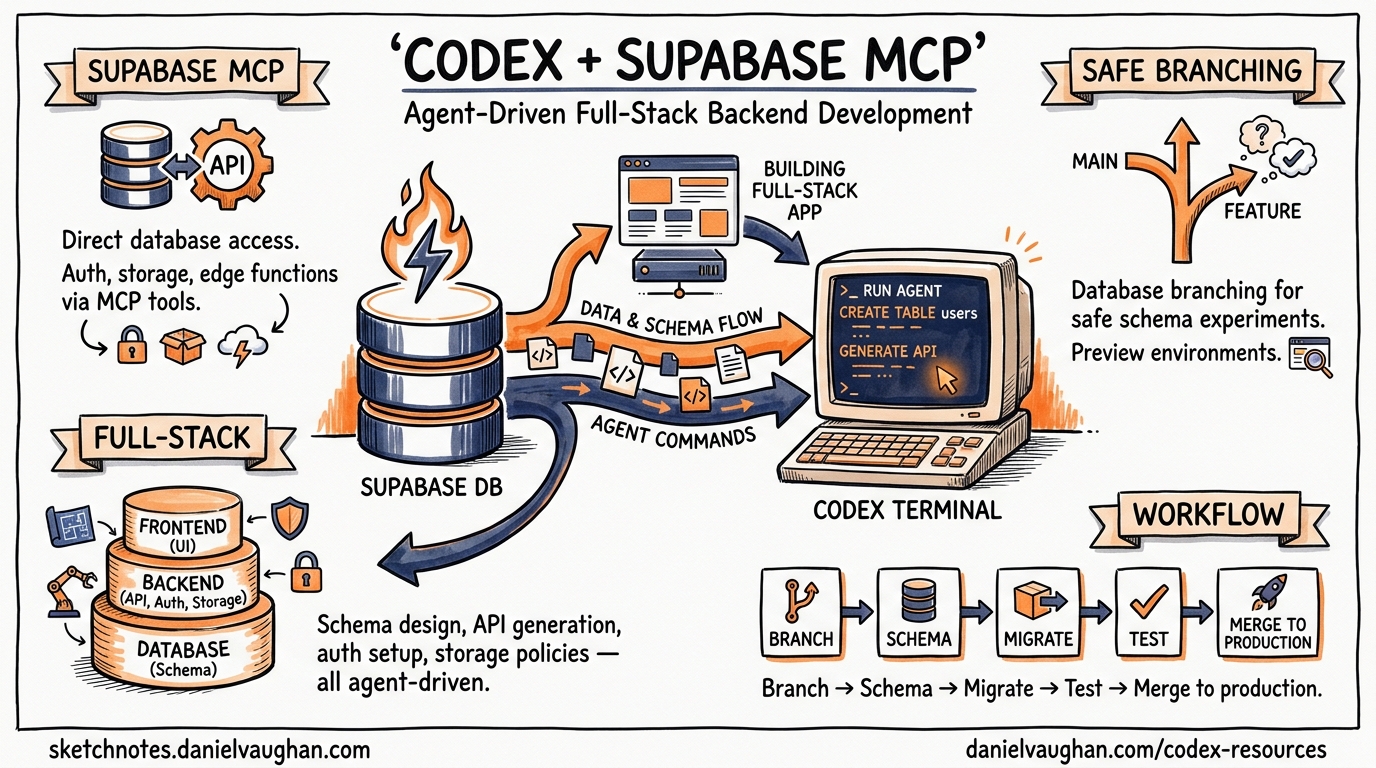
Supabase’s MCP server exposes over 20 tools that let Codex CLI query databases, inspect schemas, generate migrations, manage Edge Functions, and orchestrate database branches — all through natural language from your terminal1. This article walks through the complete integration: from initial config.toml wiring through branching-based migration workflows, AGENTS.md templates for Supabase-heavy projects, and the security guardrails you need before pointing an autonomous agent at your database.
Why Supabase MCP Matters for Codex CLI Workflows
Most backend development with Codex CLI follows a predictable loop: the agent writes application code, runs tests, and iterates. Database changes break that loop. Schema migrations require careful sequencing, destructive operations need human review, and testing against production data is a non-starter. Supabase’s MCP server addresses each of these friction points:
- Schema inspection without context bloat — the agent calls
list_tablesandlist_extensionsrather than needing the entire schema pasted into the prompt1 - Migration generation with drift detection — DDL operations are tracked as migration files, keeping the agent’s changes version-controlled2
- Copy-on-write branching — each branch clones the production migration history into an isolated PostgreSQL instance, so the agent can experiment without risk3
- TypeScript type generation —
generate_typesproduces interfaces from the live schema, keeping application code in sync1
Setting Up the Supabase MCP Server
Remote MCP Configuration
Supabase runs a hosted MCP server at mcp.supabase.com. Codex CLI connects to it as a remote (HTTP-based) MCP server45:
# ~/.codex/config.toml

[mcp_servers.supabase]
url = "https://mcp.supabase.com/mcp?project_ref=your-project-ref"
startup_timeout_sec = 120
tool_timeout_sec = 600
The project_ref query parameter scopes the server to a single Supabase project, preventing the agent from accidentally operating on the wrong database1. For development projects where you want broader access, omit the parameter — but understand that the agent can then list and switch between all projects in your account.
Authentication
Supabase MCP supports three authentication paths1:
1. OAuth (recommended for interactive use)
codex mcp login supabase
This opens a browser-based OAuth flow. Codex stores the resulting token and refreshes it automatically5. After login, restart Codex and verify with /mcp.
2. Personal Access Token (CI environments)
[mcp_servers.supabase]
url = "https://mcp.supabase.com/mcp?project_ref=your-project-ref"
bearer_token_env_var = "SUPABASE_ACCESS_TOKEN"
startup_timeout_sec = 120
tool_timeout_sec = 600
Set SUPABASE_ACCESS_TOKEN in your environment or CI secrets. This avoids the browser redirect entirely1.
3. Static headers via Composio
If you prefer Composio’s unified MCP gateway:
[mcp_servers.composio]
url = "https://connect.composio.dev/mcp"
http_headers = { "x-consumer-api-key" = "ck_your_key_here" }
This routes through Composio’s infrastructure and provides access to Supabase alongside other integrated services6.
Local Development with Supabase CLI
When running Supabase locally via supabase start, the MCP server is available at http://localhost:54321/mcp1:
[mcp_servers.supabase-local]
url = "http://localhost:54321/mcp"
startup_timeout_sec = 30
tool_timeout_sec = 120
This is the safest option for agent-driven development — no production data is reachable, and the agent can write freely.
Available Tool Groups
Supabase MCP organises its tools into feature groups that you can selectively enable12:
graph LR
    A[Supabase MCP Server] --> B[database]
    A --> C[debugging]
    A --> D[development]
    A --> E[functions]
    A --> F[branching]
    A --> G[storage]
    A --> H[docs]
    A --> I[account]

    B --> B1[list_tables]
    B --> B2[list_extensions]
    B --> B3[list_migrations]
    B --> B4[apply_migration]
    B --> B5[execute_sql]

    F --> F1[create_branch]
    F --> F2[list_branches]
    F --> F3[merge_branch]
    F --> F4[rebase_branch]
    F --> F5[delete_branch]

    D --> D1[get_api_url]
    D --> D2[get_anon_key]
    D --> D3[generate_types]
To restrict the agent to specific groups, append the features parameter to the URL1:
[mcp_servers.supabase]
url = "https://mcp.supabase.com/mcp?project_ref=abc123&features=database,branching,development"
This prevents the agent from deploying Edge Functions or modifying storage buckets unless you explicitly grant access.
The Branch-Migrate-Merge Workflow
The most powerful pattern for agent-driven database development combines Supabase branching with Codex CLI’s iterative loop. The workflow follows a disciplined sequence37:
sequenceDiagram
    participant Dev as Developer
    participant Codex as Codex CLI
    participant MCP as Supabase MCP
    participant Branch as Dev Branch
    participant Prod as Production

    Dev->>Codex: "Add a comments table with RLS"
    Codex->>MCP: create_branch("feat-comments")
    MCP->>Branch: Clone migration history
    Codex->>MCP: apply_migration(CREATE TABLE...)
    MCP->>Branch: Apply DDL
    Codex->>MCP: execute_sql(INSERT test data)
    MCP->>Branch: Execute on branch
    Codex->>MCP: generate_types()
    MCP-->>Codex: TypeScript interfaces
    Codex->>Codex: Write application code + tests
    Codex->>MCP: execute_sql(SELECT to verify)
    MCP-->>Codex: Query results
    Dev->>Dev: Review migration + code
    Dev->>MCP: merge_branch("feat-comments")
    MCP->>Prod: Apply migrations
    Dev->>MCP: delete_branch("feat-comments")
Key Principles
- Always branch first — never let the agent run DDL against the production branch directly
- Generate types after migration — ensures application code matches the new schema
- Verify with queries — have the agent run
execute_sqlon the branch to confirm the migration produces the expected schema - Human-gate the merge — the
merge_branchstep should require explicit approval
Configuration for Safe Branching
Combine Codex CLI’s approval policies with Supabase MCP’s tool controls to enforce this workflow8:
# .codex/config.toml (project-scoped)

[mcp_servers.supabase]
url = "https://mcp.supabase.com/mcp?project_ref=abc123&features=database,branching,development&read_only=false"
bearer_token_env_var = "SUPABASE_ACCESS_TOKEN"
startup_timeout_sec = 120
tool_timeout_sec = 600
enabled_tools = [
    "list_tables",
    "list_extensions",
    "list_migrations",
    "apply_migration",
    "execute_sql",
    "generate_types",
    "create_branch",
    "list_branches",
    "delete_branch"
]
disabled_tools = ["merge_branch"]
By explicitly disabling merge_branch, the agent cannot promote changes to production. The developer reviews the migration files and merges manually — either through the Supabase dashboard or a separate codex exec step with elevated permissions.
AGENTS.md Template for Supabase Projects
An effective AGENTS.md for a Supabase-backed project steers the agent toward safe patterns9:
# AGENTS.md

## Database

- ALWAYS create a Supabase branch before modifying schema
- NEVER run DDL statements directly via execute_sql — use apply_migration instead
- After every migration, run generate_types and update src/types/supabase.ts
- Include Row Level Security (RLS) policies in every migration that creates a table
- Test migrations with sample queries on the branch before requesting merge

## Stack

- Runtime: Supabase Edge Functions (Deno)
- Client: @supabase/supabase-js v2
- Auth: Supabase Auth with PKCE flow
- Types: Generated via Supabase MCP generate_types tool

## Testing

- Run `supabase db test` for pgTAP tests after migration
- Verify RLS policies with both authenticated and anon roles
Security Considerations
Prompt Injection via Database Content
Supabase’s MCP server wraps SQL results with additional instructions to discourage LLMs from following instructions or commands that might be present in the data1. However, this is a mitigation, not a guarantee. If your database contains user-generated content, a malicious row could contain text that attempts to manipulate the agent’s behaviour.
Mitigations:
- Use
read_only=truewhen the agent only needs to inspect data1 - Scope queries to specific tables via AGENTS.md instructions
- Run Codex CLI with
approval_policy = "on-request"so you review every MCP tool call8
Credential Exposure
The MCP server configuration may reference access tokens. Ensure your config.toml uses environment variable references rather than inline secrets4:
# Good: references an environment variable
bearer_token_env_var = "SUPABASE_ACCESS_TOKEN"

# Bad: inline token (never do this)
# bearer_token = "sbp_abc123..."
For team projects, store the token in your secrets manager and inject it via CI or shell profile.
Production Isolation
Supabase’s own documentation is emphatic: do not connect the MCP server to production data1. The recommended approach is:
- Create a dedicated development project mirroring your production schema
- Use branching within that development project for agent work
- Promote tested migrations to production through your existing CI/CD pipeline — not through the agent
CI Integration with codex exec
For automated migration validation in CI, combine codex exec with the Supabase MCP server10:
#!/bin/bash
# ci/validate-migration.sh

codex exec \
  --approval-policy never \
  -c "mcp_servers.supabase.url=https://mcp.supabase.com/mcp?project_ref=${SUPABASE_PROJECT_REF}&read_only=true" \
  -c "mcp_servers.supabase.bearer_token_env_var=SUPABASE_ACCESS_TOKEN" \
  "Review the latest migration in supabase/migrations/. Check for:
   1. Missing RLS policies on new tables
   2. Destructive operations without a reversible counterpart
   3. Missing indexes on foreign key columns
   4. Type mismatches with the existing schema" \
  --json | jq '.output'
This runs a read-only review of pending migrations without granting the agent write access to the database.
Comparison with Neon MCP
Both Supabase and Neon offer branching-based database workflows for AI agents11. The key differences for Codex CLI users:
| Feature | Supabase MCP | Neon MCP |
|---|---|---|
| Branching model | Full project clone (Postgres + Auth + Storage) | Copy-on-write PostgreSQL only |
| MCP tools | 20+ across 8 feature groups | Database-focused (SQL, branches) |
| Authentication | OAuth, PAT, or Composio | Connection string or API key |
| Edge Functions | Deployable via MCP | Not applicable |
| Type generation | Built-in generate_types |
External tooling required |
| Local development | supabase start with MCP at localhost |
Neon CLI with local proxy |
| Pricing for branching | Paid plans only | Free tier includes branching |
Choose Supabase MCP when your project already uses the Supabase platform and benefits from the broader tool surface (auth, storage, Edge Functions). Choose Neon when you need lightweight, cost-effective database branching without the broader platform commitment.
Practical Tips
- Set generous timeouts — database operations, especially branching, can take 30-60 seconds. The default MCP timeout of 10 seconds will cause failures4
- Use
enabled_toolsaggressively — expose only the tools the agent needs for the current task. Fewer tools means less schema bloat in the system prompt12 - Pair with hooks for audit logging — use a
PostToolUsehook to log every MCP call to a local audit file8:
[[hooks]]
event = "PostToolUse"
match_tool = "mcp__supabase__*"
command = "echo '$(date -u +%Y-%m-%dT%H:%M:%SZ) $TOOL_NAME $TOOL_ARGS' >> .codex/supabase-audit.log"
- Generate types into version control — commit the output of
generate_typesso that diffs reveal schema changes in code review - Rebase branches before merging — if your production schema has evolved since the branch was created, use
rebase_branchto synchronise before merging to avoid migration conflicts3
Citations
-
Supabase, “Model context protocol (MCP),” Supabase Docs, 2026. https://supabase.com/docs/guides/getting-started/mcp ↩ ↩2 ↩3 ↩4 ↩5 ↩6 ↩7 ↩8 ↩9 ↩10 ↩11 ↩12
-
supabase-community, “supabase-mcp — Connect Supabase to your AI assistants,” GitHub, 2026. https://github.com/supabase-community/supabase-mcp ↩ ↩2
-
DeepWiki, “Branching and Migration Workflows — supabase-community/supabase-mcp,” 2026. https://deepwiki.com/supabase-community/supabase-mcp/10-branching-and-migration-workflows ↩ ↩2 ↩3
-
OpenAI, “Model Context Protocol — Codex,” OpenAI Developers, 2026. https://developers.openai.com/codex/mcp ↩ ↩2 ↩3
-
We Build Internet, “How to connect the Supabase MCP server to Codex and Claude CLIs (step-by-step),” January 2026. https://www.webuildinternet.com/2026/01/09/using-supabase-mcp-in-openai-codex-cli/ ↩ ↩2
-
Composio, “How to integrate Supabase MCP with Codex,” 2026. https://composio.dev/toolkits/supabase/framework/codex ↩
-
Design Revision, “Supabase MCP Server: AI Integration Guide (2026),” 2026. https://designrevision.com/blog/supabase-mcp-server ↩
-
OpenAI, “Agent approvals & security — Codex,” OpenAI Developers, 2026. https://developers.openai.com/codex/agent-approvals-security ↩ ↩2 ↩3
-
OpenAI, “Custom instructions with AGENTS.md — Codex,” OpenAI Developers, 2026. https://developers.openai.com/codex/guides/agents-md ↩
-
OpenAI, “Non-interactive mode — Codex,” OpenAI Developers, 2026. https://developers.openai.com/codex/noninteractive ↩
-
Daniel Vaughan, “Safe Database Schema Refactoring with Codex CLI and Neon Branching,” Codex Blog, April 2026. https://codex.danielvaughan.com/2026/04/25/codex-cli-neon-branching-safe-database-schema-refactoring-mcp/ ↩
-
Daniel Vaughan, “MCP Schema Bloat and System Prompt Tax,” Codex Blog, April 2026. https://codex.danielvaughan.com/2026/04/23/mcp-schema-bloat-system-prompt-tax-tool-definition-performance/ ↩