Codex CLI Enterprise Managed Configuration: requirements.toml, managed_config.toml, and Admin-Enforced Policies
Codex CLI Enterprise Managed Configuration: requirements.toml, managed_config.toml, and Admin-Enforced Policies
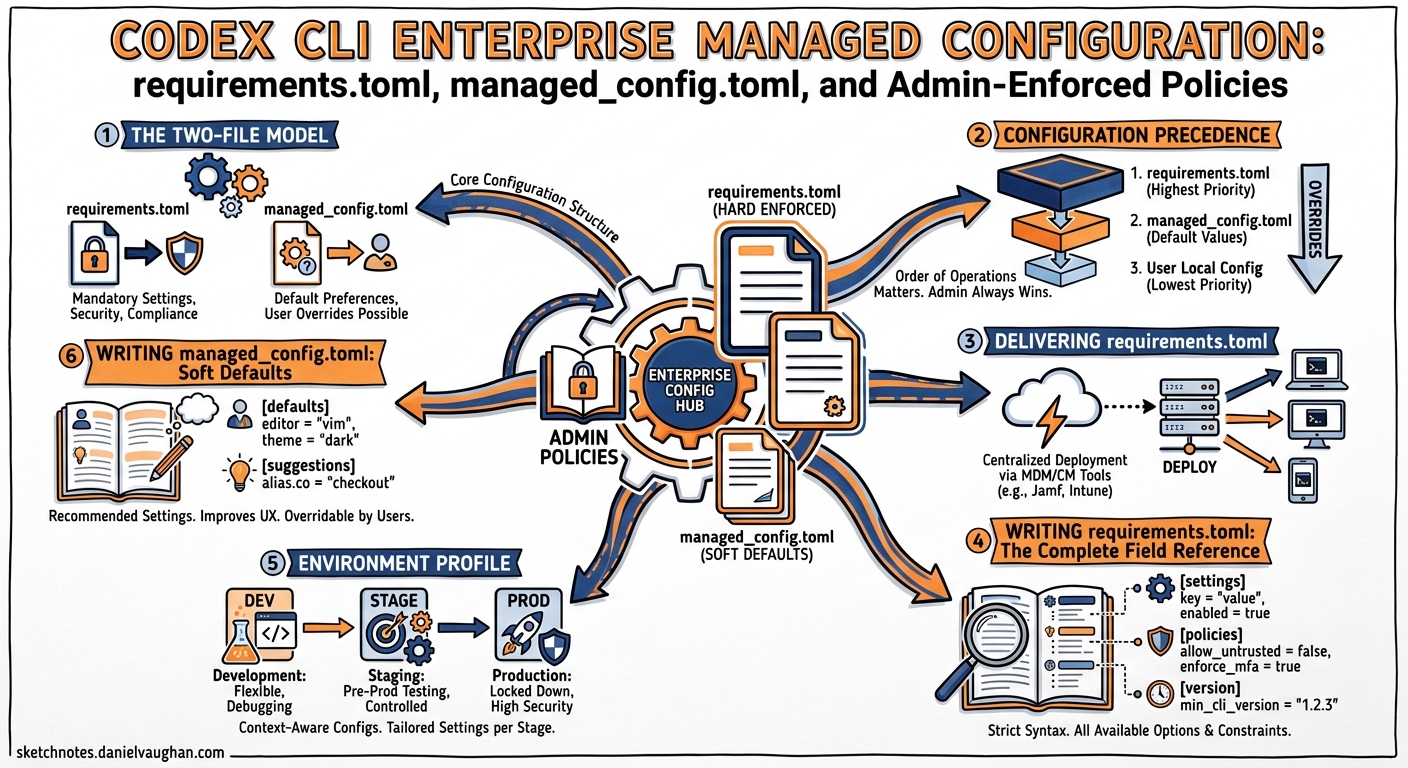
Deploying Codex CLI to a team of five developers is straightforward — everyone edits their own config.toml and moves on. Deploying it to five hundred (or five thousand) developers across regulated business units is an entirely different problem. OpenAI’s managed configuration system addresses this with two admin-controlled files — requirements.toml for hard constraints and managed_config.toml for soft defaults — delivered through cloud policies, macOS MDM, or the filesystem 1. This article is the practitioner’s reference for both.
The Two-File Model
The managed configuration system separates intent from enforcement:
| File | Purpose | User can override? |
|---|---|---|
requirements.toml |
Admin-enforced constraints on security-sensitive settings | No — hard ceiling |
managed_config.toml |
Organisation defaults applied at session startup | Yes — during the session, reset on next launch |
This split means security teams get non-negotiable guardrails while developers retain day-to-day flexibility within those bounds 1.
Configuration Precedence
Understanding precedence is critical. Codex resolves configuration through a layered stack where higher layers win per field:
graph TD
A["Cloud-Managed Requirements<br/>(ChatGPT Business / Enterprise)"] --> B["macOS MDM Requirements<br/>(com.openai.codex:requirements_toml_base64)"]
B --> C["System requirements.toml<br/>(/etc/codex/requirements.toml)"]
C --> D["Managed Defaults<br/>(managed_config.toml)"]
D --> E["CLI --config Overrides"]
E --> F["Profile Values<br/>(--profile <name>)"]
F --> G["Project .codex/config.toml"]
G --> H["User ~/.codex/config.toml"]
H --> I["Built-in Defaults"]
style A fill:#e74c3c,color:#fff
style B fill:#e74c3c,color:#fff
style C fill:#e74c3c,color:#fff
style D fill:#f39c12,color:#fff
style E fill:#3498db,color:#fff
style F fill:#3498db,color:#fff
style G fill:#3498db,color:#fff
style H fill:#3498db,color:#fff
style I fill:#95a5a6,color:#fff
Red = admin-enforced (cannot be overridden); Orange = managed defaults (overridable during session); Blue = developer-controlled 2.
A crucial detail: across requirements layers, Codex merges per field — if an earlier layer sets a field (including an empty list), later layers do not override it, but lower layers can still fill fields that remain unset 1.
Delivering requirements.toml
Admins have three delivery mechanisms, applied in precedence order:
1. Cloud-Managed Requirements (ChatGPT Business/Enterprise)
Configure directly from the ChatGPT Codex Policies page. This is the preferred approach for organisations already on ChatGPT Enterprise 3:
- Assign different requirements to user groups with fallback defaults
- If a user matches more than one group-specific rule, the first match applies — Codex does not fill unset fields from later group rules 1
- Changes propagate without touching developer machines
2. macOS MDM
For organisations using Jamf, Kandji, or Mosyle, push a base64-encoded TOML payload as a managed preference 1:
- Preference domain:
com.openai.codex - Key:
requirements_toml_base64
# Encode your requirements file
base64 -i requirements.toml | tr -d '\n' > requirements_b64.txt
Insert the resulting string into your MDM configuration profile under the com.openai.codex domain. Users restart Codex to pick up changes 1.
3. System Filesystem
Drop the file at the system-wide path:
| Platform | Path |
|---|---|
| Linux / macOS | /etc/codex/requirements.toml |
| Windows | %ProgramData%\OpenAI\Codex\requirements.toml |
This works well for containerised developer environments, devcontainers, and CDEs where you bake the file into the image 4.
Writing requirements.toml: The Complete Field Reference
Approval and Sandbox Policies
These are the most common constraints. Restrict which approval policies and sandbox modes developers can select 1:
# Only allow supervised modes — block "never" (full autonomy)
allowed_approval_policies = ["untrusted", "on-request"]

# Prevent danger-full-access sandbox mode
allowed_sandbox_modes = ["read-only", "workspace-write"]

# Restrict web search to cached results only
allowed_web_search_modes = ["cached"]
Automatic Review Enforcement
Force all tool executions through the automatic reviewer agent before they run, reducing approval fatigue while maintaining oversight 5:
allowed_approval_policies = ["on-request"]
allowed_approvals_reviewers = ["auto_review"]

guardian_policy_config = """
## Environment Profile
- Trusted internal destinations: github.com/my-org, artifacts.example.com
- Escalate any write to production branches to human review
"""
Filesystem Deny-Read Policies
Prevent the agent from reading sensitive files, even in full-auto mode. These policies enforce at the sandbox level and cannot be overridden 6:
[permissions.filesystem]
deny_read = [
  "/Users/*/.ssh",
  "/Users/*/.aws/credentials",
  "./.env",
  "./.env.*",
  "./private/**/*.pem",
]
Feature Flags and Kill Switches
Pin or disable specific features across the organisation 1:
[features]
personality = true
unified_exec = false

[feature_requirements]
browser_use = false
in_app_browser = false
computer_use = false
Command Rule Enforcement
Block or gate dangerous commands organisation-wide 3:
[rules]
prefix_rules = [
  # Block rm entirely — enforce git clean instead
  { pattern = [{ token = "rm" }], decision = "forbidden", justification = "Use git clean -fd instead." },

  # Require human approval for git push and commit
  { pattern = [{ token = "git" }, { any_of = ["push", "commit"] }], decision = "prompt" },

  # Block force-push
  { pattern = [{ token = "git" }, { token = "push" }, { token = "--force" }], decision = "forbidden" },
]
⚠️ Requirements rules must specify decision as "prompt" or "forbidden" — "allow" is not permitted in requirements context 1.
MCP Server Allowlists
Restrict which MCP servers developers can connect. Only servers matching a listed identity are permitted 1:
[mcp_servers.docs]
identity = { command = "codex-mcp" }

[mcp_servers.internal-api]
identity = { url = "https://mcp.internal.example.com/v1" }
Managed Hooks
Since v0.124, hooks are stable and can be enforced via requirements.toml 7:
[features]
codex_hooks = true

[hooks]
managed_dir = "/enterprise/hooks"

[[hooks.PreToolUse]]
matcher = "^Bash$"

[[hooks.PreToolUse.hooks]]
type = "command"
command = "python3 /enterprise/hooks/pre_tool_use_policy.py"
timeout = 30
⚠️ Codex enforces the hook configuration but does not distribute the scripts referenced by managed_dir. Deliver those separately through MDM or container images 1.
Writing managed_config.toml: Soft Defaults
Managed defaults set the starting configuration for every session but let developers override values as needed. They merge on top of local config.toml and override CLI --config flags 1.
File Locations
| Platform | Path |
|---|---|
| Linux / macOS | /etc/codex/managed_config.toml |
| Windows | ~/.codex/managed_config.toml |
| macOS MDM | com.openai.codex:config_toml_base64 |
Example: Standard Enterprise Defaults
# Sensible starting point — developers can adjust mid-session
model = "gpt-5.5"
approval_policy = "on-request"
sandbox_mode = "workspace-write"
model_reasoning_effort = "medium"

[sandbox_workspace_write]
network_access = false

# Standardise OTEL export for cost attribution
[otel]
environment = "prod"
exporter = "otlp-http"
log_user_prompt = false

# Default model provider for air-gapped or regulated environments
[model_providers.azure-internal]
openai_base_url = "https://codex.openai.azure.com/v1"
env_key = "AZURE_OPENAI_API_KEY"
wire_api = "openai"
The Deployment Flow
sequenceDiagram
    participant Security as Security Team
    participant Admin as Codex Admin
    participant MDM as MDM / Cloud Policy
    participant Dev as Developer Machine

    Security->>Admin: Define policy requirements
    Admin->>Admin: Write requirements.toml + managed_config.toml
    Admin->>MDM: Push via cloud policies / MDM profile
    MDM->>Dev: requirements.toml (non-overridable)
    MDM->>Dev: managed_config.toml (overridable defaults)
    Dev->>Dev: Launch Codex CLI
    Dev->>Dev: Merge: requirements → managed → user → project → defaults
Governance: Analytics and Compliance APIs
Managed configuration is only half the story — you also need visibility into what developers are actually doing.
Analytics and Compliance APIs
Create dedicated API keys scoped to codex.enterprise.analytics.read and codex.enterprise.compliance.read respectively 8. The Analytics API surfaces daily usage metrics (threads, turns, credits) with client-surface breakdowns, whilst the Compliance API exports full audit logs — prompts, responses, user IDs, timestamps, and token metadata — retained for 30 days. Use the delete scope for GDPR erasure workflows 8.
OpenTelemetry Integration
Pin OTEL settings in managed_config.toml to ensure every session exports traces 9:
[otel]
environment = "prod"
exporter = "otlp-http"
endpoint = "https://otel-collector.internal.example.com:4318"
log_user_prompt = false
Keep log_user_prompt = false unless your data handling policy explicitly permits prompt storage 1.
Practical Recommendations
-
Start with requirements.toml, not managed_config.toml. Hard constraints are more important than comfortable defaults. Lock down
allowed_sandbox_modes,allowed_approval_policies, anddeny_readpaths before worrying about model selection defaults. -
Version-control your TOML files. Treat them like any other infrastructure-as-code artefact. Store them in a dedicated
codex-policyrepository with PR review requirements. -
Test in a canary group first. Use cloud-managed requirements with group assignment to roll out new policies to a small team before organisation-wide deployment.
-
Audit configuration drift. Compare the effective configuration (
codex --dump-config) against your intended policy periodically. The Analytics API can surface users whose sessions deviate from expected patterns. -
Deliver hook scripts separately. Requirements.toml references hooks but does not distribute them. Use your MDM, container images, or a configuration management tool (Ansible, Chef, Puppet) to ensure scripts exist at
managed_dirbefore Codex needs them 1. -
Pin
log_user_prompt = falsein production unless your legal and compliance teams have explicitly approved prompt retention. The Compliance API provides audit trails without storing prompts in OTEL spans 1.
Citations
-
OpenAI, “Managed configuration – Codex,” https://developers.openai.com/codex/enterprise/managed-configuration ↩ ↩2 ↩3 ↩4 ↩5 ↩6 ↩7 ↩8 ↩9 ↩10 ↩11 ↩12 ↩13 ↩14 ↩15
-
OpenAI, “Config basics – Codex,” https://developers.openai.com/codex/config-basic ↩
-
OpenAI, “Admin Setup – Codex,” https://developers.openai.com/codex/enterprise/admin-setup ↩ ↩2
-
OpenAI, “Configuration Reference – Codex,” https://developers.openai.com/codex/config-reference ↩
-
OpenAI, “Agent approvals & security – Codex,” https://developers.openai.com/codex/agent-approvals-security ↩
-
OpenAI, “Codex CLI Filesystem Security: Deny-Read Policies, Glob Patterns, and Credential Protection,” Codex Blog, 2026-04-25, https://codex.danielvaughan.com/2026/04/25/codex-cli-filesystem-security-deny-read-policies-credential-protection/ ↩
-
OpenAI, “Codex CLI Hooks Graduate to Stable,” Codex Changelog v0.124.0, https://developers.openai.com/codex/changelog ↩
-
OpenAI, “Governance – Codex,” https://developers.openai.com/codex/enterprise/governance ↩ ↩2
-
OpenAI, “Advanced Configuration – Codex,” https://developers.openai.com/codex/config-advanced ↩