Codex CLI for Dockerfile Optimisation: Multi-Stage Builds, Layer Caching, and Security Hardening
Codex CLI for Dockerfile Optimisation: Multi-Stage Builds, Layer Caching, and Security Hardening
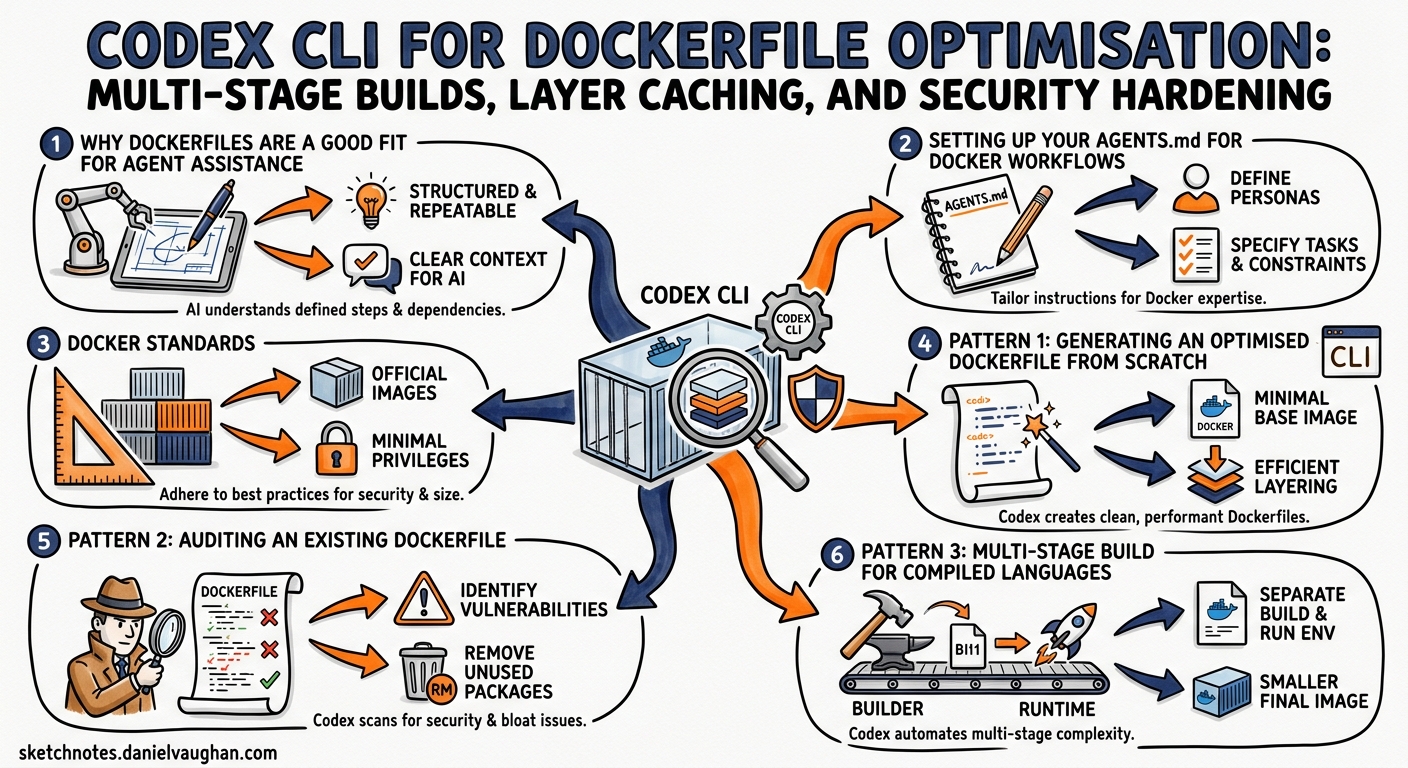
Dockerfiles look simple. They are deceptively hard to get right. A naively written Dockerfile for a Node.js application can produce a 1.2 GB image with a shell, package manager, build tools, and dozens of known CVEs baked in. A well-engineered one — multi-stage, distroless, non-root — compresses that to under 80 MB with zero critical vulnerabilities. Codex CLI, powered by GPT-5.5 1, is remarkably good at bridging that gap. This article covers practical patterns for using Codex CLI to write, audit, and harden Dockerfiles across your projects.
Why Dockerfiles Are a Good Fit for Agent Assistance
Dockerfiles sit at an intersection that plays to a coding agent’s strengths: they are declarative, well-documented, and the feedback loop is tight. Run docker build, observe the output, adjust. Codex CLI’s agent loop — read, propose, execute, verify — maps cleanly onto this cycle 2.
More importantly, Dockerfile best practices are stable and well-codified. The Sysdig top-21 checklist 3, Docker’s own security guidance 4, and Chainguard’s hardened-image methodology 5 have converged on a set of principles that GPT-5.5 has thoroughly internalised from training data. The result is that Codex generates solid Dockerfiles on first pass, typically including multi-stage builds and proper COPY ordering for layer caching without being prompted 6.
Setting Up Your AGENTS.md for Docker Workflows
Before asking Codex to touch your Dockerfiles, encode your organisation’s container standards in AGENTS.md at the repository root 7. This ensures every session respects your constraints:
## Docker Standards

- Base images: use Chainguard or distroless variants. Never use `:latest` tags.
- Pin base image digests in production Dockerfiles.
- All containers run as non-root (UID 1000+).
- No secrets in build args or environment variables.
- Multi-stage builds required for compiled languages.
- Final stage must not contain build toolchains, shells, or package managers.
- Layer ordering: OS deps → app deps → source code → build → copy artefacts.
With these constraints set, every Codex session in the repository will respect them without re-prompting 7.
Pattern 1: Generating an Optimised Dockerfile from Scratch
The simplest workflow is asking Codex to scaffold a Dockerfile for an existing project:
codex "Create an optimised production Dockerfile for this Node.js application. \
Use multi-stage builds, pin the base image digest, run as non-root, \
and ensure the final image is distroless."
Codex will inspect your package.json, identify the Node.js version, and produce something structurally similar to:
# Stage 1: Build
FROM node:22.15-slim@sha256:abc123... AS builder
WORKDIR /app
COPY package.json package-lock.json ./
RUN npm ci --production=false
COPY . .
RUN npm run build

# Stage 2: Production
FROM gcr.io/distroless/nodejs22-debian12@sha256:def456...
WORKDIR /app
COPY --from=builder /app/dist ./dist
COPY --from=builder /app/node_modules ./node_modules
COPY --from=builder /app/package.json ./
USER 1000
EXPOSE 3000
CMD ["dist/server.js"]
The key optimisations Codex applies automatically:
- Dependency layer caching —
package.jsonand lockfile are copied before source code, sonpm cionly re-runs when dependencies change 3. - Digest pinning — base images are pinned by SHA256 digest, not just tag, preventing silent upstream changes 5.
- Distroless final stage — no shell, no package manager, dramatically reduced attack surface 8.
- Non-root execution —
USER 1000prevents container breakout escalation 4.
Pattern 2: Auditing an Existing Dockerfile
For legacy projects, the audit-and-fix workflow is more valuable than starting fresh:
codex "Audit this Dockerfile for security issues, layer caching inefficiencies, \
and image size problems. Fix everything you find, explain each change."
Codex reads the Dockerfile, identifies anti-patterns, and applies fixes. Common issues it catches:
| Anti-Pattern | Fix Applied | Impact |
|---|---|---|
FROM ubuntu:latest |
Pin to specific digest | Reproducibility, security |
RUN apt-get update && apt-get install on separate lines |
Combine into single RUN |
Prevents stale cache |
COPY . . before dependency install |
Reorder to copy lockfile first | Cache hit rate |
| Running as root | Add USER directive |
CVE mitigation |
Secrets in ENV or ARG |
Use --mount=type=secret |
Credential safety |
No .dockerignore |
Generate .dockerignore |
Build context size |
Pattern 3: Multi-Stage Build for Compiled Languages
Multi-stage builds shine brightest with compiled languages. Here is a workflow for a Go service:
codex "Write a multi-stage Dockerfile for this Go service. \
The final image should be scratch-based with only the static binary. \
Include a health check endpoint on /healthz."
The resulting Dockerfile typically follows this architecture:
graph LR
    A["Stage 1: Builder<br/>golang:1.24-alpine"] --> B["go mod download"]
    B --> C["go build -ldflags '-s -w'<br/>CGO_ENABLED=0"]
    C --> D["Stage 2: Final<br/>scratch"]
    D --> E["COPY --from=builder<br/>/app/server /server"]
    E --> F["USER 65534<br/>ENTRYPOINT [\"/server\"]"]
The critical flags Codex includes for Go builds:
CGO_ENABLED=0for fully static binaries that run onscratch9-ldflags '-s -w'to strip debug symbols (typically 30-40% size reduction)HEALTHCHECKdirective pointing at the health endpoint
Pattern 4: Layer Cache Optimisation with a Skill
For teams that repeatedly optimise Dockerfiles, wrap the workflow in a Codex skill 10:
---
name: docker-optimise
description: >
  Audit and optimise Dockerfiles for image size, layer caching,
  security hardening, and build speed. Trigger when user mentions
  Dockerfile, container image, or Docker build optimisation.
---

## Steps

1. Read all Dockerfiles and .dockerignore files in the repository.
2. For each Dockerfile:
   - Check base image for known CVEs using `docker scout cves` if available.
   - Verify layer ordering follows: OS deps → app deps → source → build → copy.
   - Confirm multi-stage build separates build and runtime.
   - Verify non-root USER directive exists.
   - Check for secrets in ENV/ARG directives.
   - Verify base images are digest-pinned.
3. Generate a report table with findings and severity.
4. Apply fixes automatically, preserving existing functionality.
5. Run `docker build` to verify the fixed Dockerfile builds successfully.
Place this in .agents/skills/docker-optimise/SKILL.md and it activates automatically whenever you mention Docker optimisation in a Codex session 10.
Pattern 5: Security Hardening Pipeline
Combine Codex with Docker Scout or Trivy for a closed-loop security workflow:
codex "Run docker scout on the built image, analyse the CVE report, \
and fix any vulnerabilities by updating base images or removing \
unnecessary packages. Iterate until zero critical CVEs remain."
This leverages Codex’s agent loop to create an iterative hardening cycle:
flowchart TD
    A[Build Image] --> B[Scan with Docker Scout / Trivy]
    B --> C{Critical CVEs?}
    C -->|Yes| D[Codex analyses CVE report]
    D --> E[Update base image / remove packages]
    E --> A
    C -->|No| F[Image passes security gate]
    F --> G[Push to registry]
For CI integration, use codex exec in non-interactive mode 11:
codex exec --approval-mode full-auto \
  "Scan the Docker image with trivy and fix any HIGH or CRITICAL \
  vulnerabilities found. Output a summary of changes made." \
  | tee docker-security-report.txt
Chainguard and Distroless: Choosing Your Base
The base image choice is the single most impactful security decision in a Dockerfile 3. Codex understands the trade-offs between the major options:
| Base Image | Shell | Package Manager | Typical CVEs | Best For |
|---|---|---|---|---|
ubuntu:24.04 |
Yes | apt | 50-100+ | Development only |
alpine:3.21 |
Yes (ash) | apk | 5-20 | Small images, needs shell |
gcr.io/distroless/* |
No | No | 0-5 | Production, Google ecosystem |
cgr.dev/chainguard/* |
No | No | 0 (rebuilt daily) | Production, compliance-heavy 5 |
scratch |
No | No | 0 | Static binaries (Go, Rust) |
When prompting Codex, specify your preference explicitly:
codex "Migrate this Dockerfile from ubuntu:22.04 to a Chainguard base image. \
Preserve all functionality and test that the application starts correctly."
Integrating with Docker Model Runner
Docker Desktop 4.42+ includes Docker Model Runner, which provides local LLM inference via docker model commands 12. While this does not replace Codex CLI for Dockerfile engineering, it enables an interesting hybrid pattern: use Codex CLI (with GPT-5.5) for the heavy lifting of Dockerfile creation and optimisation, then use Docker Model Runner with a local model for quick, offline validation checks during the build cycle.
Common Pitfalls and How Codex Handles Them
Build context bloat. If you forget a .dockerignore, Codex will notice the build context size and generate one. It typically excludes node_modules, .git, dist, *.log, and IDE configuration directories.
Layer cache invalidation. Codex understands that COPY . . early in a Dockerfile invalidates the cache on every source change. It reorders instructions to maximise cache reuse.
Multi-platform builds. When asked, Codex generates docker buildx commands for multi-architecture images (linux/amd64,linux/arm64), including the correct --platform flags in both the Dockerfile FROM directives and the build command.
Secret leakage. Codex uses RUN --mount=type=secret,id=npm_token for private registry authentication rather than ARG NPM_TOKEN, preventing secrets from persisting in image layers 4.
Putting It All Together
A complete workflow for a team adopting Codex-driven Dockerfile management:
- Encode standards in
AGENTS.mdwith your base image policy, CVE thresholds, and layer ordering rules. - Create a
docker-optimiseskill in.agents/skills/for repeatable audits. - Run initial audit with
codex "Audit all Dockerfiles in this repository". - Integrate into CI with
codex execscanning on every PR that modifies a Dockerfile. - Iterate — Codex’s agent loop handles the build-scan-fix cycle until your images meet your security bar.
The combination of GPT-5.5’s understanding of container best practices, Codex CLI’s ability to execute docker build and scanning tools in its agent loop, and the AGENTS.md constraint system makes Dockerfile engineering one of the most productive Codex CLI workflows available today.
Citations
-
Introducing GPT-5.5 — OpenAI, April 2026. GPT-5.5 is OpenAI’s newest frontier model, recommended for complex coding tasks. ↩
-
Features — Codex CLI — OpenAI Developers. Describes the agent loop, tool execution, and iterative workflow. ↩
-
Top 21 Dockerfile Best Practices for Container Security — Sysdig. Comprehensive Dockerfile security and optimisation checklist. ↩ ↩2 ↩3
-
Docker Container Security Best Practices in 2026 — TechSaaS. Covers non-root execution, secret management, and runtime hardening. ↩ ↩2 ↩3
-
Getting Started with Distroless Container Images — Chainguard Academy. Chainguard’s approach to minimal, CVE-free base images. ↩ ↩2 ↩3
-
Claude Code vs Codex CLI vs Gemini CLI — 2026 Comparison — DeployHQ. Notes Codex produced solid Dockerfiles with multi-stage builds on first pass in ~45 seconds. ↩
-
Custom Instructions with AGENTS.md — OpenAI Developers. How AGENTS.md files provide persistent per-repository instructions to Codex. ↩ ↩2
-
How to Build Minimal Container Images with Distroless and Chainguard — OneUptime. Comparison of distroless and Chainguard approaches to minimal images. ↩
-
Docker Multi-Stage Builds: The Complete Guide for 2026 — DevToolbox. Covers Go static binary patterns, CGO_ENABLED=0, and scratch images. ↩
-
Agent Skills — Codex — OpenAI Developers. Skill creation, SKILL.md format, and discovery locations. ↩ ↩2
-
Best Practices — Codex — OpenAI Developers. Guidance on non-interactive
codex execusage in CI/CD pipelines. ↩ -
Docker Model Skills — Docker Docs. Docker Model Runner for local LLM inference alongside container workflows. ↩