OpenAI Symphony: Turning Linear Into a Control Plane for Autonomous Codex Agents
OpenAI Symphony: Turning Linear Into a Control Plane for Autonomous Codex Agents
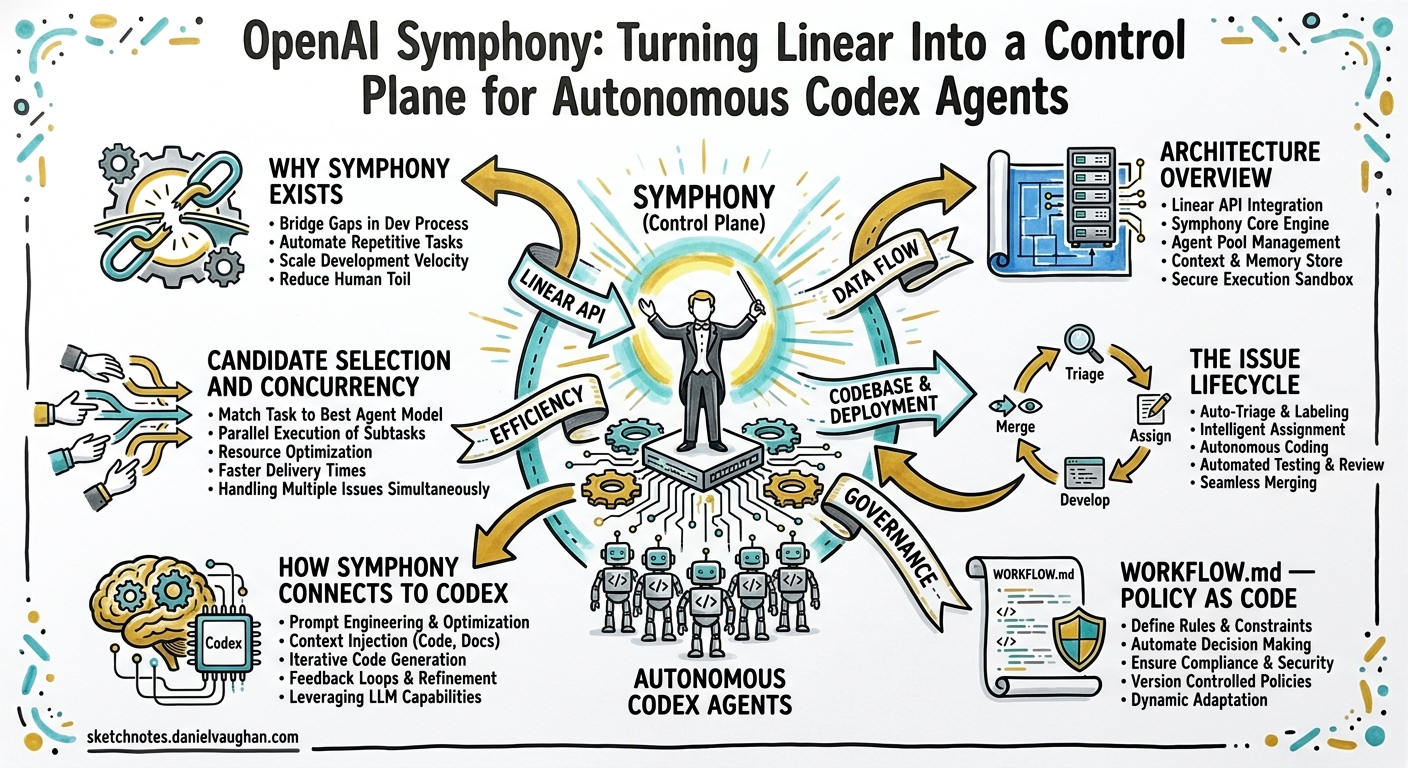
OpenAI today open-sourced Symphony, an orchestration specification that transforms a project-management board — currently Linear — into a fully autonomous control plane for Codex agents1. Each open issue spawns a dedicated agent workspace; agents code, test, open pull requests, and retire — all without a human sitting in the loop. Some internal OpenAI teams reported a 500% increase in landed pull requests during the first three weeks of use2.
This article unpacks Symphony’s architecture, walks through its configuration surface, maps its lifecycle to the Codex primitives you already know, and offers practical guidance on adopting it for your own teams.
Why Symphony Exists
Until now, Codex CLI workflows have been session-centric. Whether you run an interactive TUI session or script a one-shot codex exec, a human decides when work starts, what the agent works on, and when to stop. That model works brilliantly for pair programming and CI gates, but it does not scale when your backlog has fifty issues and you want agents working on all of them simultaneously.
Symphony decouples work from sessions1. Instead of a developer launching Codex per task, an orchestrator daemon polls Linear, claims eligible issues, provisions isolated workspaces, and launches Codex App Server subprocesses. The developer’s job shifts from supervising agents to managing work — triaging issues, reviewing pull requests, and refining the team’s WORKFLOW.md policy3.
As Sanchit Vir Gogia of Greyhound Research put it: “It schedules, tracks, retries, reconciles, persists state, and governs flow… it resembles a lightweight operating system for software delivery.”4
Architecture Overview
Symphony decomposes into six layers, each with a single responsibility5:
| Layer | Component | Responsibility |
|---|---|---|
| Policy | WORKFLOW.md |
Prompt template, team rules, tracker config |
| Configuration | YAML parser | Typed getters, env-var expansion, validation |
| Coordination | Orchestrator | Poll loop, concurrency control, retry logic |
| Execution | Workspace Manager + Agent Runner | Per-issue isolation, subprocess lifecycle |
| Integration | Issue Tracker Client | Linear GraphQL adapter, normalisation |
| Observability | Status Surface + Logging | Structured logs, optional HTTP dashboard |
flowchart TB
    subgraph Linear["Linear Issue Tracker"]
        ISSUES["Active Issues"]
    end

    subgraph Symphony["Symphony Orchestrator"]
        POLL["Poll Loop"]
        ORCH["Orchestrator State Machine"]
        RETRY["Retry Queue"]
    end

    subgraph Workspaces["Isolated Workspaces"]
        WS1["Workspace ABC-101"]
        WS2["Workspace ABC-102"]
        WS3["Workspace ABC-103"]
    end

    subgraph Agents["Codex App Server Instances"]
        A1["Agent 1"]
        A2["Agent 2"]
        A3["Agent 3"]
    end

    subgraph Outputs["Outputs"]
        PR["Pull Requests"]
        COMMENTS["Issue Comments"]
    end

    ISSUES -->|"GraphQL fetch"| POLL
    POLL --> ORCH
    ORCH -->|"dispatch"| WS1 & WS2 & WS3
    WS1 --> A1
    WS2 --> A2
    WS3 --> A3
    A1 & A2 & A3 --> PR
    A1 & A2 & A3 --> COMMENTS
    ORCH -->|"failed runs"| RETRY
    RETRY -->|"backoff elapsed"| ORCH
The Issue Lifecycle
Every issue in Linear passes through a state machine managed by the orchestrator1:
stateDiagram-v2
    [*] --> Idle: Issue created in Linear
    Idle --> Active: Claimed by orchestrator
    Active --> Retrying: Agent fails or times out
    Retrying --> Active: Backoff elapsed, retry
    Active --> Completed: Agent succeeds or max retries
    Retrying --> Completed: Max retries exceeded
    Completed --> [*]: Workspace cleaned up

    note right of Active
        Agent runs in isolated workspace.
        Turns capped by max_turns (default 20).
    end note

    note right of Retrying
        Exponential backoff up to
        max_retry_backoff_ms (default 5 min).
    end note
Crucially, Symphony never writes to Linear directly1. The Codex agent uses a linear_graphql tool exposed by the orchestrator to update issue states, post comments, and create branches — keeping the tracker API token out of the agent’s sandbox5.
WORKFLOW.md — Policy as Code
The entire behaviour of a Symphony deployment is governed by a single WORKFLOW.md file committed to your repository1. It combines YAML front matter for configuration with a Markdown body serving as the prompt template.
Minimal Example
---
tracker:
  kind: "linear"
  api_key: "$LINEAR_API_KEY"
  project_slug: "backend"
  active_states: ["Todo", "In Progress"]
  terminal_states: ["Done", "Cancelled"]

polling:
  interval_ms: 30000

workspace:
  root: "~/symphony-workspaces"
  hooks:
    after_create: |
      git clone --depth 1 "$REPO_URL" .
      npm ci

agent:
  max_concurrent_agents: 8
  max_turns: 25
  max_retry_backoff_ms: 300000
---

You are a senior engineer working on the {{issue.identifier}} issue.

**Title:** {{issue.title}}
**Description:** {{issue.description}}

Follow the project's AGENTS.md. Write tests before implementation.
Open a pull request when done. If tests fail, diagnose and fix.
Key Configuration Parameters
| Key | Default | Purpose |
|---|---|---|
polling.interval_ms |
30,000 | How often to poll Linear for new work |
agent.max_concurrent_agents |
10 | Global concurrency cap |
agent.max_turns |
20 | Maximum coding-agent turns per session |
agent.max_retry_backoff_ms |
300,000 | Ceiling for exponential retry backoff |
workspace.root |
System temp | Base directory for per-issue workspaces |
hooks.timeout_ms |
60,000 | Timeout for workspace hook scripts |
Environment variables are resolved at runtime via $VAR_NAME syntax, keeping secrets out of version control1.
How Symphony Connects to Codex
Symphony is built on top of the Codex App Server — the same JSON-RPC/Unix-socket backend that powers the Codex desktop app and IDE extensions6. Each agent subprocess launches in app-server mode, receiving the rendered prompt and operating within its isolated workspace directory.
This means every Codex primitive you already use — AGENTS.md, skills, MCP servers, hooks, sandbox policies, permission profiles — works inside a Symphony-managed agent without modification1. If your repository already has a robust AGENTS.md and config.toml, Symphony inherits that context automatically.
What the Agent Runner Does
- Creates or reuses a per-issue workspace directory
- Runs
after_createhook (typically: clone repo, install dependencies) - Runs
before_runhook (e.g.,git pull --rebase) - Renders the prompt template with issue data
- Launches
codexas an app-server subprocess withcwd = workspace_path - Streams turn events back to the orchestrator for metrics and status
- On exit, runs
after_runhook and classifies the result1
Candidate Selection and Concurrency
Not every open issue gets an agent immediately. The orchestrator applies a selection pipeline each poll tick1:
- Fetch all issues in
active_statesfrom Linear - Filter out issues already claimed, blocked by open dependencies, or in the completed set
- Sort by priority (lower number = higher priority), then creation date
- Dispatch up to the global concurrency limit
- Reconcile running sessions — if an issue moves to a terminal state in Linear, the agent is stopped
Per-state concurrency limits allow fine-grained control:
agent:
  max_concurrent_agents: 10
  max_concurrent_agents_by_state:
    "Todo": 3
    "In Progress": 7
This prevents the orchestrator from claiming more “Todo” issues than the team can review, whilst allowing “In Progress” work to saturate available capacity1.
Failure Handling and Retry
Symphony classifies failures into three categories1:
| Class | Examples | Recovery |
|---|---|---|
| Transient | Network glitch, temporary rate limit | Automatic retry with exponential backoff |
| Recoverable | Agent timeout, workspace permission error | Cleanup + retry with backoff |
| Terminal | Authentication failure, malformed WORKFLOW.md | Halt service; operator intervention required |
On retry, the prompt is augmented with context from the previous failure: “Previous attempt failed with: …”1. This gives the agent a chance to adjust its approach — a pattern familiar to anyone who has used scored improvement loops with codex exec.
Idempotency Guarantees
- Workspace creation is idempotent — re-dispatching the same issue reuses the existing directory1
- Run attempts include an
attemptcounter for replay safety - On restart, the retry queue is rebuilt from workspace state and tracker queries; no persistent scheduler database is required1
Observability
Symphony emits structured logs (JSON or key-value) with timestamp, component, operation, issue_id, session_id, and message1. The optional HTTP server (default port 9090) exposes:
| Endpoint | Purpose |
|---|---|
GET / |
Human-readable HTML dashboard |
GET /api/v1/status |
JSON snapshot of orchestrator state |
GET /api/v1/runs |
List of run attempts with token metrics |
GET /api/v1/issues |
Current candidates and eligibility |
POST /api/v1/dispatch |
Manual dispatch of a specific issue |
Token accounting — input_tokens, output_tokens, total_tokens — is tracked per session and aggregated across the service, integrating naturally with the cost-monitoring patterns described in earlier articles on cross-agent usage analytics1.
Reference Implementations
OpenAI’s reference implementation is written in Elixir, chosen for its concurrency primitives (OTP supervisors map cleanly to the orchestrator’s retry and lifecycle needs)2. However, to validate the specification’s language-agnosticism, Codex itself generated conforming implementations in TypeScript, Go, Rust, Java, and Python from the same SPEC.md2.
The repository is at github.com/openai/symphony, licensed under Apache 2.07. OpenAI has stated that Symphony is a reference implementation, not a maintained product — teams are expected to fork, study, or rebuild it to suit their own toolchains2.
Prerequisites: Harness Engineering First
Symphony is explicitly not a tool for greenfield projects without automated testing. The specification states that it assumes repositories with established “harness engineering practices” — agent-friendly structures, automated tests, and operational guardrails2.
In practical terms, before deploying Symphony you should have:
- AGENTS.md encoding your project conventions, test commands, and review policies
- Automated test suites that the agent can run after every change
- CI/CD pipelines that validate pull requests before merge
- Permission profiles configured in
config.tomlto constrain agent behaviour - PostToolUse hooks for linting, type-checking, or security scanning
If your team has already invested in the context engineering patterns covered in this knowledge base — AGENTS.md, skills, hooks, sandbox policies — Symphony is the natural next step. If not, start there first.
Security Considerations
Symphony introduces a broader trust surface than interactive Codex sessions. Key mitigations built into the specification1:
- Workspace isolation: Each agent’s subprocess launches with
cwd == workspace_path, and paths are sanitised to[A-Za-z0-9._-]characters only - Token indirection: The Linear API key never reaches agent subprocesses; agents use the
linear_graphqltool, which executes queries on their behalf5 - Hook timeouts: All workspace hooks enforce
timeout_ms(default 60 seconds) - No direct tracker writes: Symphony reads from Linear; agents write through the provided tool, maintaining an audit trail
⚠️ However, hook scripts run with the same privilege as the orchestrator process and are not sandboxed1. Treat WORKFLOW.md with the same care as any CI/CD pipeline definition — it is executable policy.
Practical Adoption Path
For teams considering Symphony, a phased rollout is advisable:
Phase 1 — Single-Issue Pilot
Set max_concurrent_agents: 1 and restrict active_states to a single label (e.g., "Symphony Pilot"). Observe agent behaviour, token spend, and PR quality on one issue at a time.
Phase 2 — Limited Concurrency
Increase to 3–5 concurrent agents. Introduce per-state limits. Establish a review cadence for agent-generated PRs.
Phase 3 — Team-Scale Deployment
Open the floodgates to your full backlog. Monitor the /api/v1/status dashboard for stalls, retry storms, and token budget consumption. Iterate on WORKFLOW.md prompts based on PR review feedback.
Phase 4 — Multi-Repository
Use workspace hooks to clone different repositories based on issue labels or project slugs. Consider running separate Symphony instances per repository for isolation.
What Symphony Is Not
It is worth being explicit about boundaries:
- Not a replacement for Codex CLI interactive sessions — pair programming, exploratory debugging, and design work still benefit from human-in-the-loop TUI sessions
- Not a maintained product — OpenAI treats it as a reference implementation2
- Not a guarantee of quality — as Forrester’s Biswajeet Mahapatra cautioned, organisations should measure “quality, delivery speed, developer experience, and business impact” rather than raw code volume4
- Not Linear-exclusive by design — the spec abstracts the tracker interface, though only a Linear adapter ships today1
Conclusion
Symphony represents a significant shift in how teams interact with coding agents. Rather than supervising individual sessions, engineering leads manage a backlog; the orchestrator handles the rest. Built on the same Codex App Server and configuration primitives that power the CLI and desktop app, it rewards teams that have already invested in harness engineering — AGENTS.md, hooks, skills, sandbox policies — by letting those investments compound across dozens of concurrent agent runs.
The specification is open, the reference implementation is Apache-licensed, and the design explicitly invites teams to rebuild it for their own stacks. If your team has a mature Codex CLI setup and a growing issue backlog, Symphony is worth a serious look.
Citations
-
OpenAI, “Symphony Service Specification (SPEC.md),” GitHub, 28 April 2026. https://github.com/openai/symphony/blob/main/SPEC.md ↩ ↩2 ↩3 ↩4 ↩5 ↩6 ↩7 ↩8 ↩9 ↩10 ↩11 ↩12 ↩13 ↩14 ↩15 ↩16 ↩17 ↩18 ↩19
-
OpenAI, “An open-source spec for Codex orchestration: Symphony,” OpenAI Blog, 28 April 2026. https://openai.com/index/open-source-codex-orchestration-symphony/ ↩ ↩2 ↩3 ↩4 ↩5 ↩6
-
Help Net Security, “OpenAI releases Symphony to automate Codex work through Linear,” 28 April 2026. https://www.helpnetsecurity.com/2026/04/28/openai-symphony-codex-orchestration-linear/ ↩
-
InfoWorld, “OpenAI’s Symphony spec pushes coding agents from prompts to orchestration,” 28 April 2026. https://www.infoworld.com/article/4164173/openais-symphony-spec-pushes-coding-agents-from-prompts-to-orchestration.html ↩ ↩2
-
AllThings.How, “Symphony: OpenAI’s open-source orchestrator that turns Linear into a Codex command center,” 28 April 2026. https://allthings.how/symphony-openais-open-source-orchestrator-that-turns-linear-into-a-codex-command-center/ ↩ ↩2 ↩3
-
OpenAI, “Codex Changelog,” OpenAI Developers, April 2026. https://developers.openai.com/codex/changelog ↩
-
OpenAI, “openai/symphony,” GitHub repository. https://github.com/openai/symphony ↩