Codex CLI and Docker Model Runner: Containerised Local Inference for Private, Cost-Free Coding Agents
Codex CLI and Docker Model Runner: Containerised Local Inference for Private, Cost-Free Coding Agents
Introduction
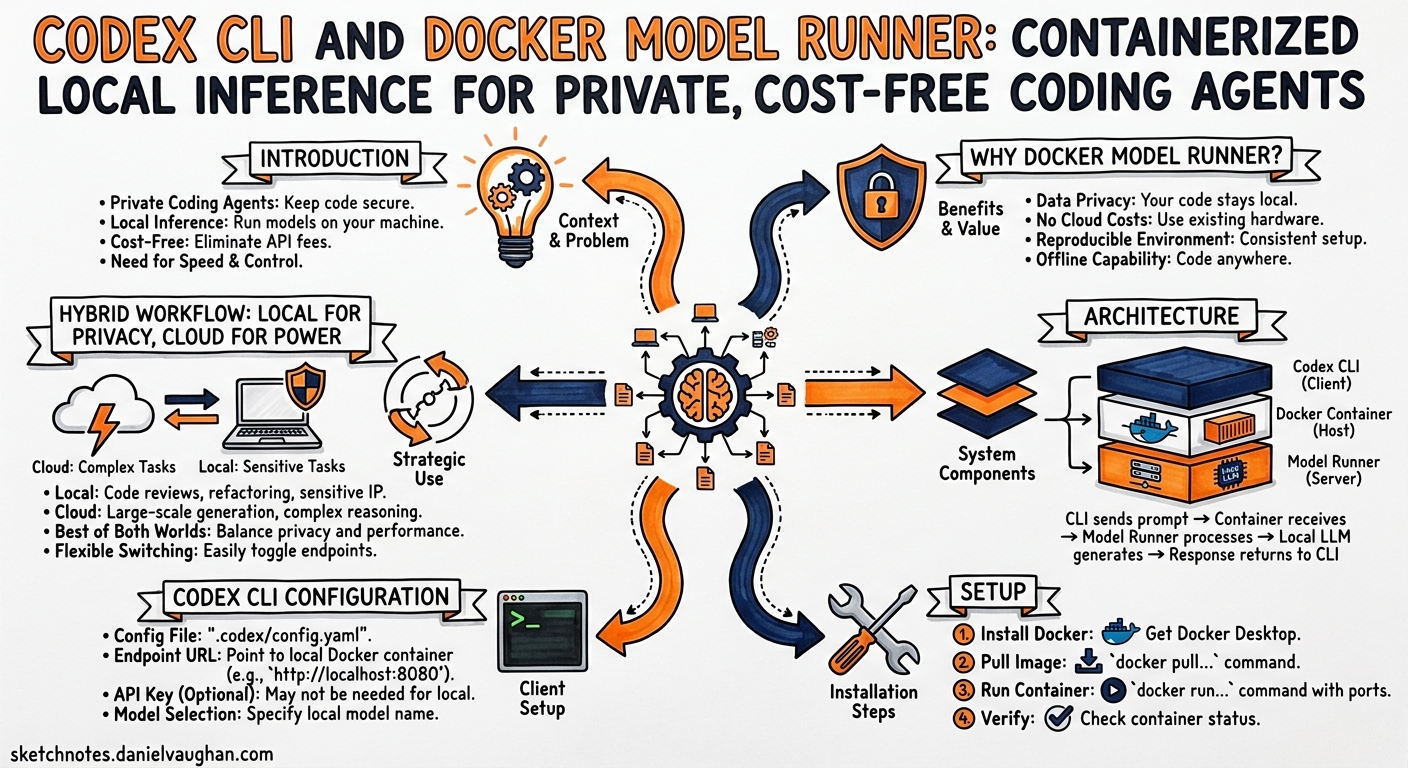
Running Codex CLI against the OpenAI API is the default path — and for good reason. GPT-5.5’s 400K context window, server-side compaction, and prompt caching make it formidable1. But not every task warrants an API call. Internal refactors on proprietary code, air-gapped enterprise environments, personal projects where you would rather not burn credits — these all benefit from local inference.
Docker Model Runner (DMR) provides a Docker-native route to local model serving that many developers overlook. Unlike Ollama, which runs as a standalone daemon, DMR is embedded in Docker Desktop and Docker Engine, manages models as OCI artifacts pulled from Docker Hub or Hugging Face, and exposes an OpenAI-compatible API that Codex CLI can target with a few lines of TOML2. It even ships first-party Codex CLI skills via docker model skills --codex3.
This article covers the end-to-end workflow: enabling DMR, pulling a coding model, configuring Codex CLI as a provider, installing Docker-aware skills, and building profiles for a hybrid local-plus-cloud workflow.
Why Docker Model Runner?
Developers already have Docker installed. DMR leverages that existing investment rather than introducing another daemon. Key differentiators:
| Feature | Docker Model Runner | Ollama |
|---|---|---|
| Installation | Built into Docker Desktop / docker-model-plugin for Engine2 |
Separate binary |
| Model format | OCI artifacts (GGUF, Safetensors)2 | Modelfile + GGUF |
| Registry | Docker Hub, any OCI registry, Hugging Face2 | ollama.com library |
| API endpoint | http://localhost:12434/engines/v1 (host) / http://model-runner.docker.internal/engines/v1 (container)4 |
http://localhost:11434/v1 |
| Inference engines | llama.cpp (all platforms), vLLM (NVIDIA Linux/WSL2), Diffusers (image gen)2 | llama.cpp only |
| GPU support | CUDA, ROCm, Vulkan, Apple Silicon2 | CUDA, ROCm, Apple Silicon |
| Coding agent skills | docker model skills --codex3 |
None shipped |
| Resource management | Models loaded on-demand, unloaded when idle2 | Models loaded on-demand |
The Vulkan backend is particularly notable — it means DMR runs on virtually any modern GPU, including integrated Intel and AMD graphics2.
Architecture
graph LR
    subgraph Developer Machine
        CLI["Codex CLI<br/>--profile docker-local"]
        DMR["Docker Model Runner<br/>localhost:12434"]
        Model["GPT-OSS-120B<br/>(GGUF, llama.cpp)"]
        Skills["~/.codex/skills/<br/>docker-model-runner/"]
    end

    CLI -->|"OpenAI-compatible<br/>POST /engines/v1/chat/completions"| DMR
    DMR -->|"llama.cpp inference"| Model
    Skills -.->|"Loaded at session start"| CLI

    subgraph Docker Hub
        OCI["ai/gpt-oss:120b<br/>(OCI Artifact)"]
    end

    OCI -->|"docker model pull"| Model
The flow is straightforward. DMR serves the model behind an OpenAI-compatible API on port 12434. Codex CLI connects to it via a custom model provider in config.toml. The DMR skills teach Codex how to manage models, troubleshoot inference, and optimise context windows for local hardware constraints.
Setup
1. Enable Docker Model Runner
Docker Desktop (macOS / Windows / Linux):
Navigate to Settings > AI and toggle Docker Model Runner on. For NVIDIA GPU users on Windows, also enable GPU-backed inference5.
Docker Engine (Linux headless):
# Ubuntu / Debian
sudo apt-get install docker-model-plugin

# RHEL / Fedora
sudo dnf install docker-model-plugin
Verify the installation:
docker model version
2. Pull a Coding Model
GPT-OSS models are optimised for Codex CLI’s tool-calling protocol. The 120B parameter variant is the recommended choice for local coding work; the 20B variant works on machines with 16 GB RAM6.
# Full-size model (requires ~80 GB RAM or GPU VRAM for Q4 quantisation)
docker model pull ai/gpt-oss:120b

# Smaller variant for constrained hardware
docker model pull ai/gpt-oss:20b
You can also pull third-party coding models from Hugging Face:
docker model pull hf.co/bartowski/Qwen3-Coder-Next-30B-GGUF
List downloaded models:
docker model ls
3. Test the Model
docker model run ai/gpt-oss:120b
This opens an interactive chat. Type a coding question to confirm inference works, then exit with Ctrl+C.
4. Install Codex CLI Skills
DMR ships skills that teach Codex how to interact with the Docker model ecosystem:
docker model skills --codex
This installs skill files to ~/.codex/skills/. You can install for multiple agents simultaneously:
docker model skills --codex --claude
Use --force to overwrite existing skills during upgrades3.
Codex CLI Configuration
Provider Definition
Add the DMR provider to ~/.codex/config.toml:
[model_providers.docker-runner]
name = "Docker Model Runner"
base_url = "http://localhost:12434/engines/v1"
No env_key is needed — DMR runs locally without authentication4.
Profiles
Create profiles for different local models and a hybrid workflow:
# Local full-size model for deep coding work
[profiles.docker-local]
model_provider = "docker-runner"
model = "ai/gpt-oss:120b"
reasoning_effort = "medium"

# Local small model for quick iterations
[profiles.docker-fast]
model_provider = "docker-runner"
model = "ai/gpt-oss:20b"
reasoning_effort = "low"

# Cloud model for complex, long-horizon tasks
[profiles.cloud]
model = "gpt-5.5"
reasoning_effort = "high"
Switch profiles from the command line:
# Private local inference
codex --profile docker-local "Refactor the auth module to use RBAC"

# Quick local iteration
codex --profile docker-fast "Add a unit test for the parseConfig function"

# Cloud power when needed
codex --profile cloud "Migrate the codebase from Express to Fastify"
The --oss Shortcut
If you only need Ollama or LM Studio, Codex CLI supports --oss as a convenience flag. For DMR, however, use the explicit profile approach above — the built-in --oss flag targets the reserved ollama and lmstudio provider IDs, not custom providers7.
Hybrid Workflow: Local for Privacy, Cloud for Power
The most practical pattern is not “local or cloud” but “both, depending on the task.” Context window size is the key decision variable.
flowchart TD
    A["New Codex Task"] --> B{"Sensitive code?"}
    B -->|Yes| C{"Task complexity?"}
    B -->|No| D["Cloud: --profile cloud<br/>GPT-5.5, 400K context"]
    C -->|"Simple (< 32K context)"| E["Local: --profile docker-fast<br/>GPT-OSS-20B"]
    C -->|"Medium (32K-64K)"| F["Local: --profile docker-local<br/>GPT-OSS-120B"]
    C -->|"Complex (> 64K)"| G["Local with compaction<br/>or accept trade-offs"]
Local models top out at 64K tokens of effective context for most hardware configurations8. Beyond that, you either accept degraded quality or switch to the cloud. The GPT-5.5 cloud path offers 400K tokens in Codex CLI and up to 1M via the API1.
Practical Decision Framework
| Scenario | Recommended Profile | Rationale |
|---|---|---|
| Proprietary algorithm refactoring | docker-local |
Code never leaves the machine |
| Quick test generation | docker-fast |
Low latency, no cost |
| Multi-file migration (> 20 files) | cloud |
Needs large context window |
| Air-gapped environment | docker-local |
No network required |
| Security audit with GPT-5.2-Codex | cloud (GPT-5.2-Codex) |
Purpose-built for cybersecurity9 |
| Weekend personal project | docker-fast |
Zero API spend |
Performance Tuning
Context Window Configuration
DMR defaults to conservative context sizes. For coding work, increase the context window in your Docker Compose configuration or via the DMR API:
# Check current context configuration
docker model inspect ai/gpt-oss:120b
Codex CLI recommends at least 64K tokens for effective agent operation8. On Apple Silicon Macs with 64 GB+ unified memory, the 120B model comfortably serves 64K context. On 32 GB machines, the 20B model is a better fit.
GPU Backend Selection
DMR automatically selects the best available backend, but you can influence the choice:
- Apple Silicon: Metal is used automatically — no configuration needed
- NVIDIA: Ensure CUDA drivers are installed; enable GPU inference in Docker Desktop settings
- AMD: ROCm support on Linux; requires compatible drivers
- Other GPUs: Vulkan backend provides broad compatibility2
Model Unloading
DMR unloads models from memory when idle, freeing resources for other work2. This is particularly useful when switching between local and cloud profiles — the model is not consuming VRAM while you are using the cloud path.
Security Considerations
CVE-2026-33990
In April 2026, Docker patched CVE-2026-33990, an SSRF vulnerability in DMR’s OCI Registry Client10. Update Docker Desktop to the latest version to ensure you have the fix. Run docker model version and verify you are on a patched release.
Network Isolation
DMR serves on localhost by default. The TCP endpoint (port 12434) is not exposed to external networks unless explicitly configured4. For additional hardening in enterprise environments:
# In Codex CLI config.toml — restrict to loopback
[model_providers.docker-runner]
name = "Docker Model Runner (local only)"
base_url = "http://127.0.0.1:12434/engines/v1"
Code Privacy
The primary motivation for local inference is keeping proprietary code off third-party servers. With DMR, inference happens entirely on your hardware. No telemetry is sent to Docker or model publishers during inference2.
Comparison with Ollama
Both Ollama and DMR serve as local model providers for Codex CLI. The choice depends on your existing toolchain:
Choose DMR when:
- Docker Desktop is already part of your workflow
- You want OCI-native model management (push/pull/tag like container images)
- You need vLLM for higher-throughput production-like inference
- You want first-party Codex CLI skills via
docker model skills3 - You need Vulkan GPU support for non-NVIDIA hardware
Choose Ollama when:
- You prefer a standalone, minimal installation
- You use
ollama launch codexfor zero-config startup8 - Your team has standardised on Ollama’s model library
- You want the built-in
--ossflag without custom provider configuration
Both can coexist. You can define providers for both and switch via profiles:
[model_providers.docker-runner]
name = "Docker Model Runner"
base_url = "http://localhost:12434/engines/v1"

[model_providers.local_ollama]
name = "Ollama"
base_url = "http://localhost:11434/v1"

[profiles.dmr]
model_provider = "docker-runner"
model = "ai/gpt-oss:120b"

[profiles.ollama]
model_provider = "local_ollama"
model = "gpt-oss:120b"
Limitations
- Context window ceiling: Local models are constrained by available RAM/VRAM. The practical ceiling is 64K tokens for most developer hardware, versus 400K for GPT-5.5 in the cloud18.
- No server-side compaction: Codex CLI’s compaction endpoint is an OpenAI Responses API feature. Local providers cannot use it, so long sessions degrade faster1.
- No prompt caching: OpenAI’s prompt caching is server-side. Local inference pays full compute cost on every request.
- Tool-calling fidelity: GPT-OSS models support Codex’s tool protocol, but community models (Qwen, Gemma, DeepSeek) may have lower tool-calling reliability, particularly with
apply_patch6. wire_apicompatibility: DMR serves the Chat Completions API. Codex CLI’s built-in OpenAI provider uses the Responses API (wire_api = "responses"). Custom providers default to"openai"(Chat Completions), which works with DMR but lacks some Responses API features7.
Putting It All Together
A complete ~/.codex/config.toml for a hybrid local-cloud workflow:
# Default: cloud model
model = "gpt-5.5"

# Docker Model Runner provider
[model_providers.docker-runner]
name = "Docker Model Runner"
base_url = "http://localhost:12434/engines/v1"

# Profiles
[profiles.private]
model_provider = "docker-runner"
model = "ai/gpt-oss:120b"
reasoning_effort = "medium"

[profiles.quick]
model_provider = "docker-runner"
model = "ai/gpt-oss:20b"
reasoning_effort = "low"

[profiles.deep]
model = "gpt-5.5"
reasoning_effort = "high"
Daily workflow:
# Morning: quick local test generation on private code
codex --profile quick "Generate edge-case tests for src/billing/"

# Afternoon: private refactoring session
codex --profile private "Extract the payment gateway into a separate module"

# Complex migration: switch to cloud
codex --profile deep "Migrate the REST API from v2 to v3 spec"
Citations
-
OpenAI, “Models — Codex,” April 2026. https://developers.openai.com/codex/models ↩ ↩2 ↩3 ↩4
-
Docker, “Docker Model Runner,” April 2026. https://docs.docker.com/ai/model-runner/ ↩ ↩2 ↩3 ↩4 ↩5 ↩6 ↩7 ↩8 ↩9 ↩10 ↩11
-
Docker, “docker model skills — Install Docker Model Runner skills for AI coding assistants,” April 2026. https://docs.docker.com/reference/cli/docker/model/skills/ ↩ ↩2 ↩3 ↩4
-
Docker, “DMR REST API,” April 2026. https://docs.docker.com/ai/model-runner/api-reference/ ↩ ↩2 ↩3
-
Docker, “Get started with DMR,” April 2026. https://docs.docker.com/ai/model-runner/get-started/ ↩
-
OpenAI, “Open-Weight Models for Codex CLI,” April 2026. https://developers.openai.com/codex/models ↩ ↩2
-
OpenAI, “Advanced Configuration — Codex,” April 2026. https://developers.openai.com/codex/config-advanced ↩ ↩2
-
Ollama, “Codex — Ollama Integration,” April 2026. https://docs.ollama.com/integrations/codex ↩ ↩2 ↩3 ↩4
-
OpenAI, “Introducing GPT-5.2-Codex,” 28 April 2026. https://openai.com/index/introducing-gpt-5-2-codex/ ↩
-
Docker, “Docker Desktop Release Notes — April 2026,” April 2026. https://releasebot.io/updates/docker/docker-desktop ↩