CSV Batch Processing with spawn_agents_on_csv: Map-Reduce Workflows for Codex CLI
CSV Batch Processing with spawn_agents_on_csv: Map-Reduce Workflows for Codex CLI
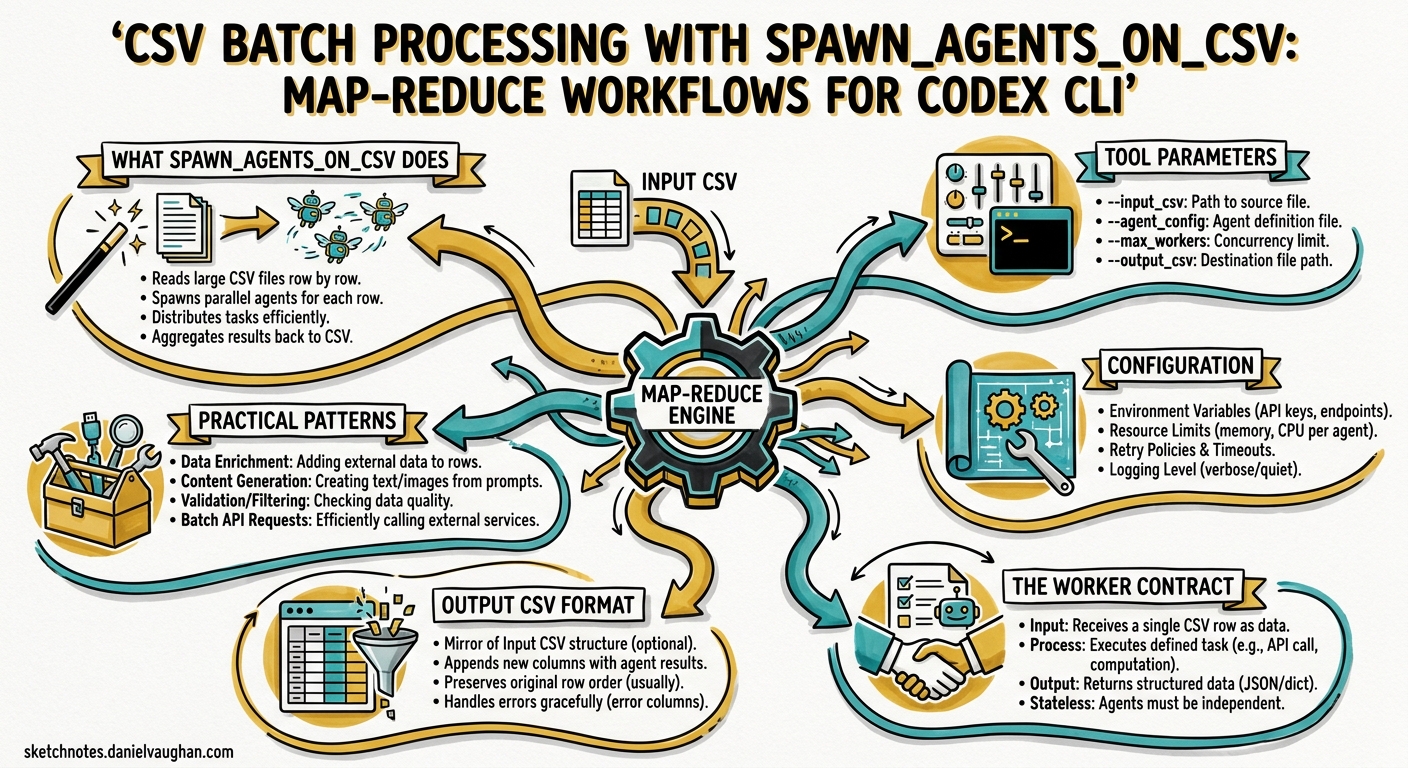
Codex CLI’s subagent system handles ad-hoc parallelism well — spawn a few workers, fan out, collect results. But when the unit of work is a row in a spreadsheet — a file to audit, a service to review, a migration target to validate — you need structured fan-out with deterministic result collection. That is precisely what spawn_agents_on_csv delivers: a map-reduce primitive built directly into the agent runtime 1.
This article covers the tool’s mechanics, configuration, practical patterns, and the pitfalls that trip up teams adopting it for the first time.
What spawn_agents_on_csv Does
The tool reads a CSV file, spawns one worker subagent per row, waits for all workers to complete (or time out), and exports the combined results to a new CSV 1. Each worker receives a templated instruction with column values substituted in, executes independently inside the Codex sandbox, and reports a structured JSON result back to the orchestrator.
flowchart LR
    A[Input CSV] --> B[spawn_agents_on_csv]
    B --> C1[Worker 1<br/>Row 1]
    B --> C2[Worker 2<br/>Row 2]
    B --> C3[Worker 3<br/>Row 3]
    B --> C4[Worker N<br/>Row N]
    C1 --> D[Result Collection]
    C2 --> D
    C3 --> D
    C4 --> D
    D --> E[Output CSV]
    D --> F[SQLite State]
The key distinction from ad-hoc subagent spawning: spawn_agents_on_csv handles concurrency throttling, timeout enforcement, progress reporting, and result merging automatically 2. You define the work; the runtime handles the plumbing.
Tool Parameters
The spawn_agents_on_csv tool accepts the following arguments 1:
| Parameter | Type | Required | Purpose |
|---|---|---|---|
csv_path |
string | Yes | Path to the source CSV file |
instruction |
string | Yes | Prompt template with {column_name} placeholders |
id_column |
string | No | Column to use as the stable item identifier |
output_schema |
object | No | JSON structure each worker must return |
output_csv_path |
string | No | Destination for merged results |
max_concurrency |
number | No | Override for concurrent worker count |
max_runtime_seconds |
number | No | Per-worker timeout override |
Column placeholders in the instruction string use curly-brace syntax — {path}, {owner}, {service_name} — and are substituted from the corresponding CSV header before each worker receives its prompt 3.
Configuration
Enabling Multi-Agent Features
The multi-agent collaboration tools — including spawn_agents_on_csv — are stable and enabled by default via features.multi_agent 4. If you are running an older configuration that explicitly disabled them, re-enable in ~/.codex/config.toml:
[features]
multi_agent = true
Global Agent Settings
The [agents] section in config.toml controls batch behaviour 4:
[agents]
max_threads = 16
max_depth = 1
job_max_runtime_seconds = 1800
max_threadscaps concurrent worker threads. The default is 6, though the original PR used 16 for batch workloads 2. For large CSV files (100+ rows), increasing this trades memory for throughput.max_depthprevents recursive delegation. Leave at 1 for batch jobs — workers should not spawn their own subagents.job_max_runtime_secondssets the default per-worker timeout. When unset,spawn_agents_on_csvfalls back to 1800 seconds (30 minutes) per worker 1. Override per-call with themax_runtime_secondsparameter for tighter or looser deadlines.
The Worker Contract
Every worker spawned by spawn_agents_on_csv must call report_agent_job_result exactly once 1. This is the mechanism by which results flow back to the orchestrator. A worker that exits without calling this function is marked as failed in the output CSV, with the status column set to an error state and last_error populated 1.
The result passed to report_agent_job_result should be a JSON object. If you specified an output_schema, the worker’s output is validated against it. Define schemas tightly — loose schemas invite inconsistent results across workers.
Output CSV Format
The exported CSV merges original row data with metadata columns 1:
| Column | Source | Description |
|---|---|---|
| (original columns) | Input CSV | Preserved verbatim |
job_id |
Runtime | Unique identifier for the batch run |
item_id |
Runtime | Row identifier (from id_column or auto-generated) |
status |
Runtime | Completion state (completed, failed, timed_out) |
last_error |
Runtime | Error message if the worker failed |
result_json |
Worker | The structured JSON output from report_agent_job_result |
Results are also persisted to SQLite for recovery and post-hoc analysis 2. The database location is controlled by the sqlite_home configuration key 4.
Practical Patterns
Pattern 1: Security Audit Across Services
Given a CSV of microservices with their repository paths and owners:
service,path,owner
auth-api,/repos/auth-api,platform-team
billing,/repos/billing,payments-team
notifications,/repos/notifications,comms-team
user-service,/repos/user-service,platform-team
Prompt Codex to batch-audit the lot:
Call spawn_agents_on_csv with:
- csv_path: /tmp/services.csv
- instruction: "Review the service at {path} owned by {owner}. Check for hardcoded secrets, missing input validation, and insecure dependencies. Return JSON with keys: service, risk_level, findings, and recommendations via report_agent_job_result."
- id_column: service
- output_csv_path: /tmp/security-audit-results.csv
- output_schema: {"service": "string", "risk_level": "string", "findings": "string", "recommendations": "string"}
Each worker reviews one service in isolation. The output CSV gives you a single-sheet security posture view across the entire portfolio.
Pattern 2: Migration Readiness Assessment
Before migrating from one framework version to another, assess each module:
module,path,framework_version
dashboard,src/dashboard,react-17
checkout,src/checkout,react-17
admin-panel,src/admin,react-17
analytics,src/analytics,react-17
Call spawn_agents_on_csv with:
- csv_path: /tmp/modules.csv
- instruction: "Analyse the module at {path} currently on {framework_version}. Identify breaking changes for React 19 migration. List deprecated API usage, class component count, and estimated migration effort in hours. Return JSON with keys: module, deprecated_apis, class_components, effort_hours, blocking_issues via report_agent_job_result."
- id_column: module
- output_csv_path: /tmp/migration-readiness.csv
- max_runtime_seconds: 900
The output CSV becomes your migration planning spreadsheet — no manual file-by-file review needed.
Pattern 3: Automated PR Review Batch
For teams processing a backlog of pull requests:
pr_number,repo,title
1234,frontend,Add dark mode toggle
1235,backend,Fix rate limiter race condition
1236,infra,Upgrade Terraform provider
1237,frontend,Refactor auth flow
Call spawn_agents_on_csv with:
- csv_path: /tmp/pr-backlog.csv
- instruction: "Review PR #{pr_number} in the {repo} repository titled '{title}'. Check for correctness, test coverage, and security issues. Return JSON with keys: pr_number, verdict (approve/request_changes/comment), risk, summary, and suggestions via report_agent_job_result."
- id_column: pr_number
- output_csv_path: /tmp/pr-reviews.csv
- max_concurrency: 8
Pattern 4: Non-Interactive CI Pipeline
For headless execution in CI, combine with codex exec 5:
codex exec \
  --full-auto \
  -c agents.max_threads=16 \
  - <<'PROMPT'
Call spawn_agents_on_csv with:
- csv_path: ./audit-targets.csv
- instruction: "Review {path} for OWASP Top 10 vulnerabilities. Return JSON with keys: path, vulnerabilities, severity, remediation via report_agent_job_result."
- output_csv_path: ./audit-results.csv
- max_runtime_seconds: 600
PROMPT
When run through codex exec, the tool displays a single-line progress update on stderr while the batch processes 2. This makes it straightforward to integrate into CI dashboards without log noise.
Progress Monitoring and Recovery
During execution, Codex shows a stable single-line progress bar with an ETA on stderr 2. This replaced the earlier multi-step workflow of running, checking status, and manually exporting results.
Because job state persists in SQLite 2, you get implicit recovery semantics. If a batch is interrupted, the SQLite database retains completed results — though the current implementation does not support automatic resume of partially completed batches. Export what you have and re-run the remaining rows.
Error Handling
Three failure modes to plan for:
-
Worker timeout: Workers exceeding
max_runtime_secondsare reaped by a stale-running reaper 2. The row is markedtimed_outin the output CSV. Reduce instruction scope or increase the timeout. -
Missing result report: Workers that exit without calling
report_agent_job_resultare marked as failed 1. This typically happens when the instruction is ambiguous and the worker completes the task conversationally rather than structurally. Be explicit: “Return JSON via report_agent_job_result”. -
Schema mismatch: If the worker’s JSON does not match the
output_schema, the result may be stored but flagged. Define schemas with the minimum viable fields to reduce friction.
Failed rows do not halt the batch — remaining workers continue processing 3. Inspect the status and last_error columns in the output CSV to identify and re-run failures.
Sizing and Cost Considerations
Each worker is a full subagent session with its own context window and API calls. For a 100-row CSV with max_concurrency set to 16, you will have 16 concurrent API sessions cycling through all 100 rows. Cost scales linearly with row count and instruction complexity.
Practical guidelines:
- Keep instructions narrow. A focused three-sentence instruction costs far less than a paragraph of exploratory analysis per row.
- Use cheaper models for bulk work. Define a worker agent in
.codex/agents/batch-worker.tomlwithmodel = "gpt-5.4-mini"for cost-sensitive batch jobs 6. - Set tight timeouts. Workers that wander burn tokens. A 300-second timeout for file reviews is usually sufficient.
- Validate CSV headers. Column names must exactly match
{placeholder}names in the instruction. The CSV parser validates header uniqueness and deduplicates IDs 2.
flowchart TD
    A[Define CSV with targets] --> B[Write narrow instruction template]
    B --> C{Cost-sensitive?}
    C -->|Yes| D[Set model to gpt-5.4-mini<br/>in worker agent TOML]
    C -->|No| E[Use default model]
    D --> F[Set max_concurrency<br/>and timeout]
    E --> F
    F --> G[Run spawn_agents_on_csv]
    G --> H[Monitor progress bar]
    H --> I[Inspect output CSV]
    I --> J{Failures?}
    J -->|Yes| K[Filter failed rows<br/>Re-run subset]
    J -->|No| L[Done]
    K --> G
Custom Worker Agent Definitions
For recurring batch workflows, define a dedicated worker agent in .codex/agents/batch-auditor.toml 6:
name = "batch-auditor"
description = "Lightweight auditor for CSV batch security reviews"
model = "gpt-5.4-mini"
model_reasoning_effort = "medium"

developer_instructions = """
You are a security auditor processing one target per invocation.
Always return structured JSON via report_agent_job_result.
Never spawn subagents. Never modify files.
Keep responses under 500 tokens.
"""
This keeps batch workers cheap, fast, and predictable. The developer_instructions reinforce the contract: structured output, no side effects, no recursion.
Limitations
- No automatic resume: Interrupted batches require manual re-run of remaining rows. SQLite retains completed results but does not checkpoint pending work for restart 2.
- No cross-worker communication: Workers are fully isolated. If row 5 depends on row 3’s output,
spawn_agents_on_csvis the wrong tool — use sequential subagent orchestration instead. - Sandbox inheritance: Workers inherit the parent session’s sandbox policy 1. If the parent runs in
full-automode, so do all workers. For batch jobs touching production-adjacent code, consider using a stricter sandbox profile.
Citations
-
OpenAI, “Subagents — Codex,” OpenAI Developers, 2026. https://developers.openai.com/codex/subagents ↩ ↩2 ↩3 ↩4 ↩5 ↩6 ↩7 ↩8 ↩9
-
daveaitel-openai, “Agent jobs (spawn_agents_on_csv) + progress UI,” GitHub Pull Request #10935, openai/codex, 2026. https://github.com/openai/codex/pull/10935 ↩ ↩2 ↩3 ↩4 ↩5 ↩6 ↩7 ↩8 ↩9
-
Morph, “Codex CLI Multi-Agent: Agent Roles, CSV Batch & Config Guide,” 2026. https://www.morphllm.com/codex-multi-agent ↩ ↩2
-
OpenAI, “Configuration Reference — Codex,” OpenAI Developers, 2026. https://developers.openai.com/codex/config-reference ↩ ↩2 ↩3
-
OpenAI, “Command line options — Codex CLI,” OpenAI Developers, 2026. https://developers.openai.com/codex/cli/reference ↩
-
OpenAI, “Subagents — Codex: Custom Agent Definitions,” OpenAI Developers, 2026. https://developers.openai.com/codex/subagents ↩ ↩2