Codex CLI for Data Analysis: ETL Pipelines, Tabular Workflows, and Reproducible Reports
Codex CLI for Data Analysis: ETL Pipelines, Tabular Workflows, and Reproducible Reports
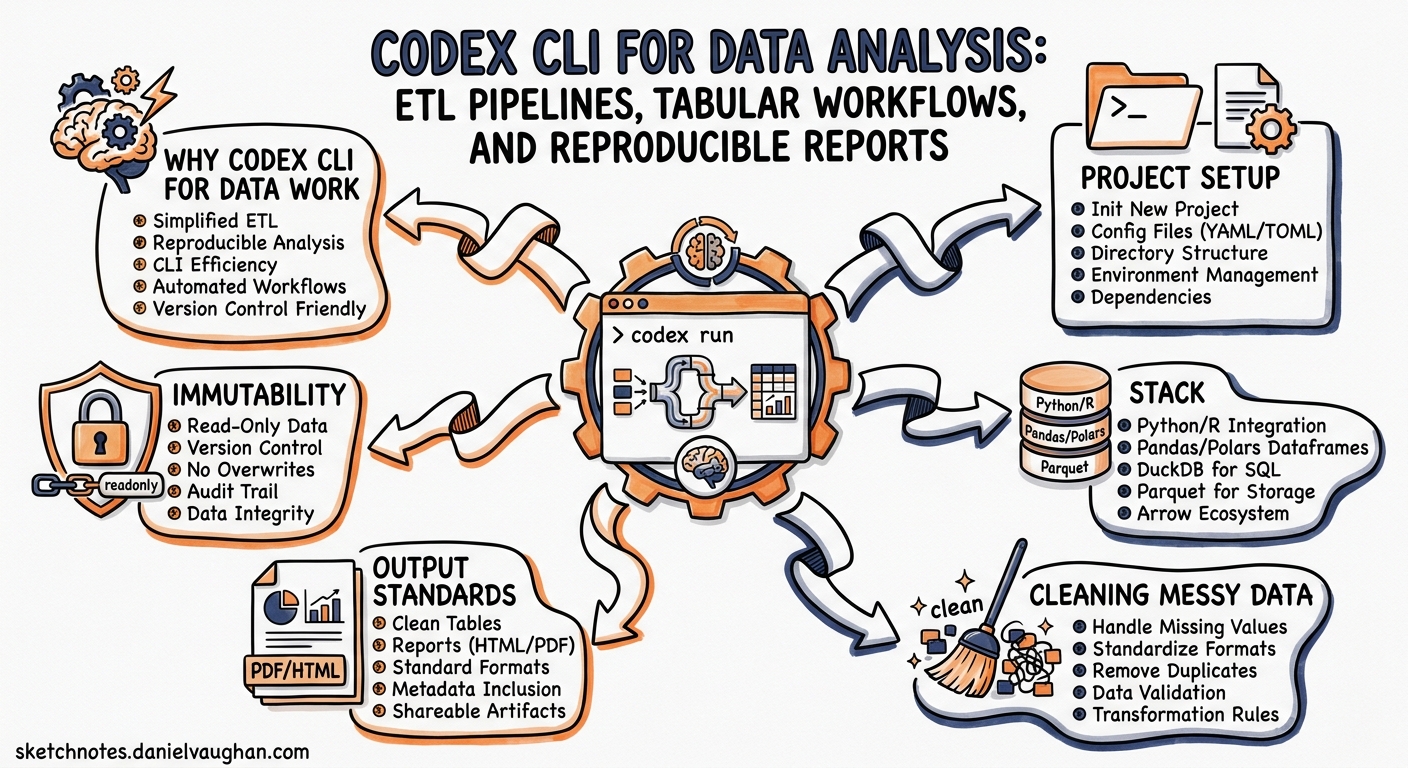
Most Codex CLI coverage focuses on software engineering workflows — refactoring, testing, CI/CD. But Codex is equally capable as a data engineering and analysis partner. This article covers practical patterns for using Codex CLI to clean messy datasets, build reproducible ETL pipelines, explore hypotheses, and ship stakeholder-ready reports — all from the terminal.
Why Codex CLI for Data Work
Traditional data work lives in Jupyter notebooks. The problem: notebooks accumulate state, resist version control, and break reproducibility. Codex CLI offers a different model. You describe the transformation you need in natural language, and the agent writes, executes, and iterates on scripts in your working directory — producing artefacts that are deterministic, diffable, and CI-friendly 1.
With GPT-5.5’s million-token context window 2, Codex can ingest substantial datasets alongside your AGENTS.md, data dictionaries, and schema definitions in a single session. The $spreadsheet and $jupyter-notebook skills give the agent specialised capabilities for tabular inspection and notebook-native deliverables 3.
Project Setup
Directory Conventions
A clean directory structure helps Codex navigate your data project without confusion. Encode these conventions in your AGENTS.md:
data-project/
  AGENTS.md
  data/
    raw/          # immutable source files
    processed/    # cleaned outputs
  scripts/        # reproducible transformation scripts
  reports/        # charts, summaries, final deliverables
  tests/          # data validation tests
AGENTS.md for Data Projects
Your AGENTS.md should encode data-specific guardrails:
# Data Analysis Rules

## Immutability
- NEVER overwrite files in `data/raw/`. Always write cleaned outputs to `data/processed/`.
- Every transformation must be a script in `scripts/`, never ad-hoc REPL commands.

## Stack
- Python 3.12+ with pandas, matplotlib, seaborn, statsmodels.
- Use vectorised pandas operations; never iterate rows with `.iterrows()`.
- Include type hints and docstrings on every function.

## Output Standards
- Charts: PNG at 300 DPI, saved to `reports/`.
- Data files: UTF-8 CSV with ISO 8601 dates and no BOM.
- Reports: Markdown with embedded chart references.
This aligns with OpenAI’s recommended approach of treating Codex “like a teammate with explicit context and a clear definition of done” 1.
Cleaning Messy Data
The simplest data workflow is the five-minute clean. Drag a messy CSV into Codex (or reference it by path) and describe the problems you see 4:
codex "Read data/raw/customer-export.csv. Problems I've spotted:
- Mixed date formats (DD/MM/YYYY and MM-DD-YYYY in the 'signup_date' column)
- Currency symbols embedded in the 'revenue' column
- Duplicate rows by 'customer_id'
- Summary rows mixed into the data (rows where customer_id is blank)
Clean it up: normalise dates to ISO 8601, strip currency symbols and cast
revenue to float, deduplicate by customer_id keeping the latest signup_date,
remove summary rows. Write the result to data/processed/customers-clean.csv
and print a quality summary."
Codex will write a Python script, execute it, and report back. Critically, because you specified an output path and did not say “edit the file in place”, the raw data stays untouched.
Validating the Clean
Follow up with a validation prompt or, better, have Codex write a reusable test:
codex "Write a pytest test in tests/test_customers.py that loads
data/processed/customers-clean.csv and asserts:
- No null customer_id values
- All signup_date values parse as valid ISO 8601
- revenue column is numeric with no negatives
- No duplicate customer_id rows
Run it."
Building ETL Pipelines
For recurring data work, single-shot cleaning is not enough. You need a reproducible pipeline. Codex can scaffold one from a high-level description 5:
codex "Build an ETL pipeline in scripts/etl_pipeline.py:

Extract: Read all CSV files from data/raw/ matching 'orders_*.csv'.
Transform:
  - Standardise column names to snake_case
  - Parse 'order_date' as datetime
  - Convert 'amount' from string with commas to float
  - Add a 'quarter' column derived from order_date
  - Remove rows where status is 'cancelled'
  - Aggregate total amount per customer per quarter
Load: Write results to data/processed/quarterly_revenue.csv

Include logging, a main() entry point, and a --dry-run flag that
prints the schema without writing files. Add a requirements.txt."
Automating with codex exec
Once you have a working pipeline, wire it into a cron job or GitHub Action using codex exec 6:
# One-shot validation in CI
codex exec "Run scripts/etl_pipeline.py --dry-run. If it exits 0,
run tests/test_pipeline.py. Report pass/fail."
You can also pipe data directly into codex exec for ad-hoc analysis 7:
curl -s https://api.example.com/sales/latest.csv \
  | codex exec "Read CSV from stdin. Summarise total revenue by region.
    Flag any region with >20% month-on-month decline." \
  > reports/sales-alert.md
The prompt-plus-stdin workflow (landed in v0.124) lets you pass a separate instruction on the command line whilst piping the data through stdin 7.
Exploratory Data Analysis
For exploratory work, Codex’s interactive mode shines. Start a session and iterate:
codex "Load data/processed/quarterly_revenue.csv. Describe the dataset:
row count, column types, summary statistics, missing values. Then:
1. Plot revenue distribution per quarter as a box plot
2. Identify the top 10 customers by total revenue
3. Test whether Q1 revenue differs significantly from Q3 (use a t-test)
Save charts to reports/ and print a narrative summary."
flowchart LR
    A[Raw Data] --> B[Clean & Validate]
    B --> C[Transform & Aggregate]
    C --> D{Explore}
    D --> E[Charts & Visualisation]
    D --> F[Statistical Tests]
    D --> G[Model Building]
    E --> H[Stakeholder Report]
    F --> H
    G --> H
Using Worktrees for Hypothesis Isolation
OpenAI’s official workflow guide recommends using separate Git worktrees for isolated hypothesis testing 3. This prevents one exploratory tangent from polluting another:
git worktree add ../analysis-churn -b hypothesis/churn-drivers
cd ../analysis-churn
codex "Investigate whether customers with fewer than 3 orders in Q1
are more likely to churn in Q2. Build a logistic regression model.
Save results to reports/churn-analysis.md."
Each worktree gets its own context, and you merge only the analyses that prove useful.
Modelling and Reporting
Once exploration identifies a question worth answering rigorously, Codex can build interpretable models:
codex "Using data/processed/quarterly_revenue.csv, build a linear
regression predicting Q4 revenue from Q1-Q3 trends per customer.
Use statsmodels OLS. Print the summary table. Flag any customers
where the residual exceeds 2 standard deviations — these are
anomalies worth investigating. Write the full analysis as a
Markdown report in reports/revenue-forecast.md with embedded
chart references."
The official recommendation is to “prefer interpretable baselines (OLS, logistic regression, decision trees) over black-box models” 3 — sensible advice when the output is a stakeholder report rather than a production ML system.
Packaging Reports
For final deliverables, use the $doc and $pdf skills 3:
codex "Convert reports/revenue-forecast.md to a polished PDF using
the $pdf skill. Include a title page, table of contents, and page
numbers."
Integrating with Data Tools via MCP
Codex’s MCP server support extends its reach beyond local files. Common data-oriented MCP integrations include:
| MCP Server | Purpose |
|---|---|
| PostgreSQL / MySQL | Query databases directly from Codex sessions 8 |
| BigQuery | Run analytical queries against cloud data warehouses |
| dbt | Trigger transformations and inspect lineage |
| Snowflake | Enterprise data warehouse access |
Configure them in your project’s .codex/config.toml:
[mcp_servers.postgres]
command = "npx"
args = ["-y", "@modelcontextprotocol/server-postgres"]
env = { DATABASE_URL = "postgresql://user:pass@localhost:5432/analytics" }
With a database MCP server connected, you can work across file-based and database-backed data in a single session:
codex "Query the orders table for all orders in April 2026.
Join with the customers table to get customer segments.
Compare the SQL results against data/raw/orders_april.csv
to check for discrepancies. Write a reconciliation report."
The Data Workflow Lifecycle
flowchart TD
    subgraph Interactive["Interactive Sessions"]
        A[Import & Profile] --> B[Clean & Validate]
        B --> C[Explore & Hypothesise]
        C --> D[Model & Report]
    end

    subgraph Automated["codex exec Automation"]
        E[Scheduled ETL] --> F[Validation Tests]
        F --> G[Alert on Failure]
    end

    D -->|Scripts mature| E
    B -->|Write tests| F

    style Interactive fill:#f0f7ff,stroke:#336
    style Automated fill:#f0fff0,stroke:#363
The natural progression: start interactively to understand the data, write scripts and tests as patterns solidify, then promote stable workflows to codex exec for unattended execution.
Practical Tips
-
Be specific about column names and types. Vague prompts produce vague transformations. Say “cast the ‘purchase_date’ column to datetime” rather than “fix the dates” 5.
-
Use
--dry-runpatterns. Have Codex add dry-run flags to scripts so you can verify schemas before writing files. -
Lower reasoning effort for simple transforms. Cleaning a CSV does not need maximum reasoning. Use
Alt+,in the TUI or--reasoning-effort lowwithcodex execto save tokens 9. -
Leverage prompt caching. Keep your AGENTS.md and data dictionary at the start of the context — the stable prefix enables cache hits that cut token costs by up to 90% 10.
-
Codex self-corrects. If a pandas script throws a
KeyErrororValueError, Codex reads the traceback and proposes a fix automatically 5. Let it iterate rather than rewriting your prompt. -
Never trust agent-generated analysis blindly. Spot-check row counts, edge cases, and statistical assumptions. Codex is a fast first-drafter, not a peer reviewer.
Conclusion
Codex CLI fills a gap between ad-hoc notebook exploration and production data engineering. By encoding conventions in AGENTS.md, using skills like $spreadsheet and $jupyter-notebook, and promoting stable scripts to codex exec automation, you get reproducible, version-controlled data workflows that a senior engineer can review as easily as any other pull request.
The key insight: treat data transformations as code, not as interactive sessions. Codex makes that transition nearly frictionless.
Citations
-
OpenAI, “Best practices – Codex”, https://developers.openai.com/codex/learn/best-practices ↩ ↩2
-
OpenAI, “Introducing GPT-5.5”, April 2026, https://openai.com/index/introducing-gpt-5-5/ ↩
-
OpenAI, “Analyze datasets and ship reports – Codex use cases”, https://developers.openai.com/codex/use-cases/datasets-and-reports ↩ ↩2 ↩3 ↩4
-
OpenAI, “Clean and prepare messy data – Codex use cases”, https://developers.openai.com/codex/use-cases/clean-messy-data ↩
-
DataCamp, “Codex CLI For Data Workflow Automation: A Complete Guide”, 2026, https://www.datacamp.com/tutorial/codex-cli-for-data-workflow-automation ↩ ↩2 ↩3
-
OpenAI, “Non-interactive mode – Codex”, https://developers.openai.com/codex/noninteractive ↩
-
OpenAI, “Codex CLI Changelog – v0.124.0”, April 2026, https://developers.openai.com/codex/changelog ↩ ↩2
-
OpenAI, “Model Context Protocol – Codex”, https://developers.openai.com/codex/mcp ↩
-
OpenAI, “Codex CLI Changelog – v0.124.0 (Quick reasoning controls)”, April 2026, https://developers.openai.com/codex/changelog ↩
-
OpenAI, “Prompt Caching 201”, https://developers.openai.com/cookbook/examples/prompt_caching_201 ↩