Codex CLI in the Post-Password Era: Advanced Account Security, Passkeys, and Hardening Your Authentication Chain
Codex CLI in the Post-Password Era: Advanced Account Security, Passkeys, and Hardening Your Authentication Chain
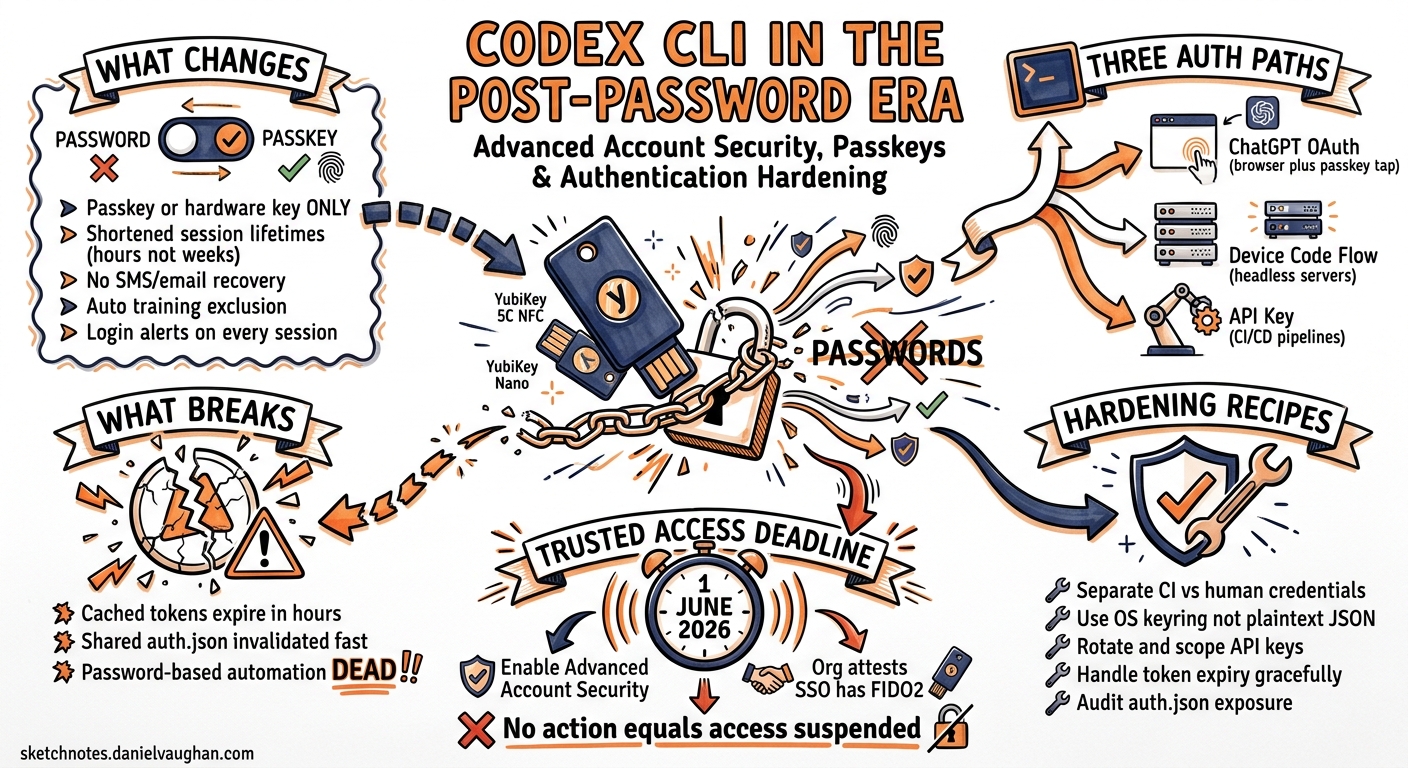
On 30 April 2026, OpenAI launched Advanced Account Security — a new opt-in hardening layer that disables password-based login entirely, mandates phishing-resistant credentials, shortens session lifetimes, and blocks legacy recovery methods1. Protection extends to every surface authenticated through that account, including Codex CLI sessions2. For members of the Trusted Access for Cyber programme, enrolment becomes mandatory from 1 June 20263.
This article examines how the announcement reshapes Codex CLI authentication workflows, what breaks if you enable it naively, and how to configure CLI access patterns — interactive, headless, and CI/CD — that satisfy the new security posture without sacrificing developer velocity.
What Advanced Account Security Actually Changes
The feature bundles five capabilities under a single toggle in ChatGPT account settings1:
| Control | Before | After |
|---|---|---|
| Sign-in method | Password, social login, passkey | Passkey or hardware security key only |
| Recovery | Email, SMS, support ticket | Backup passkey, recovery key — no support recovery |
| Session lifetime | Extended (weeks) | Shortened (hours) |
| Login alerts | None | Notification on every new session |
| Training exclusion | Manual opt-out | Automatic — conversations excluded from training |
The key implication: password-based codex login flows stop working immediately once Advanced Account Security is active on the underlying ChatGPT account1.
How Codex CLI Authentication Works Today
Codex CLI offers three authentication paths45:
flowchart TD
    A[codex login] --> B{Environment?}
    B -->|Desktop with browser| C[ChatGPT OAuth<br/>Browser redirect]
    B -->|Headless / Remote| D[Device Code Flow<br/>--device-auth]
    B -->|CI / Automation| E[API Key<br/>--with-api-key]
    C --> F[Token stored in<br/>~/.codex/auth.json]
    D --> F
    E --> G[Key read from stdin<br/>or OPENAI_API_KEY]
ChatGPT OAuth (Default)
Running codex login opens a browser window. After completing the OAuth flow (now requiring a passkey tap if Advanced Account Security is enabled), an access token is returned to the CLI and cached in ~/.codex/auth.json or the OS keyring5.
Device Code Flow (Beta)
For headless servers and remote development environments, codex login --device-auth prints a one-time code and verification URL. You authenticate on any device with a browser, then the CLI receives its token6. This flow works with passkeys — the browser-side authentication supports hardware keys and platform passkeys natively.
API Key Authentication
For CI/CD pipelines, printenv OPENAI_API_KEY | codex login --with-api-key reads a platform API key from stdin4. This path bypasses ChatGPT authentication entirely, using usage-based billing instead of subscription credits.
What Breaks (and What Doesn’t)
Scenarios That Continue Working
-
Interactive desktop sessions: The browser OAuth redirect works with passkeys. You tap your YubiKey or use a platform passkey (Touch ID, Windows Hello) during the browser-side flow. No CLI changes required.
-
Device code flow: Because authentication happens in a browser on a separate device, hardware keys work naturally. The CLI itself never handles the passkey — it only receives the resulting token6.
-
API key authentication: Completely unaffected. API keys authenticate against the OpenAI Platform, not ChatGPT accounts4.
Scenarios That Break
-
Cached tokens expiring faster: With shortened session lifetimes,
~/.codex/auth.jsontokens expire in hours rather than weeks. Long-running CI jobs using cached ChatGPT credentials will fail mid-session1. -
Shared credential files: Teams copying
auth.jsonbetween machines (a discouraged but common pattern) will find tokens invalidated more quickly and login alerts triggered5. -
Password-authenticated automation: Any scripted flow that previously relied on password entry during
codex loginbreaks entirely — passwords no longer work1.
Configuration for Each Environment
Interactive Development (Desktop)
For developers with Advanced Account Security enabled, configure the credential store to use the OS keyring for better security:
# ~/.codex/config.toml
cli_auth_credentials_store = "keyring"
The keyring integration stores tokens in macOS Keychain, Windows Credential Manager, or Linux Secret Service rather than a plaintext JSON file5.
Remote / Headless Servers
The device code flow is the recommended path for remote servers where no local browser exists:
# On the remote server
codex login --device-auth

# Output:
# Visit https://auth.openai.com/device and enter code: ABCD-1234
# Waiting for authorisation...
Complete the flow on your phone or laptop (tapping your YubiKey there), and the remote CLI receives its token6.
CI/CD Pipelines
For automation, use API key authentication exclusively. This avoids session lifetime issues entirely:
# GitHub Actions example
- name: Authenticate Codex CLI
  run: |
    echo "${{ secrets.OPENAI_API_KEY }}" | codex login --with-api-key
Note that API key authentication uses usage-based billing and does not provide access to ChatGPT-subscription-only features like fast mode or Codex-Spark47.
Enterprise SSO with Managed Configuration
For organisations using SSO, administrators can enforce authentication method and workspace through managed configuration8:
# requirements.toml (cloud-pushed or local)
forced_login_method = "chatgpt"
forced_chatgpt_workspace_id = "00000000-0000-0000-0000-000000000000"
If your SSO provider already enforces phishing-resistant authentication (FIDO2/WebAuthn), the organisation can attest this as an alternative to individual YubiKey enrolment for Trusted Access for Cyber compliance3.
The Trusted Access for Cyber Deadline
OpenAI’s Trusted Access for Cyber programme grants verified security researchers access to the most capable and permissive models — including unrestricted GPT-5.3-Codex for vulnerability research3. From 1 June 2026, individual programme members must either:
- Enable Advanced Account Security on their personal account, or
- Have their organisation attest that SSO already enforces phishing-resistant authentication3
flowchart LR
    A[Trusted Access<br/>Member] --> B{Before<br/>1 June 2026}
    B -->|Option 1| C[Enable Advanced<br/>Account Security]
    B -->|Option 2| D[Org attests SSO<br/>has FIDO2/WebAuthn]
    C --> E[Access retained]
    D --> E
    B -->|No action| F[Access suspended]
For Codex CLI users in this programme, this means ensuring your authentication workflow handles the passkey requirement before the deadline.
Practical Hardening Recommendations
1. Separate CI and Interactive Credentials
Never share authentication methods between humans and machines. Humans use ChatGPT OAuth with passkeys; machines use API keys:
# Developer config (~/.codex/config.toml)
cli_auth_credentials_store = "keyring"

# CI config (project .codex/config.toml)
# No auth config — API key passed via environment
2. Rotate and Scope API Keys
Create dedicated API keys for each CI/CD pipeline with appropriate spend limits. The OpenAI dashboard supports per-key budget caps7.
3. Handle Token Expiry Gracefully
With shorter sessions, long-running interactive sessions may require re-authentication. The CLI refreshes tokens automatically during active use5, but idle sessions exceeding the new shortened window will prompt for re-login.
4. Configure Custom CA Bundles for Corporate Proxies
Enterprises using TLS-intercepting proxies must configure the CA bundle for authentication traffic to reach OpenAI:
export CODEX_CA_CERTIFICATE=/path/to/corporate-ca.pem
5. Audit auth.json Exposure
Check whether ~/.codex/auth.json appears in any dotfile backups, shared volumes, or container images:
# Find exposed credential files
codex exec "search this repository and any Docker images for references to auth.json or OPENAI_API_KEY that might leak credentials"
The YubiKey Bundle
OpenAI partnered with Yubico to offer a branded 2-pack (YubiKey 5C NFC + YubiKey 5C Nano) for $68 — a meaningful discount over individual retail pricing of approximately $55 per key9. The bundle provides:
- 5C NFC: Primary key for mobile and laptop use (USB-C + NFC)
- 5C Nano: Backup key that remains inserted in a laptop USB-C port
Both keys store hardware-backed passkeys using the FIDO2/WebAuthn standard. They work with the Codex CLI OAuth flow because authentication happens in the browser, where WebAuthn is natively supported9.
What This Means for the Codex CLI Ecosystem
The shift to phishing-resistant authentication is part of a broader industry convergence. GitHub now requires 2FA for all contributors10, and OpenAI is following suit for its most sensitive access tiers. For Codex CLI practitioners, the practical impact is:
- Desktop users: Minimal friction — a passkey tap during
codex login - Remote developers: Device code flow continues working without changes
- CI/CD pipelines: Already using API keys should see zero impact
- Security researchers: Must act before 1 June 2026 or lose Trusted Access
The authentication chain is only as strong as its weakest link. Advanced Account Security removes the weakest links — passwords and SMS recovery — leaving a credential surface that hardware keys and platform passkeys can genuinely protect.
Citations
-
OpenAI, “Introducing Advanced Account Security,” 30 April 2026. https://openai.com/index/advanced-account-security/ ↩ ↩2 ↩3 ↩4 ↩5
-
RMN Digital, “OpenAI Launches ‘Advanced Account Security’ to Shield High-Risk ChatGPT and Codex Users,” May 2026. https://www.rmndigital.com/openai-launches-advanced-account-security-to-shield-high-risk-chatgpt-and-codex-users/ ↩
-
OpenAI, “Trusted access for the next era of cyber defense,” 2026. https://openai.com/index/scaling-trusted-access-for-cyber-defense/ ↩ ↩2 ↩3 ↩4
-
OpenAI Developers, “Command line options – Codex CLI.” https://developers.openai.com/codex/cli/reference ↩ ↩2 ↩3 ↩4
-
OpenAI Developers, “Authentication – Codex.” https://developers.openai.com/codex/auth ↩ ↩2 ↩3 ↩4 ↩5
-
GitHub Issue #9253, “Codex CLI cannot log in on headless environments unless Device Code auth is enabled by workspace admin.” https://github.com/openai/codex/issues/9253 ↩ ↩2 ↩3
-
OpenAI Developers, “Pricing – Codex.” https://developers.openai.com/codex/pricing ↩ ↩2
-
OpenAI Developers, “Admin Setup – Codex.” https://developers.openai.com/codex/enterprise/ ↩
-
Yubico/OpenAI, “OpenAI and Yubico Partner to Bring Custom Phishing-Resistant YubiKeys to OpenAI Users,” 30 April 2026. https://www.yubico.com/press-releases/openai-and-yubico-partner-to-bring-custom-phishing-resistant-yubikeys-to-openai-users/ ↩ ↩2
-
GitHub Blog, “Raising the bar for software security: GitHub 2FA begins March 13,” 2023. https://github.blog/news-insights/product-news/raising-the-bar-for-software-security-github-2fa-begins-march-13/ ↩