Codex CLI Non-Interactive Pipelines: Production Automation with exec, resume, and Structured Output
Codex CLI Non-Interactive Pipelines: Production Automation with exec, resume, and Structured Output
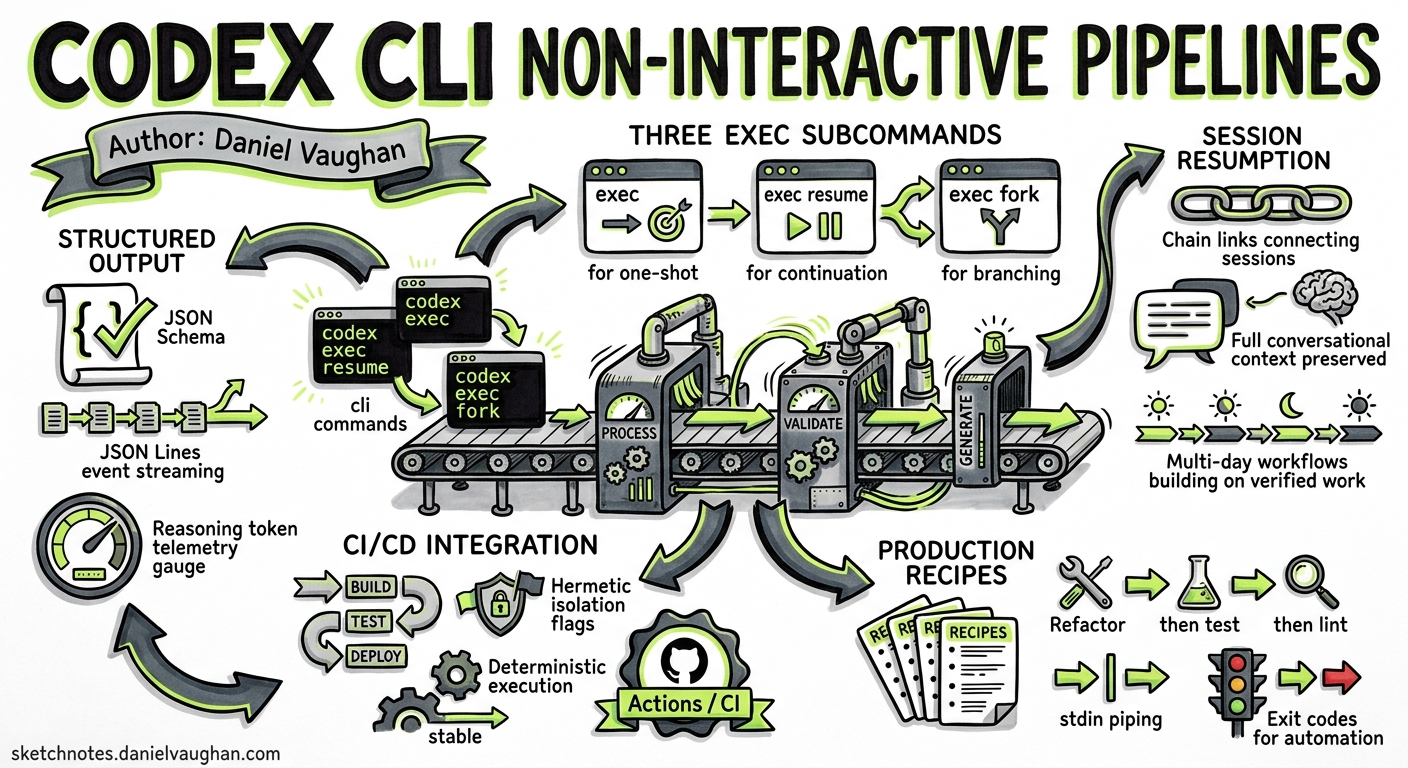
The interactive TUI gets all the attention, but codex exec is where Codex CLI earns its keep in production. As of May 2026, the non-interactive surface has matured into a proper pipeline primitive: JSON Schema–validated output, session resumption for multi-stage workflows, JSON Lines event streaming with reasoning-token telemetry, and hermetic isolation flags that make CI integration deterministic1. This article covers the complete codex exec surface as it stands today, with production-ready recipes you can deploy immediately.
The Three exec Subcommands
Codex CLI exposes three non-interactive entry points, each targeting a distinct automation pattern12:
flowchart LR
    A[codex exec] -->|one-shot task| B[Single prompt → stdout]
    C[codex exec resume] -->|continue previous| D[Append to existing thread]
    E[codex exec fork] -->|branch from session| F[New thread, inherited context]
codex exec — One-Shot Execution
The workhorse. Accepts a prompt (or - for stdin), streams progress to stderr, and writes the final agent message to stdout1. The process exits once the agent loop completes.
codex exec "Refactor src/auth.ts to use the new OAuth2 client"
codex exec resume — Multi-Stage Continuation
Reopens a previous session with full conversational context intact. Two targeting modes12:
# Resume the most recent session
codex exec resume --last "Now write integration tests for the changes"

# Resume a specific session by ID
codex exec resume 7f9f9a2e-1b3c-4c7a "Run the linter and fix any issues"
The key property: the model sees the complete history of the prior session, including file reads, tool calls, and reasoning — enabling multi-day workflows where each stage builds on verified previous work2.
codex exec fork — Branched Exploration
Creates a new session inheriting context from an existing one without mutating the original transcript3. Useful when you want to explore alternative approaches in CI without corrupting the main execution thread.
Structured Output with --output-schema
For automation workflows that consume agent output programmatically, the --output-schema flag constrains the final response to a JSON Schema14:
codex exec "Analyse src/ for security vulnerabilities" \
  --output-schema ./schemas/vuln-report.json \
  -o ./reports/vulnerabilities.json
The schema file follows standard JSON Schema Draft 2020-12:
{
  "$schema": "https://json-schema.org/draft/2020-12/schema",
  "type": "object",
  "properties": {
    "vulnerabilities": {
      "type": "array",
      "items": {
        "type": "object",
        "properties": {
          "file": { "type": "string" },
          "line": { "type": "integer" },
          "severity": { "enum": ["critical", "high", "medium", "low"] },
          "description": { "type": "string" },
          "suggested_fix": { "type": "string" }
        },
        "required": ["file", "line", "severity", "description"]
      }
    },
    "summary": { "type": "string" },
    "risk_score": { "type": "number", "minimum": 0, "maximum": 10 }
  },
  "required": ["vulnerabilities", "summary", "risk_score"],
  "additionalProperties": false
}
The model’s final turn is forced to conform. If it cannot satisfy the schema, the response will indicate failure rather than producing malformed output4. Combined with -o, this gives you a file-on-disk guarantee for downstream pipeline stages.
JSON Lines Event Stream
The --json flag transforms stdout into a machine-readable event stream1. Each line is a self-contained JSON object, enabling real-time processing without buffering the entire response:
codex exec --json "Generate release notes for v2.4" | while IFS= read -r line; do
  type=$(echo "$line" | jq -r '.type')
  case "$type" in
    turn.completed)
      echo "$line" | jq -r '.usage'
      ;;
    item.completed)
      echo "$line" | jq -r '.item.content // empty'
      ;;
  esac
done
Token Telemetry in the Event Stream
Each turn.completed event includes a usage object with reasoning-token granularity15:
{
  "type": "turn.completed",
  "usage": {
    "input_tokens": 14230,
    "cached_input_tokens": 11800,
    "output_tokens": 2150,
    "reasoning_output_tokens": 890
  }
}
The reasoning_output_tokens field — added in v0.125 — reports how many tokens the model spent on internal chain-of-thought5. This is critical for cost attribution: reasoning tokens are billed at the same rate as output tokens but invisible in the final response text.
Hermetic Isolation Flags
Production pipelines demand reproducibility. These flags strip non-determinism1:
| Flag | Effect |
|---|---|
--ephemeral |
Skips persisting session rollout files to disk |
--ignore-user-config |
Ignores $CODEX_HOME/config.toml |
--ignore-rules |
Skips user and project execution policy rules |
--skip-git-repo-check |
Runs without requiring a Git repository |
--sandbox read-only |
Default; prevents all file mutations |
--sandbox workspace-write |
Allows writes within the working directory |
A fully hermetic CI invocation:
CODEX_API_KEY="$VAULT_SECRET" codex exec \
  --ephemeral \
  --ignore-user-config \
  --sandbox workspace-write \
  -c model=gpt-5.4-mini \
  -c model_reasoning_effort=medium \
  "Run the test suite and fix any failures"
Production Pipeline Patterns
Pattern 1: Multi-Stage Analysis Pipeline
Chain exec and exec resume for workflows that need verified intermediate results:
#!/usr/bin/env bash
set -euo pipefail

# Stage 1: Identify deprecated API usages
codex exec --json \
  --output-schema ./schemas/deprecated-apis.json \
  -o ./stage1-results.json \
  "Identify all deprecated API usages in src/"

# Stage 2: Generate replacement stubs (using previous context)
codex exec resume --last \
  --output-schema ./schemas/migration-plan.json \
  -o ./stage2-plan.json \
  "Generate replacement stubs for everything flagged"

# Stage 3: Apply the migration
codex exec resume --last \
  --sandbox workspace-write \
  "Apply the migration plan. Run tests after each file change."
Pattern 2: Stdin-Piped Triage
Feed command output directly into Codex for contextual analysis1:
# Pipe test failures for diagnosis
npm test 2>&1 | codex exec \
  --output-schema ./schemas/test-diagnosis.json \
  -o ./diagnosis.json \
  "Summarise failures, identify root causes, propose fixes"

# Pipe git diff for review
git diff main...HEAD | codex exec \
  "Review this diff for bugs, security issues, and style violations"
Pattern 3: Scheduled Report Generation
Combine with cron or GitHub Actions for periodic intelligence6:
# .github/workflows/weekly-debt-report.yml
name: Technical Debt Report
on:
  schedule:
    - cron: '0 6 * * 1'  # Every Monday at 06:00

jobs:
  analyse:
    runs-on: ubuntu-latest
    steps:
      - uses: actions/checkout@v4
      - name: Generate debt report
        env:
          CODEX_API_KEY: ${{ secrets.CODEX_API_KEY }}
        run: |
          npx -y codex exec \
            --ephemeral \
            --ignore-user-config \
            --output-schema ./schemas/debt-report.json \
            -o ./reports/debt-$(date +%Y-%m-%d).json \
            "Analyse the codebase for technical debt. \
             Focus on: dependency staleness, test coverage gaps, \
             TODO/FIXME density, and circular dependencies."
      - uses: actions/upload-artifact@v4
        with:
          name: debt-report
          path: ./reports/
Pattern 4: Parallel Exec with GNU Parallel
Run independent analyses concurrently for large codebases:
find src/ -name "*.ts" -type f | \
  parallel -j4 --bar \
  'codex exec --ephemeral --sandbox read-only \
    --output-schema ./schemas/file-review.json \
    -o ./reviews/{/.}.json \
    "Review {} for type safety issues and missing error handling"'
Configuration Overrides for exec
The -c key=value flag overrides any config.toml key for a single invocation17:
codex exec \
  -c model=gpt-5.3-codex \
  -c model_reasoning_effort=high \
  -c tool_output_token_limit=16000 \
  "Implement the feature described in SPEC.md"
Common overrides for CI:
# Equivalent config.toml section (for reference)
model = "gpt-5.4-mini"              # Cost-efficient for CI
model_reasoning_effort = "medium"   # Balance speed vs quality
model_verbosity = "low"             # Reduce output noise
tool_output_token_limit = 8000      # Cap tool output injection
Authentication in CI
API key authentication is the recommended path for non-interactive environments18:
# Set as environment variable (preferred)
export CODEX_API_KEY="sk-proj-..."

# Or inline for single invocations
CODEX_API_KEY="$SECRET" codex exec "task"
For Amazon Bedrock–backed deployments, set the standard AWS credential chain instead9:
export AWS_ACCESS_KEY_ID="..."
export AWS_SECRET_ACCESS_KEY="..."
export AWS_REGION="us-east-1"

codex exec \
  -c 'providers.bedrock.base_url = "https://bedrock-runtime.us-east-1.amazonaws.com"' \
  -c 'providers.bedrock.model = "anthropic.claude-v3"' \
  "Analyse the deployment configuration"
Exit Codes and Error Handling
codex exec follows Unix conventions1:
- 0 — Task completed successfully
- Non-zero — Failure (model error, timeout, auth failure, required MCP server unavailable)
For pipelines, always check exit codes:
if ! codex exec --sandbox workspace-write "Fix the failing tests"; then
  echo "Agent could not resolve failures" >&2
  exit 1
fi
Performance Considerations
Prompt Caching
The cached_input_tokens field in telemetry reveals how much context the API cached between turns510. For exec resume workflows, prompt caching can reduce input costs by 80%+ on subsequent stages because the prior conversation history hits the cache.
Ephemeral Mode
Use --ephemeral in CI to avoid writing rollout JSONL files to disk1. This eliminates I/O overhead and prevents session accumulation on ephemeral runners.
Model Selection
For CI tasks, gpt-5.4-mini offers the best cost/performance ratio for straightforward operations (linting, test generation, structured extraction). Reserve gpt-5.5 or gpt-5.3-codex for complex reasoning tasks like architecture analysis or multi-file refactoring11.
When to Use exec vs the TUI
flowchart TD
    A{Is the task<br/>repeatable?} -->|Yes| B{Needs human<br/>judgement?}
    A -->|No, exploratory| C[Use TUI]
    B -->|No| D[codex exec]
    B -->|Yes, at stages| E[exec + resume<br/>with manual review]
    D --> F{Multiple stages?}
    F -->|Yes| G[exec resume chain]
    F -->|No| H[Single exec invocation]
Summary
The codex exec surface in May 2026 provides everything needed for production automation: schema-validated output for downstream consumption, session resumption for multi-stage workflows, reasoning-token telemetry for cost attribution, and hermetic isolation for CI reproducibility. Combined with standard Unix patterns (pipes, parallel, cron), it transforms Codex from a developer productivity tool into a programmable code intelligence layer.
Citations
-
OpenAI, “Non-interactive mode – Codex,” OpenAI Developers, 2026. https://developers.openai.com/codex/noninteractive ↩ ↩2 ↩3 ↩4 ↩5 ↩6 ↩7 ↩8 ↩9 ↩10 ↩11 ↩12 ↩13
-
OpenAI, “Command line options – Codex CLI,” OpenAI Developers, 2026. https://developers.openai.com/codex/cli/reference ↩ ↩2 ↩3
-
GitHub Issue #17568, “exec: add fork subcommand for non-interactive session forking,” openai/codex, April 2026. https://github.com/openai/codex/issues/17568 ↩
-
GitHub Issue #14343, “Add –output-schema support to codex exec resume,” openai/codex, 2026. https://github.com/openai/codex/issues/14343 ↩ ↩2
-
OpenAI, “Changelog – Codex,” OpenAI Developers, May 2026. https://developers.openai.com/codex/changelog ↩ ↩2 ↩3
-
OpenAI, “Best practices – Codex,” OpenAI Developers, 2026. https://developers.openai.com/codex/learn/best-practices ↩
-
OpenAI, “Configuration Reference – Codex,” OpenAI Developers, 2026. https://developers.openai.com/codex/config-reference ↩
-
OpenAI, “Features – Codex CLI,” OpenAI Developers, 2026. https://developers.openai.com/codex/cli/features ↩
-
OpenAI, “OpenAI on AWS – Codex and Amazon Bedrock,” OpenAI Blog, April 2026. https://openai.com/index/openai-on-aws/ ↩
-
OpenAI, “Codex Prompting Guide,” OpenAI Cookbook, 2026. https://developers.openai.com/cookbook/examples/gpt-5/codex_prompting_guide ↩
-
OpenAI, “Models – GPT-5.3-Codex,” OpenAI API Documentation, 2026. https://developers.openai.com/api/docs/models/gpt-5.3-codex ↩