MCP Parallel Tool Calls in Codex CLI: Unlocking Concurrent Execution with supports_parallel_tool_calls
MCP Parallel Tool Calls in Codex CLI: Unlocking Concurrent Execution with supports_parallel_tool_calls
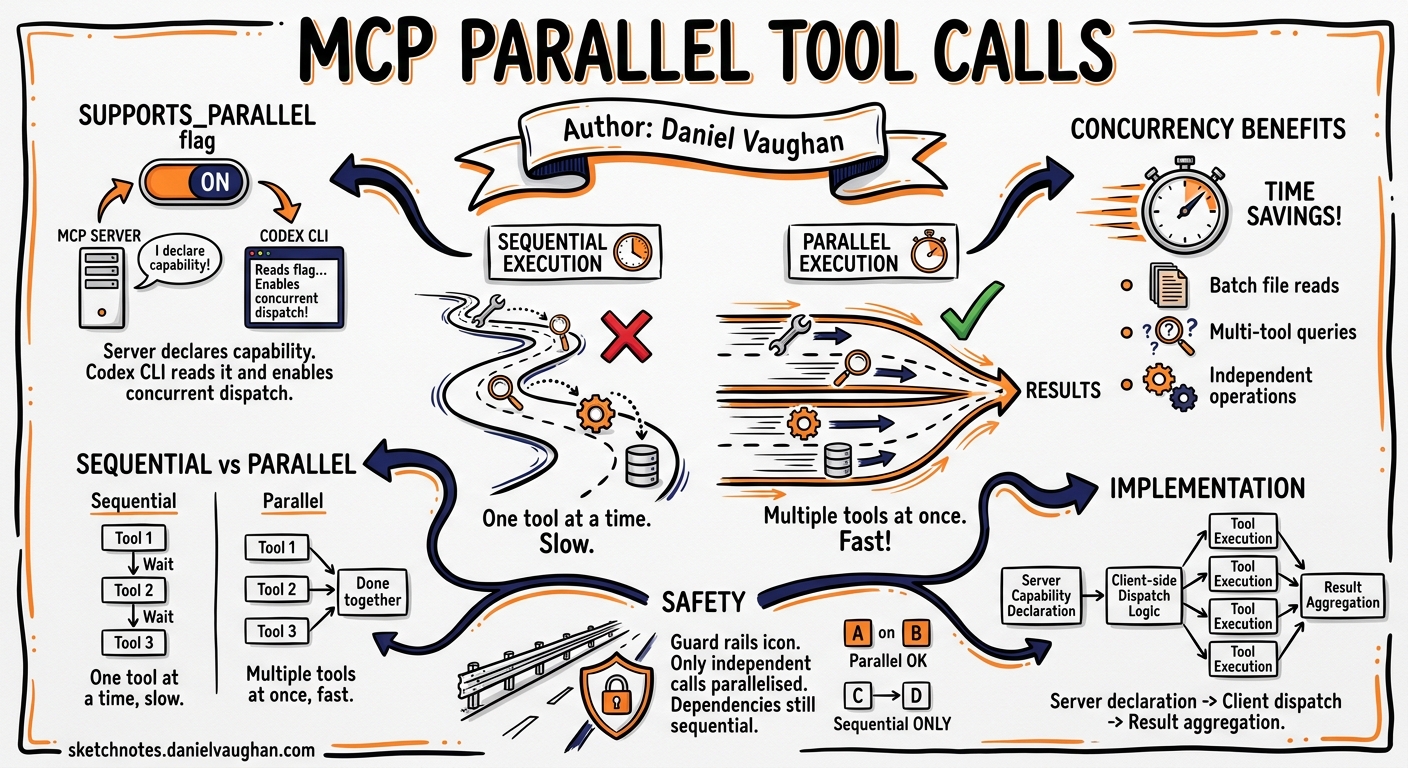
Since v0.121.0, Codex CLI has shipped a quietly powerful configuration flag for MCP servers: supports_parallel_tool_calls. When enabled, it allows tools exposed by a given MCP server to execute concurrently rather than serially — cutting wall-clock time roughly in half for eligible workloads 1. This article explains how the feature works, when to enable it, and the concurrency pitfalls that make the serial default the right choice for most servers.
The Serial Default and Why It Exists
By default, every MCP tool call in Codex CLI executes serially. When the model requests three tool calls in a single turn, Codex runs them one after another, waiting for each result before starting the next. This is intentional: MCP servers are arbitrary programs, and many maintain internal state — open file handles, database connections, in-memory caches — that is not safe to access concurrently 1 2.
Consider a documentation server that reads markdown files from disc. Two parallel reads are harmless. But a project management server that creates tickets, updates boards, and modifies sprint data has shared mutable state. Running its tools concurrently risks race conditions that produce non-deterministic failures — the kind that surface intermittently and resist reproduction 3.
The serial default protects you from this class of bug entirely.
sequenceDiagram
    participant Model as GPT-5.5
    participant CLI as Codex CLI
    participant MCP as MCP Server

    Note over Model: Requests 3 tool calls
    Model->>CLI: tool_call_1, tool_call_2, tool_call_3

    rect rgb(255, 240, 240)
        Note over CLI,MCP: Serial execution (default)
        CLI->>MCP: tool_call_1
        MCP-->>CLI: result_1
        CLI->>MCP: tool_call_2
        MCP-->>CLI: result_2
        CLI->>MCP: tool_call_3
        MCP-->>CLI: result_3
    end

    CLI-->>Model: [result_1, result_2, result_3]
Enabling Parallel Execution
To opt a specific MCP server into parallel tool calls, add the flag to its configuration block in config.toml:
[mcp_servers.docs]
command = "npx"
args = ["-y", "@example/docs-mcp"]
supports_parallel_tool_calls = true
The flag is per-server, not global. You can enable it for a read-only documentation server while leaving your database server serial 1:
# Safe for parallel — read-only lookups
[mcp_servers.docs]
command = "docs-server"
supports_parallel_tool_calls = true

# Unsafe for parallel — mutates shared state
[mcp_servers.jira]
command = "jira-mcp-server"
supports_parallel_tool_calls = false  # default, explicit for clarity
When the model emits multiple tool calls in a single turn and all target a parallel-enabled server, Codex dispatches them concurrently. If the calls span multiple servers with different settings, each server’s calls respect its own configuration 1.
sequenceDiagram
    participant Model as GPT-5.5
    participant CLI as Codex CLI
    participant MCP as MCP Server (parallel)

    Note over Model: Requests 3 tool calls
    Model->>CLI: tool_call_1, tool_call_2, tool_call_3

    rect rgb(240, 255, 240)
        Note over CLI,MCP: Parallel execution (opted-in)
        par
            CLI->>MCP: tool_call_1
            CLI->>MCP: tool_call_2
            CLI->>MCP: tool_call_3
        end
        MCP-->>CLI: result_1
        MCP-->>CLI: result_2
        MCP-->>CLI: result_3
    end

    CLI-->>Model: [result_1, result_2, result_3]
Performance Impact
PR #17667 included benchmark results that demonstrate the benefit clearly. With two tool calls each introducing a 25-second delay 1:
| Mode | Wall-clock time |
|---|---|
| Serial (default) | ~57 seconds |
| Parallel (opted-in) | ~32 seconds |
That is a 44% reduction in wall-clock time — and the gains scale with the number of concurrent calls. For an MCP server exposing search, fetch, and summarise tools, a single turn requesting all three completes in the time of the slowest call rather than the sum of all three.
In practice, the benefit compounds across a session. A 20-turn session where the model averages two parallel-eligible tool calls per turn saves minutes of cumulative wait time. Paired with prompt caching 4, this makes MCP-heavy workflows substantially more responsive.
Implementation: How Codex Routes Parallel Calls
The implementation, introduced in v0.121.0 5, places the parallel-safety decision at the server level rather than the tool level. This is a deliberate design choice 1:
- Configuration is read from the
mcp_serversblock at startup - Server names with
supports_parallel_tool_calls = trueare threaded into theToolRouter - At execution time, the router inspects each
ToolPayload::Mcpto determine its originating server - If the server is parallel-enabled, calls are dispatched concurrently; otherwise, they queue serially
The design avoids relying on tool names for routing, which can be ambiguous when multiple servers expose identically named tools. Server-level configuration sidesteps this entirely 1.
flowchart TD
    A[Model emits N tool calls] --> B{All target same server?}
    B -- Yes --> C{Server has parallel = true?}
    B -- No --> D[Group by server]
    D --> E[Each group follows its server's config]
    C -- Yes --> F[Dispatch all concurrently]
    C -- No --> G[Execute serially]
    F --> H[Collect results, return to model]
    G --> H
    E --> H
The multi_tool_use.parallel Connection
Parallel tool calling at the MCP layer is distinct from the model’s own multi_tool_use.parallel capability. The model may request multiple tool calls in a single response regardless of MCP configuration — that is a model-level behaviour controlled by the parallel_tool_calls parameter in the Responses API 6. What supports_parallel_tool_calls controls is whether Codex CLI executes those calls concurrently or serially.
This distinction matters because a known issue with GPT-5.4 occasionally causes the model to emit raw multi_tool_use.parallel scaffold text instead of proper tool-call payloads 7. That is a model-layer bug unrelated to MCP server configuration. The MCP parallel flag operates entirely at the execution layer.
When to Enable It
Enable supports_parallel_tool_calls when a server’s tools are:
- Stateless or read-only — documentation lookups, API queries, search indices
- Idempotent — repeated calls produce the same result without side effects
- Externally safe — no shared file locks, database transactions, or rate-limited APIs that penalise bursts
Do not enable it when:
- Tools write to shared state — file systems, databases, project management boards
- Tools have ordering dependencies — where tool B’s input depends on tool A’s output
- The server rate-limits concurrency — some APIs throttle parallel requests, causing silent failures
- You are uncertain — the serial default is always safe; parallel is an optimisation, not a requirement
Combining with Other Speed Levers
Parallel MCP calls compose well with Codex CLI’s other performance controls 8:
| Lever | Effect | Interaction with parallel MCP |
|---|---|---|
| Fast mode | 1.5× inference speed | Reduces time between tool-call batches |
| Prompt caching | Reduces input token cost and TTFT | Unchanged — MCP execution is post-inference |
| Low reasoning effort | Faster model responses | Fewer reasoning tokens before tool dispatch |
| Codex-Spark model | 1,000+ tok/s generation | Faster tool-call emission, same execution benefit |
The optimal configuration for MCP-heavy interactive work combines parallel execution with prompt caching and fast mode:
[profile.mcp-heavy]
model = "gpt-5.5"
service_tier = "fast"

[profile.mcp-heavy.mcp_servers.docs]
command = "docs-server"
supports_parallel_tool_calls = true

[profile.mcp-heavy.mcp_servers.search]
command = "search-server"
supports_parallel_tool_calls = true
Debugging Parallel Execution Issues
When parallel execution causes unexpected behaviour, the diagnostic path is straightforward:
- Disable the flag — set
supports_parallel_tool_calls = falseand confirm the issue disappears - Check for shared state — review whether tools read/write the same files, databases, or APIs
- Inspect tool timeouts — parallel calls share the server’s
tool_timeout_sec; if one call is slow, others may time out - Review JSONL telemetry —
codex exec --jsonemits per-call timing that reveals whether parallelism caused ordering issues 9
If a server’s tools are mostly safe for parallel execution but one or two are not, the current implementation does not support per-tool granularity. The workaround is to split the server into two: one parallel-enabled for the safe tools, one serial for the rest.
Conclusion
supports_parallel_tool_calls is a targeted optimisation that trades the safety of serial execution for the speed of concurrency — but only where you explicitly opt in. The per-server granularity, serial default, and execution-layer implementation make it a well-designed addition to Codex CLI’s performance toolkit. For teams running MCP-heavy workflows with read-only or stateless servers, enabling it is one of the simplest ways to reclaim wall-clock time without touching model configuration or prompt architecture.
Citations
-
Josiah (OpenAI), “Add
supports_parallel_tool_callsflag to included mcps,” Pull Request #17667, https://github.com/openai/codex/pull/17667 ↩ ↩2 ↩3 ↩4 ↩5 ↩6 ↩7 -
OpenAI, “Model Context Protocol,” Codex Documentation, https://developers.openai.com/codex/mcp ↩
-
OpenAI, “MCP Debugging and Diagnostics,” Codex CLI Best Practices, https://developers.openai.com/codex/learn/best-practices ↩
-
OpenAI, “Prompt Caching,” API Documentation, https://developers.openai.com/api/docs/guides/prompt-caching ↩
-
Releasebot, “Codex Updates — v0.121.0,” https://releasebot.io/updates/openai/codex ↩
-
OpenAI, “What models support parallel_tool_calls, and when to use it?” OpenAI Developer Community, https://community.openai.com/t/what-models-support-parallel-tool-calls-and-when-to-use-it/1310788 ↩
-
OpenAI, “GPT-5.4 emits internal multi_tool_use.parallel format as plain text,” Issue #13867, https://github.com/openai/codex/issues/13867 ↩
-
OpenAI, “Speed – Codex,” Codex Documentation, https://developers.openai.com/codex/speed ↩
-
OpenAI, “Non-interactive mode,” Codex Documentation, https://developers.openai.com/codex/noninteractive ↩