Codex CLI Daily Driver Setup for May 2026: An Opinionated Configuration Guide
Codex CLI Daily Driver Setup for May 2026: An Opinionated Configuration Guide
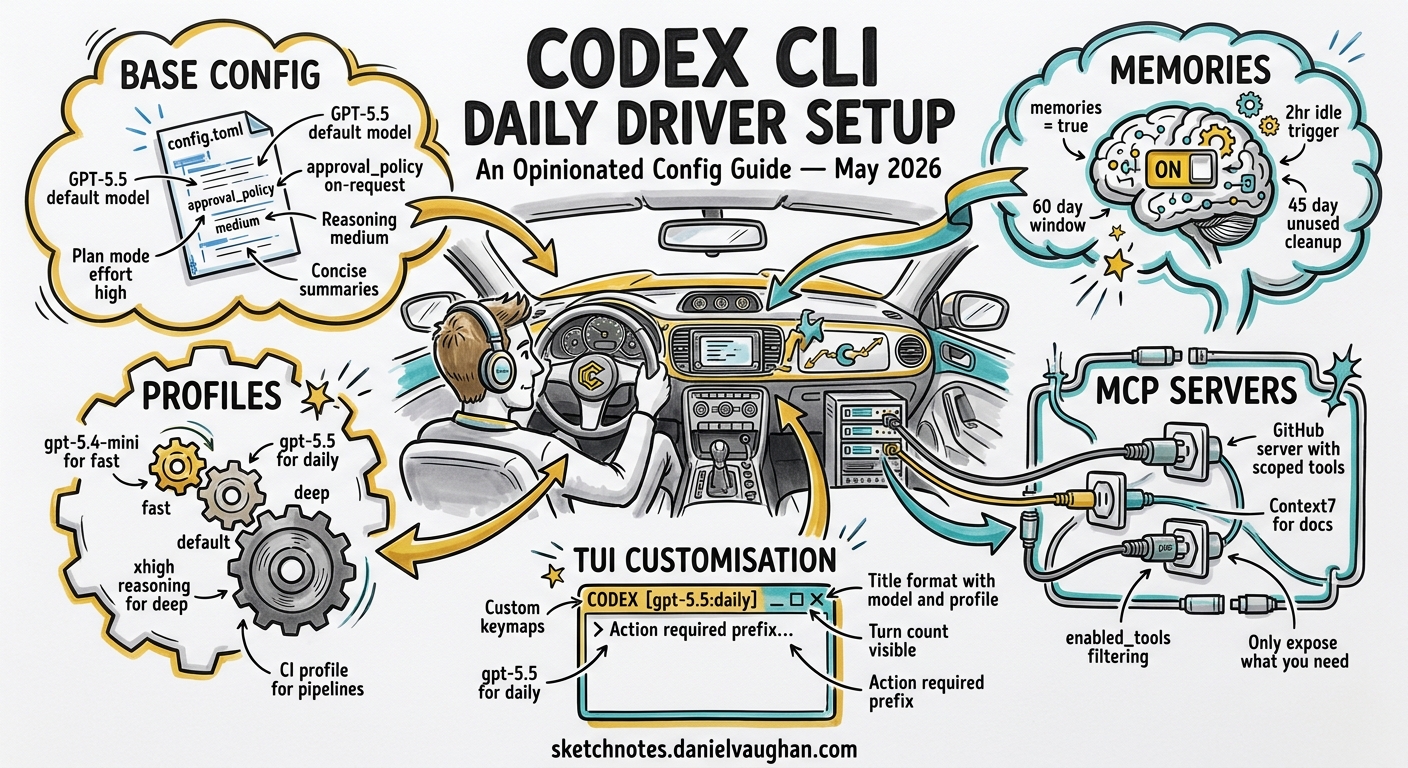
Codex CLI v0.128 is the most configurable release yet. Between named profiles, persistent memories, configurable keymaps, goal workflows, and a growing MCP ecosystem, the number of knobs available can paralyse new adopters and leave experienced users with stale defaults. This guide presents a single, opinionated config.toml for a senior developer using Codex CLI as their primary coding tool in May 2026 — then explains every choice so you can adapt it to your own workflow.
The Full Configuration
Drop this into ~/.codex/config.toml and adjust the three lines marked with comments:
# ~/.codex/config.toml — May 2026 daily driver

model = "gpt-5.5"
approval_policy = "on-request"
model_reasoning_effort = "medium"
plan_mode_reasoning_effort = "high"
model_reasoning_summary = "concise"

[features]
memories = true

[memories]
min_rollout_idle_hours = 2
max_rollout_age_days = 60
max_unused_days = 45

[tui.keymap]
copy = "Ctrl+Shift+C"
reasoning-up = "Ctrl+]"
reasoning-down = "Ctrl+["

[tui.title]
format = "{model} | {profile} | {cwd_basename}"
show_turn_count = true
action_required_prefix = "! "

# --- Profiles ---

[profiles.fast]
model = "gpt-5.4-mini"
model_reasoning_effort = "low"

[profiles.deep]
model = "gpt-5.5"
model_reasoning_effort = "high"
plan_mode_reasoning_effort = "xhigh"
model_reasoning_summary = "detailed"

[profiles.ci]
model = "gpt-5.4-mini"
model_reasoning_effort = "minimal"
approval_policy = "never"

# --- MCP Servers ---

[mcp_servers.github]
command = "npx"
args = ["-y", "@modelcontextprotocol/server-github"]
env = { GITHUB_TOKEN = "env:GITHUB_TOKEN" }          # set your token
enabled_tools = ["get_file_contents", "search_code", "list_issues", "create_pull_request"]

[mcp_servers.context7]
command = "npx"
args = ["-y", "@upstash/context7-mcp"]
Why These Choices
Model: GPT-5.5 as Default
GPT-5.5 scores 88.7% on SWE-bench Verified and 82.7% on Terminal-Bench 2.0 — the benchmark most relevant to agentic CLI work12. Its 40% token efficiency gain partially offsets the doubled per-token pricing, making the effective cost increase closer to 20%3. For daily interactive work, medium reasoning effort strikes the right balance: deep enough for multi-file refactoring, lean enough to keep responses snappy.
The plan_mode_reasoning_effort = "high" override gives the model more room to think when you enter /plan mode, where architectural decisions benefit from deeper reasoning4.
Approval Policy: on-request
flowchart LR
    A[Agent proposes action] --> B{Action type?}
    B -->|Read file| C[Auto-approved]
    B -->|Write file| D[Requires approval]
    B -->|Shell command| D
    D --> E{User approves?}
    E -->|Yes| F[Execute]
    E -->|No| G[Skip]
The on-request policy auto-approves read operations but requires explicit approval for writes and shell commands5. This is the sweet spot for daily work — you maintain oversight without the friction of approving every cat or ls. For trusted automation, the ci profile drops to never; for unfamiliar codebases, switch to untrusted at launch with codex --approval-policy untrusted.
Memories: Enabled and Tuned
Native memories are off by default6. Enabling them means Codex extracts insights from completed sessions and injects them into future ones automatically. The tuning choices here reflect iterative daily use:
min_rollout_idle_hours = 2— faster extraction than the 6-hour default, suited to developers who complete multiple sessions per day7.max_rollout_age_days = 60— retains context from recent project phases rather than expiring after 30 days.max_unused_days = 45— prunes genuinely stale memories but keeps seasonal knowledge (quarterly release patterns, infrequent deployment procedures).
Note: memories are currently unavailable in the EEA, UK, and Switzerland6. Developers in those regions should consider ctx-memory or Basic Memory as MCP-based alternatives8.
TUI Keymaps
The default Alt+, and Alt+. bindings for reasoning effort clash with readline’s “insert last argument” in many terminal emulators9. Remapping to Ctrl+] and Ctrl+[ avoids the conflict. Similarly, Ctrl+Shift+C for copy prevents collision with tmux prefix bindings.
Terminal Title
The action_required_prefix setting prepends ! to your terminal tab title when Codex is waiting for approval — invaluable when running multiple sessions across tmux panes9.
The Three Profiles
fast — Quick Iterations
codex --profile fast
Uses gpt-5.4-mini at low reasoning effort. Ideal for boilerplate generation, simple refactors, and exploratory questions where speed matters more than depth. At roughly one-fifth the cost of GPT-5.5 at high effort, this is the profile for high-volume, low-complexity work3.
deep — Architectural Work
codex --profile deep
GPT-5.5 at high reasoning effort with xhigh in plan mode. Use this for complex refactoring, security reviews, and architectural decisions. The detailed reasoning summary makes the model’s chain of thought visible, which is useful for reviewing why the agent chose a particular approach4.
ci — Non-Interactive Automation
codex --profile ci -q "Run the test suite and fix any failures"
# or
codex exec --profile ci "Lint and auto-fix all TypeScript files"
Minimal reasoning effort on the cheapest model, with approval_policy = "never" for unattended execution. Pair this with codex exec for CI/CD pipelines where human approval is not available10.
flowchart TD
    T[New Task] --> Q{Complexity?}
    Q -->|Low / boilerplate| F["fast profile\ngpt-5.4-mini · low effort"]
    Q -->|Standard| D["default config\ngpt-5.5 · medium effort"]
    Q -->|High / architectural| H["deep profile\ngpt-5.5 · high/xhigh effort"]
    Q -->|Automated / CI| CI["ci profile\ngpt-5.4-mini · minimal · no approval"]
MCP Servers: Start Small
The configuration includes two MCP servers — GitHub and Context7 — chosen because they cover the two most common manual loops: repository operations and documentation lookups11.
Resist the temptation to add every available MCP server. Each server adds startup latency and injects its tools into the agent’s tool list, which consumes context window tokens. Start with two or three servers that eliminate your most frequent context switches, then add more only when you identify a recurring manual step12.
Use enabled_tools to restrict what the agent can do through each server. The GitHub configuration above permits read operations and PR creation but blocks repository deletion, branch management, and other destructive operations — a sensible default when the agent runs with write access to your codebase11.
AGENTS.md: The Static Layer
Memories handle dynamic session-to-session knowledge. For static project conventions — coding standards, architectural constraints, testing requirements — use AGENTS.md at your repository root13:
# AGENTS.md

## Code Style
- TypeScript strict mode, no `any` types
- Prefer composition over inheritance
- All public functions require JSDoc comments

## Testing
- Run `npm test` after every file change
- Minimum 80% branch coverage for new code

## Architecture
- Repository pattern for data access
- No direct database queries outside repository classes
The agent reads AGENTS.md at session start and treats its contents as project-level instructions. Keep it concise — under 500 words — to avoid consuming context budget that would be better spent on your actual task13.
Essential Slash Commands
Six commands cover 90% of daily interactive use:
| Command | Purpose |
|---|---|
/model gpt-5.4-mini |
Switch models mid-session without restarting14 |
/plan |
Enter plan mode for multi-step reasoning before execution4 |
/compact |
Compress conversation history when approaching context limits14 |
/goal create "..." |
Set a persistent objective that survives session restarts9 |
/fork |
Branch the conversation to explore an alternative approach14 |
/debug-config |
Inspect the resolved configuration — invaluable when profiles interact unexpectedly14 |
What to Do Next
- Copy the configuration above into
~/.codex/config.toml. - Set your
GITHUB_TOKENenvironment variable. - Run
codex --profile faston a low-stakes task to verify the setup. - Gradually increase complexity: try
deepfor a real refactoring session. - After a week, check
~/.codex/memories/memory_summary.mdto see what the memory system has captured. - Adjust reasoning effort levels based on observed output quality and cost.
The best configuration is one you actually use. Start with these defaults, tune what irritates you, and ignore everything else until you need it.
Citations
-
OpenAI’s GPT-5.5 masters agentic coding with 82.7% benchmark score — Interesting Engineering ↩
-
GPT-5.5 Pricing: Full Breakdown of API, Codex, and ChatGPT Costs — Apidog ↩ ↩2
-
[Memories — Codex OpenAI Developers](https://developers.openai.com/codex/memories) -
[Memories System openai/codex DeepWiki](https://deepwiki.com/openai/codex/3.9-memories-system) -
[ctx-memory by GhadiSaab Glama](https://glama.ai/mcp/servers/GhadiSaab/ctx-memory) -
[Best Practices — Codex OpenAI Developers](https://developers.openai.com/codex/learn/best-practices)