Codex CLI MCP Sandbox-State Metadata: Building Context-Aware Tool Servers
Codex CLI MCP Sandbox-State Metadata: Building Context-Aware Tool Servers
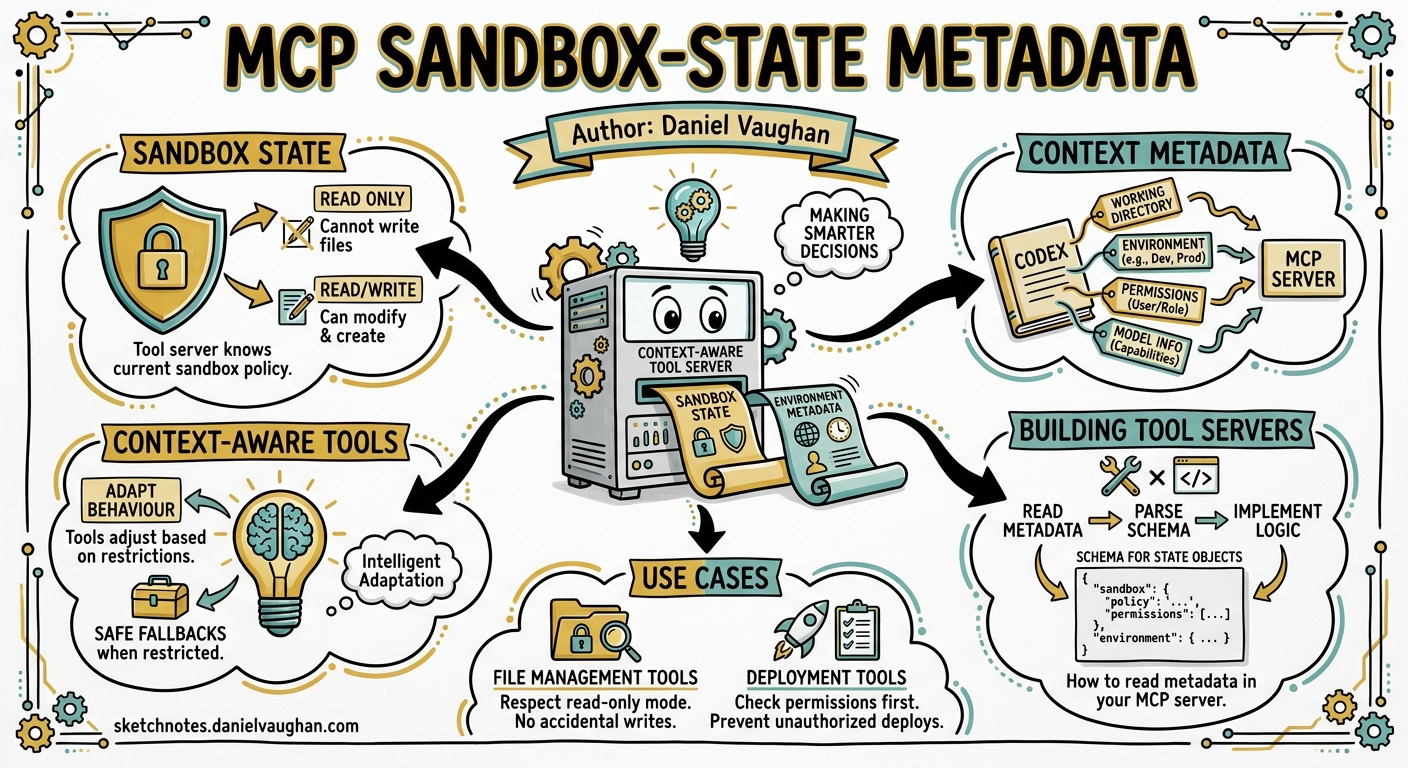
The Problem: Blind Tool Servers
MCP servers connected to Codex CLI traditionally operate without knowledge of their execution context. A database migration tool behaves identically whether Codex is running in read-only mode or danger-full-access — it discovers the restriction only when a command fails. This creates poor user experiences: wasted tokens on plans that cannot execute, cryptic sandbox violations mid-operation, and no way for servers to offer degraded-but-useful alternatives.
Since Codex v0.125.0, sandbox state flows through MCP tool metadata1, allowing servers to introspect their permission envelope before attempting operations. This article covers the architecture, opt-in mechanism, and practical patterns for building context-aware MCP servers.
Architecture Overview
sequenceDiagram
    participant Model as LLM (o3/o4-mini)
    participant Core as codex-core
    participant MCP as MCP Server

    Model->>Core: tool_call(server:tool_name, params)
    Core->>Core: Check server capabilities
    alt Server advertises codex/sandbox-state-meta
        Core->>Core: Serialize SandboxState
        Core->>MCP: call_tool(params, _meta: {sandbox_state: {...}})
    else No capability declared
        Core->>MCP: call_tool(params, _meta: {})
    end
    MCP->>MCP: Inspect _meta.sandbox_state
    MCP-->>Core: result
    Core-->>Model: tool_result
The key insight: sandbox metadata injection is opt-in per server. Only servers that declare the codex/sandbox-state-meta experimental capability receive the enriched _meta payload2. This preserves backward compatibility — existing servers see no change in their request format.
Opting In: The Capability Declaration
When Codex starts an MCP server, it performs the standard MCP initialize handshake. To receive sandbox state, your server must advertise the experimental capability in its response:
{
  "capabilities": {
    "tools": {},
    "experimental": {
      "codex/sandbox-state-meta": {}
    }
  }
}
No configuration in config.toml is required beyond the standard MCP server registration3. The capability declaration is sufficient.
The SandboxState Payload
Once opted in, every model-initiated tool call includes a _meta object containing the current sandbox configuration. The structure mirrors Codex’s internal SandboxState type2:
{
  "_meta": {
    "sandbox_state": {
      "sandbox_mode": "workspace-write",
      "filesystem_policy": {
        "writable_roots": ["/home/user/project"],
        "deny_read_globs": ["**/.env", "**/credentials.*"],
        "protected_paths": [".git/", ".codex/"]
      },
      "network_policy": {
        "network_access": true,
        "allowed_domains": ["api.github.com", "registry.npmjs.org"],
        "unix_sockets": []
      },
      "permission_profile": "workspace",
      "approval_policy": "on-request"
    }
  }
}
Key Fields
| Field | Type | Description |
|---|---|---|
sandbox_mode |
string | One of read-only, workspace-write, danger-full-access4 |
filesystem_policy.writable_roots |
string[] | Directories where writes are permitted |
filesystem_policy.deny_read_globs |
string[] | Glob patterns for read-denied paths |
network_policy.network_access |
bool | Whether outbound network is available |
network_policy.allowed_domains |
string[] | Domain allowlist when network is restricted |
permission_profile |
string | Active named profile (:read-only, :workspace, custom) |
approval_policy |
string | Current approval strictness level |
Practical Pattern: Adaptive Database Migration Server
Consider a database schema migration MCP server. Without sandbox awareness, it always generates destructive ALTER TABLE statements. With _meta inspection, it can adapt:
import json
from mcp import Server, tool

app = Server("db-migrate")

@app.tool()
async def migrate_schema(spec: str, _meta: dict | None = None) -> str:
    sandbox = (_meta or {}).get("sandbox_state", {})
    mode = sandbox.get("sandbox_mode", "read-only")

    if mode == "read-only":
        # Generate plan only — no execution
        return generate_migration_plan(spec, dry_run=True)
    elif mode == "workspace-write":
        # Check if DB host is in allowed domains
        network = sandbox.get("network_policy", {})
        allowed = network.get("allowed_domains", [])
        if "db.internal" not in allowed and not network.get("network_access"):
            return json.dumps({
                "error": "network_restricted",
                "message": "Database host not in allowed domains. "
                           "Run with network access or add db.internal to allowlist.",
                "suggestion": "Use /permissions to grant network access"
            })
        return execute_migration(spec)
    else:
        # danger-full-access: proceed without checks
        return execute_migration(spec)
This pattern eliminates the “try-fail-retry” loop that wastes tokens and confuses the model.
Practical Pattern: File-Aware Code Generator
A code generation server can use writable_roots to ensure generated files land in permitted directories:
import { McpServer } from "@modelcontextprotocol/sdk/server/mcp.js";

const server = new McpServer({
  name: "codegen",
  capabilities: {
    experimental: { "codex/sandbox-state-meta": {} }
  }
});

server.tool("generate_module", { name: "string", path: "string" },
  async ({ name, path }, { _meta }) => {
    const sandbox = _meta?.sandbox_state;
    const writableRoots = sandbox?.filesystem_policy?.writable_roots ?? [];

    const isWritable = writableRoots.some(root => path.startsWith(root));
    if (!isWritable && sandbox?.sandbox_mode !== "danger-full-access") {
      return {
        content: [{
          type: "text",
          text: `Cannot write to ${path} — outside writable roots: ${writableRoots.join(", ")}`
        }]
      };
    }

    const code = await generateModule(name);
    await writeFile(path, code);
    return { content: [{ type: "text", text: `Generated ${path}` }] };
  }
);
Interaction with Permission Profile Round-Tripping
Since v0.125.0, permission profiles persist across TUI sessions, user turns, and app-server API calls1. This means the sandbox state your MCP server receives is stable within a session — it reflects the committed security posture, not a transient state. If a user escalates permissions mid-session via /permissions, subsequent tool calls will carry the updated state.
stateDiagram-v2
    [*] --> SessionStart
    SessionStart --> ProfileLoaded: Load permission profile
    ProfileLoaded --> MCPCall: Model requests tool
    MCPCall --> SandboxInjected: _meta enriched
    SandboxInjected --> MCPCall: Next tool call

    ProfileLoaded --> Escalation: User runs /permissions
    Escalation --> ProfileLoaded: New profile committed
Security Considerations
The sandbox-state metadata is informational, not enforceable at the MCP layer. A malicious or buggy MCP server can ignore the metadata entirely — Codex’s platform-native sandbox (Seatbelt on macOS, Bubblewrap on Linux4) still enforces the actual boundaries. The metadata exists to enable cooperative behaviour: well-behaved servers adapting their output to avoid sandbox violations.
Do not use _meta.sandbox_state as a security boundary within your MCP server. It is advisory context, not a capability token.
Debugging Sandbox Metadata
To verify your server receives the expected metadata, enable MCP debug logging:
CODEX_LOG_LEVEL=debug codex --mcp-debug
Tool call payloads including _meta will appear in the debug output. You can also use the codex mcp test command to send synthetic tool calls with crafted sandbox states5.
When to Use This Feature
Good candidates:
- Servers that perform filesystem writes (code generators, scaffolders)
- Servers that make network calls (API clients, package installers)
- Servers offering destructive operations (database tools, infrastructure provisioners)
- Servers that want to provide helpful degraded modes in restricted contexts
Not needed for:
- Read-only information servers (documentation lookup, search)
- Pure computation servers (formatters, linters, calculators)
- Servers that never interact with the filesystem or network
Configuration Example
A complete config.toml entry for a sandbox-aware MCP server:
[mcp_servers.db-migrate]
command = "uvx"
args = ["db-migrate-mcp"]
startup_timeout_sec = 10
tool_timeout_sec = 30
# No special config needed — capability declared by server itself
The server advertises codex/sandbox-state-meta during initialisation; Codex handles the rest.
Conclusion
Sandbox-state metadata transforms MCP servers from blind executors into context-aware collaborators. By advertising a single experimental capability, your server gains visibility into the permission envelope it operates within — enabling graceful degradation, informative error messages, and efficient token usage. As this feature moves from experimental to stable, expect it to become a baseline expectation for production MCP servers in enterprise Codex deployments.
Citations
-
OpenAI, “Changelog – Codex v0.125.0”, April 2026. https://developers.openai.com/codex/changelog ↩ ↩2
-
aaronl-openai, “Send sandbox state through MCP tool metadata”, PR #17763, openai/codex. https://github.com/openai/codex/pull/17763 ↩ ↩2
-
OpenAI, “Model Context Protocol – Codex”, Developer Documentation. https://developers.openai.com/codex/mcp ↩
-
OpenAI, “Sandbox – Codex”, Developer Documentation. https://developers.openai.com/codex/concepts/sandboxing ↩ ↩2
-
OpenAI, “Command line options – Codex CLI”, Developer Documentation. https://developers.openai.com/codex/cli/reference ↩