Codex CLI Split Permissions: Fine-Grained Filesystem and Network Policies
Codex CLI Split Permissions: Fine-Grained Filesystem and Network Policies
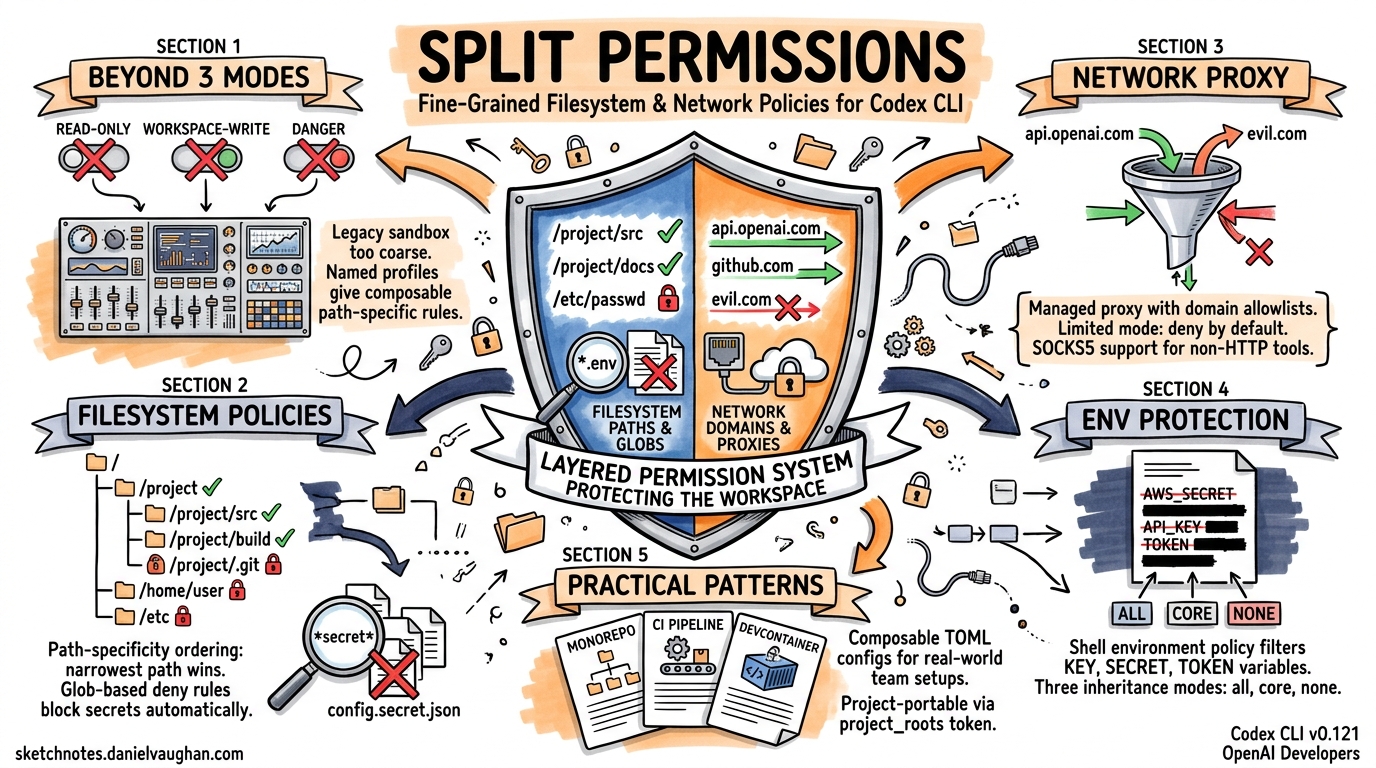
The three-mode sandbox (read-only, workspace-write, danger-full-access) that shipped with early Codex CLI versions works well for solo developers, but falls apart the moment a team needs the agent to write to a build cache and deny access to .env files and allow egress only to api.openai.com. Named permission profiles — introduced progressively through v0.119–v0.121 and documented as stable in the April 2026 configuration reference1 — solve this by replacing a single boolean sandbox toggle with composable, path-specific filesystem and network rules.
This article covers the full split-permissions surface: filesystem path policies with glob-based deny rules, the managed network proxy with domain allowlists, and practical configuration patterns for CI pipelines and enterprise teams.
Why the Legacy Sandbox Modes Are Not Enough
The original sandbox_mode key offers three settings2:
| Mode | Filesystem | Network |
|---|---|---|
read-only |
No writes | Disabled |
workspace-write |
Writes to CWD + writable_roots |
Disabled (opt-in via network_access) |
danger-full-access |
Unrestricted | Unrestricted |
This is fundamentally a coarse-grained model. Consider a monorepo where the agent must write to packages/api/src/ but not to packages/billing/secrets/, must read .env.example but not .env, and must reach npm.pkg.github.com for package installs but nothing else. With the legacy model, you either grant workspace-write (too broad) or read-only (too restrictive). The writable_roots array adds paths but cannot subtract them3.
Split permissions solve this with a deny-capable, path-hierarchical filesystem policy and a managed proxy for network egress.
Named Permission Profiles
A named profile groups filesystem and network rules under a single identifier. Activate it by setting default_permissions in your config.toml1:
default_permissions = "workspace"
Every sandboxed tool call then uses the [permissions.workspace] tables for enforcement. You can define multiple profiles and switch between them via --profile or the /permissions TUI command4.
Filesystem Split Policies
Path-Specificity Ordering
The filesystem table maps absolute paths (or special tokens) to access levels: read, write, or none5. When paths overlap, the most specific (narrowest) path wins — a model borrowed from route-matching in web frameworks:
[permissions.workspace.filesystem]
"/repo" = "write"
"/repo/secrets" = "none"
"/repo/secrets/public-keys" = "read"
This configuration allows the agent to write anywhere under /repo, completely blocks /repo/secrets, but re-opens /repo/secrets/public-keys for reading. The enforcement layer in codex-linux-sandbox resolves these by sorting entries from broadest to narrowest and applying bubblewrap bind mounts in that order5:
graph TD
    A["/repo → write<br/>--bind /repo /repo"] --> B["/repo/secrets → none<br/>mount /dev/null"]
    B --> C["/repo/secrets/public-keys → read<br/>--ro-bind"]
Protected paths — .git, .codex, and resolved gitdir: references — are always re-mounted as read-only inside writable roots, regardless of explicit policy5.
The :project_roots Token
Rather than hardcoding absolute paths, you can scope rules relative to detected project roots (directories containing .git or configured project_root_markers)1:
[permissions.workspace.filesystem.":project_roots"]
"." = "write"
"dist" = "write"
"node_modules" = "read"
This makes the profile portable across machines and repositories — the same config.toml works whether the project lives at /home/dev/app or /workspace/monorepo/packages/api.
Glob-Based File Restrictions
The most powerful feature for secret protection is glob-based denial. Any path key containing a wildcard character is evaluated as a glob pattern against files within the scope5:
[permissions.workspace.filesystem.":project_roots"]
"." = "write"
"**/*.env" = "none"
"**/*.pem" = "none"
"**/*.key" = "none"
"**/credentials.json" = "none"
Under the hood, Codex uses rg --files --hidden --no-ignore --glob <pattern> to enumerate matching files at sandbox construction time. If ripgrep is unavailable, it falls back to an internal globset walker. Any enumeration failure aborts sandbox construction entirely — the system fails closed5.
You can tune glob scan depth to balance security against startup latency:
[permissions.workspace.filesystem]
glob_scan_max_depth = 2
⚠️ Setting glob_scan_max_depth too low may miss deeply nested sensitive files. For monorepos with deep directory structures, the default (unlimited) is safer, albeit slower on first invocation.
Managed Network Proxy
The legacy network_access = true flag in [sandbox_workspace_write] is an all-or-nothing switch. The managed proxy replaces it with domain-level and socket-level control16.
Architecture
When network rules are active, Codex starts a local proxy bridge that routes all subprocess TCP traffic through a controlled path:
sequenceDiagram
    participant Agent as Agent Command
    participant Seccomp as Seccomp Filter
    participant Bridge as Managed Proxy<br/>(localhost)
    participant Target as Allowed Domain

    Agent->>Seccomp: connect(api.openai.com:443)
    Seccomp->>Bridge: TCP → UDS → TCP routing
    Bridge->>Bridge: Check domain allowlist
    alt Domain allowed
        Bridge->>Target: Forward request
        Target-->>Bridge: Response
        Bridge-->>Agent: Response
    else Domain denied
        Bridge-->>Agent: Connection refused
    end
After the bridge is active, a seccomp filter blocks new AF_UNIX and socketpair creation for user commands, preventing bypass of the proxy5. On Windows (elevated sandbox mode), OS-level firewall rules enforce proxy-only networking at the kernel level, making it impossible for even malicious code to exfiltrate data7.
Configuration
[permissions.workspace.network]
enabled = true
mode = "limited"

[permissions.workspace.network.domains]
"api.openai.com" = "allow"
"npm.pkg.github.com" = "allow"
"registry.npmjs.org" = "allow"
"*.example.com" = "deny"

[permissions.workspace.network.unix_sockets]
"/var/run/docker.sock" = "allow"
The mode key accepts two values1:
limited— only domains in the allowlist are reachable; everything else is denied by defaultfull— all domains are reachable except those explicitly denied
For most security-conscious setups, limited is correct.
SOCKS5 Support
Some tools (database clients, custom TCP protocols) don’t respect HTTP proxies. The managed proxy optionally exposes a SOCKS5 listener1:
[permissions.workspace.network]
enabled = true
enable_socks5 = true
socks_url = "socks5://127.0.0.1:43130"
enable_socks5_udp = false
Upstream Proxy Chaining
In corporate environments where all traffic must traverse a corporate proxy, the managed proxy can chain to an upstream1:
[permissions.workspace.network]
enabled = true
proxy_url = "http://127.0.0.1:43128"
allow_upstream_proxy = true
Shell Environment Policy
Split permissions extend beyond files and sockets to environment variables. The [shell_environment_policy] table controls what subprocess tools can see18:
[shell_environment_policy]
inherit = "none"
set = { PATH = "/usr/bin:/usr/local/bin", HOME = "/home/agent" }
exclude = ["AWS_*", "AZURE_*", "GH_TOKEN"]
By default, Codex applies “default excludes” that filter any variable whose name contains KEY, SECRET, or TOKEN (case-insensitive) before your explicit rules run8. You can suppress this with ignore_default_excludes = true, but doing so is inadvisable for anything beyond local development.
The three inheritance modes are:
| Mode | Behaviour |
|---|---|
all |
Inherit everything from the parent process, then apply excludes |
core |
Inherit only PATH, HOME, USER, SHELL, LANG, and TERM |
none |
Start with an empty environment; only set values are available |
Practical Configuration Patterns
Pattern 1: Monorepo with Secret Protection
A team working on a monorepo with multiple services, each containing its own .env and credential files:
default_permissions = "monorepo"

[permissions.monorepo.filesystem.":project_roots"]
"." = "write"
"**/*.env" = "none"
"**/*.env.*" = "none"
"**/*.pem" = "none"
"**/secrets/" = "none"
".git" = "read"

[permissions.monorepo.network]
enabled = true
mode = "limited"

[permissions.monorepo.network.domains]
"api.openai.com" = "allow"
"registry.npmjs.org" = "allow"
Pattern 2: CI Pipeline with codex exec
Non-interactive pipelines need write access to build outputs but zero network access beyond the API:
default_permissions = "ci"
approval_policy = "never"

[permissions.ci.filesystem]
"/workspace" = "write"
"/workspace/.env" = "none"
"/tmp" = "write"

[permissions.ci.network]
enabled = true
mode = "limited"

[permissions.ci.network.domains]
"api.openai.com" = "allow"

[shell_environment_policy]
inherit = "core"
exclude = ["CI_*_TOKEN", "DOCKER_AUTH_*"]
Pattern 3: Secure Devcontainer
The v0.121.0 secure devcontainer profile9 pairs bubblewrap isolation with split permissions inside Docker containers:
default_permissions = "devcontainer"

[permissions.devcontainer.filesystem]
"/workspace" = "write"
"/workspace/**/*.env" = "none"
"/home/vscode" = "read"

[permissions.devcontainer.network]
enabled = true
mode = "limited"

[permissions.devcontainer.network.domains]
"api.openai.com" = "allow"

[permissions.devcontainer.network.unix_sockets]
"/var/run/docker.sock" = "none"
Inside the container, bubblewrap provides namespace-level isolation (--unshare-user, --unshare-pid, --unshare-net), whilst the split permissions layer provides path-level and domain-level control within those namespaces5.
Debugging Permissions
When a tool call fails with a sandbox denial, use the built-in sandbox test commands10:
# macOS
codex sandbox macos --full-auto --log-denials ls /path/to/denied

# Linux
codex sandbox linux --full-auto ls /path/to/denied
The --log-denials flag on macOS surfaces Seatbelt denial messages. On Linux, bubblewrap failures appear as EPERM or EACCES errors in the tool output.
The /status TUI command shows the active permissions profile and its resolved rules. The /permissions command allows switching profiles mid-session4.
Limitations and Caveats
Glob scan cost: On large repositories (100k+ files), the initial glob enumeration can add 2–5 seconds to sandbox construction. The glob_scan_max_depth setting mitigates this at the cost of reduced coverage.
WSL1 incompatibility: Bubblewrap-based enforcement requires user namespace support, which WSL1 lacks. Since v0.115, WSL1 is unsupported for sandboxed execution11. WSL2 follows the standard Linux path.
AppArmor restrictions: On Ubuntu 24.04+ and similar distributions where AppArmor restricts unprivileged user namespaces, you must explicitly enable them5:
sudo sysctl -w kernel.apparmor_restrict_unprivileged_userns=0
No cross-profile composition: You cannot combine rules from multiple named profiles. Each tool call uses exactly one profile. Teams needing different policies for different subagents should configure per-agent profiles via agents.<name>.config_file1.
Citations
-
[Configuration Reference – Codex OpenAI Developers](https://developers.openai.com/codex/config-reference) -
[Sandbox – Codex OpenAI Developers](https://developers.openai.com/codex/concepts/sandboxing) -
[Advanced Configuration – Codex OpenAI Developers](https://developers.openai.com/codex/config-advanced) -
[Agent approvals & security – Codex OpenAI Developers](https://developers.openai.com/codex/agent-approvals-security) -
codex-rs/linux-sandbox/README.md – openai/codex GitHub ↩ ↩2 ↩3 ↩4 ↩5 ↩6 ↩7 ↩8
-
[Sample Configuration – Codex OpenAI Developers](https://developers.openai.com/codex/config-sample) -
[Config basics – Codex OpenAI Developers](https://developers.openai.com/codex/config-basic) -
[Command line options – Codex CLI OpenAI Developers](https://developers.openai.com/codex/cli/reference) -
Regression in 0.115.0: shell commands fail in WSL – GitHub Issue #16076 ↩