Codex CLI and Kubernetes: MCP Servers, Helm Chart Workflows, and Cluster Debugging
Codex CLI and Kubernetes: MCP Servers, Helm Chart Workflows, and Cluster Debugging
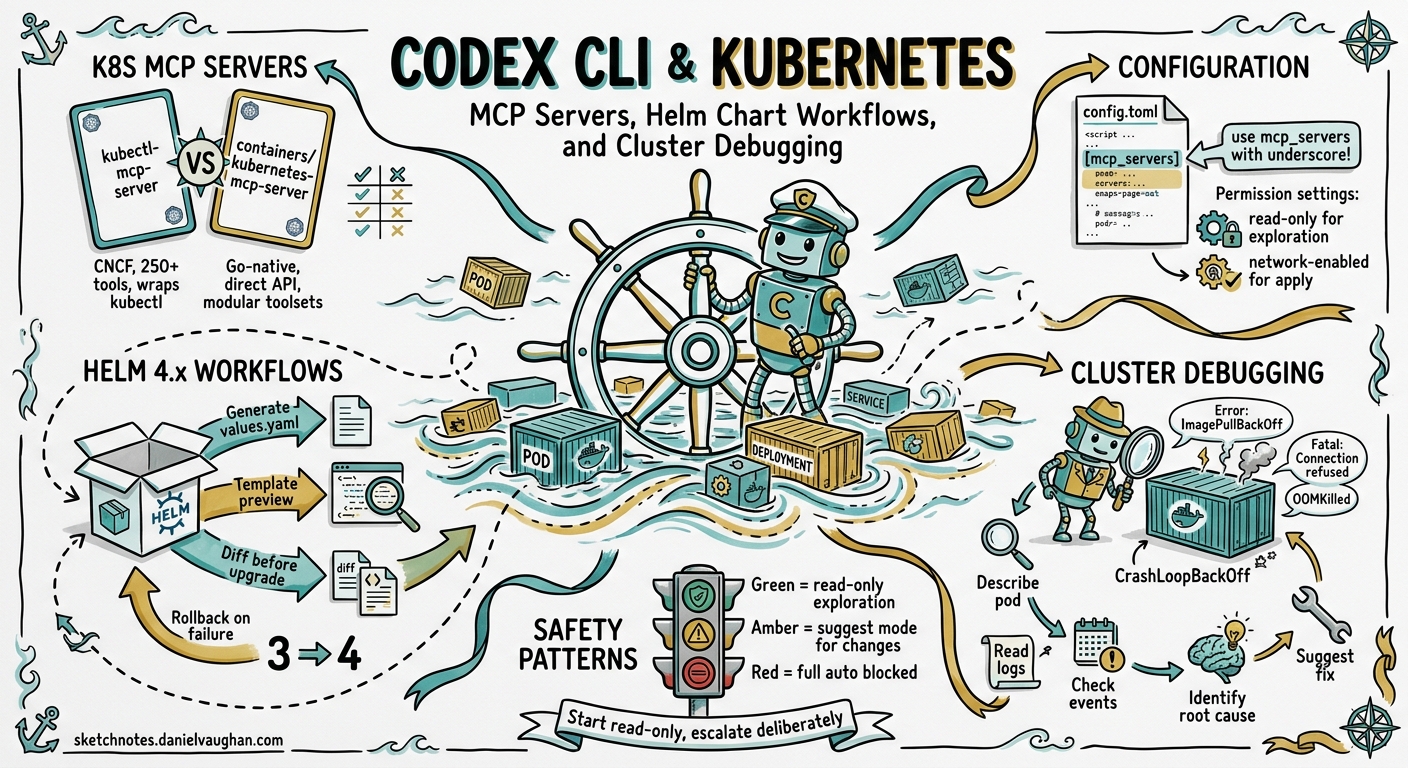
Kubernetes development involves a constant dance between YAML manifests, Helm chart templating, cluster state inspection, and debugging misbehaving pods. Codex CLI can handle all of these — but only if it can see your cluster. Out of the box, Codex has no Kubernetes awareness. Connect it to a Kubernetes MCP server, however, and it gains live cluster context: pod status, event streams, Helm releases, logs, and even the ability to apply manifests or roll back deployments.
This article covers how to wire Codex CLI into a Kubernetes workflow using MCP servers, how to generate and manage Helm 4.x charts with agent assistance, and how to debug cluster issues without leaving your terminal.
The Kubernetes MCP Server Landscape
Two mature MCP servers dominate the Kubernetes space in mid-2026, each with a distinct architecture.
kubectl-mcp-server
Published in the CNCF Landscape1, kubectl-mcp-server wraps the kubectl and helm CLI tools, exposing over 250 tools across troubleshooting, deployment, cost optimisation, and security auditing2. It requires kubectl (and optionally helm) to be installed on the host. Available via npm or pip:
npm install -g kubectl-mcp-server
# or
pip install kubectl-mcp-server
containers/kubernetes-mcp-server
Maintained by the Containers organisation on GitHub, this Go-native implementation talks directly to the Kubernetes API server without shelling out to kubectl3. The result is lower latency, no external binary dependencies, and a modular toolset architecture that lets you enable only the capabilities you need:
| Toolset | Purpose | Default |
|---|---|---|
config |
Kubeconfig management | Enabled |
core |
Pods, Events, Namespaces | Enabled |
helm |
Chart install, list, uninstall | Disabled |
tekton |
Pipeline and task execution | Disabled |
kiali |
Service mesh observability | Disabled |
kubevirt |
Virtual machine management | Disabled |
This toolset gating is particularly useful with Codex CLI, where minimising the number of exposed tools reduces context consumption and avoids tool-selection confusion4.
Configuring Codex CLI for Kubernetes
Both servers integrate via Codex CLI’s standard MCP configuration in ~/.codex/config.toml. The key detail: use mcp_servers (with an underscore), not mcp-servers5.
Option 1: kubectl-mcp-server (npm)
[mcp_servers.kubernetes]
command = "npx"
args = ["-y", "kubectl-mcp-server"]

[mcp_servers.kubernetes.env]
KUBECONFIG = "/home/dev/.kube/config"
Option 2: containers/kubernetes-mcp-server (native binary)
[mcp_servers.k8s]
command = "/usr/local/bin/kubernetes-mcp-server"
args = ["--toolsets", "config,core,helm", "--read-only"]
The --read-only flag prevents all write operations — a sensible default for production clusters3. Remove it for development environments where you want Codex to apply manifests directly.
Project-Scoped Configuration
For team projects, place MCP configuration in .codex/config.toml at the repository root. Codex will load it automatically for trusted projects, giving every team member the same Kubernetes tooling without manual setup5:
# .codex/config.toml (committed to repo)
[mcp_servers.k8s-staging]
command = "npx"
args = ["-y", "kubectl-mcp-server"]

[mcp_servers.k8s-staging.env]
KUBECONFIG = ".kube/staging-config"
Helm Chart Generation Workflows
Helm 4.x, released in late 2025, brought server-side apply (SSA) as the default installation strategy6. This changes how templates handle field ownership and conflicts — and Codex CLI is well-positioned to generate charts that follow Helm 4 conventions, provided you give it the right instructions.
AGENTS.md for Kubernetes Projects
An AGENTS.md file at the project root ensures Codex follows your cluster conventions:
# AGENTS.md

## Kubernetes Conventions

- Target Kubernetes 1.32+ and Helm 4.1
- Use server-side apply (SSA) — do NOT set `--force` on install
- All manifests must include resource requests and limits
- Use `app.kubernetes.io/` standard labels on every resource
- NetworkPolicy is mandatory for every namespace
- Secrets must reference ExternalSecrets, never inline values
- Prefer `RollingUpdate` strategy with `maxUnavailable: 0`

## Helm Chart Structure

- Follow the Helm 4 chart layout: Chart.yaml, values.yaml, templates/
- Include _helpers.tpl for all template functions
- Every values.yaml key must have a comment explaining its purpose
- Tests go in templates/tests/ using helm test conventions
Generating a Chart from Scratch
With the Kubernetes MCP server connected, Codex can inspect your running services and generate a matching Helm chart:
> Look at the running deployments in the staging namespace and generate
  a Helm 4 chart that reproduces this setup. Include resource limits
  matching current usage, HPA configs, and a values.yaml with
  environment-specific overrides for staging and production.
Codex will use the MCP server to query deployments, services, configmaps, and HPAs, then scaffold a complete chart directory. The MCP connection means it works from live cluster state rather than hallucinating resource names.
Chart Review and Linting
For existing charts, combine Codex CLI’s /review command with the MCP server’s Helm toolset:
> /review -- Focus on Helm 4 SSA compatibility, missing resource
  limits, and security context gaps. Cross-reference values.yaml
  defaults against our staging cluster's actual resource usage.
Cluster Debugging Patterns
The highest-value use of Kubernetes MCP servers with Codex CLI is interactive debugging. Instead of manually cycling through kubectl describe, kubectl logs, and kubectl get events, you describe the symptom and let Codex investigate.
The Debugging Flow
sequenceDiagram
    participant Dev as Developer
    participant Codex as Codex CLI
    participant MCP as K8s MCP Server
    participant Cluster as K8s Cluster

    Dev->>Codex: "Pods in payments namespace are crash-looping"
    Codex->>MCP: list_pods(namespace=payments, status=CrashLoopBackOff)
    MCP->>Cluster: API call
    Cluster-->>MCP: Pod details
    MCP-->>Codex: Pod list with statuses
    Codex->>MCP: get_pod_logs(pod=payments-api-7f9d, container=main, tail=100)
    MCP->>Cluster: Log retrieval
    Cluster-->>MCP: Log output
    MCP-->>Codex: Logs
    Codex->>MCP: get_events(namespace=payments, type=Warning)
    MCP->>Cluster: Events query
    Cluster-->>MCP: Event list
    MCP-->>Codex: Events
    Codex->>Dev: Root cause analysis + fix suggestion
Practical Debugging Examples
OOMKilled pods:
> The order-processor pods keep getting OOMKilled. Check their
  current memory limits, actual memory usage from metrics,
  and recent events. Suggest new limits based on the p95 usage.
Failed rolling update:
> The last deployment of auth-service is stuck with unavailable
  replicas. Check the rollout status, new pod logs, and events.
  If the new pods are failing, show me what changed and draft
  a rollback command.
Network policy debugging:
> Service A in namespace frontend can't reach Service B in
  namespace backend. Check the NetworkPolicies in both namespaces,
  verify the label selectors match, and show me what's blocking.
Permission Profiles for Cluster Work
When debugging production clusters, use Codex CLI’s permission profiles to prevent accidental writes7:
# ~/.codex/config.toml
[profiles.k8s-prod]
model = "o3"
approval_policy = "on-request"

[profiles.k8s-dev]
model = "o4-mini"
approval_policy = "auto-edit"
Run with codex --profile k8s-prod for production investigation. The on-request approval policy means Codex will show you every kubectl apply or helm upgrade command before executing it.
Multi-Cluster Workflows
Both MCP servers support multi-cluster management through kubeconfig contexts. The Go-native server handles this particularly well — every tool accepts an optional context parameter, so Codex can query staging and production clusters in the same session without switching contexts3.
A common pattern for comparing environments:
> Compare the deployment specs for payment-service across
  the staging and production contexts. Highlight any differences
  in resource limits, replica counts, image tags, and environment
  variables. Format as a table.
CI/CD Integration with codex exec
For automated Kubernetes validation in CI pipelines, use codex exec with the MCP server:
codex exec \
  --sandbox workspace-write \
  --model o4-mini \
  --output-schema '{"type":"object","properties":{"issues":{"type":"array","items":{"type":"string"}},"severity":{"type":"string","enum":["pass","warn","fail"]}},"required":["issues","severity"]}' \
  "Review all Helm charts in deploy/ for security issues, missing
   resource limits, and Kubernetes 1.32 deprecations. Return structured
   results."
The --output-schema flag ensures machine-parseable output that your pipeline can gate on8.
Security Considerations
Running an MCP server with cluster access inside Codex CLI requires careful thought about trust boundaries:
-
Read-only by default — Start every MCP server in read-only mode. Only enable writes for development clusters where Codex needs to apply changes3.
-
Scoped kubeconfigs — Do not hand Codex a cluster-admin kubeconfig. Create a dedicated ServiceAccount with RBAC scoped to the namespaces and verbs the agent actually needs.
-
Sandbox alignment — Codex CLI’s sandbox should match the MCP server’s permissions. A read-only MCP server paired with
approval_policy = "on-request"is the safest combination for production work7. -
Secret redaction — The Go-native server supports sensitive data redaction in client logs, preventing Kubernetes secrets from leaking into Codex session transcripts3.
graph TD
    subgraph "Trust Boundary"
        A[Codex CLI<br/>on-request approval] --> B[K8s MCP Server<br/>read-only mode]
        B --> C[K8s API Server<br/>RBAC-scoped ServiceAccount]
    end
    D[Developer] --> A
    A -.->|blocked without approval| E[Write Operations]
    B -->|allowed| F[Read Operations]
What to Watch
The Kubernetes MCP server ecosystem is maturing rapidly. The Go-native server added Tekton pipeline support and Kiali service mesh observability in recent releases3. The CNCF-listed kubectl-mcp-server now includes cost optimisation tools that map resource usage to estimated cloud spend2. As Codex CLI’s plugin marketplace grows, expect packaged Kubernetes plugins that bundle an MCP server, AGENTS.md conventions, and deployment skills into a single installable unit.
For teams already using Codex CLI for application development, adding Kubernetes MCP integration closes the gap between writing code and deploying it — all without leaving the terminal.