Codex CLI MCP OAuth: Authenticating Remote Tool Servers with OAuth 2.1
Codex CLI MCP OAuth: Authenticating Remote Tool Servers with OAuth 2.1
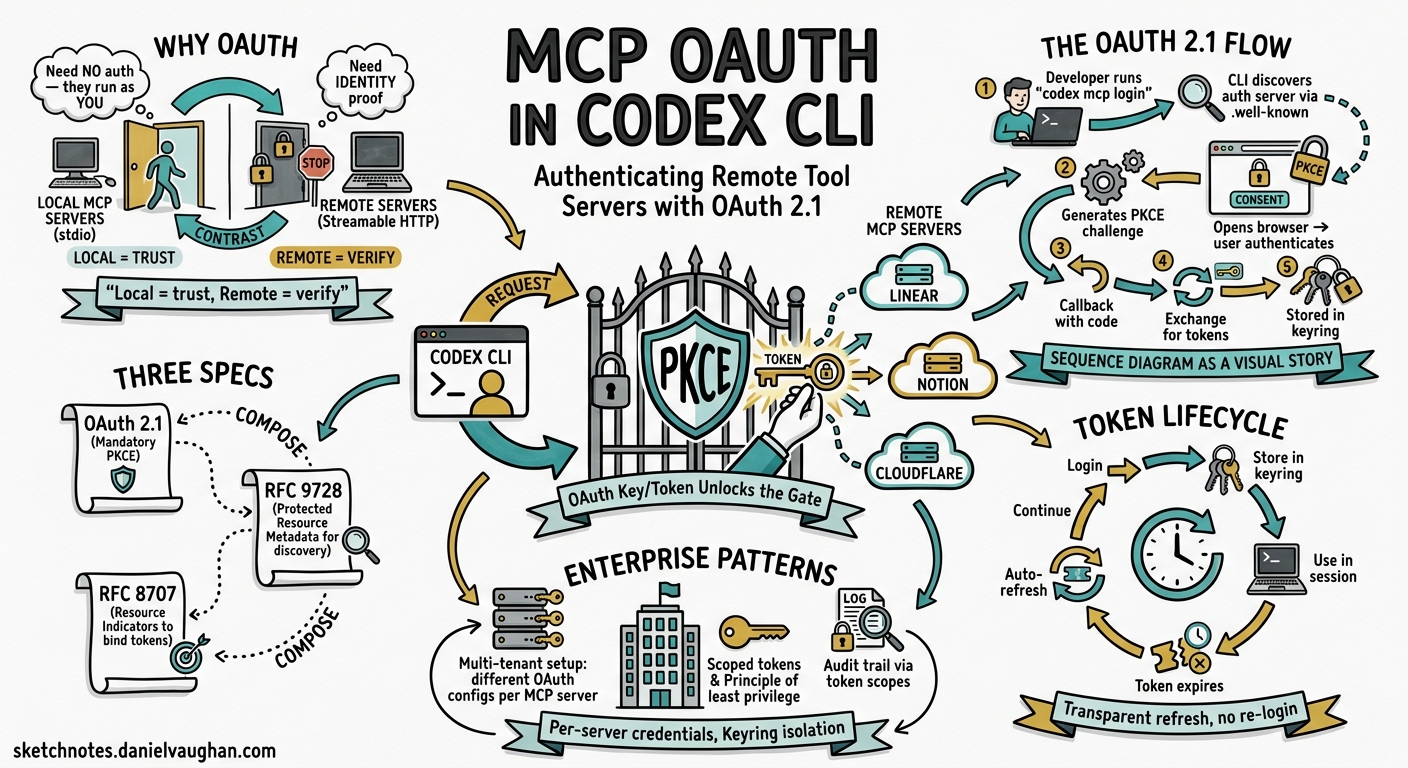
Why MCP OAuth Matters
Local MCP servers — launched via command and communicating over stdio — need no authentication. The process runs on your machine with your permissions. Remote MCP servers are different. When Codex CLI connects to a Linear, Notion, Cloudflare, or custom enterprise endpoint over Streamable HTTP, it must prove identity and obtain scoped access tokens before the server will expose its tools.1
The MCP specification adopted OAuth 2.1 with mandatory PKCE as its authorisation standard in the 2025-06-18 transport revision.2 Codex CLI implements this flow natively through the codex mcp login command, storing credentials securely in the platform keyring and refreshing tokens transparently during sessions.3
The OAuth 2.1 Flow in Codex CLI
sequenceDiagram
    participant Dev as Developer
    participant CLI as Codex CLI
    participant Browser as Browser
    participant AS as Authorization Server
    participant MCP as Remote MCP Server

    Dev->>CLI: codex mcp login linear
    CLI->>MCP: GET /.well-known/oauth-protected-resource
    MCP-->>CLI: authorization_servers[], resource URI
    CLI->>AS: GET /.well-known/oauth-authorization-server
    AS-->>CLI: authorization_endpoint, token_endpoint
    CLI->>CLI: Generate PKCE code_verifier + code_challenge
    CLI->>Browser: Open authorize URL (code_challenge, scopes, resource)
    Browser->>AS: User authenticates + consents
    AS->>CLI: Authorization code via localhost callback
    CLI->>AS: POST /token (code + code_verifier + resource)
    AS-->>CLI: access_token + refresh_token
    CLI->>CLI: Store tokens in platform keyring
    CLI-->>Dev: Login successful
The flow relies on three specification documents: OAuth 2.1 (mandatory PKCE for all clients), RFC 9728 (OAuth 2.0 Protected Resource Metadata for server discovery), and RFC 8707 (Resource Indicators to bind tokens to specific MCP servers).24
Configuring a Remote MCP Server
Basic Streamable HTTP with Bearer Token
For servers that use static API keys rather than OAuth, configure a bearer token environment variable:
[mcp_servers.github]
url = "https://api.github-mcp.example.com/mcp"
bearer_token_env_var = "GITHUB_TOKEN"
startup_timeout_sec = 10.0
tool_timeout_sec = 60.0
enabled_tools = ["list_issues", "create_pr"]
The bearer_token_env_var field tells Codex to read the token from your shell environment at connection time — the secret never appears in the configuration file.5
OAuth-Enabled Server
For servers supporting OAuth discovery (like Linear or Notion), the configuration is simpler:
[mcp_servers.linear]
url = "https://mcp.linear.app/sse"
scopes = ["read", "write", "issues:create"]
oauth_resource = "https://api.linear.app/"
required = true
The scopes field declares what permissions to request during the OAuth flow. The oauth_resource field provides the RFC 8707 resource indicator, ensuring the issued token is audience-bound to the correct server.46
The Login and Logout Commands
Authenticating
# Interactive OAuth login with auto-detected scopes
codex mcp login linear

# Explicit scope override
codex mcp login notion --scopes "read_content,write_content,read_comments"
Codex starts a local HTTP callback server, opens your browser to the authorisation endpoint, and waits for the redirect. The PKCE code verifier ensures the token exchange cannot be intercepted even on localhost.3
Auto-Login on Add
When adding a new HTTP-based server, Codex automatically probes for OAuth support:
codex mcp add linear -- https://mcp.linear.app/sse
If the server responds to /.well-known/oauth-protected-resource, Codex triggers the login flow immediately via perform_oauth_login_retry_without_scopes() — falling back to unauthenticated access if discovery fails.3
Removing Credentials
codex mcp logout linear
This deletes tokens from all configured storage backends (keyring and file fallback). The server configuration in config.toml remains untouched.3
Token Storage and Security
Codex stores OAuth tokens using the keyring-store crate, which maps to platform-native secure storage:3
| Platform | Storage Backend |
|---|---|
| macOS | Keychain Access (service: “Codex Auth”) |
| Linux | Secret Service API (GNOME Keyring / KDE Wallet) |
| Windows | Credential Manager |
Keyring entries use a computed key derived from the CODEX_HOME directory path, so multiple Codex installations maintain isolated credential stores.7
When keyring access is unavailable (headless servers, containers), Codex falls back to an encrypted file store. Tokens never appear in config.toml or process environment variables at rest.
Token Refresh
Access tokens are refreshed proactively during active sessions before expiry. If a refresh token itself expires, Codex prompts for re-authentication on the next tool call rather than failing silently.7
Remote and Devbox Environments
The standard OAuth callback assumes http://localhost:<port>/callback. For remote development environments (devboxes, SSH tunnels, cloud workstations), two configuration keys override this behaviour:
# Fixed port for the callback listener
mcp_oauth_callback_port = 5555

# Custom redirect URI (e.g. devbox ingress)
mcp_oauth_callback_url = "https://my-devbox.corp.internal:5555/callback"
When mcp_oauth_callback_url is set to a non-local address, Codex binds the callback listener on 0.0.0.0 rather than the loopback interface, allowing external traffic to reach it.5
This enables OAuth flows in environments where the browser runs on a different machine from Codex CLI:
flowchart LR
    A[Developer Browser] -->|OAuth redirect| B[Devbox Ingress :5555]
    B --> C[Codex CLI callback listener]
    C --> D[Token exchange with Auth Server]
    D --> E[Tokens stored in devbox keyring]
Practical Patterns
Pattern 1: Project-Scoped OAuth Servers
Keep OAuth-requiring servers in your project’s .codex/config.toml so every team member gets the same tool surface:
# .codex/config.toml (committed to repository)
[mcp_servers.linear]
url = "https://mcp.linear.app/sse"
scopes = ["read", "write"]
required = true

[mcp_servers.notion]
url = "https://mcp.notion.so/mcp"
scopes = ["read_content"]
Each developer runs codex mcp login linear once; their token is stored locally and never shared.5
Pattern 2: CI/CD with Bearer Tokens
In non-interactive environments, OAuth flows are impractical. Use bearer_token_env_var instead:
[mcp_servers.internal_docs]
url = "https://docs-mcp.corp.internal/mcp"
bearer_token_env_var = "MCP_DOCS_TOKEN"
tool_timeout_sec = 120.0
# GitHub Actions workflow
env:
  MCP_DOCS_TOKEN: ${{ secrets.MCP_DOCS_TOKEN }}
  CODEX_API_KEY: ${{ secrets.OPENAI_API_KEY }}
Pattern 3: Scoped Tool Access
Combine OAuth with tool allowlists for defence-in-depth:
[mcp_servers.cloudflare]
url = "https://mcp.cloudflare.com/"
scopes = ["workers:read", "dns:read"]
enabled_tools = ["list_workers", "get_dns_records"]
disabled_tools = ["delete_worker", "update_dns"]
Even if the OAuth token grants write access, Codex won’t expose destructive tools to the model.5
Troubleshooting OAuth Flows
Diagnosing Connection Issues
# List servers with authentication status
codex mcp list --json

# Full diagnostic output in TUI
/mcp verbose
The --json output includes an auth_status field per server: authenticated, oauth_available, bearer_token, or none.3
Known Limitations
Resource indicator support: Some OAuth providers require the resource parameter in the authorisation request (RFC 8707). Earlier Codex versions omitted this; ensure you’re on v0.126.0+ and set oauth_resource explicitly in config.8
Dynamic client registration: Codex uses a built-in public client ID. Servers requiring pre-registered client IDs need custom OAuth configuration via their provider’s admin panel.6
Token audience mismatch: If tokens are issued for the wrong audience, set oauth_resource to match the server’s expected resource URI exactly.8
Security Considerations
- PKCE is mandatory — Codex never performs plain OAuth flows. The code verifier is generated per-login and never stored.2
- Tokens are scoped — Request only the permissions your workflow needs. The
scopesconfig field controls this at the TOML level. - Resource binding — RFC 8707 resource indicators prevent token reuse across different MCP servers.4
- Credential isolation — Different
CODEX_HOMEpaths produce different keyring entries, useful for separating personal and work contexts. - Automatic expiry — Codex handles refresh transparently but will not cache expired tokens or retry indefinitely.
Citations
-
[Model Context Protocol — Codex OpenAI Developers](https://developers.openai.com/codex/mcp) -
Authorization — Model Context Protocol Specification (Draft) ↩ ↩2 ↩3
-
[MCP CLI Commands openai/codex DeepWiki](https://deepwiki.com/openai/codex/6.3-mcp-cli-commands) -
The New MCP Authorization Specification — dasroot.net ↩ ↩2 ↩3
-
[Configuration Reference — Codex OpenAI Developers](https://developers.openai.com/codex/config-reference) -
[Authentication — Codex OpenAI Developers](https://developers.openai.com/codex/auth) -
codex mcp login omits OAuth resource indicator — Issue #13891 — openai/codex ↩ ↩2