Agents SDK TypeScript Goes Sandbox-Native: Building Codex-Powered Agents with the Open-Source Harness
Agents SDK TypeScript Goes Sandbox-Native: Building Codex-Powered Agents with the Open-Source Harness
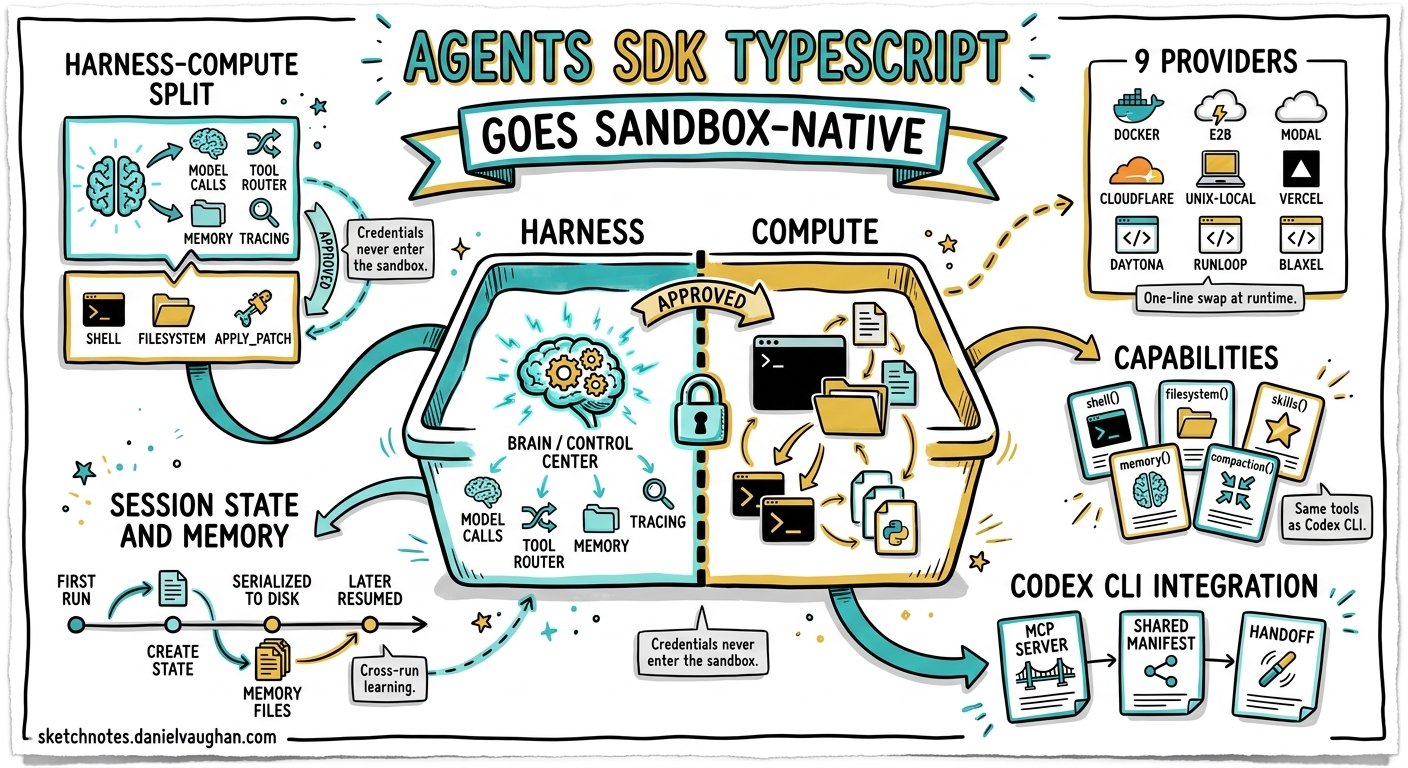
On 6 May 2026, OpenAI released v0.9.1 of the Agents SDK for TypeScript — the first version to ship sandbox agents and the open-source harness that underpins Codex itself1. The Python SDK gained these features in mid-April2; TypeScript developers now have parity. This matters for Codex CLI users because it means you can embed the same harness–compute separation that powers codex exec into your own TypeScript applications, CI pipelines, and multi-agent orchestrators — and swap the underlying compute provider at runtime without touching agent logic.
This article covers the architecture, walks through practical integration patterns with Codex CLI, and examines provider trade-offs for production deployments.
Why the Harness–Compute Split Matters
Codex CLI has always separated its reasoning loop from command execution: the agent decides what to do, and the sandbox decides where and how it runs3. The Agents SDK formalises this boundary into two clean layers:
| Layer | Responsibilities | Where it runs |
|---|---|---|
| Harness | Model calls, tool dispatch, handoffs, approvals, memory, tracing, recovery | Trusted infrastructure (your server, CI runner, Lambda) |
| Compute | File I/O, shell commands, package installation, port exposure | Sandboxed environment (local Unix, Docker, E2B, Modal…) |
graph TB
    subgraph Harness["Harness (Trusted)"]
        A[Agent Loop] --> B[Tool Router]
        A --> C[Memory]
        A --> D[Tracing]
        B --> E[Approval Gate]
    end

    subgraph Compute["Compute (Sandboxed)"]
        F[Shell]
        G[Filesystem]
        H[apply_patch]
        I[Skills]
    end

    E -->|"Approved"| F
    E -->|"Approved"| G
    E -->|"Approved"| H
    B -->|"Skill request"| I
This split means credentials, API keys, and orchestration state never enter the sandbox. The sandbox sees only the files and environment variables you explicitly declare in the Manifest4.
Getting Started: A Minimal Sandbox Agent
Install the SDK and create a sandbox agent that reviews a workspace:
npm install @openai/agents@0.9.1
import { run } from "@openai/agents";
import {
  SandboxAgent,
  Manifest,
  file,
  shell,
  filesystem,
} from "@openai/agents/sandbox";
import { UnixLocalSandboxClient } from "@openai/agents/sandbox/local";

const manifest = new Manifest({
  entries: {
    "AGENTS.md": file({
      content: `# Review Agent
## Rules
- Run tests before summarising.
- Never modify production files.`,
    }),
    "src/index.ts": file({ content: "export const greet = () => 'hello';" }),
    "src/index.test.ts": file({
      content: `import { greet } from './index';
test('greets', () => expect(greet()).toBe('hello'));`,
    }),
  },
});

const reviewer = new SandboxAgent({
  name: "Code Reviewer",
  model: "gpt-5.5",
  instructions:
    "Read AGENTS.md first. Run the test suite, then summarise results.",
  defaultManifest: manifest,
  capabilities: [shell(), filesystem()],
});

const result = await run(
  reviewer,
  "Review this workspace and report any issues.",
  { sandbox: { client: new UnixLocalSandboxClient() } },
);

console.log(result.finalOutput);
The UnixLocalSandboxClient runs commands on the host machine inside a restricted directory — fast for local development, unsuitable for untrusted code4.
Capabilities: What a Sandbox Agent Can Do
Each capability grants the agent a set of tools. The defaults mirror what Codex CLI provides in a standard session4:
| Capability | Tools added | Requires |
|---|---|---|
shell() |
run_command, interactive input |
— |
filesystem() |
apply_patch, view_image, file read/write |
— |
skills() |
Skill discovery and materialisation | — |
memory() |
Cross-run lesson retention | shell() |
compaction() |
Context trimming for long sessions | — |
The apply_patch tool uses the same v4a diff format as Codex CLI5, ensuring patches generated in one environment apply cleanly in the other.
Loading Skills from Git
Skills — the same SKILL.md format used by Codex CLI6 — can be loaded from local directories or Git repositories:
import { skills, gitRepo } from "@openai/agents/sandbox";

const agent = new SandboxAgent({
  name: "Skilled Agent",
  model: "gpt-5.5",
  instructions: "Use available skills when appropriate.",
  capabilities: [
    shell(),
    filesystem(),
    skills({
      from: gitRepo({
        repo: "your-org/codex-skills",
        ref: "main",
      }),
    }),
  ],
});
This means teams that maintain skill libraries for Codex CLI can reuse them directly in TypeScript agents without duplication6.
Nine Sandbox Providers at Runtime
The provider is a runtime argument — change it without modifying agent logic4:
| Provider | Client class | Best for |
|---|---|---|
| Unix-local | UnixLocalSandboxClient |
Fast local iteration |
| Docker | DockerSandboxClient |
Local container isolation |
| Blaxel | BlaxelSandboxClient |
Managed multi-tenant |
| Cloudflare | CloudflareSandboxClient |
Edge compute |
| Daytona | DaytonaSandboxClient |
Multi-language devbox |
| E2B | E2BSandboxClient |
Managed preview URLs |
| Modal | ModalSandboxClient |
Serverless GPU access |
| Runloop | RunloopSandboxClient |
Devbox with tunnels |
| Vercel | VercelSandboxClient |
Deployment integration |
Switching from local development to production is a one-line change:
import { DockerSandboxClient } from "@openai/agents/sandbox/local";

const result = await run(agent, "Analyse this codebase.", {
  sandbox: {
    client: new DockerSandboxClient({
      image: "node:22-bookworm-slim",
    }),
  },
});
For CI pipelines, Docker or E2B provides repeatable isolation without host contamination4.
Session State and Resume
Sandbox sessions support persistence and resumption — the same pattern Codex CLI uses for codex resume7:
// First run
const session = await client.create({ manifest });
const firstResult = await run(agent, "Set up the project.", {
  maxTurns: 20,
  sandbox: { session },
});

// Serialise state
const frozen = await client.serializeSessionState?.(session.state);
await session.close?.();

// Later: resume from frozen state
const resumed = await client.resume(
  await client.deserializeSessionState(frozen),
);

const secondResult = await run(agent, "Now add integration tests.", {
  maxTurns: 20,
  sandbox: { session: resumed },
});
This enables long-running workflows that span CI stages, human review gates, or time-bounded compute budgets4.
Sandbox Memory: Cross-Run Learning
The memory() capability persists lessons across runs without polluting conversational context4. Memory files follow a defined layout:
workspace/
  memories/
    memory_summary.md      # Distilled guidance
    MEMORY.md              # Active memory document
    raw_memories.md        # Unprocessed entries
    raw_memories/<run>.md  # Per-run raw memories
    rollout_summaries/     # Run-level summaries
Three memory modes control behaviour:
- Default — read existing memories, generate new entries
- Read-only — consume prior lessons without writing
- Generate-only — produce memories without reading
This mirrors Codex CLI’s native memories system8, and memories written by Codex sessions can be read by TypeScript agents if they share the same workspace directory.
Codex CLI Integration Patterns
Pattern 1: Codex CLI as MCP Server, TypeScript Agent as Orchestrator
Run codex mcp-server and connect a TypeScript SandboxAgent to it via the MCP transport9. The orchestrator handles routing and approvals; Codex handles code execution:
import { MCPServerStdio } from "@openai/agents/mcp";

const codexMcp = new MCPServerStdio({
  name: "codex",
  command: "codex",
  args: ["mcp-server", "--path", "/workspace/project"],
});

const orchestrator = new SandboxAgent({
  name: "Orchestrator",
  model: "gpt-5.5",
  mcpServers: [codexMcp],
  instructions: "Delegate coding tasks to the Codex MCP server.",
  capabilities: [shell(), filesystem()],
});
Pattern 2: Shared Manifest for Codex CLI and TypeScript Agents
Define workspace contents once in a Manifest, use it across both surfaces:
const sharedManifest = new Manifest({
  entries: {
    repo: gitRepo({ repo: "your-org/your-project", ref: "main" }),
    "AGENTS.md": file({ content: agentsContent }),
  },
});

// TypeScript agent uses the manifest directly
const result = await run(agent, task, {
  sandbox: { client, manifest: sharedManifest },
});

// Codex CLI uses the same repo + AGENTS.md via normal git clone
// $ codex exec "Run the test suite" --path /workspace/your-project
Pattern 3: Handoff from Non-Sandbox to Sandbox Agent
A lightweight orchestration agent without sandbox capabilities delegates workspace-heavy tasks to a sandbox agent4:
import { Agent } from "@openai/agents";

const triage = new Agent({
  name: "Triage",
  model: "gpt-5.5",
  instructions: "Classify incoming requests. Hand off coding tasks.",
  handoffs: [sandboxCodingAgent],
});
The triage agent handles natural-language routing; the sandbox agent handles file manipulation. This separates concerns cleanly and keeps the triage agent’s context lean.
What This Means for Codex CLI Users
The TypeScript SDK release closes a significant gap. Prior to v0.9.1, TypeScript developers who wanted sandbox-powered agents had three options: shell out to codex exec, use the Python SDK, or build their own harness10. Now they can build natively in TypeScript with the same primitives:
- Portable skills — SKILL.md files work across Codex CLI, the Python SDK, and now the TypeScript SDK6.
- Portable manifests — workspace definitions are provider-agnostic and SDK-agnostic.
- Shared memory — agents across languages can read the same memory files if they share a workspace.
- Consistent patching —
apply_patchuses the same v4a format everywhere5.
The beta label is worth noting: API details, defaults, and supported capabilities may change1. Pin your SDK version in package.json and watch the changelog.
Decision Framework: When to Use What
flowchart TD
    A[Need an agent with workspace?] -->|No| B[Use standard Agent class]
    A -->|Yes| C{Language?}
    C -->|TypeScript| D[SandboxAgent from @openai/agents/sandbox]
    C -->|Python| E[SandboxAgent from openai-agents]
    C -->|Shell script| F[codex exec]
    D --> G{Deployment?}
    E --> G
    G -->|Local dev| H[UnixLocalSandboxClient]
    G -->|CI pipeline| I[DockerSandboxClient]
    G -->|Production| J[E2B / Modal / Cloudflare]
    G -->|Enterprise| K[Daytona / Runloop]
Limitations and Sharp Edges
- Beta status — sandbox agents in TypeScript are beta; expect breaking changes between minor versions1.
- No code mode yet — the TypeScript SDK does not yet support the Codex CLI-style
code_modethat restricts the agent to code-only output. OpenAI lists this as planned1. - No subagent primitive — TypeScript sandbox agents cannot natively spawn sub-sandbox-agents the way Codex CLI’s MultiAgentV2 does11. Use handoffs or tool-based composition instead.
- Provider parity varies — snapshot support, port exposure, and mount types differ across providers. Test your target provider early4.
- Memory requires persistence — cross-run memory only works if the workspace directory (or cloud mount) survives between runs4.
Citations
-
OpenAI Agents SDK TypeScript documentation — v0.9.1 release, sandbox agents beta status, planned features. ↩ ↩2 ↩3 ↩4
-
OpenAI, “The next evolution of the Agents SDK” — April 2026 announcement of harness and sandbox for Python SDK. ↩
-
OpenAI, “Unlocking the Codex harness: how we built the App Server” — Codex app-server architecture and harness–compute separation. ↩
-
OpenAI API docs, “Sandbox Agents” — Manifest format, capabilities, provider table, session state, memory, secret management. ↩ ↩2 ↩3 ↩4 ↩5 ↩6 ↩7 ↩8 ↩9 ↩10
-
OpenAI Codex CLI features — apply_patch v4a diff format, shared across Codex and Agents SDK. ↩ ↩2
-
OpenAI, “Agent Skills” — SKILL.md format specification, progressive disclosure, skill loading from Git. ↩ ↩2 ↩3
-
OpenAI Codex CLI features — resume —
codex resumesession persistence. ↩ -
OpenAI Codex Memories documentation — Native memories pipeline, memory file layout. ↩
-
OpenAI, “Use Codex with the Agents SDK” — Running Codex as MCP server for SDK orchestration. ↩
-
OpenAI Developer Changelog, 6 May 2026 — “The updated Agents SDK became available in TypeScript, featuring sandbox agents and an open-source harness built in.” ↩
-
OpenAI Codex CLI subagents documentation — MultiAgentV2 thread orchestration and depth handling. ↩