The Codex CLI Instruction Stack: How Six Configuration Surfaces Shape Agent Behaviour
The Codex CLI Instruction Stack: How Six Configuration Surfaces Shape Agent Behaviour
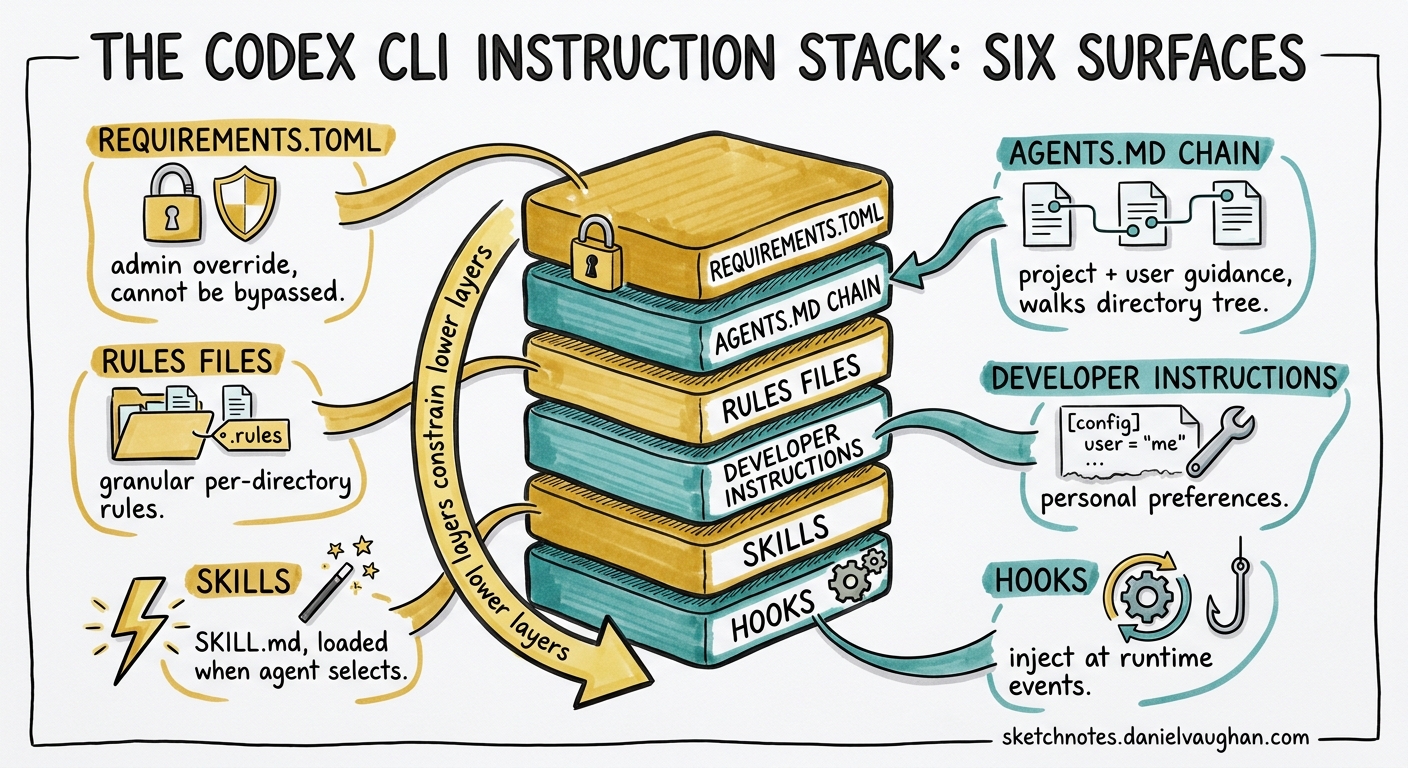
Codex CLI does not read a single instruction file. It assembles a composite instruction set from six distinct surfaces, each with its own scope, precedence, and purpose. Understanding how these surfaces compose at runtime is the difference between a well-governed agent and one that ignores half your guidance because a higher-precedence layer overwrote it.
This article maps the full instruction architecture as of Codex CLI v0.128/v0.129-alpha, explains where each surface wins, and provides practical patterns for layering them in team repositories and enterprise environments.
The Six Instruction Surfaces
When Codex starts a session, it constructs the agent’s system prompt from these sources, resolved in a specific order:
flowchart TD
    A["1. requirements.toml\n(admin-enforced)"] --> B["2. AGENTS.md chain\n(project + user)"]
    B --> C["3. Rules files\n(.rules in rules/)"]
    C --> D["4. developer_instructions\n(config.toml)"]
    D --> E["5. Skills\n(SKILL.md, on-demand)"]
    E --> F["6. Hooks\n(lifecycle injection)"]

    style A fill:#d32f2f,color:#fff
    style B fill:#1565c0,color:#fff
    style C fill:#ef6c00,color:#fff
    style D fill:#2e7d32,color:#fff
    style E fill:#6a1b9a,color:#fff
    style F fill:#00838f,color:#fff
Each surface operates at a different layer of the stack. They do not simply concatenate — some constrain, some guide, some inject at runtime, and some only activate when the agent selects them.
1. requirements.toml — The Admin Override
The highest-precedence instruction surface is requirements.toml, available to organisations using ChatGPT Business, Enterprise, or macOS MDM 1. This file enforces security-sensitive constraints that users cannot override:
- Approval policy floors (e.g. forcing
approval_policy = "on-request") - Sandbox mode ceilings (preventing
danger-full-access) - Web search restrictions
- Managed hooks that inject lifecycle scripts from an admin-controlled directory
- MCP server allow/deny lists
# /etc/codex/requirements.toml (system-level)
# or cloud-managed via Codex Policies page

[requirements]
approval_policy = "on-request"
sandbox_mode = "workspace-write"
web_search = "cached"

[hooks]
managed_dir = "/etc/codex/managed-hooks"
When a user’s config.toml conflicts with an enforced requirement, Codex silently falls back to the compliant value and notifies the user 2. This surface exists purely for constraint — it does not add creative guidance or project-specific knowledge.
Precedence: Cloud-managed requirements take priority over MDM requirements, which take priority over system-level /etc/codex/requirements.toml 3.
2. AGENTS.md — The Project Knowledge Base
AGENTS.md is the primary surface for project-specific instructions. Codex builds an instruction chain by walking the directory tree 4:
- User scope:
~/.codex/AGENTS.override.md→~/.codex/AGENTS.md(first non-empty file wins) - Project scope: From the Git root down to the current working directory, checking each level for
AGENTS.override.md→AGENTS.md→ fallback filenames
Files concatenate from root downward, separated by blank lines. At most one file loads per directory level. The combined output is capped at project_doc_max_bytes (default: 32 KiB) 5.
repo/
├── AGENTS.md                    # Global: coding standards, architecture
├── services/
│   ├── payments/
│   │   └── AGENTS.override.md   # Overrides AGENTS.md at this level
│   └── search/
│       └── AGENTS.md            # Search-specific patterns
└── .codex/
    └── config.toml
Override Mechanics
AGENTS.override.md replaces — not supplements — the regular AGENTS.md at the same directory level 4. This is useful when a subdirectory needs fundamentally different guidance (e.g. a legacy module that should not follow the repository’s standard patterns).
Surviving Compaction
AGENTS.md instructions are re-read on every turn and survive context compaction intact 6. This makes them the right place for invariants: coding standards, architectural boundaries, and safety rules that must persist across long sessions.
3. Rules Files — Command Execution Policy
Rules control what shell commands Codex may execute without human approval. Written in Starlark (a Python-like language designed for safe evaluation), rule files live in rules/ directories next to active config layers 7:
~/.codex/rules/default.rules— user-level policies<repo>/.codex/rules/— project-level policies (requires project trust)
# ~/.codex/rules/default.rules

prefix_rule(
    pattern = ["rm", ["-rf", "-r"]],
    decision = "forbidden",
    justification = "Recursive deletion is never agent-initiated"
)

prefix_rule(
    pattern = ["docker", "compose", "up"],
    decision = "prompt",
    justification = "Container lifecycle changes need human review"
)

prefix_rule(
    pattern = ["pytest"],
    decision = "allow",
    justification = "Test execution is always safe in sandbox"
)
When multiple rules match a command, Codex applies the most restrictive decision: forbidden > prompt > allow 7. You can validate rules before deployment with codex execpolicy check --rules 7.
Rules do not add knowledge or guidance — they constrain actions. They complement AGENTS.md (which constrains thinking) and requirements.toml (which constrains configuration).
4. developer_instructions — The Config-Level Injection
The developer_instructions key in config.toml injects additional text into the agent’s system prompt without modifying any file in the repository 8:
# ~/.codex/config.toml

developer_instructions = """
Always use British English spelling.
Prefer explicit error handling over try/catch blocks.
When writing tests, use property-based testing where applicable.
"""
This surface is ideal for personal preferences that should not live in the project’s AGENTS.md:
- Spelling and formatting preferences
- Preferred testing frameworks
- Response style guidance
- CI-specific instructions (via profile-scoped config)
A related key, model_instructions_file, points to an external file that replaces the built-in system instructions entirely 8. This is a power-user escape hatch — misuse it and you lose Codex’s default tool-use behaviour.
Profile-Scoped Instructions
Combined with named profiles, developer_instructions enables per-workflow instruction sets:
[profiles.review]
developer_instructions = """
Focus on security, error handling, and test coverage gaps.
Do not suggest stylistic changes unless they affect readability.
"""

[profiles.ci]
developer_instructions = """
Output structured JSON summaries. Do not ask clarifying questions.
Fail fast on any ambiguity.
"""
Activate with codex --profile review or set profile = "review" as the default.
5. Skills — On-Demand Instruction Packages
Skills are the only instruction surface that loads conditionally. A skill’s SKILL.md instructions enter the context only when the agent determines the current task matches the skill’s description, or when the user explicitly invokes it via /skills or $skill-name 9.
Codex discovers skills from four scopes, in priority order 9:
| Scope | Path | Typical Use |
|---|---|---|
| Repository | .agents/skills/ at repo root and parent directories |
Team workflows |
| User | $HOME/.agents/skills/ |
Personal cross-project skills |
| Admin | /etc/codex/skills/ |
Organisation-wide defaults |
| System | Bundled with Codex | Built-in skills |
The initial skills list costs roughly 2% of the context window (~8,000 characters) 9. When Codex selects a skill, it reads the full SKILL.md instructions — potentially adding thousands of tokens. This progressive disclosure model keeps the base prompt lean while allowing deep specialisation when needed.
sequenceDiagram
    participant U as User
    participant C as Codex Agent
    participant S as Skill Registry

    U->>C: "Generate a database migration"
    C->>S: Match task against skill descriptions
    S-->>C: db-migration skill (SKILL.md loaded)
    C->>C: Full skill instructions enter context
    C->>U: Migration with skill-specific patterns
Skills differ from AGENTS.md in a critical way: AGENTS.md is always loaded and survives compaction. Skills are loaded on demand and may be evicted during compaction if the agent determines they are no longer relevant.
6. Hooks — Runtime Instruction Injection
Hooks are the only surface that injects instructions during a turn rather than at session start. Through the systemMessage field, a hook script can add contextual guidance after observing a tool call or its output 10:
{
  "hooks": [
    {
      "event": "PostToolUse",
      "matcher": { "tool_name": "shell" },
      "command": ["./scripts/check-test-coverage.sh"],
      "status_message": "Checking test coverage..."
    }
  ]
}
When the hook script returns a systemMessage, it appears as a warning in the UI and enters the agent’s context for subsequent reasoning 10. This enables patterns like:
- PostToolUse test gates: After every shell command, check whether tests still pass and inject a correction instruction if they don’t
- PreToolUse guardrails: Deny specific commands and inject an explanation of why they are forbidden in this project
- SessionStart context loading: Inject environment-specific configuration details at startup
Hooks are discovered from ~/.codex/hooks.json, ~/.codex/config.toml, .codex/hooks.json, and .codex/config.toml, in that order 10. Project-level hooks only load when the project is trusted.
How the Surfaces Compose
The six surfaces are not a simple priority stack. They operate at different times and constrain different aspects of behaviour:
| Surface | When Loaded | What It Constrains | Survives Compaction |
|---|---|---|---|
| requirements.toml | Session start | Configuration values | N/A (config, not prompt) |
| AGENTS.md | Every turn | Thinking and approach | Yes (re-read each turn) |
| Rules | Command evaluation | Shell command execution | N/A (evaluated per command) |
| developer_instructions | Session start | Thinking and style | No (in system prompt) |
| Skills | On demand | Task-specific patterns | No (may be evicted) |
| Hooks | During turns | Runtime corrections | No (injected per event) |
Practical Layering Patterns
For an individual developer:
~/.codex/AGENTS.md           → Personal coding standards
~/.codex/config.toml          → developer_instructions for style
~/.codex/rules/default.rules  → Safety rules (no rm -rf, no force push)
$HOME/.agents/skills/         → Personal productivity skills
For a team repository:
AGENTS.md                     → Architecture, conventions, boundaries
.codex/rules/safety.rules     → Command policies for this codebase
.codex/hooks.json              → PostToolUse test verification
.agents/skills/                → Team-specific workflow skills
For an enterprise:
/etc/codex/requirements.toml   → Enforced sandbox and approval floors
/etc/codex/skills/              → Organisation-wide compliance skills
Cloud-managed requirements      → Remote policy updates without MDM
Common Mistakes
Putting everything in AGENTS.md. If your AGENTS.md exceeds 10 KiB, you are almost certainly mixing concerns. Move command policies to rules, personal preferences to developer_instructions, and specialised workflows to skills 5.
Ignoring project trust. Project-level .codex/config.toml, hooks, and rules only load when the project is trusted. If your team’s hooks are not firing, the most common cause is an untrusted project — not a configuration error 11.
Using model_instructions_file casually. This key replaces the entire built-in system prompt. Unless you are building a custom harness, you almost certainly want developer_instructions (which appends) rather than model_instructions_file (which replaces) 8.
Forgetting that skills are evictable. During long sessions, context compaction may drop skill instructions. If a skill’s guidance must persist, promote it to an AGENTS.md section instead.
Verifying Your Stack
Two commands reveal the assembled instruction set:
# Show which config layers and files are active
codex /debug-config

# Ask the agent to summarise its instructions
codex --ask-for-approval never "Summarise the current instructions."
The first shows configuration layering. The second shows the composed prompt from the agent’s perspective — including AGENTS.md content, developer_instructions, and any active skill instructions.
Citations
-
[Managed configuration – Codex OpenAI Developers](https://developers.openai.com/codex/enterprise/managed-configuration) -
[Admin Setup – Codex OpenAI Developers](https://developers.openai.com/codex/enterprise/admin-setup) -
[Custom instructions with AGENTS.md – Codex OpenAI Developers](https://developers.openai.com/codex/guides/agents-md) -
[Configuration Reference – Codex OpenAI Developers](https://developers.openai.com/codex/config-reference) -
[Best practices – Codex OpenAI Developers](https://developers.openai.com/codex/learn/best-practices) -
[Rules – Codex OpenAI Developers](https://developers.openai.com/codex/rules) -
[Config basics – Codex OpenAI Developers](https://developers.openai.com/codex/config-basic) -
[Agent Skills – Codex OpenAI Developers](https://developers.openai.com/codex/skills) -
[Hooks – Codex OpenAI Developers](https://developers.openai.com/codex/hooks) -
[Advanced Configuration – Codex OpenAI Developers](https://developers.openai.com/codex/config-advanced)