Codex CLI for Data Analysis: From Raw CSV to Stakeholder Report in One Agent Session
Codex CLI for Data Analysis: From Raw CSV to Stakeholder Report in One Agent Session
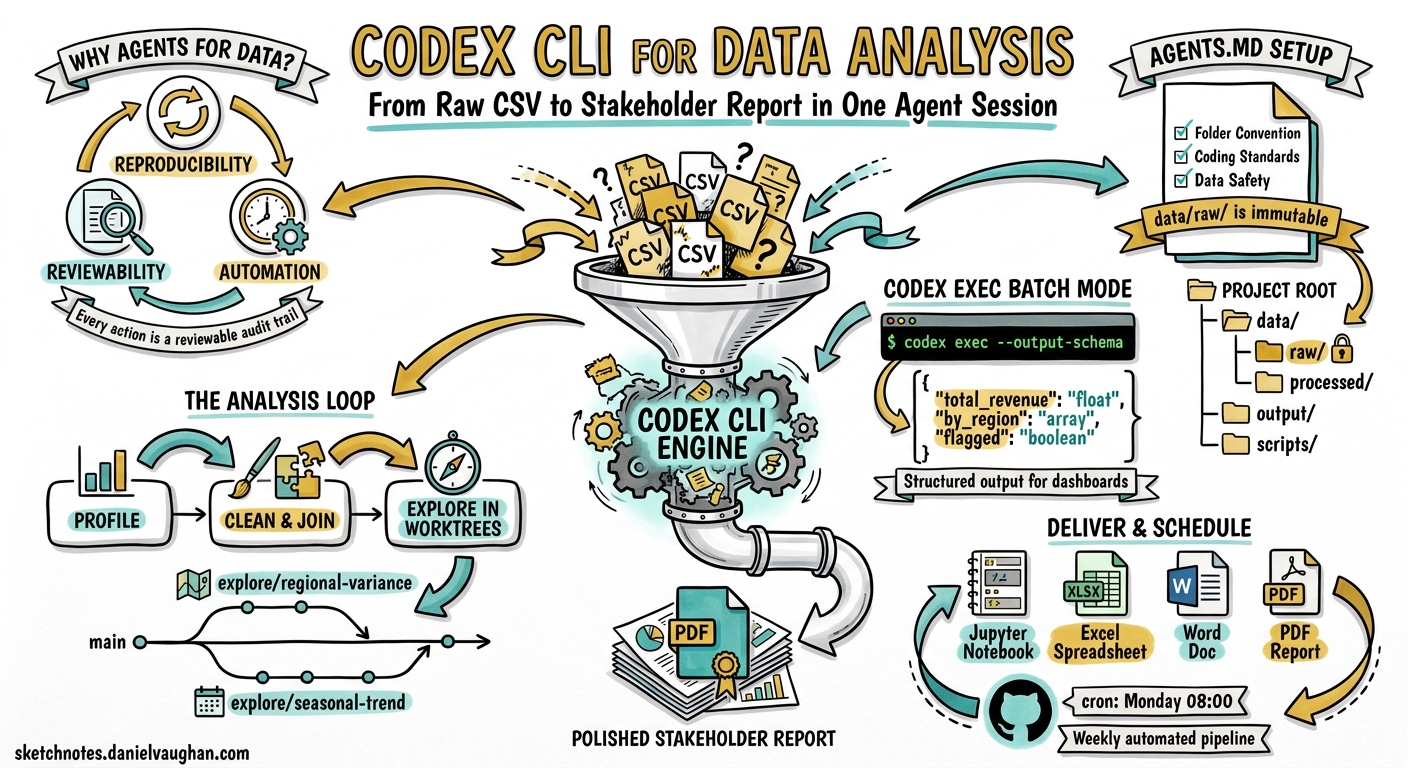
Codex CLI started life as a coding agent, but OpenAI’s April 2026 “Codex for (almost) everything” update made the shift explicit: the same agent loop that rewrites your React components can also clean a messy CSV, build a regression model, and package the result as a PDF brief — all without leaving the terminal 1. With over four million weekly active users and GPT-5.5 powering the backend 2, the question is no longer whether Codex can handle data work, but how to configure it so the output is reproducible and trustworthy.
This article walks through a complete data-analysis workflow using Codex CLI, covering project scaffolding, interactive exploration, non-interactive batch processing with codex exec, and final delivery via built-in skills.
Why Use a Coding Agent for Data Work?
The traditional data-analysis stack — Jupyter notebooks, ad-hoc scripts, manual chart tweaking — produces results that are difficult to reproduce, hard to review, and nearly impossible to schedule. Codex CLI addresses all three problems:
- Reproducibility. Every action Codex takes is a tool call inside a sandboxed environment. The session transcript is a reviewable audit trail.
- Reviewability. Because Codex writes real Python files rather than executing ephemeral cells, the output is diffable and can go through code review.
- Automation.
codex execturns any analysis into a single-command pipeline suitable for cron jobs, CI, or GitHub Actions 3.
OpenAI’s official use-case documentation now recommends mirroring the R for Data Science framework — import, tidy, transform, visualise, model, communicate — and letting Codex accelerate movement through each stage 4.
Project Structure and AGENTS.md
Before handing data to the agent, establish a project structure and encode your conventions in AGENTS.md:
# AGENTS.md

## Project: Q2 Revenue Analysis

### Environment
- Python 3.12 via `uv` (do NOT use pip directly)
- All dependencies pinned in `pyproject.toml`

### Folder Convention
- `data/raw/` — immutable source files, never modified
- `data/processed/` — cleaned and joined outputs
- `output/` — charts, tables, and final deliverables
- `scripts/` — reusable analysis scripts

### Coding Standards
- PEP 8, type hints on all function signatures
- pandas for tabular work; polars only if explicitly requested
- matplotlib + seaborn for charts; no plotly unless asked
- Every script must be runnable standalone: `python scripts/foo.py`

### Data Safety
- Never modify files in `data/raw/`
- Log all join operations with match rates before committing
- Flag any column with >5% null values in output summaries
This file loads automatically at the start of every Codex session, ensuring the agent respects your data conventions from the first prompt 5.
The Interactive Exploration Loop
Start a TUI session in your project directory:
cd ~/projects/q2-revenue
codex
Stage 1: Data Profiling
Your first prompt should ask Codex to inventory the raw data:
Read all files in data/raw/. For each CSV, report: row count, column names
and types, null rates per column, and any duplicate-key candidates.
Write the profile to output/data-profile.md.
Codex will generate a Python script that uses pandas.DataFrame.info(), describe(), and duplicated(), execute it inside the sandbox, and write the Markdown summary. You review the output, approve, and move on.
Stage 2: Cleaning and Joining
Clean the revenue data: drop rows where amount <= 0, parse date columns
as datetime, normalise region codes to ISO 3166-2. Then join with the
customer dimension table on customer_id. Profile the join key first —
show uniqueness and null rates — and report the match rate before writing
the joined output to data/processed/revenue-customers.parquet.
The key instruction here is profile the join key first. OpenAI’s data-analysis best practices explicitly recommend running trial joins and reporting match rates before committing changes 4. This prevents silent data loss from mismatched keys.
Stage 3: Exploration with Worktrees
For exploratory hypotheses, use separate Git worktrees to keep diffs reviewable:
Create a worktree for the regional-variance hypothesis. In that worktree,
group revenue by region and month, compute coefficient of variation,
and generate a heatmap. Keep the diff focused on exploration only.
graph LR
    A[main branch] -->|git worktree add| B[explore/regional-variance]
    A -->|git worktree add| C[explore/seasonal-trend]
    B --> D[heatmap + summary stats]
    C --> E[decomposition plot + ADF test]
    D --> F{Merge winning hypothesis}
    E --> F
This pattern, recommended in OpenAI’s datasets-and-reports guide, prevents exploratory code from polluting your main analysis branch 4.
Non-Interactive Batch Processing with codex exec
Once you have validated scripts, codex exec turns them into automated pipelines:
codex exec "Run scripts/clean_revenue.py and scripts/build_model.py \
  in sequence. If any script fails, stop and report the error. \
  Write a JSON summary of the results." \
  --sandbox workspace-write \
  -o output/run-summary.txt
Structured Output for Downstream Consumption
For integration with dashboards or alerting systems, use --output-schema to enforce a JSON contract 3:
codex exec "Analyse data/processed/revenue-customers.parquet. \
  Compute total revenue, revenue by region, month-over-month growth rates, \
  and flag any region with >10% decline." \
  --output-schema ./schemas/revenue-summary.json \
  -o output/revenue-summary.json \
  --sandbox workspace-write
Where schemas/revenue-summary.json defines the expected shape:
{
  "$schema": "https://json-schema.org/draft/2020-12/schema",
  "type": "object",
  "properties": {
    "total_revenue": { "type": "number" },
    "by_region": {
      "type": "array",
      "items": {
        "type": "object",
        "properties": {
          "region": { "type": "string" },
          "revenue": { "type": "number" },
          "mom_growth_pct": { "type": "number" },
          "flagged": { "type": "boolean" }
        },
        "required": ["region", "revenue", "mom_growth_pct", "flagged"]
      }
    },
    "analysis_date": { "type": "string", "format": "date" }
  },
  "required": ["total_revenue", "by_region", "analysis_date"]
}
The agent’s final response will conform exactly to this schema, making it safe to parse programmatically 3.
Reasoning Token Reporting
As of v0.130, codex exec --json reports reasoning-token usage alongside completion tokens 6. For data-analysis tasks, this helps you understand how much of the cost is the model thinking versus writing:
codex exec --json "Build a linear regression model predicting Q3 revenue" \
  2>/dev/null | jq 'select(.type == "usage") | .usage'
Built-In Skills for Output Delivery
Codex ships with several built-in skills that handle the final communication stage 7:
| Skill | Use When |
|---|---|
$jupyter-notebook |
Deliverable should stay notebook-native for data scientists |
$spreadsheet |
Stakeholders want Excel with formulas and pivot tables |
$doc |
Word document for non-technical executives |
$pdf |
Formatted report with charts for archival |
Invoke a skill directly in your prompt:
Using the $pdf skill, create a stakeholder report from the analysis in
output/revenue-summary.json. Include an executive summary, regional
breakdown table, month-over-month trend chart, and a caveats section
noting join quality and sampling assumptions.
Configuration Profile for Data Work
Create a dedicated profile in ~/.codex/config.toml:
[profile.data-analyst]
model = "gpt-5.5"
model_reasoning_effort = "high"
sandbox = "workspace-write"

[profile.data-analyst.tools.web_search]
mode = "cached"

[profile.data-analyst.permissions]
# Allow pandas, matplotlib, and data processing
allowed_commands = ["python", "uv", "pip"]
Activate it per session:
codex --profile data-analyst
Or for batch runs:
codex exec --profile data-analyst "Run the weekly revenue pipeline"
Scheduling Recurring Analysis
Combine codex exec with cron or GitHub Actions for weekly reporting 3:
# .github/workflows/weekly-revenue.yml
name: Weekly Revenue Report
on:
  schedule:
    - cron: '0 8 * * 1'  # Every Monday at 08:00 UTC

jobs:
  analyse:
    runs-on: ubuntu-latest
    steps:
      - uses: actions/checkout@v4
      - name: Run analysis
        env:
          CODEX_API_KEY: ${{ secrets.CODEX_API_KEY }}
        run: |
          codex exec --profile data-analyst \
            --output-schema schemas/revenue-summary.json \
            -o output/weekly-report.json \
            "Pull latest data from data/raw/, run the full Q2 pipeline, \
             and generate the weekly revenue summary."
      - name: Upload report
        uses: actions/upload-artifact@v4
        with:
          name: revenue-report-${{ github.run_id }}
          path: output/
The Complete Workflow
flowchart TD
    A[Raw CSV in data/raw/] --> B[Data Profiling]
    B --> C{Quality OK?}
    C -->|No| D[Clean & Transform]
    C -->|Yes| E[Join & Enrich]
    D --> E
    E --> F[Exploratory Analysis<br/>in Git worktrees]
    F --> G{Hypothesis validated?}
    G -->|Yes| H[Build Model]
    G -->|No| F
    H --> I[Generate Structured Output<br/>codex exec --output-schema]
    I --> J[Deliver via Skill<br/>PDF / Excel / Notebook]
    J --> K[Schedule with CI<br/>GitHub Actions / cron]

    style A fill:#e1f5fe
    style I fill:#fff3e0
    style K fill:#e8f5e9
Caveats and Limitations
Token costs scale with data size. Codex reads file contents into its context window. For datasets larger than a few hundred rows, instruct the agent to sample or summarise rather than ingest the entire file. The model_reasoning_effort setting in your profile controls how much reasoning budget the model spends per turn 8.
Sandbox constraints matter. The default read-only sandbox prevents Codex from writing output files. Always use --sandbox workspace-write or configure it in your profile for data work.
Skill availability. The $jupyter-notebook, $spreadsheet, $doc, and $pdf skills are available in the Codex app and CLI as of the April 2026 update 7. ⚠️ Availability of specific skills may vary by plan tier and region — verify with /skills in your TUI session.
Reproducibility requires pinned dependencies. Codex may install packages at analysis time. Pin your environment in pyproject.toml and instruct the agent to use uv for deterministic installs.
Citations
-
OpenAI, “Codex for (almost) everything,” April 2026. https://openai.com/index/codex-for-almost-everything/ ↩
-
NVIDIA Blog, “OpenAI’s New GPT-5.5 Powers Codex on NVIDIA Infrastructure,” April 2026. https://blogs.nvidia.com/blog/openai-codex-gpt-5-5-ai-agents/ ↩
-
OpenAI Developers, “Non-interactive mode — Codex,” 2026. https://developers.openai.com/codex/noninteractive ↩ ↩2 ↩3 ↩4
-
OpenAI Developers, “Analyse datasets and ship reports — Codex use cases,” 2026. https://developers.openai.com/codex/use-cases/datasets-and-reports ↩ ↩2 ↩3
-
OpenAI Developers, “Custom instructions with AGENTS.md — Codex,” 2026. https://developers.openai.com/codex/guides/agents-md ↩
-
OpenAI, Codex CLI v0.130.0 release notes, May 2026. https://github.com/openai/codex/releases/tag/rust-v0.130.0 ↩
-
OpenAI Developers, “Skills — Codex,” 2026. https://developers.openai.com/codex/skills ↩ ↩2
-
OpenAI Developers, “Configuration Reference — Codex,” 2026. https://developers.openai.com/codex/config-reference ↩