Codex CLI Dynamic Tools: Building Custom Client-Side Tool Handlers via the App-Server Protocol
Codex CLI Dynamic Tools: Building Custom Client-Side Tool Handlers via the App-Server Protocol
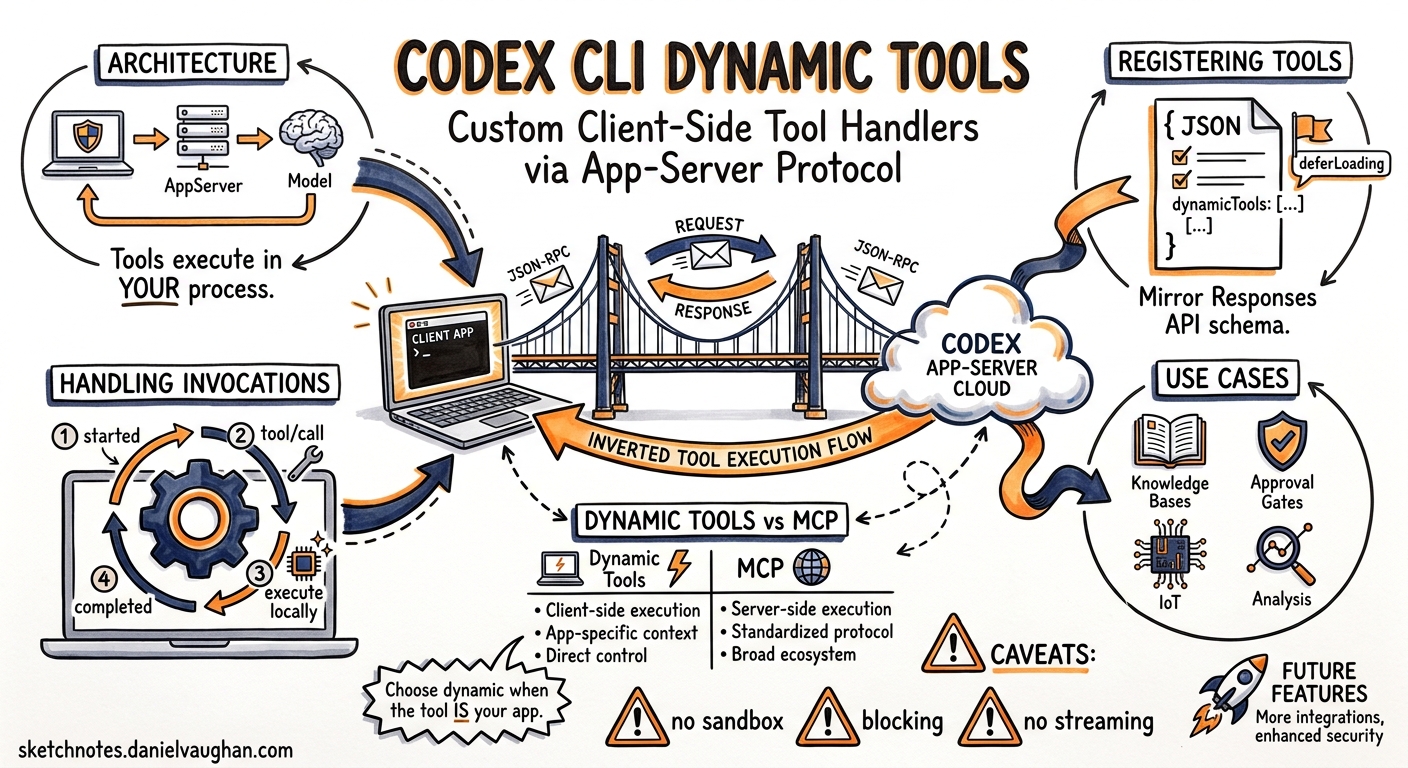
Every MCP server and built-in skill in Codex CLI runs server-side — the agent invokes it, the sandbox executes it, and results flow back through the turn. But what if the tool you need lives in your process? Perhaps you need to query an internal ticketing system behind a VPN, call a proprietary calculation engine, or present a custom approval UI before the agent proceeds.
The Dynamic Tools API answers this. Introduced as an experimental feature in the Codex app-server protocol, dynamic tools let clients register custom tool definitions at thread start and handle invocations locally — turning any app-server client into a tool provider without writing or deploying an MCP server1.
Architecture Overview
Dynamic tools invert the normal tool-call flow. Instead of the app-server executing commands in its sandbox, it dispatches tool calls back to the client over the same JSON-RPC transport2.
sequenceDiagram
    participant Client as Your Application
    participant AppServer as Codex App-Server
    participant Model as GPT-5.5

    Client->>AppServer: thread/start {dynamicTools: [...]}
    AppServer->>Model: Turn with tool definitions
    Model-->>AppServer: tool_call: lookup_ticket({id: "ENG-1234"})
    AppServer-->>Client: item/tool/call request
    Client->>Client: Execute local logic
    Client->>AppServer: DynamicToolCallResponse {contentItems}
    AppServer->>Model: Tool result injected
    Model-->>AppServer: Agent continues
The critical distinction: dynamic tools execute in the client’s process, not in Codex’s sandbox. This means they have access to whatever resources your application can reach — local databases, authenticated APIs, hardware peripherals, or interactive UIs1.
Enabling the Experimental API
Dynamic tools require an explicit opt-in during the initialize handshake1:
{
  "jsonrpc": "2.0",
  "method": "initialize",
  "id": 1,
  "params": {
    "clientInfo": {
      "name": "my-orchestrator",
      "title": "Custom Orchestrator",
      "version": "1.0.0"
    },
    "capabilities": {
      "experimentalApi": true
    }
  }
}
Without experimentalApi: true, the app-server silently ignores any dynamicTools array on thread/start2.
Registering Tools at Thread Start
Tools are declared as part of the thread/start request. Each tool definition mirrors the OpenAI Responses API function tool schema13:
{
  "jsonrpc": "2.0",
  "method": "thread/start",
  "id": 2,
  "params": {
    "model": "gpt-5.5",
    "dynamicTools": [
      {
        "name": "lookup_ticket",
        "description": "Fetch a Jira ticket by ID and return its summary, status, and assignee.",
        "inputSchema": {
          "type": "object",
          "properties": {
            "id": { "type": "string", "description": "Ticket ID, e.g. ENG-1234" }
          },
          "required": ["id"],
          "additionalProperties": false
        }
      },
      {
        "name": "run_proprietary_lint",
        "description": "Run the internal Acme linter on a file path and return findings.",
        "deferLoading": true,
        "inputSchema": {
          "type": "object",
          "properties": {
            "file_path": { "type": "string" }
          },
          "required": ["file_path"],
          "additionalProperties": false
        }
      }
    ]
  }
}
Naming Constraints
Tool identifiers follow the same rules as Responses API function tools1:
namemust match^[a-zA-Z0-9_-]+$(1–128 characters)namespace, when present, must match^[a-zA-Z0-9_-]+$(1–64 characters)inputSchemamust be valid JSON Schema withadditionalProperties: falseat the top level
The deferLoading Flag
Setting deferLoading: true keeps the tool registered and callable but excludes it from the model-facing tool list on ordinary turns1. The tool remains available to runtime features (such as js_repl or code-mode execution) but won’t appear as a candidate for the model’s tool selection unless explicitly triggered. This is useful for tools that should only fire under specific conditions — for example, a deployment approval tool that only activates when the agent signals readiness.
Handling Tool Invocations
When the model decides to call a dynamic tool, the app-server emits a server-initiated request to the client2:
1. Item Started Notification
{
  "jsonrpc": "2.0",
  "method": "item/started",
  "params": {
    "item": {
      "id": "item_abc123",
      "type": "dynamicToolCall",
      "tool": "lookup_ticket",
      "arguments": "{\"id\": \"ENG-1234\"}",
      "status": "inProgress"
    }
  }
}
2. Tool Call Request
The app-server sends a JSON-RPC request (not a notification) to the client, expecting a response2:
{
  "jsonrpc": "2.0",
  "method": "item/tool/call",
  "id": "call_xyz789",
  "params": {
    "itemId": "item_abc123",
    "tool": "lookup_ticket",
    "arguments": "{\"id\": \"ENG-1234\"}"
  }
}
3. Client Response
Your client executes the tool logic locally and returns a DynamicToolCallResponse2:
{
  "jsonrpc": "2.0",
  "id": "call_xyz789",
  "result": {
    "success": true,
    "contentItems": [
      {
        "type": "text",
        "text": "ENG-1234: Fix auth token refresh\nStatus: In Progress\nAssignee: daniel@example.com\nPriority: P1"
      }
    ]
  }
}
4. Item Completed Notification
The app-server confirms completion and injects the result into the model’s context2:
{
  "jsonrpc": "2.0",
  "method": "item/completed",
  "params": {
    "item": {
      "id": "item_abc123",
      "type": "dynamicToolCall",
      "tool": "lookup_ticket",
      "status": "completed",
      "success": true,
      "contentItems": [...],
      "durationMs": 142
    }
  }
}
TypeScript Implementation Pattern
Using the @openai/codex-sdk package (v0.16+), the SDK abstracts the JSON-RPC plumbing4:
import { Codex } from "@openai/codex-sdk";

const codex = new Codex();

const thread = codex.startThread({
  model: "gpt-5.5",
  dynamicTools: [
    {
      name: "lookup_ticket",
      description: "Fetch a Jira ticket by ID",
      inputSchema: {
        type: "object",
        properties: { id: { type: "string" } },
        required: ["id"],
        additionalProperties: false,
      },
    },
  ],
  onToolCall: async (tool, args) => {
    if (tool === "lookup_ticket") {
      const ticket = await jiraClient.getIssue(args.id);
      return {
        success: true,
        contentItems: [
          { type: "text", text: `${ticket.key}: ${ticket.summary}\nStatus: ${ticket.status}` },
        ],
      };
    }
    return { success: false, contentItems: [{ type: "text", text: "Unknown tool" }] };
  },
});

const result = await thread.run("Check the status of ENG-1234 and suggest next steps");
console.log(result.text);
Practical Use Cases
Internal Knowledge Bases
Register a search_wiki tool that queries your company’s Confluence or Notion workspace. The agent can pull in relevant documentation without you needing to pre-load it as context5.
Custom Approval Gates
A request_deploy_approval tool can trigger a Slack message or Teams notification, wait for human response, and return the decision. The agent pauses until your client responds to the item/tool/call request2.
Hardware and IoT Integration
For embedded development workflows, a flash_firmware tool can trigger a local build-and-flash pipeline, returning success/failure status to the agent for iterative debugging.
Proprietary Analysis Engines
Static analysis tools, licence scanners, or compliance checkers that cannot be open-sourced or deployed as MCP servers can run locally in your client process and expose results to the agent.
Thread Persistence and Resumption
Dynamic tool definitions are persisted in the thread’s rollout metadata1. When resuming a thread via thread/resume, the app-server restores the original dynamic tool registrations automatically — unless you supply a new dynamicTools array, which replaces the stored set. This means:
- Sessions can survive restarts without re-registering tools
- Different clients can resume the same thread (provided they implement the same tool handlers)
- Tool schemas evolve gracefully by supplying updated definitions on resume
Dynamic Tools vs MCP Servers
| Concern | Dynamic Tools | MCP Servers |
|---|---|---|
| Execution location | Client process | Separate server process |
| Discovery | Registered per-thread | Configured in config.toml |
| Persistence | Thread-scoped | Global/project-scoped |
| Network requirements | None (same transport) | Stdio or HTTP/SSE |
| Approval flow | Implicit (client controls) | Standard sandbox approval |
| Portability | Tied to your client | Reusable across clients |
| Maturity | Experimental | Stable |
Choose dynamic tools when the tool logic is your application — when you’re building a custom IDE extension, an orchestration platform, or a specialised workflow runner where the client naturally owns the execution context2. Choose MCP when you want tools to be portable, discoverable, and usable across different Codex surfaces (CLI, app, IDE extension).
Generating Type Definitions
For strongly-typed client development, the app-server can generate its own protocol schema2:
# TypeScript type definitions
codex app-server generate-ts > codex-protocol.d.ts

# Full JSON Schema bundle
codex app-server generate-json-schema > codex-protocol.json
These generated schemas include the DynamicToolDefinition, DynamicToolCallResponse, and all event types — keeping your client implementation in sync with your installed Codex version.
Caveats and Limitations
⚠️ Experimental status: The dynamic tools API may change without deprecation notice. Pin your Codex version in production integrations.
⚠️ No sandbox enforcement: Dynamic tool execution bypasses Codex’s sandbox entirely. Your client is responsible for its own security boundaries.
⚠️ Blocking behaviour: The agent’s turn blocks while waiting for your item/tool/call response. Slow handlers stall the entire session. Implement timeouts in your client.
⚠️ No streaming results: Dynamic tool responses are returned atomically. You cannot stream partial results back to the model mid-execution (unlike item/agentMessage/delta for agent output)2.
What’s Next
The dynamic tools API represents Codex’s clearest path toward becoming an embeddable agent runtime rather than just a CLI tool. As the protocol stabilises, expect:
- Approval policy integration for dynamic tool calls
- Streaming response support for long-running tools
- A
dynamicTools/updatemethod for mid-session tool registration - First-class IDE extension support (VS Code, JetBrains) using dynamic tools for editor-specific operations
For teams building custom Codex integrations today, dynamic tools eliminate the need to deploy and maintain separate MCP server processes — at the cost of coupling your tool logic to a single client implementation.
Citations
-
OpenAI, “App Server – Codex,” OpenAI Developers Documentation, 2026. Available: https://developers.openai.com/codex/app-server ↩ ↩2 ↩3 ↩4 ↩5 ↩6 ↩7
-
OpenAI, “codex-rs/app-server/README.md,” GitHub, 2026. Available: https://github.com/openai/codex/blob/main/codex-rs/app-server/README.md ↩ ↩2 ↩3 ↩4 ↩5 ↩6 ↩7 ↩8 ↩9 ↩10
-
OpenAI, “Responses API — Function Tools,” OpenAI Platform Documentation, 2026. Available: https://platform.openai.com/docs/guides/tools-apply-patch ↩
-
OpenAI, “SDK – Codex,” OpenAI Developers Documentation, 2026. Available: https://developers.openai.com/codex/sdk ↩
-
OpenAI, “Model Context Protocol – Codex,” OpenAI Developers Documentation, 2026. Available: https://developers.openai.com/codex/mcp ↩