Codex CLI v0.130: Building Headless Agent Services with remote-control and the Thread Pagination API
Codex CLI v0.130: Building Headless Agent Services with remote-control and the Thread Pagination API
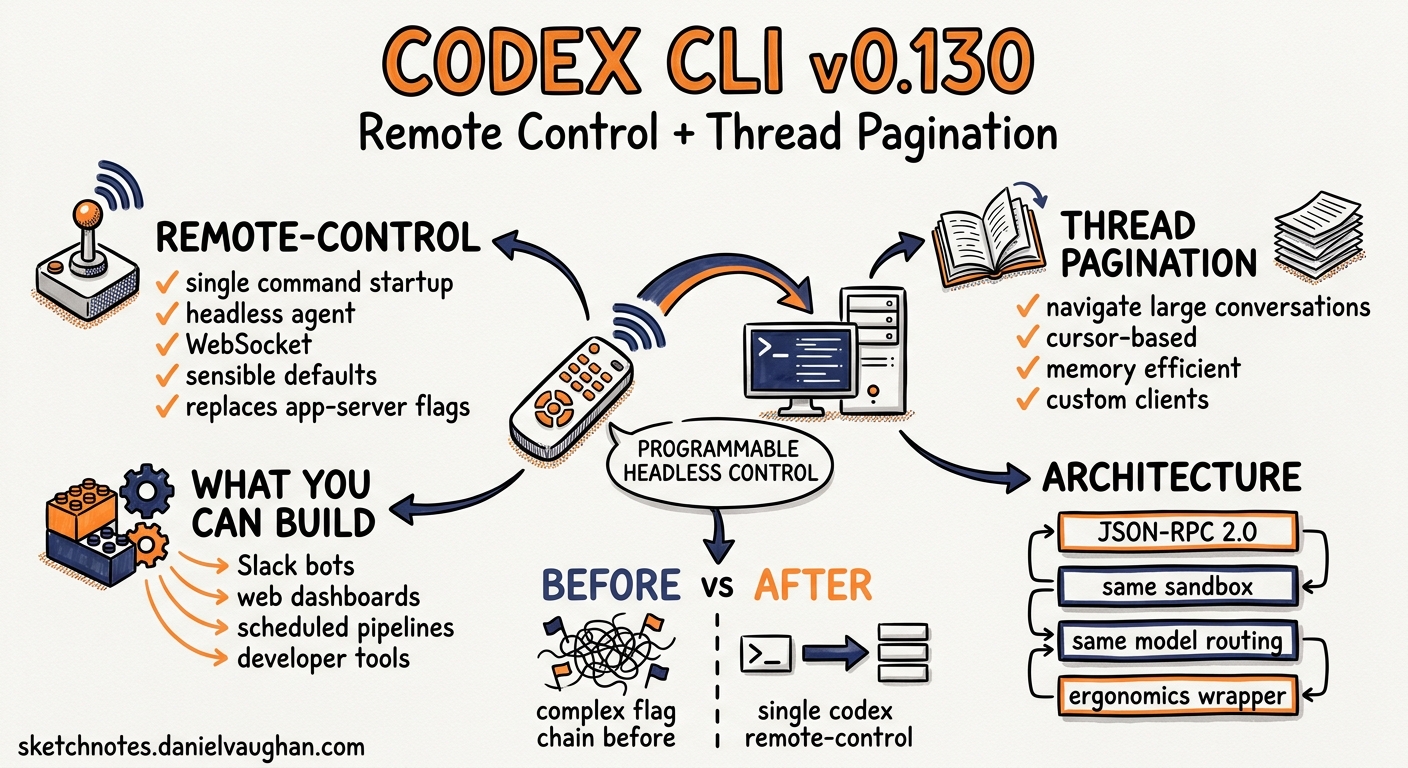
Codex CLI v0.130.0, released on 8 May 2026, ships two features that quietly change what you can build on top of the agent: a new codex remote-control subcommand that reduces headless app-server startup to a single line, and a thread pagination API that lets custom clients navigate large conversation histories without loading entire threads into memory1. Together, they lower the barrier for teams building Slack bots, web dashboards, scheduled pipelines, and bespoke developer tools that treat Codex as a programmable backend rather than an interactive terminal.
This article covers the architecture, walks through practical setup, and shows how to build a minimal custom client that creates threads, submits turns, and pages through results.
Why remote-control Exists
Before v0.130, running Codex headlessly meant invoking codex app-server with a chain of flags for transport, authentication, and listener configuration2. The incantation looked something like this:
codex app-server \
  --listen ws://127.0.0.1:9742 \
  --ws-auth capability-token \
  --ws-token-file /var/run/codex/token
The remote-control subcommand wraps these defaults into a single opinionated entrypoint designed for the common case: a headless Codex agent listening on a local WebSocket, ready for programmatic control1.
codex remote-control
Under the hood it still starts the same app-server process — the same JSON-RPC 2.0 protocol, the same sandbox enforcement, the same model routing. What changes is the ergonomics: sensible defaults for transport, auth, and lifecycle management are baked in so you spend less time wiring plumbing and more time building the integration layer above it.
Architecture: Where remote-control Fits
Codex CLI’s process model splits into three layers. Understanding them prevents confusion about which component does what.
graph TB
    subgraph "Client Layer"
        TUI["Interactive TUI"]
        Bot["Slack Bot / Custom Client"]
        Dash["Web Dashboard"]
        CI["CI Pipeline"]
    end

    subgraph "App Server Layer"
        AS["codex remote-control<br/>(app-server)"]
        JRPC["JSON-RPC 2.0<br/>Bidirectional"]
    end

    subgraph "Execution Layer"
        ES["Exec Server<br/>(sandbox + tools)"]
        SB["Seatbelt / Bubblewrap<br/>Sandbox"]
    end

    TUI -->|WebSocket / stdio| JRPC
    Bot -->|WebSocket| JRPC
    Dash -->|WebSocket| JRPC
    CI -->|stdio| JRPC
    JRPC --> AS
    AS --> ES
    ES --> SB
The app server manages threads, turns, model inference, and MCP tool dispatch. The exec server handles sandboxed command execution underneath it. Custom clients talk to the app server over JSON-RPC; they never interact with the exec server directly23.
The remote-control command is simply a convenience wrapper around the app-server layer. It does not introduce a new process or protocol — it configures the existing one for headless use.
Getting Started
Prerequisites
Update to v0.130.0 or later:
codex update
codex --version
# codex 0.130.0
Starting a Headless Instance
The simplest invocation:
codex remote-control
This starts the app-server on a local WebSocket listener with capability-token authentication. The startup banner prints the connection URL and token path1.
For production deployments, explicit configuration is clearer:
codex remote-control \
  --listen ws://127.0.0.1:9742 \
  --ws-auth signed-bearer-token \
  --ws-shared-secret-file /etc/codex/hmac-secret
Authentication Modes
Two authentication modes are available for WebSocket connections2:
| Mode | Use Case | Setup |
|---|---|---|
capability-token |
Single-user, local network | Generate random token file; client sends it as Authorization: Bearer <token> |
signed-bearer-token |
Multi-client, production | HMAC shared secret; client signs JWT with configurable issuer/audience claims |
For capability-token auth, create the token:
openssl rand -hex 32 > /var/run/codex/token
chmod 600 /var/run/codex/token
For signed-bearer-token auth, generate the HMAC secret:
openssl rand -base64 64 > /etc/codex/hmac-secret
chmod 600 /etc/codex/hmac-secret
The signed-bearer-token mode supports --ws-issuer and --ws-audience flags for JWT claim validation, plus --ws-max-clock-skew-seconds for distributed environments where clocks may drift2.
The JSON-RPC Protocol
Every interaction with the headless agent follows the JSON-RPC 2.0 specification. Requests include a method, params, and id; notifications omit the id3.
Connection Lifecycle
All WebSocket connections must complete an initialisation handshake before sending any other message:
// 1. Client sends initialize
{
  "method": "initialize",
  "id": 1,
  "params": {
    "clientInfo": { "name": "my-bot", "title": "Slack Bot", "version": "1.0.0" },
    "capabilities": { "experimentalApi": true }
  }
}

// 2. Server responds with session info
// 3. Client sends initialized notification
{ "method": "initialized" }
Setting experimentalApi: true unlocks beta methods including thread pagination and goal management3.
Creating a Thread and Submitting a Turn
// Start a new thread
{
  "method": "thread/start",
  "id": 2,
  "params": { "model": "gpt-5.4" }
}

// Submit a user turn
{
  "method": "turn/start",
  "id": 3,
  "params": {
    "input": [{ "type": "text", "text": "Refactor auth.py to use async/await" }]
  }
}
The server streams progress via notifications: turn/started, item/started, content deltas, item/completed, and finally turn/completed with the full result and token usage3.
Steering an In-Flight Turn
If the agent goes off-piste mid-turn, turn/steer lets you inject additional context without starting a new turn:
{
  "method": "turn/steer",
  "id": 4,
  "params": {
    "input": [{ "type": "text", "text": "Focus on the login endpoint only" }],
    "expectedTurnId": "turn_abc123"
  }
}
This is particularly useful for long-running tasks where early course correction saves tokens3.
Thread Pagination: Navigating Large Histories
The second headline feature in v0.130 is thread pagination via thread/turns/list1. Before this release, retrieving a thread’s history meant loading the entire conversation — impractical for threads with hundreds of turns spanning hours of agent work.
Paginated Turn Retrieval
{
  "method": "thread/turns/list",
  "id": 5,
  "params": {
    "threadId": "thread_xyz789",
    "limit": 20
  }
}
The response includes bidirectional cursors:
{
  "turns": [ /* ... 20 turn objects ... */ ],
  "nextCursor": "cursor_fwd_abc",
  "backwardsCursor": "cursor_bwd_def"
}
Use nextCursor to page forward through newer turns, or backwardsCursor to page backward through older ones3.
Turn Item Views
The v0.130 pagination API supports three view modes for turn items, letting clients trade detail for speed1:
| View | Payload | Use Case |
|---|---|---|
unloaded |
Turn metadata only; no items | Thread overview, listing recent sessions |
summary |
Condensed item summaries | Dashboard widgets, activity feeds |
full |
Complete item payloads with deltas | Detailed replay, audit trail |
{
  "method": "thread/read",
  "id": 6,
  "params": {
    "threadId": "thread_xyz789",
    "includeTurns": true,
    "turnItemView": "summary"
  }
}
For a dashboard that shows the last 10 turns with summaries, combine pagination with the summary view to keep payloads small.
Practical Example: A Python Agent Client
Here is a minimal Python client that connects to a headless Codex instance, creates a thread, submits a prompt, and collects the response:
import asyncio
import json
import websockets

CODEX_URL = "ws://127.0.0.1:9742"
TOKEN = open("/var/run/codex/token").read().strip()

async def run_agent(prompt: str) -> str:
    headers = {"Authorization": f"Bearer {TOKEN}"}
    async with websockets.connect(CODEX_URL, additional_headers=headers) as ws:
        msg_id = 0

        async def send(method, params=None):
            nonlocal msg_id
            msg_id += 1
            await ws.send(json.dumps({
                "method": method, "id": msg_id,
                "params": params or {}
            }))
            return msg_id

        async def send_notify(method):
            await ws.send(json.dumps({"method": method}))

        # Initialise
        await send("initialize", {
            "clientInfo": {"name": "py-client", "version": "0.1.0"},
            "capabilities": {"experimentalApi": True}
        })
        await ws.recv()  # init response
        await send_notify("initialized")

        # Start thread
        await send("thread/start", {"model": "gpt-5.4"})
        await ws.recv()  # thread/start response

        # Submit turn
        await send("turn/start", {
            "input": [{"type": "text", "text": prompt}]
        })

        # Collect streamed results
        result_text = ""
        while True:
            msg = json.loads(await ws.recv())
            if msg.get("method") == "item/agentMessage/delta":
                result_text += msg["params"].get("delta", "")
            elif msg.get("method") == "turn/completed":
                break

        return result_text

if __name__ == "__main__":
    output = asyncio.run(run_agent("Explain the SOLID principles in 3 sentences"))
    print(output)
This pattern scales to Slack bots, web APIs, and CI pipeline steps. The client is stateless — each connection initialises, runs its work, and disconnects. The app-server manages thread persistence independently.
Deployment Patterns
systemd Service
For a Linux server running Codex headlessly:
# /etc/systemd/system/codex-agent.service
[Unit]
Description=Codex Headless Agent
After=network.target

[Service]
Type=simple
User=codex
ExecStart=/usr/local/bin/codex remote-control \
  --listen ws://127.0.0.1:9742 \
  --ws-auth capability-token \
  --ws-token-file /var/run/codex/token
Restart=on-failure
Environment=CODEX_HOME=/var/lib/codex
Environment=OPENAI_API_KEY=sk-...

[Install]
WantedBy=multi-user.target
Docker Container
FROM node:22-slim
RUN npm install -g @anthropic-ai/codex@0.130.0
COPY config.toml /root/.codex/config.toml
EXPOSE 9742
CMD ["codex", "remote-control", "--listen", "ws://0.0.0.0:9742"]
When containerised, note that the Bubblewrap sandbox requires --privileged or specific capability grants (CAP_SYS_ADMIN, CAP_NET_ADMIN) unless you set sandbox_mode = "external-sandbox" in your config.toml and rely on the container boundary for isolation4.
Secure Exposure
Never expose the WebSocket listener directly to the internet. Use SSH port forwarding, a reverse proxy with TLS termination, or a mesh network like Tailscale2:
# SSH tunnel from developer laptop
ssh -L 9742:127.0.0.1:9742 devbox
sequenceDiagram
    participant Client as Custom Client
    participant Proxy as nginx / Caddy (TLS)
    participant Codex as codex remote-control

    Client->>Proxy: wss://codex.internal:443
    Proxy->>Codex: ws://127.0.0.1:9742
    Codex-->>Proxy: JSON-RPC responses
    Proxy-->>Client: Encrypted responses
Configuration Layering
The headless agent loads configuration from the same layered sources as the interactive CLI5:
- System —
/etc/codex/config.toml(admin-managed) - User —
~/.codex/config.toml(developer defaults) - Project —
.codex/config.toml(repo-scoped, trust-gated) - Per-thread overrides — passed in
thread/startparams
A v0.130 improvement means live threads now refresh from the latest configuration snapshot without requiring a restart1. If an admin updates a permission profile or model routing rule, active threads pick up the change on the next turn.
What This Unlocks
The remote-control + pagination combination opens several workflows that were previously awkward:
- Scheduled batch agents — a cron job starts a thread, submits a prompt (e.g., “audit yesterday’s dependency updates”), and pages through the result for a summary report.
- Slack-integrated agents — a bot bridges Slack messages to Codex threads, paginating history for
/recapcommands. - Web dashboards — a React frontend pages through thread history with summary views for a team activity feed, switching to full views for audit drill-down.
- CI pipeline agents — a GitHub Action starts a headless instance, runs a code review, and posts the paginated output as a PR comment.
Known Limitations
- The
codex remote-controlsubcommand is new in v0.130 and documentation is still sparse; the canonical reference remains thecodex app-serverhelp output1. - Thread pagination with
thread/turns/listrequiresexperimentalApi: trueduring initialisation3. - WebSocket transport is still marked experimental; for production workloads, plan for reconnection logic and handle the
-32001backpressure error with exponential backoff3. - The
codex execsubcommand does not support the app-server protocol — it runs a single non-interactive task and exits. For programmatic multi-turn workflows, useremote-controlwiththread/startandturn/startinstead6.
Citations
-
OpenAI, “Codex CLI v0.130.0 Release Notes,” GitHub, 8 May 2026. https://github.com/openai/codex/releases/tag/rust-v0.130.0 ↩ ↩2 ↩3 ↩4 ↩5 ↩6 ↩7
-
OpenAI, “Remote Connections — Codex,” OpenAI Developers, 2026. https://developers.openai.com/codex/remote-connections ↩ ↩2 ↩3 ↩4 ↩5
-
OpenAI, “App Server — Codex,” OpenAI Developers, 2026. https://developers.openai.com/codex/app-server ↩ ↩2 ↩3 ↩4 ↩5 ↩6 ↩7 ↩8
-
OpenAI, “Sandboxing — Codex,” OpenAI Developers, 2026. https://developers.openai.com/codex/sandboxing ↩
-
OpenAI, “Configuration Reference — Codex,” OpenAI Developers, 2026. https://developers.openai.com/codex/config-reference ↩
-
OpenAI, “Command Line Options — Codex CLI,” OpenAI Developers, 2026. https://developers.openai.com/codex/cli/reference ↩