The Codex App Server: A Complete Guide to the Protocol That Powers Every Surface
The Codex App Server: A Complete Guide to the Protocol That Powers Every Surface
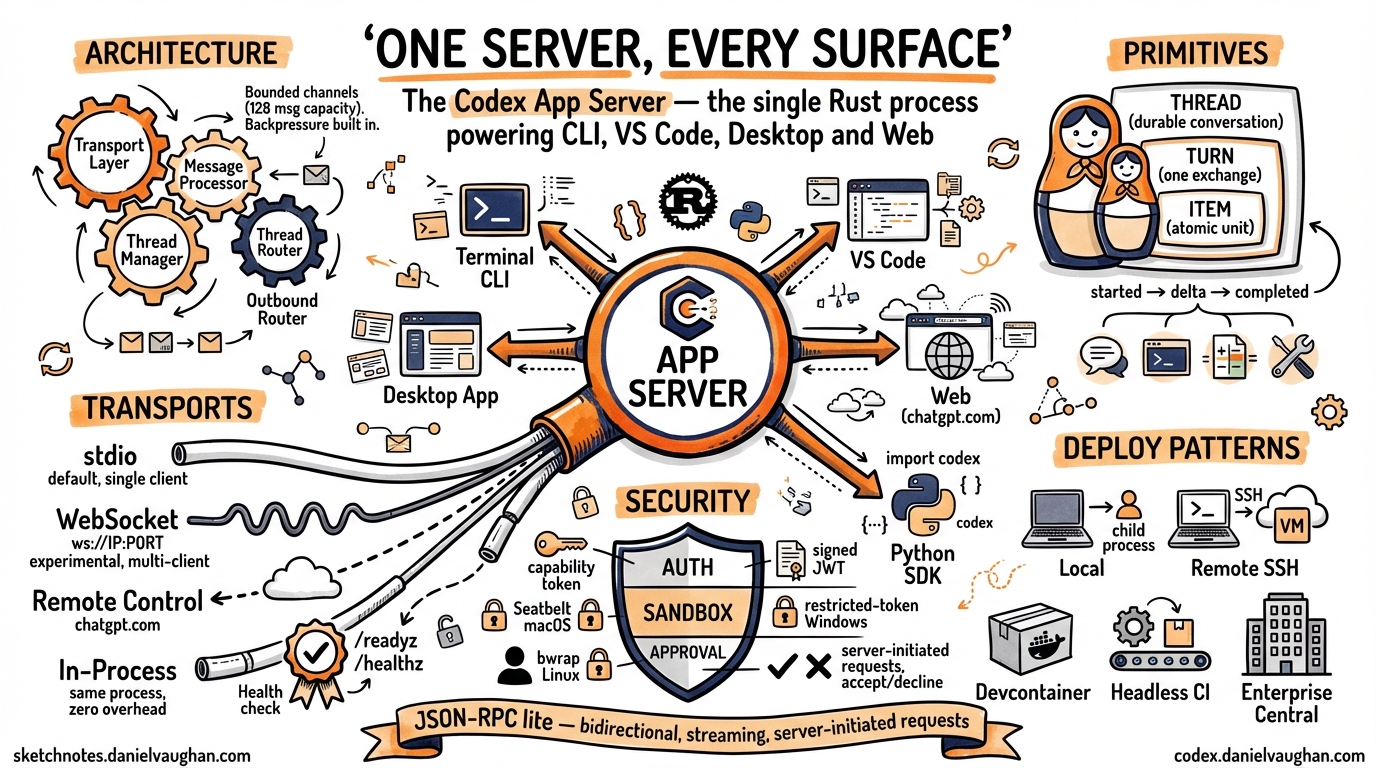
Every time you type a prompt in Codex — whether in the terminal, VS Code, the macOS desktop app, or the web interface at chatgpt.com/codex — the same Rust process handles your request. That process is the Codex App Server, and understanding it is key to understanding how Codex actually works.
This article is a single, comprehensive reference for the app server as of April 2026. It covers the architecture, the wire protocol, every transport option, authentication, sandboxing, the Python SDK, the exec-server companion, Remote Control, and production deployment patterns. If you have read earlier articles on specific app-server topics, this consolidates and updates all of them.1
Why the App Server Exists
The original Codex CLI (pre-v0.117.0) was a monolith: model interaction, tool execution, sandboxing, and the terminal UI all lived in a single process. That architecture was fast to iterate on but created three problems:
- Every new surface reimplemented the agent. The web app, IDE extension, and desktop app each needed their own integration with the model loop and sandbox.
- Remote development was impossible. The TUI was coupled to the agent process — you could not run the agent on a powerful remote machine while typing locally.
- Embedding was painful. Third-party tools that wanted to use Codex as a library had to reverse-engineer internal APIs.
OpenAI’s solution was to extract the agent core into a standalone server process with a documented protocol. The result is a bidirectional JSON-RPC 2.0 service that any client — official or third-party — can drive.2
OpenAI initially experimented with exposing Codex as an MCP (Model Context Protocol) server, but found that MCP’s tool-oriented request/response model could not accommodate streaming diffs, approval workflows, thread persistence, or server-initiated requests. MCP remains supported for connecting external tools to Codex, but the app server protocol is used for connecting clients to Codex.3
Architecture Overview
An app-server process consists of four cooperating async tasks:4
graph LR
    subgraph AppServer["Codex App Server"]
        Transport["Transport Layer\n(stdio / WebSocket /\nRemote Control)"]
        Processor["Message Processor\n(JSON-RPC dispatch)"]
        ThreadMgr["Thread Manager\n(per-thread state\n& agent)"]
        Router["Outbound Router"]

        Transport -->|requests| Processor
        Processor -->|commands| ThreadMgr
        ThreadMgr -->|events| Router
        Router -->|responses &\nnotifications| Transport
    end
- Transport Layer — Accepts connections (stdio, WebSocket, or Remote Control), deserialises incoming messages into
JSONRPCMessagestructs, and forwards them on a bounded channel. - Message Processor — The dispatch hub. Routes each
ClientRequestto the appropriate subsystem: thread management, turn control, configuration, command execution, auth, MCP tools, skills, or fuzzy file search. - Thread Manager — Maintains per-thread state (
ThreadState) and per-connection subscriptions. Multiple clients can subscribe to the same thread simultaneously. - Outbound Router — Routes outgoing messages to the correct connection. Handles per-connection filtering (experimental API gating, notification opt-outs), backpressure, and broadcast to all initialised connections.
All four components communicate through bounded mpsc channels with a capacity of 128 messages. When ingress is saturated, requests are rejected with JSON-RPC error code -32001 (“Server overloaded; retry later”). Clients should implement exponential backoff with jitter.5
The Three Primitives: Thread, Turn, Item
The entire protocol is organised around three nested primitives:6
Thread
A Thread is a durable conversation container. Threads survive process restarts and can be resumed by ID, forked into branches, or archived. The protocol provides:
thread/start— create a new conversationthread/resume— reopen an existing threadthread/fork— branch from a specific turnthread/list— enumerate all stored threadsthread/read— retrieve full event historythread/archive/thread/unarchive— lifecycle managementthread/rollback— undo to a specific point
Threads unload from memory after 30 minutes with no subscribers and no activity. An unloaded thread emits thread/closed as a notification.7
Turn
A Turn is one complete exchange: user input followed by all the agent work that produces a response. Turns are the unit of interruption and rollback.
turn/start— send user input and begin agent workturn/steer— inject guidance mid-turn without interruptingturn/interrupt— cancel the current turn
When a turn completes, the server emits turn/completed with token usage statistics.
Item
An Item is the atomic unit of output within a turn. Each item has an explicit lifecycle:
graph LR
    A["item/started"] --> B["item/*/delta\n(0..N)"] --> C["item/completed"]
Item types include:
- User message — the input that started the turn
- Agent message — streamed text response
- Agent reasoning — chain-of-thought (when visible)
- Shell command — a command to execute, with approval workflow
- File change — a diff or patch to apply
- Tool call — an MCP tool invocation
- Context compaction — a summary replacing older context
This hierarchy maps directly onto the UI. When Codex edits three files and runs pytest, you are watching a single turn emit multiple items, all streamed incrementally.
Wire Protocol
The app server uses a “JSON-RPC lite” variant: standard JSON-RPC 2.0 structure, but with the "jsonrpc": "2.0" header omitted on the wire to reduce bandwidth.8
Three message types:
// Request (client → server)
{"id": 1, "method": "thread/start", "params": {...}}

// Response (server → client)
{"id": 1, "result": {...}}

// Notification (either direction, no id)
{"method": "item/agentMessage/delta", "params": {...}}
Notifications are the primary mechanism for streaming. A typical turn produces dozens of delta notifications before the final item/completed.
The server can also initiate requests to the client — this is the mechanism for approval workflows. When Codex wants to execute a shell command or apply a file change, it sends an approval request and waits for the client to respond with accept, decline, or cancel.9
Schema Generation
You can generate TypeScript or JSON Schema definitions matching the running version:
codex app-server generate-ts --out ./types
codex app-server generate-json-schema --out ./schemas
This is the recommended way to stay in sync with protocol changes.10
Transport Options
The app server supports multiple transports, selected via the --listen flag:11
stdio (Default)
codex app-server --listen stdio://
Communication uses newline-delimited JSON (JSONL) over stdin/stdout. This is single-client mode — the server exits when the connection closes.
No authentication is needed because the client and server share a process boundary. This is the transport used by the VS Code extension, the macOS desktop app, and the Python SDK when they launch Codex as a child process.
WebSocket (Experimental)
codex app-server --listen ws://127.0.0.1:9090
One JSON-RPC message per WebSocket text frame. Multi-client: the server stays alive across connections.
The WebSocket transport also serves HTTP health endpoints:
GET /readyz— returns 200 when the server can accept connectionsGET /healthz— returns 200 when the server is running
CSRF protection: Any request with an Origin header receives 403 Forbidden.12
Slow client handling: If a WebSocket client’s outbound queue fills, the connection is forcibly closed. stdio connections block instead (they are never dropped, since there is only one).
Off
codex app-server --listen off
No local transport is exposed. This is used when only Remote Control is active, meaning the server is reachable exclusively through OpenAI’s cloud relay.
In-Process
An internal transport (in_process.rs) provides bounded in-memory channels that replace socket/stdio communication. This is used when the CLI’s TUI runs in the same process as the app server — no process boundary, but the same protocol semantics apply.13
Connection Lifecycle
Every client connection follows the same initialisation handshake:14
sequenceDiagram
    participant Client
    participant Server
    Client->>Server: initialize (clientInfo, capabilities)
    Server-->>Client: initialize response (serverInfo, capabilities)
    Client->>Server: initialized (notification)
    Note over Client,Server: Normal operation begins
- The client sends an
initializerequest withclientInfo(name, version, title) and optional capabilities (e.g.,experimentalApi: true,optOutNotificationMethods: [...]). - The server responds with its own capabilities.
- The client sends an
initializednotification to confirm.
Before initialisation completes, all requests are rejected. Repeated initialize calls return “Already initialized.” Each connection gets a unique ConnectionId (a monotonically increasing counter).
Authentication
Authentication applies only to the WebSocket transport — stdio is inherently trusted.15
Capability Token
codex app-server --listen ws://0.0.0.0:9090 \
  --ws-auth capability-token \
  --ws-token-file /run/secrets/codex-token
The client presents the token as Authorization: Bearer <token> during the WebSocket handshake. The server verifies via SHA-256 constant-time comparison. You can also supply --ws-token-sha256 if the raw token is stored separately.
Signed Bearer Token (JWT)
codex app-server --listen ws://0.0.0.0:9090 \
  --ws-auth signed-bearer-token \
  --ws-shared-secret-file /run/secrets/codex-hmac \
  --ws-issuer my-platform \
  --ws-audience codex-server
HMAC-SHA256 signed JWTs with configurable issuer, audience, and clock skew tolerance (default: 30 seconds). The shared secret must be at least 32 bytes. Tokens with alg: none are rejected.
User-Level Auth
For upstream API calls to OpenAI, the server supports three modes:
apikey— caller supplies OpenAI credentials stored locallychatgpt— Codex manages an OAuth flow with automatic token refreshchatgptAuthTokens— the host application supplies tokens directly
Sandbox Policies
Every thread runs under a sandbox policy that determines what the agent can access:16
| Policy | Behaviour |
|---|---|
dangerFullAccess |
No restrictions — the agent can read, write, and execute anything |
readOnly |
Read-only access, optionally with platform defaults |
workspaceWrite |
Write access within configured writableRoots, with optional network access |
externalSandbox |
The host provides its own isolation; the server skips enforcement |
Sandbox enforcement is platform-specific:
- macOS — Apple Seatbelt framework
- Linux/WSL2 — bubblewrap (
bwrap) - Windows — native restricted-token sandbox in PowerShell, or Linux sandbox in WSL2
Approval Workflows
The app server supports human-in-the-loop approval through server-initiated requests:17
When the agent wants to execute a shell command:
- Server sends
item/commandExecution/requestApprovalwith the command, working directory, reason, and optionaladditionalPermissions(filesystem read/write paths) andproposedExecpolicyAmendment. - The client displays the request to the user.
- The client responds with one of:
accept,decline,cancel, oracceptWithExecpolicyAmendment.
The same flow applies to file changes via item/fileChange/requestApproval.
Approval can also be delegated to a Guardian subagent — a risk-based automated reviewer that evaluates commands against policy rules before execution.
The Full API Surface
The app server exposes a rich set of RPC methods, grouped by domain:18
Thread Management
thread/start, thread/resume, thread/fork, thread/list, thread/loaded/list, thread/read, thread/metadata/update, thread/memoryMode/set, memory/reset, thread/archive, thread/unarchive, thread/unsubscribe, thread/name/set, thread/compact/start, thread/shellCommand, thread/backgroundTerminals/clean, thread/rollback, thread/inject_items
Turn Operations
turn/start, turn/steer, turn/interrupt
Command Execution
command/exec, command/exec/write, command/exec/resize, command/exec/terminate
Filesystem
fs/readFile, fs/writeFile, fs/createDirectory, fs/getMetadata, fs/readDirectory, fs/remove, fs/copy, fs/watch, fs/unwatch
Configuration
config/read, config/value/write, config/batchWrite, configRequirements/read, config/mcpServer/reload
Discovery
model/list, experimentalFeature/list, skills/list, app/list, plugin/list, plugin/install, plugin/uninstall, marketplace/add
MCP Integration
mcpServerStatus/list, mcpServer/resource/read, mcpServer/tool/call, mcpServer/oauth/login
Realtime (Experimental)
thread/realtime/start, thread/realtime/appendAudio, thread/realtime/appendText, thread/realtime/stop
Review
review/start — supports uncommittedChanges, baseBranch, commit, and custom target types
Command Execution Engine
The command/exec subsystem provides sandboxed command execution independent of the agent loop:19
{
  "id": 42,
  "method": "command/exec",
  "params": {
    "command": ["pytest", "-v"],
    "cwd": "/workspace/myproject",
    "tty": true,
    "stream_stdout_stderr": true,
    "timeout_ms": 30000
  }
}
Key capabilities:
- PTY mode (
tty: true) — spawns with a pseudo-terminal; supportscommand/exec/resizefor terminal dimensions - Streaming I/O — base64-encoded
command/exec/outputDeltanotifications in real time - Output capping — configurable per-stream byte limits with
capReachednotification - Timeout — configurable per-request or server default; exit code 124 on timeout
- stdin injection —
command/exec/writesends base64-encoded input - Termination —
command/exec/terminatekills the process
Output is chunked at a 64 KiB hint size, with individual raw PTY chunks capped at 8 KiB.
The Exec-Server Companion
Alongside the app server, Codex ships a separate exec-server (codex-exec-server) that handles the lower-level concerns: running commands in sandboxes, reading and writing files, and watching filesystem changes.20
graph TB
    Client["Client\n(TUI / IDE)"]
    AppServer["App Server\n(codex app-server)\nConversations, threads, model calls"]
    ExecServer["Exec Server\n(codex exec-server)\nCommand execution, filesystem, sandbox"]

    Client -->|JSON-RPC| AppServer
    AppServer -->|JSON-RPC| ExecServer
This separation enables a key deployment pattern: the app server runs locally (close to the user for low-latency interaction), while the exec server runs on a remote machine with more resources. The developer types on a laptop, but code executes on a cloud VM.
Remote Control: How chatgpt.com Reaches Your Machine
When you use Codex through the web interface at chatgpt.com/codex, the app server on your local machine connects outward to OpenAI’s infrastructure through the Remote Control system:21
Enrolment
- The app server calls
POST /wham/remote/control/server/enrollto register with the ChatGPT backend. - It opens a persistent WebSocket to
wss://.../wham/remote/control/server. - The web UI sends JSON-RPC messages through this relay to the local app server.
Reliable Delivery
The Remote Control protocol includes acknowledgement-based reliable delivery:
- Each message gets a
seq_idcursor - A
BoundedOutboundBufferretains sent messages until the backend acknowledges them - On reconnect, the server resends unacknowledged messages using an
x-codex-subscribe-cursorheader - Protocol version:
"2"
Client Tracking
Remote clients are tracked with:
- Idle timeout: 10 minutes per client
- Sweep interval: 30 seconds
- Ping interval: 10 seconds, pong timeout: 60 seconds
Only chatgpt.com, chatgpt-staging.com, and localhost are accepted as relay hosts.
The Python SDK
The codex_app_server Python package provides a typed client for the app server protocol:22
Basic Usage
from codex_app_server import AppServerClient, AppServerConfig

config = AppServerConfig(
    client_name="my-tool",
    client_title="My Custom Tool",
    experimental_api=True,
)

with AppServerClient(config) as client:
    # Create a thread
    thread = client.thread_start(
        instructions="You are a helpful coding assistant.",
        sandbox={"type": "workspaceWrite"},
    )

    # Start a turn
    turn = client.turn_start(
        thread_id=thread.thread_id,
        message="Write a function that checks if a number is prime",
    )

    # Stream the response
    for event in client.stream_text(thread_id=thread.thread_id):
        print(event.delta, end="", flush=True)
How It Works
The SDK spawns codex app-server --listen stdio:// as a subprocess and communicates via stdin/stdout pipes. It handles:
- Initialisation handshake — automatic
initialize+initializedexchange - Thread lifecycle —
thread_start(),thread_resume(),thread_fork(),thread_list(),thread_read(),thread_archive() - Turn control —
turn_start(),turn_interrupt(),turn_steer() - Streaming —
stream_text()yields deltas untilturn/completed - Approval handling — configurable
ApprovalHandlercallback; default auto-accepts - Backpressure —
request_with_retry_on_overload()implements exponential backoff with jitter
An async variant (AsyncAppServerClient) wraps the sync client using asyncio.to_thread().
Deployment Patterns
Pattern 1: Local Child Process
The default pattern. VS Code, the desktop app, and the Python SDK all launch codex app-server as a child process and communicate over stdio.
graph LR
    VSCode["VS Code Extension"] -->|stdio| AppServer["codex app-server\n(child process)"]
When to use: Interactive development on your own machine. Zero configuration needed.
Pattern 2: Remote via SSH Tunnel
Run the app server on a powerful remote machine; connect from a lightweight local client.
# On the remote machine:
codex app-server --listen ws://127.0.0.1:9090 \
  --ws-auth capability-token \
  --ws-token-file ~/.codex/ws-token

# On your laptop:
ssh -L 9090:127.0.0.1:9090 remote-host
codex --remote ws://127.0.0.1:9090 \
  --remote-auth-token-env CODEX_WS_TOKEN
When to use: Working with large codebases on a cloud VM. The agent has fast disk I/O and network access; you have low-latency typing.
Pattern 3: Devcontainer
The app server runs inside a devcontainer (VS Code Remote Containers, GitHub Codespaces, Gitpod). The IDE connects via WebSocket or the in-process transport.
When to use: Reproducible development environments. The container defines the toolchain; Codex inherits it.
Pattern 4: CI/CD Headless
Use codex exec for one-shot tasks or the Python SDK for programmatic control. No TUI needed.
# One-shot code review
codex exec "Review this PR and output structured JSON" \
  --output-schema review.json

# Or via the SDK
python -c "
from codex_app_server import AppServerClient, AppServerConfig
with AppServerClient(AppServerConfig()) as c:
    t = c.thread_start(sandbox={'type': 'readOnly'})
    c.turn_start(thread_id=t.thread_id, message='...')
    result = c.wait_for_turn_completed(t.thread_id)
    print(result)
"
When to use: Automated code review, test generation, or refactoring in CI pipelines.23
Pattern 5: Enterprise Central Server
A shared app server instance with WebSocket transport and signed JWT auth serves multiple developers or teams.
codex app-server --listen ws://0.0.0.0:9090 \
  --ws-auth signed-bearer-token \
  --ws-shared-secret-file /run/secrets/hmac-key \
  --ws-issuer corp-platform \
  --ws-audience codex-central
When to use: Organisations that want centralised audit logging, policy enforcement, and resource management.
Backpressure and Reliability
The app server is designed for graceful degradation under load:5
| Condition | Behaviour |
|---|---|
| Ingress queue full | Request rejected with -32001 (“Server overloaded; retry later”) |
| Response/notification delivery | Awaits capacity (never dropped) |
| Slow WebSocket client | Disconnected when outbound queue fills |
| Slow stdio client | Writer blocks (never disconnected) |
| First SIGTERM | Drains running turns, then shuts down |
| Second SIGTERM | Immediate exit |
Observability
The app server supports structured logging and tracing:24
- W3C Trace Context — requests can carry a
tracefield withtraceparentandtracestatefor distributed tracing - Structured logging — configurable via
CODEX_LOGenvironment variable - Session analytics — JSONL session logs capture every item for post-hoc analysis
What Is Not the App Server
A few clarifications for newcomers:
- The app server is not an HTTP API for building web apps. It is a process-local or LAN-local protocol for driving the Codex agent. If you want a web-facing API, wrap it with your own HTTP layer.
- The app server is not MCP. MCP connects external tools to Codex (e.g., a database MCP server). The app server connects clients to Codex. They coexist.
- The app server is not the exec-server. The app server manages conversations and model interaction. The exec-server handles sandboxed command execution and filesystem operations. They can run in the same process or be split across machines.
The Source Code
The app server is fully open source under the codex-rs/app-server directory of the Codex repository:25
| File | Purpose |
|---|---|
codex-rs/app-server/README.md |
Official protocol documentation |
codex-rs/app-server/src/lib.rs |
Main event loop and shutdown logic |
codex-rs/app-server/src/main.rs |
CLI argument parsing |
codex-rs/app-server/src/message_processor.rs |
JSON-RPC dispatch and routing |
codex-rs/app-server/src/transport/mod.rs |
Transport abstraction, backpressure |
codex-rs/app-server/src/transport/websocket.rs |
Axum-based WebSocket acceptor |
codex-rs/app-server/src/transport/auth.rs |
Authentication (752 lines) |
codex-rs/app-server/src/transport/remote_control/ |
Remote Control (5 files) |
codex-rs/app-server/src/command_exec.rs |
Sandboxed command execution |
codex-rs/app-server/src/thread_state.rs |
Per-thread state management |
codex-rs/app-server/src/in_process.rs |
In-process transport |
codex-rs/app-server-protocol/src/lib.rs |
Protocol type definitions |
sdk/python/src/codex_app_server/client.py |
Python SDK client |
Conclusion
The Codex App Server is the architectural decision that turned Codex from a terminal tool into a platform. By extracting the agent core behind a documented bidirectional protocol, OpenAI enabled a single agent implementation to power the CLI, desktop app, IDE extensions, and web interface — while also opening the door to third-party integrations, remote development, and CI/CD automation.
For most developers, the app server is invisible — it runs behind the scenes when you launch codex or open VS Code. But for those building custom integrations, deploying Codex in enterprise environments, or simply wanting to understand how the system works, the protocol is the foundation everything else stands on.
Footnotes
-
This article consolidates and updates material from earlier articles on the app server JSON-RPC protocol, TUI architecture shift, four-surface architecture, exec-server, Python SDK, and remote deployment. See the article index for the full list. ↩
-
OpenAI, “Unlocking the Codex Harness: How We Built the App Server,” OpenAI Blog, February 2026. https://openai.com/index/unlocking-the-codex-harness/ ↩
-
OpenAI initially experimented with MCP but found it inadequate for streaming diffs and approval workflows. See: “OpenAI Publishes Codex App Server Architecture,” InfoQ, February 2026. https://www.infoq.com/news/2026/02/opanai-codex-app-server/ ↩
-
Architecture derived from source:
codex-rs/app-server/src/lib.rs, lines 337-905. https://github.com/openai/codex/blob/main/codex-rs/app-server/src/lib.rs ↩ -
Backpressure implementation:
codex-rs/app-server/src/transport/mod.rs, channel capacity of 128, overload error code-32001. https://github.com/openai/codex/blob/main/codex-rs/app-server/src/transport/mod.rs ↩ ↩2 -
OpenAI, “App Server — Codex Developer Documentation,” April 2026. https://developers.openai.com/codex/app-server ↩
-
Thread lifecycle and idle unload (30-minute timeout):
codex-rs/app-server/src/thread_state.rs. https://github.com/openai/codex/blob/main/codex-rs/app-server/src/thread_state.rs ↩ -
JSON-RPC lite variant:
codex-rs/app-server-protocol/src/jsonrpc_lite.rs. https://github.com/openai/codex/blob/main/codex-rs/app-server-protocol/src/jsonrpc_lite.rs ↩ -
Server-initiated requests for approval workflows:
codex-rs/app-server/README.md, approval flow section. https://github.com/openai/codex/blob/main/codex-rs/app-server/README.md ↩ -
Schema generation:
codex app-server generate-tsandcodex app-server generate-json-schema. https://github.com/openai/codex/blob/main/codex-rs/app-server/README.md ↩ -
Transport options:
codex-rs/app-server/src/transport/mod.rs,AppServerTransportenum. https://github.com/openai/codex/blob/main/codex-rs/app-server/src/transport/mod.rs ↩ -
WebSocket CSRF protection: Origin header rejection returns 403 Forbidden.
codex-rs/app-server/src/transport/websocket.rs. https://github.com/openai/codex/blob/main/codex-rs/app-server/src/transport/websocket.rs ↩ -
In-process transport:
codex-rs/app-server/src/in_process.rs. https://github.com/openai/codex/blob/main/codex-rs/app-server/src/in_process.rs ↩ -
Initialisation handshake:
codex-rs/app-server/src/message_processor.rs. https://github.com/openai/codex/blob/main/codex-rs/app-server/src/message_processor.rs ↩ -
Authentication:
codex-rs/app-server/src/transport/auth.rs(752 lines). https://github.com/openai/codex/blob/main/codex-rs/app-server/src/transport/auth.rs ↩ -
Sandbox policies: OpenAI, “Sandboxing — Codex Developer Documentation.” https://developers.openai.com/codex/concepts/sandboxing ↩
-
Approval workflows:
codex-rs/app-server/README.md, “Approval Flow” section. https://github.com/openai/codex/blob/main/codex-rs/app-server/README.md ↩ -
Full API surface:
codex-rs/app-server/README.md, RPC method listing. https://github.com/openai/codex/blob/main/codex-rs/app-server/README.md ↩ -
Command execution:
codex-rs/app-server/src/command_exec.rs. https://github.com/openai/codex/blob/main/codex-rs/app-server/src/command_exec.rs ↩ -
Exec-server architecture:
codex-rs/exec-server/. https://github.com/openai/codex/tree/main/codex-rs/exec-server ↩ -
Remote Control:
codex-rs/app-server/src/transport/remote_control/. https://github.com/openai/codex/tree/main/codex-rs/app-server/src/transport/remote_control ↩ -
Python SDK:
sdk/python/src/codex_app_server/client.py. https://github.com/openai/codex/blob/main/sdk/python/src/codex_app_server/client.py ↩ -
Codex SDK code review in CI/CD: OpenAI Cookbook, “Build Code Review with the Codex SDK.” https://cookbook.openai.com/examples/partner_build_code_review_with_codex_sdk ↩
-
W3C Trace Context support:
JSONRPCRequest.tracefield in the protocol definition. https://github.com/openai/codex/blob/main/codex-rs/app-server-protocol/src/lib.rs ↩ -
OpenAI Codex repository. https://github.com/openai/codex ↩