Codex CLI Secrets Defence: Preventing .env Leakage with shell_environment_policy, agent-env, and Infisical Agent Vault
Codex CLI Secrets Defence: Preventing .env Leakage with shell_environment_policy, agent-env, and Infisical Agent Vault
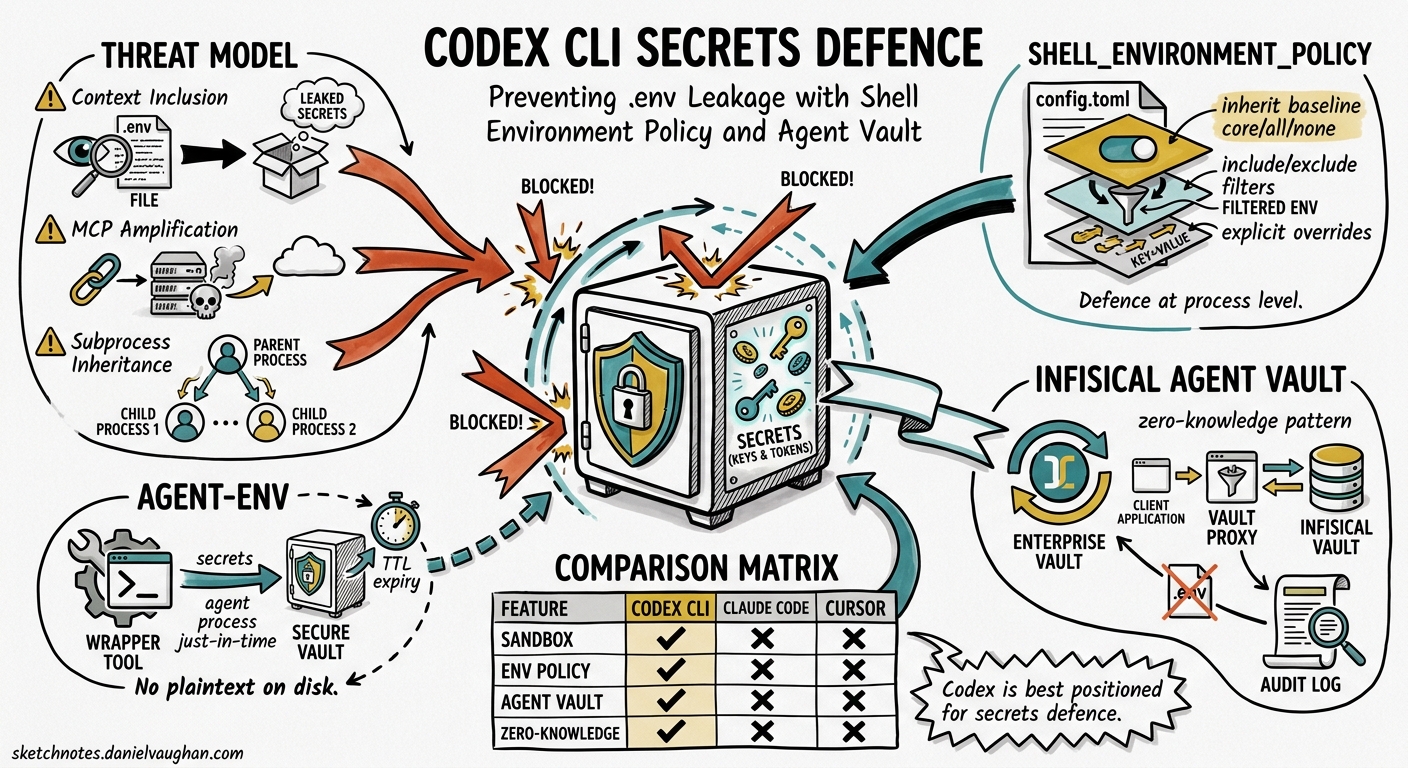
AI coding agents read your project files to provide context-aware assistance. That same context-gathering behaviour means they can silently ingest .env files containing API keys, database credentials, and tokens — then transmit them to inference servers you do not control 1. Knostic’s Spring 2026 research demonstrated concrete exfiltration paths via MCP integrations 2, and Infisical documented how Cursor, Claude Code, and Codex all traverse working directories without respecting .gitignore rules 1.
Codex CLI is better positioned than most competitors because its sandbox and shell_environment_policy configuration provide defence-in-depth at the process level. This article examines the threat model, Codex CLI’s built-in protections, and two complementary tools — agent-env and Infisical Agent Vault — that eliminate plaintext secrets from the agent’s reach entirely.
The Threat Model
flowchart LR
    A[".env file in project root"] --> B["Agent context window"]
    B --> C["Inference API request"]
    C --> D["External model server"]
    B --> E["MCP tool call"]
    E --> F["Compromised MCP server"]
    F --> G["Secret exfiltration"]
Three distinct leakage vectors exist:
- Context inclusion — The agent reads
.envas part of project traversal and sends its contents to the model provider as input tokens 1. - MCP amplification — Once secrets are in memory, a compromised or malicious MCP server can extract them through tool call parameters 2.
- Subprocess inheritance — Commands spawned by the agent inherit the parent shell’s environment, potentially exposing credentials to arbitrary processes.
Claude Code loads .env files automatically without disclosure 3. Cursor’s .cursorignore mechanism is opt-in and inconsistent 1. Codex CLI’s sandbox, by contrast, applies environment filtering before any subprocess executes.
Codex CLI’s Built-in Defence: shell_environment_policy
The [shell_environment_policy] section in ~/.codex/config.toml controls precisely which environment variables reach agent-spawned subprocesses 4. The policy executes in sequence: baseline inheritance, then include/exclude filtering, then explicit overrides.
Configuration Reference
[shell_environment_policy]
# Baseline: 'all' inherits everything, 'core' inherits PATH/HOME/TERM only,
# 'none' starts with an empty environment
inherit = "core"

# Glob patterns to exclude — applied after baseline
exclude = [
  "*_API_KEY",
  "*_SECRET",
  "*_TOKEN",
  "PASSWORD",
  "AWS_*",
  "OPENAI_API_KEY",
  "ANTHROPIC_API_KEY",
  "DATABASE_URL",
]

# Explicit variables to inject (overrides everything above)
[shell_environment_policy.set]
NODE_ENV = "development"
LANG = "en_GB.UTF-8"
How It Defends
| Policy setting | Effect |
|---|---|
inherit = "core" |
Strips all variables except PATH, HOME, TERM, USER 4 |
exclude globs |
Catches credentials that match common naming patterns |
ignore_default_excludes = false (default) |
Codex automatically strips variables containing KEY, SECRET, or TOKEN in their names before your custom excludes run 4 |
Even if a .env file has been sourced into your shell, the sandbox will not pass those variables to commands Codex executes — provided inherit is set to core or none.
Limitations
shell_environment_policy protects subprocesses. It does not prevent Codex from reading a .env file as a text file and including its contents in the model context. For that, you need either filesystem-level deny rules or — better — to remove plaintext secrets from the project directory entirely.
Removing Secrets from the Filesystem: agent-env
agent-env is a lightweight wrapper that loads secrets from encrypted SOPS files or standard .env files into memory, then replaces itself with the agent process via exec 5. After the exec, agent-env ceases to exist — only the agent process remains, with secrets available solely as in-memory environment variables.
Installation and Usage
# Install via Homebrew
brew install agent-env/tap/agent-env

# Run Codex CLI with secrets injected from an encrypted SOPS file
agent-env codex

# Or with an explicit env file outside the project
agent-env --file ~/.secrets/myproject.env codex
How It Works
sequenceDiagram
    participant Dev as Developer
    participant AE as agent-env
    participant Codex as Codex CLI
    participant FS as Filesystem

    Dev->>AE: agent-env codex
    AE->>FS: Walk from cwd to git root
    AE->>FS: Find .sops.env or .env
    AE->>AE: Decrypt (SOPS) or source (dotenv)
    AE->>AE: Load into process memory
    AE->>Codex: exec() replaces agent-env
    Note over Codex: Secrets in memory only<br/>No .env file in project tree
Key properties:
- Auto-detection — Checks for a
^sops:header to determine format; SOPS files are decrypted viasops exec-env, dotenv files sourced withset -a5. - No shell history exposure — Secrets never appear in command arguments.
- Git-root-aware — Walks the directory tree from
cwdupward, stopping at the git root, with global fallbacks in~/.config/agent-env/.
Combining with shell_environment_policy
When using agent-env, configure Codex to inherit the full environment so the injected secrets reach subprocesses that legitimately need them (e.g., npm test requiring DATABASE_URL):
[shell_environment_policy]
inherit = "all"
exclude = [
  "OPENAI_API_KEY",     # Never pass your Codex API key to subprocesses
  "ANTHROPIC_API_KEY",
]
This setup means secrets are in memory (injected by agent-env) but the .env file is no longer in the project tree — Codex cannot read it as file context.
Defence in Depth: Infisical Agent Vault
For teams requiring enterprise-grade secrets management, Infisical Agent Vault operates as a credential broker that never exposes secrets to the agent process at all 6. Instead, it intercepts outbound HTTP requests and injects credentials at the network layer.
Architecture
flowchart TB
    subgraph Agent Process
        A["Codex CLI"] -->|"fetch(api.github.com)"| B["HTTP request"]
    end
    subgraph Agent Vault
        B --> C["Proxy (port 14322)"]
        C --> D["Credential lookup"]
        D --> E["Header injection"]
    end
    E --> F["Upstream API"]
    F -->|Response| A

    style D fill:#f9f,stroke:#333
The agent makes normal API calls. Agent Vault intercepts them transparently, attaches the correct credentials (API keys, bearer tokens, basic auth), and forwards upstream 6. The agent never sees, stores, or logs the underlying secret.
Setup with Codex CLI
# Install Agent Vault
curl --proto '=https' --proto-redir '=https' --tlsv1.2 \
  -fsSL https://get.agent-vault.dev | sh

# Start the vault server (daemonised)
agent-vault server -d

# Add a credential
agent-vault vault credential add \
  --name "github-api" \
  --host "api.github.com" \
  --header "Authorization: Bearer ghp_xxxxx"

# Launch Codex through the vault proxy
agent-vault run -- codex
The agent-vault run command:
- Creates a scoped session automatically.
- Sets
HTTPS_PROXYandHTTP_PROXYenvironment variables. - Configures CA trust for the proxy’s TLS interception certificate.
- Launches Codex transparently 6.
Security Properties
| Property | Mechanism |
|---|---|
| Credentials never in agent memory | Proxy-layer injection only 6 |
| AES-256-GCM encryption at rest | Vault storage layer |
| Argon2id master password | Key derivation for local vaults |
| Unmatched host policy | deny blocks requests to unexpected destinations |
| Request logging | Method, host, path, status — never bodies or headers 6 |
Container and CI Integration
For containerised Codex workloads (Docker, Daytona, E2B), the TypeScript SDK handles session creation:
import { AgentVault, buildProxyEnv } from "@infisical/agent-vault-sdk";

const av = new AgentVault({
  token: process.env.AGENT_VAULT_TOKEN!,
  address: "http://localhost:14321",
});

const session = await av.vault("default").sessions.create({
  vaultRole: "proxy"
});
const env = buildProxyEnv(
  session.containerConfig!,
  "/etc/ssl/agent-vault-ca.pem"
);
// Pass `env` to container spawn
Decision Framework
flowchart TD
    Q1{"Solo developer<br/>or team?"}
    Q1 -->|Solo| Q2{"Encrypted secrets<br/>already in repo?"}
    Q2 -->|Yes, SOPS| R1["agent-env + shell_environment_policy"]
    Q2 -->|No| R2["Move .env outside project +<br/>shell_environment_policy inherit=core"]
    Q1 -->|Team / CI| Q3{"Need credential rotation<br/>and audit logs?"}
    Q3 -->|Yes| R3["Infisical Agent Vault"]
    Q3 -->|No| R4["agent-env + shared SOPS keys"]
| Approach | Complexity | Agent sees secrets? | Rotation support | Audit trail |
|---|---|---|---|---|
shell_environment_policy only |
Low | File readable, subprocess filtered | Manual | None |
agent-env wrapper |
Low | No file; memory-only in subprocess | Manual (re-encrypt) | None |
| Infisical Agent Vault | Medium | Never — proxy injection | Automatic | Full request logs |
Hardening Checklist
- Set
inherit = "core"inshell_environment_policyas baseline. - Remove
.envfrom project directories — useagent-envor a vault. - Add filesystem deny rules in your AGENTS.md or
config.toml:[sandbox] deny_read = [".env", ".env.*", "*.pem", "*.key"] - Audit MCP servers — any MCP integration can become an exfiltration vector if compromised 2.
- Pin
unmatched_host_policy = "deny"in Agent Vault for production workloads. - Test with
codex exec— run a test prompt that requests environment variables and verify nothing sensitive appears in output.
Conclusion
The .env leakage problem is structural: AI coding agents are designed to gather comprehensive context, and secrets stored as plaintext files in the working directory are indistinguishable from legitimate context. Codex CLI’s shell_environment_policy provides meaningful subprocess-level defence that competitors lack by default, but it does not prevent file-level reads. The layered approach — shell_environment_policy for subprocess isolation, agent-env or Agent Vault for eliminating plaintext secrets from the filesystem — closes both vectors without degrading the development workflow.
Citations
-
Infisical, “Your AI Coding Agent is Reading Your .env File,” May 2026. https://infisical.com/blog/your-ai-coding-agent-is-reading-your-env-file ↩ ↩2 ↩3 ↩4
-
Knostic, “From .env to Leakage: Mishandling of Secrets by Coding Agents,” 2026. https://www.knostic.ai/blog/claude-cursor-env-file-secret-leakage ↩ ↩2 ↩3
-
Knostic, “Claude Code Automatically Loads .env Secrets, Without Telling You,” 2026. https://www.knostic.ai/blog/claude-loads-secrets-without-permission ↩
-
OpenAI, “Configuration Reference — Codex,” 2026. https://developers.openai.com/codex/config-reference ↩ ↩2 ↩3
-
agent-env, “Universal secret injection for AI coding agents,” 2026. https://agent-env.com/ ↩ ↩2
-
Infisical, “Agent Vault: The Open Source Credential Proxy and Vault for Agents,” 2026. https://github.com/Infisical/agent-vault ↩ ↩2 ↩3 ↩4 ↩5