Running Codex Safely: What OpenAI's Internal Deployment Reveals and How to Mirror It in Your Own Config
Running Codex Safely: What OpenAI’s Internal Deployment Reveals and How to Mirror It in Your Own Config
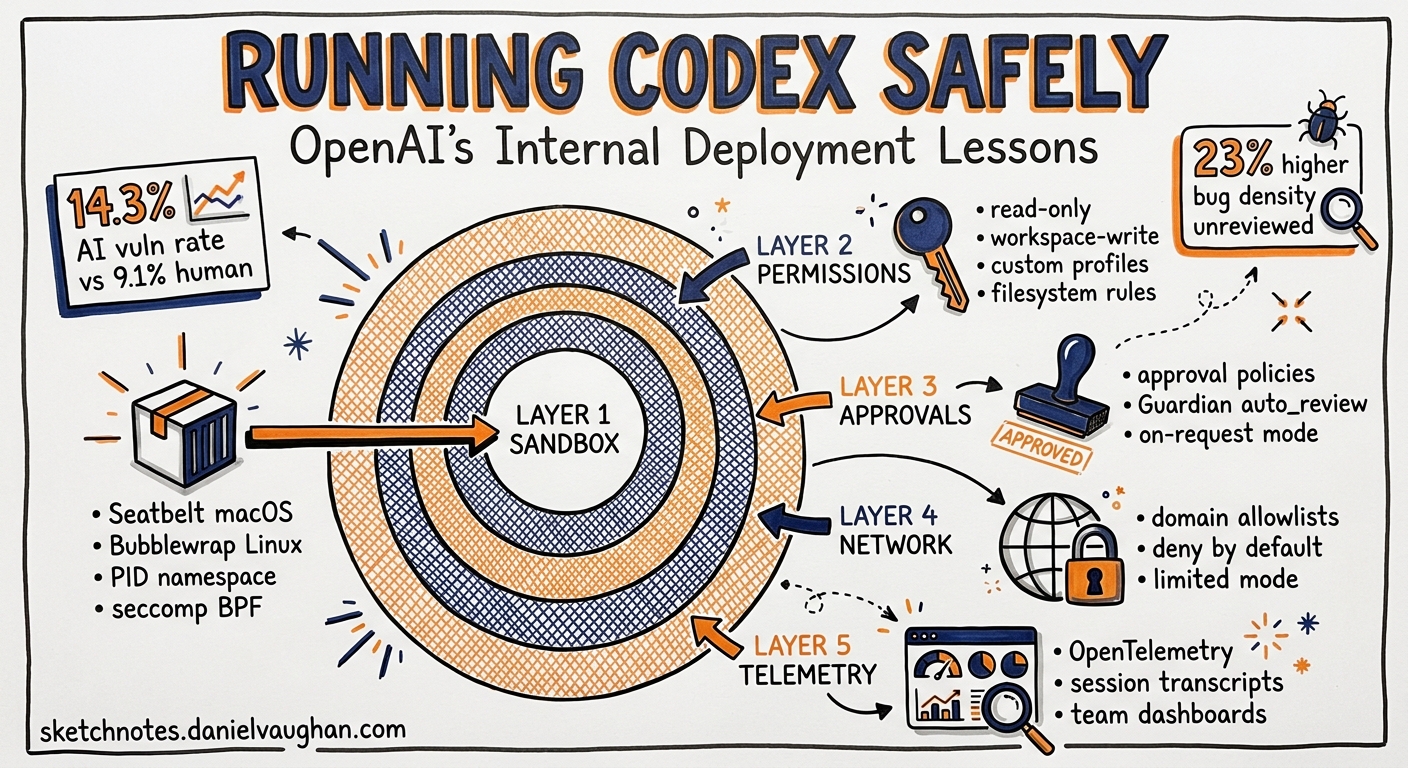
On 8 May 2026, OpenAI published Running Codex safely at OpenAI — a rare look at the controls, boundaries and telemetry the Codex team itself uses when deploying coding agents across its own engineering organisation 1. The timing is significant: the Sourcery Intel State of AI Coding Agents 2026 report, published the same week, puts the AI-generated code vulnerability rate at 14.3% compared with 9.1% for human-written code, and flags a 23% higher bug density in unreviewed agent output 2. The message is clear — productivity gains demand a matching investment in safety controls.
This article distils the OpenAI blog post into five actionable layers, maps each to current Codex CLI v0.130 configuration, and provides a complete config.toml profile you can drop into your own setup today.
The Five-Layer Safety Model
OpenAI’s internal deployment organises safety into five concentric layers. Understanding their interplay is more useful than treating any single control as a silver bullet.
graph TD
    A[Layer 1: Sandbox Isolation] --> B[Layer 2: Permission Profiles]
    B --> C[Layer 3: Approval Policies]
    C --> D[Layer 4: Network Policies]
    D --> E[Layer 5: Telemetry & Audit]
    style A fill:#e74c3c,color:#fff
    style B fill:#e67e22,color:#fff
    style C fill:#f39c12,color:#fff
    style D fill:#2ecc71,color:#fff
    style E fill:#3498db,color:#fff
Layer 1 — Sandbox Isolation
Codex CLI executes every tool invocation inside a platform-specific sandbox 3. On macOS this means Seatbelt profiles; on Linux, Bubblewrap with PID and network namespace isolation plus seccomp BPF filtering; on Windows, restricted tokens with DACL grants 4. The sandbox enforces two invariants regardless of platform:
.git,.agentsand.codexdirectories remain read-only even in writable sandbox modes 3.- Environment variables are scrubbed before the agent phase starts — secrets available during dependency setup never reach the agent 1.
OpenAI’s cloud Codex takes this further with a two-phase runtime model: the setup phase runs with network access to install dependencies, then the agent phase runs offline by default 1. CLI users can approximate this by separating dependency installation from agent execution:
# Phase 1: install deps (network enabled)
npm install

# Phase 2: run the agent (sandbox, no network)
codex --profile safe-workspace "Refactor the auth module"
Layer 2 — Permission Profiles
Permission profiles control filesystem access via glob patterns. OpenAI’s blog emphasises the principle of least privilege — giving the agent write access only to the directories it genuinely needs 1.
default_permissions = "workspace"

[permissions.workspace.filesystem]
":project_roots" = { "." = "write", "**/*.env" = "none", "**/.secrets/**" = "none" }
glob_scan_max_depth = 3
The "none" value denies even read access to matched paths, preventing the agent from ever inspecting credentials, .env files or secrets directories 5. The three built-in profiles provide useful starting points:
| Profile | Filesystem | Network | Best For |
|---|---|---|---|
workspace-write |
Read/write current directory | Disabled | Day-to-day development |
read-only |
Read-only everywhere | Disabled | Code review, exploration |
danger-full-access |
Unrestricted | Enabled | Containers, disposable VMs only |
OpenAI’s internal teams reportedly default to workspace-write with explicit "none" overrides for sensitive paths 1.
Layer 3 — Approval Policies
The approval layer determines which actions require human confirmation. OpenAI’s approach distinguishes low-risk actions (which proceed automatically) from higher-risk actions (which pause for review) 1.
approval_policy = { granular = {
  sandbox_approval = true,
  rules = true,
  mcp_elicitations = true,
  request_permissions = false,
  skill_approval = false
} }
The granular policy lets you selectively enable approval for sandbox escalations and MCP server interactions whilst allowing trusted skills and permission requests to proceed automatically 5. This sits between the blunt "on-request" (approve everything) and "never" (approve nothing) options.
Guardian Auto-Review
For teams that cannot have a human watching every session, the auto_review system routes approval requests through a reviewer agent 5:
approvals_reviewer = "auto_review"
Guardian evaluates each pending action against four risk categories: data exfiltration, credential probing, persistent security weakening and destructive actions 5. Low-risk actions proceed; critical-risk actions are denied outright. This adds model calls to your usage, but OpenAI considers it essential for headless and CI deployments 1.
Layer 4 — Network Policies
Network access is disabled by default in all local sandbox modes 5. OpenAI’s managed deployment uses a curated allowlist: expected destinations are permitted, unknown domains require approval, and blocked destinations are denied silently 1.
For CLI users, the configuration maps to:
[sandbox_workspace_write]
network_access = false
When network access is required (for example, during MCP server calls to external APIs), OpenAI recommends combining it with web search caching to reduce prompt injection risk 5:
web_search = "cached"
The "cached" mode uses an OpenAI-maintained index rather than fetching live pages, eliminating the primary prompt injection vector from web content 5.
Layer 5 — Telemetry and Audit
OpenAI’s security team uses Codex’s structured telemetry to power an AI security triage agent that inspects tool activity, approval decisions, tool results and network policy decisions across all internal sessions 1. The triage agent surfaces analysis to human reviewers, distinguishing between expected behaviour, benign mistakes and activity warranting escalation 1.
CLI users opt in to the same telemetry pipeline via OpenTelemetry:
[otel]
trace_exporter = "otlp-http"
log_exporter = "otlp-http"
otlp_endpoint = "https://your-collector.internal:4318"
Codex emits a trace per session with the service name codex_cli_rs, structured as a top-level session_loop span with child spans for individual API calls and tool invocations 6. This integrates with SigNoz, Grafana, Coralogix, Datadog and any OTLP-compatible backend 6.
For enterprise compliance, the Compliance API exports activity logs with prompts, responses and metadata — up to 30 days of retention for ChatGPT-authenticated usage 7. The Analytics API at https://api.chatgpt.com/v1/analytics/codex provides daily and weekly usage metrics with 90-day lookback 7.
Complete Safe-Workspace Profile
Combining all five layers into a single deployable profile:
[profiles.safe-workspace]
model = "gpt-5.3-codex"
approval_policy = { granular = {
  sandbox_approval = true,
  rules = true,
  mcp_elicitations = true,
  request_permissions = false,
  skill_approval = false
} }
approvals_reviewer = "auto_review"
sandbox_mode = "workspace-write"
default_permissions = "workspace"

[profiles.safe-workspace.permissions.workspace.filesystem]
":project_roots" = { "." = "write", "**/*.env" = "none", "**/.secrets/**" = "none" }
glob_scan_max_depth = 3

[profiles.safe-workspace.sandbox_workspace_write]
network_access = false
web_search = "cached"
Activate with:
codex --profile safe-workspace "Implement the retry logic for the payment service"
Closing the Quality Gap
The Sourcery Intel data showing 14.3% vulnerability rates in AI-generated code 2 makes one thing clear: adopting a coding agent without adopting its safety controls is a false economy. OpenAI’s own engineers do not run Codex without sandboxing, approval policies and telemetry — and neither should you.
The configuration above represents current best practice as of Codex CLI v0.130 (May 2026). As the requirements.toml managed configuration system matures, enterprise administrators will be able to enforce these controls organisation-wide, with cloud-managed requirements taking precedence over anything users configure locally 8.
flowchart LR
    subgraph Precedence["Configuration Precedence"]
        direction LR
        CR[Cloud Requirements] --> MDM[MDM Requirements]
        MDM --> SYS[System /etc/codex/requirements.toml]
        SYS --> USER[User ~/.codex/config.toml]
        USER --> PROJ[Project .codex/config.toml]
        PROJ --> CLI[CLI Flags]
    end
    style CR fill:#e74c3c,color:#fff
    style CLI fill:#3498db,color:#fff
The agents are already writing half the commits 2. The question is no longer whether to adopt them, but whether your safety controls are keeping pace.
Citations
-
OpenAI, “Running Codex safely at OpenAI,” openai.com, 8 May 2026. https://openai.com/index/running-codex-safely/ ↩ ↩2 ↩3 ↩4 ↩5 ↩6 ↩7 ↩8 ↩9 ↩10
-
Sourcery Intel, “The State of AI Coding Agents — 2026,” sourceryintel.com, May 2026. https://sourceryintel.com/reports/the-state-of-ai-coding-agents-2026 ↩ ↩2 ↩3
-
OpenAI, “Sandbox — Codex,” developers.openai.com, 2026. https://developers.openai.com/codex/concepts/sandboxing ↩ ↩2
-
OpenAI, “Codex CLI — Sandbox Internals,” codex.danielvaughan.com, 3 May 2026. https://codex.danielvaughan.com/2026/05/03/codex-cli-sandbox-internals-seatbelt-bubblewrap-landlock-windows-dacl/ ↩
-
OpenAI, “Agent approvals & security — Codex,” developers.openai.com, 2026. https://developers.openai.com/codex/agent-approvals-security ↩ ↩2 ↩3 ↩4 ↩5 ↩6 ↩7
-
OpenAI, “Advanced Configuration — Codex,” developers.openai.com, 2026. https://developers.openai.com/codex/config-advanced ↩ ↩2
-
OpenAI, “Governance — Codex,” developers.openai.com, 2026. https://developers.openai.com/codex/enterprise/governance ↩ ↩2
-
OpenAI, “Managed configuration — Codex,” developers.openai.com, 2026. https://developers.openai.com/codex/enterprise/managed-configuration ↩