Codex CLI Enterprise Managed Configuration: Cloud Policies, Group-Based Enforcement, and Compliance Governance
Codex CLI Enterprise Managed Configuration: Cloud Policies, Group-Based Enforcement, and Compliance Governance
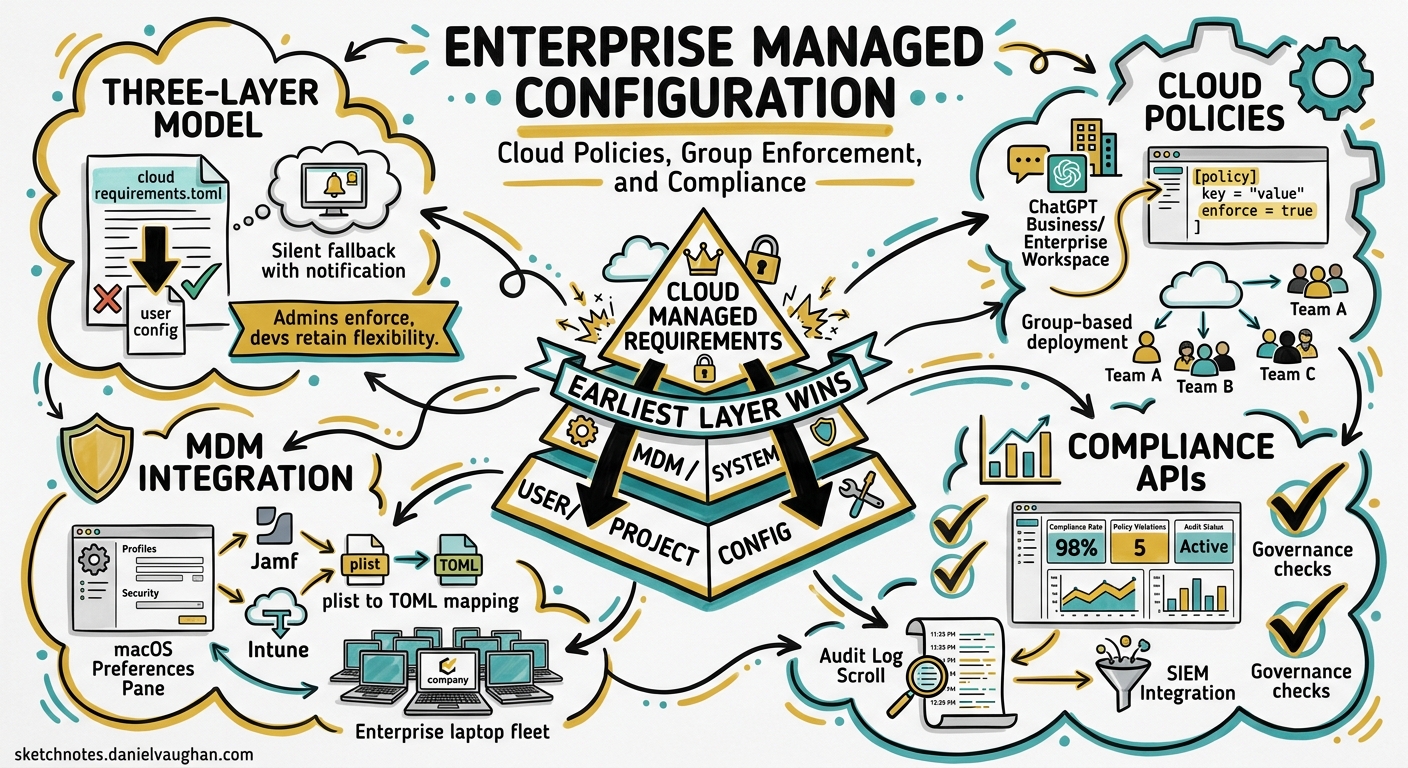
Enterprise teams adopting Codex CLI face a governance challenge that individual developers never encounter: how do you enforce security policies across hundreds of engineers without breaking their workflow? OpenAI’s managed configuration system — cloud-fetched requirements.toml, group-based policy deployment, MDM integration, and the Analytics/Compliance APIs — provides the answer. This article is the practitioner’s reference for deploying and operating these controls.
The Three-Layer Enforcement Model
Codex CLI resolves requirements through a strict precedence hierarchy where the earliest layer wins on a per-field basis[^1]:
flowchart TD
    A[Cloud-Managed Requirements<br/>ChatGPT Business/Enterprise] --> D[Merged requirements.toml]
    B[macOS MDM Preferences<br/>com.openai.codex] --> D
    C[System requirements.toml<br/>/etc/codex/ or %ProgramData%] --> D
    D --> E[User config.toml<br/>~/.codex/config.toml]
    E --> F[Project config.toml<br/>.codex/config.toml]
    F --> G[CLI flags / session overrides]
    D -.->|"Blocks conflicting values"| E
When a user’s config.toml conflicts with an enforced requirement, Codex silently falls back to a compatible value and surfaces a notification explaining the override[^2]. This means developers retain flexibility on non-security settings whilst admins maintain hard constraints on what matters.
Cloud-Managed Requirements
For ChatGPT Business and Enterprise workspaces, the primary enforcement mechanism is cloud-fetched requirements[^1]. When a user signs in with their workspace credentials, Codex fetches the applicable policy from OpenAI’s service before the first turn.
Configuring Policies
Admins author policies at the Codex managed-config page using standard requirements.toml syntax[^2]:
# Enforce read-only sandbox for all users
allowed_sandbox_modes = ["read-only"]

# Allow workspace-write only on designated devboxes
[[remote_sandbox_config]]
hostname_patterns = ["*.devbox.example.com"]
allowed_sandbox_modes = ["read-only", "workspace-write"]

# Lock down approval policy
allowed_approval_policies = ["untrusted", "on-request"]

# Restrict web search to cached mode
allowed_web_search_modes = ["cached"]

# MCP server allowlist — empty array disables all
[mcp_servers]
"github-mcp" = { command = "github-mcp-server", args = ["--readonly"] }
"linear-mcp" = { command = "linear-mcp-server" }
Group-Based Policy Assignment
Different teams need different constraints. The managed-config page supports group-specific rules where the first matching rule wins[^2]. A typical enterprise deploys:
| Group | Sandbox | Web Search | MCP Servers |
|---|---|---|---|
| Security Engineers | workspace-write |
live |
All approved |
| Backend Developers | workspace-write |
cached |
GitHub, Linear |
| Contractors | read-only |
disabled |
None |
| Data Scientists | workspace-write |
live |
Jupyter MCP only |
Caching and Resilience
Cloud requirements are cached locally after first fetch[^2]. If the service is temporarily unreachable on subsequent launches, Codex continues with the cached policy. If no cache exists and the fetch fails, enforcement for that layer is skipped — a deliberate “best-effort” design that prioritises developer productivity over hard blocks[^2].
macOS MDM Integration
For organisations using device management, Codex supports policy deployment via MDM preference domains[^2]:
<!-- Jamf Pro / Kandji / Fleet configuration profile -->
<key>com.openai.codex</key>
<dict>
    <key>requirements_toml_base64</key>
    <string>YWxsb3dlZF9zYW5kYm94X21vZGVzID0gWyJyZWFkLW9ubHkiXQo=</string>
    <key>config_toml_base64</key>
    <string>bW9kZWwgPSAiZ3B0LTUuNCIK</string>
</dict>
The requirements_toml_base64 key enforces hard constraints, whilst config_toml_base64 sets managed defaults that users can override during sessions (reapplied on restart)[^2]. This integrates cleanly with Jamf Pro, Fleet, and Kandji without requiring custom preprocessing scripts.
For Linux and Windows deployments without MDM, place the file at the system path:
- Linux/macOS:
/etc/codex/requirements.toml - Windows:
%ProgramData%\OpenAI\Codex\requirements.toml
Enforceable Constraints Reference
The full set of fields enforceable through requirements.toml[^1][^2]:
| Field | Type | Purpose |
|---|---|---|
allowed_approval_policies |
string[] |
Restrict approval modes (untrusted, on-request, never) |
approvals_reviewer |
string |
Force user or auto_review |
allowed_sandbox_modes |
string[] |
Restrict sandbox (read-only, workspace-write, danger-full-access) |
allowed_web_search_modes |
string[] |
Restrict web search (disabled, cached, live) |
mcp_servers |
table |
Allowlist MCP servers by name and command identity |
managed_hooks |
table |
Deploy organisation-wide hooks |
command_rules |
array |
Restrict shell commands to prompt or forbidden |
remote_sandbox_config |
array |
Per-hostname sandbox overrides |
Command Rules
Command rules use decision values of prompt (require user approval) or forbidden (block entirely) — allow is deliberately unavailable in requirements to prevent admins from bypassing the approval system[^2]:
[[command_rules]]
pattern = "rm -rf *"
decision = "forbidden"

[[command_rules]]
pattern = "curl *"
decision = "prompt"
RBAC and Workspace Access
Enterprise admins control Codex access through ChatGPT workspace settings with two independent toggles[^3]:
- Codex local (enabled by default): CLI, desktop app, and IDE extension
- Codex cloud (requires GitHub connection): hosted code review and cloud sandboxes
A dedicated “Codex Admin” group with limited membership manages policies and analytics without granting broader workspace permissions[^3]. Device code authentication supports non-interactive CLI environments (CI runners, shared development servers) where browser-based OAuth is impractical[^3].
Governance: Analytics and Compliance APIs
Analytics API
The Analytics API provides adoption and usage visibility at https://api.chatgpt.com/v1/analytics/codex[^4]:
# Fetch weekly usage for the workspace
curl -H "Authorization: Bearer $PLATFORM_API_KEY" \
  "https://api.chatgpt.com/v1/analytics/codex/workspaces/${WORKSPACE_ID}/usage?start_time=2026-05-04T00:00:00Z&end_time=2026-05-11T00:00:00Z&group_by=day"
Three core endpoints[^4]:
| Endpoint | Returns |
|---|---|
/usage |
Threads, turns, credits, tokens by client surface |
/code_reviews |
PR reviews, comments by priority (P0/P1/P2) |
/code_review_responses |
Developer reactions to Codex review comments |
Query parameters include start_time, end_time, group_by (day/week), and cursor-based pagination. The API supports a 90-day lookback window with keys scoped to codex.enterprise.analytics.read[^4].
Compliance API
For audit and legal workflows, the Compliance API exports detailed activity logs retained for 30 days[^4]:
- Prompt text and generated responses
- Workspace, user, timestamp, and model identifiers
- Token usage and request metadata
This integrates with eDiscovery, DLP, and SIEM systems. A typical deployment routes Compliance API exports to Splunk or Datadog for correlation with other development activity signals[^4].
Dashboard
The self-serve analytics dashboard visualises[^4]:
- Active users by product surface (CLI, IDE, cloud, desktop, Code Review)
- Credit and token consumption with workspace vs personal breakdowns
- User ranking tables with sortable engagement metrics
- Code Review activity: PRs reviewed, priority issues flagged, comments generated
Data exports in CSV or JSON format, with up to 12 hours of lag for recent activity[^4].
Deployment Checklist
A practical sequence for rolling out managed configuration:
flowchart LR
    A[Define security posture] --> B[Author requirements.toml]
    B --> C[Create group policies]
    C --> D[Deploy via cloud/MDM]
    D --> E[Configure Analytics API]
    E --> F[Route Compliance to SIEM]
    F --> G[Verify with pilot group]
    G --> H[Gradual workspace rollout]
- Define your security posture — Which sandbox modes are acceptable? Which MCP servers are approved? What approval policy floor do you require?
- Author
requirements.toml— Start restrictive; loosen per-group as trust evidence accumulates - Create group policies — Map your organisational structure to Codex groups with appropriate constraints
- Deploy — Cloud-managed for Business/Enterprise; MDM profiles for device-managed fleets;
/etc/codex/for Linux servers - Enable Analytics — Configure API key with
codex.enterprise.analytics.readscope; connect to your BI tooling - Route Compliance — Point Compliance API exports to your SIEM/DLP pipeline
- Verify — Test with a pilot group; confirm enforcement notifications appear correctly; validate audit log completeness
Common Pitfalls
Empty mcp_servers table disables all servers. If you define [mcp_servers] without entries, no MCP server will load — even ones users configure locally[^2]. Either omit the section entirely or explicitly list approved servers.
Cloud requirements cache can go stale. If you update a policy and a developer doesn’t restart their CLI, the cached policy persists. Consider communicating policy changes with a restart advisory.
Group rule ordering matters. First matching group rule wins. Place more specific groups (e.g., “Security Engineers”) before broader groups (e.g., “All Developers”) in your managed-config page[^2].
allow is not a valid command rule decision. Requirements deliberately restrict to prompt or forbidden — attempting to use allow will be rejected[^2].
When to Use What
| Scenario | Mechanism |
|---|---|
| SaaS team on ChatGPT Enterprise | Cloud-managed requirements |
| Corporate macOS fleet | MDM preference profiles |
| Linux CI runners/shared servers | System /etc/codex/requirements.toml |
| Per-project conventions (non-security) | Project .codex/config.toml |
| Individual preferences | User ~/.codex/config.toml |
Citations
| [^1]: [Managed configuration – Codex | OpenAI Developers](https://developers.openai.com/codex/enterprise/managed-configuration) |
| [^2]: [Configuration Reference – Codex | OpenAI Developers](https://developers.openai.com/codex/config-reference) |
| [^3]: [Admin Setup – Codex | OpenAI Developers](https://developers.openai.com/codex/enterprise/admin-setup) |
| [^4]: [Governance – Codex | OpenAI Developers](https://developers.openai.com/codex/enterprise/governance) |