Codex CLI for Database Migrations: Agent-Driven Schema Evolution with Atlas, Prisma, and Flyway
Codex CLI for Database Migrations: Agent-Driven Schema Evolution with Atlas, Prisma, and Flyway
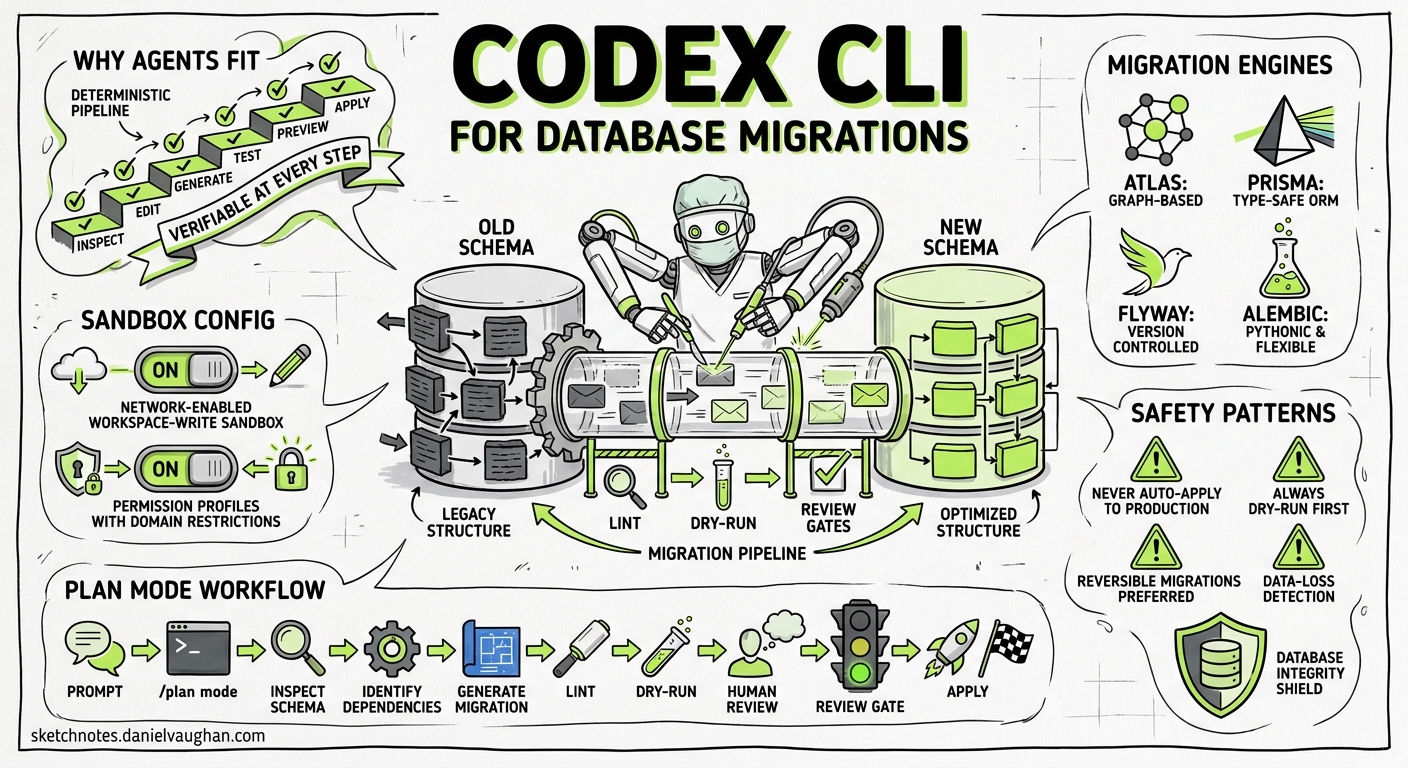
Database migrations sit in an uncomfortable sweet spot for AI coding agents. The work is repetitive enough to automate — generate a diff, lint it, test it, apply it — but destructive enough that a single mistake can drop a production column. Codex CLI’s combination of sandbox isolation, skill-based workflows, and plan-before-act prompting makes it one of the better tools for the job, provided you configure it correctly.
This article covers practical patterns for running database migration workflows through Codex CLI, using Atlas, Prisma, Flyway, and Alembic as the underlying migration engines.
Why Migrations Are a Good Fit for Agents
Schema changes follow a deterministic pipeline: inspect current state, edit the schema, generate a migration, lint it, test it, preview it, apply it 1. Each step produces verifiable output. The agent can confirm that atlas migrate lint returned zero warnings before proceeding to atlas migrate apply --dry-run, and a human can review the generated SQL before anything touches a real database.
Codex CLI’s plan mode (toggled with /plan or Shift+Tab) is particularly valuable here 2. Asking the agent to plan a migration before generating code forces it to inspect the existing schema, identify dependencies, and surface potential data-loss risks — all before a single ALTER TABLE is emitted.
flowchart TD
    A[Prompt: add email column to users] --> B[/plan mode/]
    B --> C[Inspect current schema]
    C --> D[Identify dependencies and constraints]
    D --> E[Generate migration file]
    E --> F[Lint migration]
    F --> G{Lint passes?}
    G -->|Yes| H[Dry-run preview]
    G -->|No| I[Fix and re-lint]
    I --> F
    H --> J[Human review]
    J --> K[Apply migration]
Sandbox Configuration for Database Access
By default, Codex CLI’s sandbox blocks network access 3. Database migrations require connectivity to at least a local development database, and often to Docker for ephemeral test instances. Two configuration approaches work:
Option 1: Network-Enabled Workspace-Write Sandbox
# ~/.codex/config.toml
[sandbox_workspace_write]
network_access = true
This permits outbound connections from within the sandbox, allowing the agent to reach localhost:5432 or spin up Docker containers 3.
Option 2: Permission Profiles with Domain Restrictions
For tighter control, define a custom permission profile that allows only database-related connections:
[permissions.db-migration]
[permissions.db-migration.network]
enabled = true
mode = "limited"

[permissions.db-migration.network.domains]
"localhost" = "allow"
"host.docker.internal" = "allow"
This ensures the agent can reach the local database and Docker but cannot make arbitrary outbound requests 4.
Exposing Environment Variables
Migration tools need connection strings. Pass them through the sandbox without hardcoding credentials:
export DATABASE_URL="postgresql://dev:dev@localhost:5432/myapp_dev"
codex --approval-policy on-request "Run the pending Prisma migrations"
The on-request approval policy ensures Codex pauses before executing any destructive command, giving you a chance to inspect the generated SQL 5.
Atlas: Schema-as-Code with Agent Skills
Atlas treats schema definitions as code and generates deterministic migrations from diffs 1. Its official agent skill — available for Codex CLI, Claude Code, and Cursor — packages the full migration lifecycle into a portable SKILL.md file 6.
Installing the Atlas Skill
mkdir -p ~/.codex/skills/atlas/references
# Copy SKILL.md and references/schema-sources.md from atlasgo.io
Once installed, Codex will automatically invoke the skill when you prompt with migration-related requests 7. The skill’s description field triggers on phrases like “add a column”, “create a migration”, or “apply schema changes”.
The Eight-Step Workflow
The Atlas skill encodes an eight-step workflow that the agent follows 6:
- Inspect current schema state with
atlas schema inspect --env dev - Edit schema files (HCL, SQL, or ORM models)
- Validate syntax with
atlas schema validate --env dev - Generate migration:
atlas migrate diff --env dev "add_users_email" - Lint for issues:
atlas migrate lint --env dev --latest 1 - Test migration (requires Atlas login):
atlas migrate test --env dev - Fix any issues flagged by lint or test
- Dry-run before applying:
atlas migrate apply --env dev --dry-run
The critical safety rails are steps 5 and 8. The lint step catches destructive changes (column drops, type narrowing), and the dry-run shows the exact SQL that will execute 1.
Dev Database Scope
A common pitfall: the dev URL scope must match your schema structure. Schema-scoped URLs (e.g. docker://postgres/17/dev?search_path=public) work for single-schema projects. Database-scoped URLs (e.g. docker://postgres/17/dev) are required when working with multiple schemas, extensions, or database-level objects 6. Using the wrong scope produces ModifySchema is not allowed errors or silently drops objects.
# atlas.hcl
env "dev" {
  url = getenv("DATABASE_URL")
  dev = "docker://postgres/17/dev?search_path=public"
  migration {
    dir = "file://migrations"
  }
  schema {
    src = "file://schema.hcl"
  }
}
Prisma: ORM-Driven Migrations
Prisma’s migration workflow centres on the schema.prisma file 8. The agent edits the schema, generates a migration with prisma migrate dev, and Prisma produces the SQL diff. Prisma also maintains an official set of agent skills at prisma/skills 9, installable via:
npx skills add prisma/skills
The prisma-cli skill covers the full lifecycle: prisma migrate status, prisma migrate dev --name <description>, prisma validate, and prisma db push for rapid prototyping 9.
AGENTS.md Conventions for Prisma Projects
Encoding migration conventions in AGENTS.md prevents the agent from making common mistakes 2:
# Database Conventions

## Migrations
- Always run `npx prisma migrate status` before generating a new migration
- Never use `prisma db push` in production — use `prisma migrate deploy`
- Name migrations descriptively: `add_users_email_verified_column`
- Review generated SQL in `prisma/migrations/` before approving
- Run `npx prisma validate` after every schema change
- Always update seed data if schema changes affect existing fixtures

## Safety
- Never run destructive migrations without explicit user approval
- Back up the database before applying migrations to staging/production
- If a migration fails, do NOT attempt to fix it by editing the migration file
This guidance ensures the agent follows your team’s conventions rather than defaulting to potentially unsafe patterns 10.
Flyway and Alembic: Version-Controlled Migrations
For teams using Flyway (Java/JVM ecosystems) or Alembic (Python/SQLAlchemy), the integration pattern is similar but relies on AGENTS.md conventions rather than dedicated skills.
Flyway with Codex CLI
Flyway 12.x (current stable, 2026) supports 50+ databases and maintains a flyway_schema_history table for version tracking 11. A practical AGENTS.md section:
## Flyway Conventions
- Migration files: `V{version}__{description}.sql` in `db/migration/`
- Always run `flyway info` to check current state before generating migrations
- Run `flyway validate` after adding a new migration file
- Use `flyway migrate -dryRunOutput=dryrun.sql` to preview changes
- Never modify applied migrations — create a new versioned migration instead
Alembic with Codex CLI
Alembic 1.18.x (current stable) pairs with SQLAlchemy 2.0 for Python projects 12. The agent generates revisions with alembic revision --autogenerate -m "description", but autogenerated migrations require careful review — Alembic cannot detect all changes (e.g. table renames, column type changes with data loss).
## Alembic Conventions
- Always review autogenerated migrations — they miss renames and complex type changes
- Run `alembic check` to verify model/schema alignment before generating
- Use `alembic upgrade head --sql` to preview SQL before applying
- Tag revisions with descriptive messages matching the PR title
Automating Migrations in CI/CD
Codex CLI’s codex exec mode enables non-interactive migration automation in pipelines 13. A GitHub Actions workflow might look like:
- name: Generate and lint migration
  run: |
    codex exec \
      --approval-policy never \
      --sandbox workspace-write \
      -c 'sandbox_workspace_write.network_access=true' \
      "Check if schema.prisma has changed. If so, generate a Prisma migration, \
       validate it, and write the migration name to stdout."
The --approval-policy never flag is appropriate here because the CI environment is ephemeral and the agent is generating rather than applying migrations 13. For applying migrations, use on-request or gate behind a manual approval step.
Structured Output for Pipeline Integration
Use --output-schema to extract migration metadata as structured JSON 14:
codex exec \
  --output-schema '{"type":"object","properties":{"migration_name":{"type":"string"},"tables_affected":{"type":"array","items":{"type":"string"}},"destructive":{"type":"boolean"}}}' \
  "Analyse the latest migration file and report which tables are affected and whether it contains destructive changes"
This feeds downstream pipeline steps — for instance, requiring manual approval if destructive is true.
Model Selection for Migration Tasks
Not all migration tasks need the same model. A practical selection strategy 15:
| Task | Recommended Model | Rationale |
|---|---|---|
| Schema inspection and status checks | GPT-5.4-mini | Low complexity, fast turnaround |
| Migration generation from ORM changes | GPT-5.5 | Needs deep understanding of schema dependencies |
| Lint interpretation and fix suggestions | GPT-5.4 | Balance of reasoning depth and speed |
| Migration review and safety analysis | GPT-5.5 | Critical safety task requiring thorough reasoning |
| Seed data updates | GPT-5.4-mini | Mechanical, pattern-following work |
Override the model per task with --model:
codex --model gpt-5.4-mini "Check Prisma migration status and report"
codex --model gpt-5.5 "Generate a migration for the new billing schema"
Common Pitfalls
The apply_patch hook gap. Codex CLI’s PreToolUse and PostToolUse hooks fire for shell commands but not for file writes made through the internal apply_patch mechanism 16. If your migration review hook relies on intercepting file writes, instruct the agent to use shell-based file operations instead, or validate in a PostToolUse hook triggered by the subsequent git diff.
Context window pressure. Large schemas with hundreds of tables can consume significant context. Use .codexignore to exclude irrelevant directories and consider the tool_output_token_limit setting to cap verbose command output 17.
Sandbox and Docker. If your migration tool requires Docker (Atlas dev databases, Prisma shadow databases), ensure Docker is accessible from within the sandbox. On macOS, host.docker.internal must be in the network allowlist. On Linux, the Docker socket may need explicit permission via writable_roots 3.
Practical Recommendations
- Always use plan mode for migration tasks. The inspect-before-act pattern catches dependency issues early.
- Gate destructive changes behind
--approval-policy on-request. Never let the agent drop columns or tables without human review. - Install official skills where available (Atlas, Prisma). They encode expert knowledge the agent would otherwise need to infer.
- Encode team conventions in AGENTS.md. Migration naming patterns, review requirements, and safety rules belong in version-controlled guidance.
- Separate generation from application. Use
codex execto generate and lint migrations automatically; keep application as a manual or gated step. - Use structured output in CI pipelines to extract migration metadata for downstream decision logic.
Citations
-
[Best practices — Codex OpenAI Developers](https://developers.openai.com/codex/learn/best-practices) -
[Configuration Reference — Codex OpenAI Developers](https://developers.openai.com/codex/config-reference) -
[Advanced Configuration — Codex OpenAI Developers](https://developers.openai.com/codex/config-advanced) -
[Command line options — Codex CLI OpenAI Developers](https://developers.openai.com/codex/cli/reference) -
[Database Schema Migration Skill for AI Agents Atlas Guides](https://atlasgo.io/guides/ai-tools/agent-skills) -
Best Codex CLI Skills in 2026 — Compatible SKILL.md Skills That Work ↩
-
[Prisma Migrate: Database, Schema, SQL Migration Tool Prisma Documentation](https://www.prisma.io/docs/orm/prisma-migrate) -
[Custom instructions with AGENTS.md — Codex OpenAI Developers](https://developers.openai.com/codex/guides/agents-md) -
[Flyway Database Migrations in 2026 DeployHQ](https://www.deployhq.com/blog/master-your-database-migrations-with-flyway-a-comprehensive-guide-for-all-projects) -
[Mastering Alembic Migrations in Python ThinhDA](https://thinhdanggroup.github.io/alembic-python/) -
[Non-interactive mode — Codex OpenAI Developers](https://developers.openai.com/codex/noninteractive) -
[Features — Codex CLI OpenAI Developers](https://developers.openai.com/codex/cli/features) -
[Models — Codex OpenAI Developers](https://developers.openai.com/codex/models) -
File write operations do not fire PreToolUse/PostToolUse hooks — GitHub Issue #17794 ↩
-
[Changelog — Codex OpenAI Developers](https://developers.openai.com/codex/changelog)