Database Schema Migrations with Codex CLI: Atlas Agent Skills, Policy-as-Code, and the Deterministic Safety Layer
Database Schema Migrations with Codex CLI: Atlas Agent Skills, Policy-as-Code, and the Deterministic Safety Layer
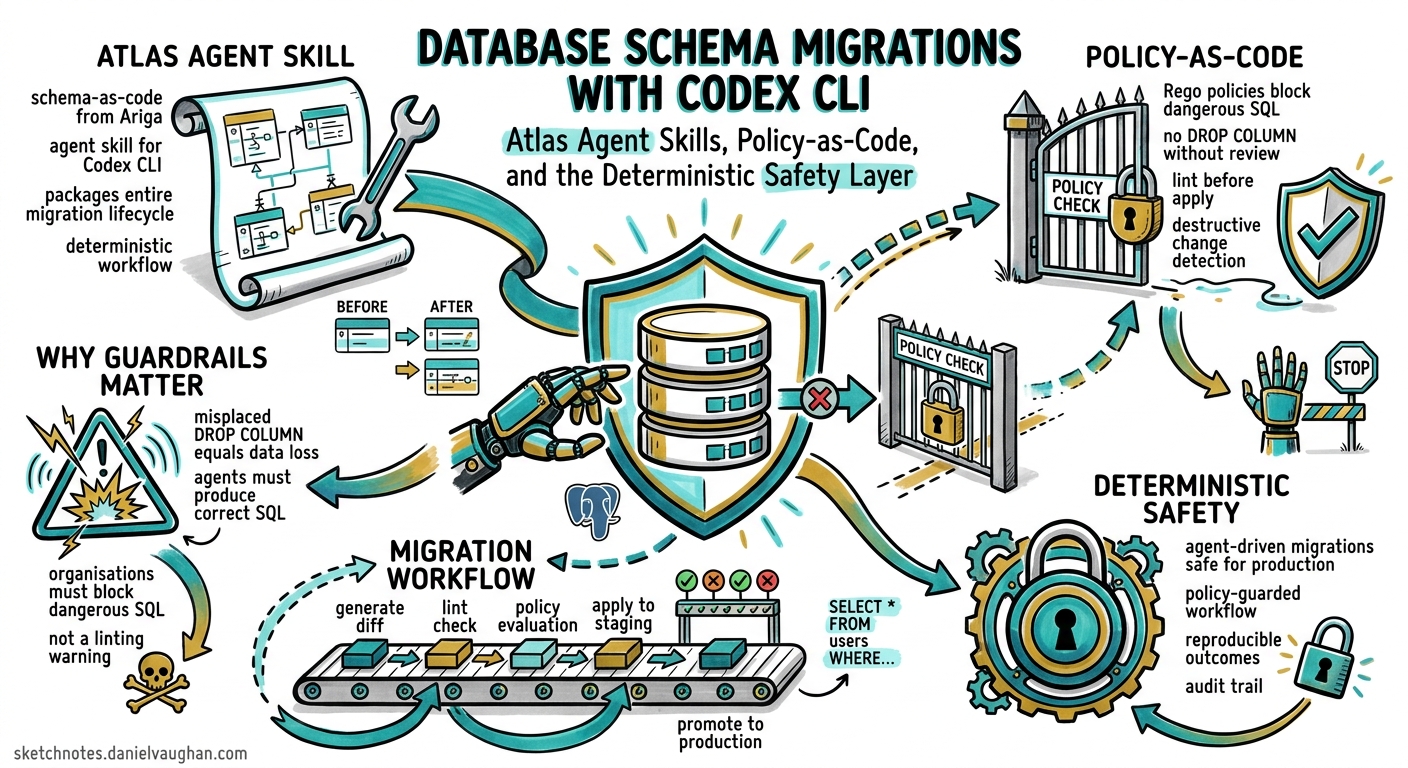
AI coding agents are remarkably good at generating application code. Database migrations are a different beast. A misplaced DROP COLUMN in production is not a linting warning — it is data loss. Atlas, the schema-as-code tool from Ariga, now ships an Agent Skill specifically designed for Codex CLI that packages the entire migration lifecycle into a deterministic, policy-guarded workflow 1. This article walks through the skill’s architecture, installation, day-to-day usage, and — critically — the policy-as-code layer that makes agent-driven migrations safe for production.
Why Agent-Driven Migrations Need Guardrails
When Codex CLI generates a TypeScript handler, the worst outcome is a failing test. When it generates a migration, the worst outcome is irreversible data corruption. The challenge is twofold: agents must produce correct SQL, and organisations must block dangerous SQL before it reaches a live database 2.
Traditional AGENTS.md instructions help, but they are suggestions the model may or may not follow. Atlas takes a different approach: deterministic tooling that computes the migration from a schema diff, then validates the result against machine-readable policies before it can be applied 3.
flowchart LR
    A[Schema Edit] --> B[atlas schema validate]
    B --> C[atlas migrate diff]
    C --> D[atlas migrate lint]
    D --> E{Policy Pass?}
    E -->|Yes| F[atlas migrate apply --dry-run]
    E -->|No| G[Block & Report]
    F --> H[atlas migrate apply]
Atlas Agent Skill: Anatomy
The Atlas skill follows the SKILL.md open standard adopted by Codex CLI, Claude Code, Cursor, and GitHub Copilot 1. It consists of three components:
| Component | Path | Purpose |
|---|---|---|
SKILL.md |
.codex/skills/atlas/SKILL.md |
Metadata header + full workflow instructions |
| References | .codex/skills/atlas/references/ |
ORM-specific configs, dev-database dialect URLs |
agents/openai.yaml |
Optional | UI hints, implicit invocation policy, tool dependencies |
The SKILL.md frontmatter tells Codex when to activate:
---
name: atlas
description: >
  Database schema management and migrations with Atlas CLI.
  Use when: generating migrations, diffing schemas, linting or
  testing migrations, applying schema changes, inspecting databases,
  working with atlas.hcl, schema.hcl, or ORM schemas.
---
Codex uses progressive disclosure loading: it reads only the skill name and description into the manifest (capped at roughly 2% of context window), loading the full SKILL.md body only when a task matches the trigger description 4. This means the Atlas skill consumes zero context tokens during a JavaScript refactoring session but activates automatically when you ask Codex to “add an email column to the users table”.
Installation
Project-Level (Recommended)
mkdir -p .codex/skills/atlas/references
Place the SKILL.md and references files in the skill directory. Atlas provides a pre-built skill you can copy directly 1:
# Download the official Atlas skill
curl -sL https://atlasgo.io/skills/codex/SKILL.md \
  -o .codex/skills/atlas/SKILL.md
curl -sL https://atlasgo.io/skills/codex/references/schema-sources.md \
  -o .codex/skills/atlas/references/schema-sources.md
Commit the skill to version control so every team member gets consistent migration workflows 5.
User-Level (Personal)
For use across all repositories:
mkdir -p ~/.codex/skills/atlas/references
# Same curl commands, targeting ~/.codex/skills/atlas/
Codex scans from the current working directory upward to the repository root, then falls back to ~/.codex/skills/ and /etc/codex/skills/ 4.
Core Configuration: atlas.hcl
The skill teaches Codex to read atlas.hcl before issuing any command. A typical environment block:
env "dev" {
  url = getenv("DATABASE_URL")
  dev = "docker://postgres/17/dev?search_path=public"
  migration {
    dir = "file://migrations"
  }
  schema {
    src = "file://schema.hcl"
  }
}
Two critical details the skill encodes:
- Never hardcode credentials. The agent uses
getenv()exclusively — database URLs never enter the LLM context 5. - Schema scope matters.
docker://postgres/17/dev?search_path=publicis schema-scoped (single schema);docker://postgres/17/devis database-scoped (multiple schemas, extensions). Wrong scope causesModifySchema is not allowederrors or silently drops database-level objects 5.
The Seven-Stage Migration Lifecycle
The skill encodes a deterministic workflow that the agent follows for every schema change:
1. Inspect
atlas schema inspect --env dev
Reads the current database state. The agent uses this to understand what exists before proposing changes.
2. Edit
The agent modifies the schema source — HCL files, ORM models (GORM, Drizzle, Django, SQLAlchemy, Ent, Sequelize, TypeORM), or raw SQL 1.
3. Validate
atlas schema validate --env dev
Checks syntax and semantic correctness before any migration is generated.
4. Generate
atlas migrate diff --env dev "add_user_email"
Atlas computes the migration SQL from the diff between desired state and current state. This is deterministic — the agent does not write SQL by hand 3.
5. Lint
atlas migrate lint --env dev --latest 1
Runs the generated migration through Atlas’s built-in analysers: destructive change detection, backward-incompatibility checks, naming convention enforcement, and any custom policies 3.
6. Test
atlas migrate test --env dev
Executes the migration against a disposable dev database to verify it applies cleanly.
7. Deploy
atlas migrate apply --env dev --dry-run   # Preview
atlas migrate apply --env dev             # Apply
The skill instructs the agent to always run --dry-run first and present the plan for human review before applying 5.
Policy-as-Code: The Deterministic Safety Layer
This is what separates agent-driven Atlas migrations from “the LLM wrote some SQL and we hope it’s fine”. Atlas policies are machine-readable rules enforced by the CLI — if a migration violates a policy, it cannot pass regardless of what the agent generates 3.
Destructive Change Detection
Atlas automatically flags irreversible operations like DROP COLUMN or DROP TABLE. Teams can configure strict enforcement:
lint {
  destructive {
    error = true
  }
}
Or allowlist specific patterns for staged deletions (tables prefixed with drop_, for instance) 3.
Backward-Incompatibility Analysis
Column renames, type changes, and constraint additions that would break running application code are flagged before the migration executes 3.
Naming Convention Enforcement
Custom rules codify internal standards:
lint {
  naming {
    index  = "^idx_.*$"
    foreign_key = "^fk_.*$"
    table  = "^[a-z][a-z0-9_]*$"
  }
}
These become living, programmatic gatekeepers rather than wiki pages nobody reads 3.
CI/CD Integration and Approval Workflows
Atlas generates execution plans during CI, comments them on pull requests, and stores artefacts in the Atlas Registry. Apply-time policies offer three modes 3:
| Mode | Behaviour |
|---|---|
| Error-Only | Proceeds unless errors detected |
| Warning-Sensitive | Pauses on warnings for review |
| Strict | Requires manual sign-off for every migration |
Database Ownership
Atlas extends governance to access control through ownership policies — essentially CODEOWNERS for your database — mapping schema objects to GitHub users or teams 3.
ORM Integration
The skill’s references/schema-sources.md file documents how to configure external schema sources for popular ORMs:
# GORM (Go)
data "external_schema" "gorm" {
  program = [
    "go", "run",
    "ariga.io/atlas-provider-gorm",
    "load", "--path", "./models",
  ]
}

# Drizzle (TypeScript)
data "external_schema" "drizzle" {
  program = ["npx", "drizzle-kit", "export"]
}

# Django (Python)
data "external_schema" "django" {
  program = [
    "python", "manage.py",
    "atlas-provider-django", "--dialect", "postgres",
  ]
}
This means the agent can work with your existing ORM models — it edits the model, then Atlas computes the correct migration from the ORM’s schema output 1.
Workflow Decision Tree
The skill includes a decision tree the agent follows:
flowchart TD
    A[Schema change needed] --> B{migrations/ dir exists?}
    B -->|Yes| C[Versioned: diff → lint → test → apply]
    B -->|No| D{Iterating locally?}
    D -->|Yes| E[Declarative: schema apply --auto-approve]
    D -->|No| F[Read atlas.hcl first, then decide]
Versioned migrations (with a migrations/ directory) suit production workflows where every change must be reviewed and tracked. Declarative mode (atlas schema apply) suits rapid local iteration where the database is disposable 5.
Combining Atlas with Codex CLI Hooks
For additional safety, pair the Atlas skill with Codex CLI hooks. A PreToolUse hook can intercept shell commands and block any direct psql or mysql calls, forcing all database changes through Atlas 6:
{
  "hooks": {
    "PreToolUse": [
      {
        "tool": "shell",
        "command": "python3 .codex/hooks/block-direct-sql.py"
      }
    ]
  }
}
The hook script inspects the proposed command, denies anything that bypasses Atlas, and returns a reason explaining the approved workflow.
Practical Example: Adding a Column
A typical interaction:
You: Add a
last_logintimestamp column to the users table, nullable, with a default of now().
Codex activates the Atlas skill, then:
- Runs
atlas schema inspect --env devto read current state - Edits
schema.hclto add the column definition - Runs
atlas schema validate --env dev— passes - Runs
atlas migrate diff --env dev "add_users_last_login"— generates migration SQL - Runs
atlas migrate lint --env dev --latest 1— no policy violations - Runs
atlas migrate apply --env dev --dry-run— shows the execution plan - Asks for confirmation before applying
At no point does the agent write raw SQL. At no point can a destructive change slip past the linting stage.
Current Limitations
- Sandbox constraints. Codex CLI’s sandbox does not expose Docker by default, so the dev-database URL (
docker://postgres/17/dev) requires either sandbox relaxation or a pre-running container accessible via TCP 4. - MCP coverage gaps.
PreToolUsehooks do not reliably fire for all MCP tool calls, so the “block direct SQL” hook may miss commands routed through an MCP database server 6. - No automatic apply. The skill deliberately requires human confirmation for
migrate applywithout--dry-run. This is by design, but means fully autonomous CI pipelines need thecodex execnon-interactive mode with appropriate approval policies. - Credential isolation. While the skill prevents credentials entering LLM context via
getenv(), the agent process itself has access to environment variables. Organisations handling sensitive databases should use Codex CLI’s managed configuration to restrict environment variable exposure.