The TanStack Supply Chain Attack: What Codex CLI Users Need to Know and How to Defend Your Pipeline
The TanStack Supply Chain Attack: What Codex CLI Users Need to Know and How to Defend Your Pipeline
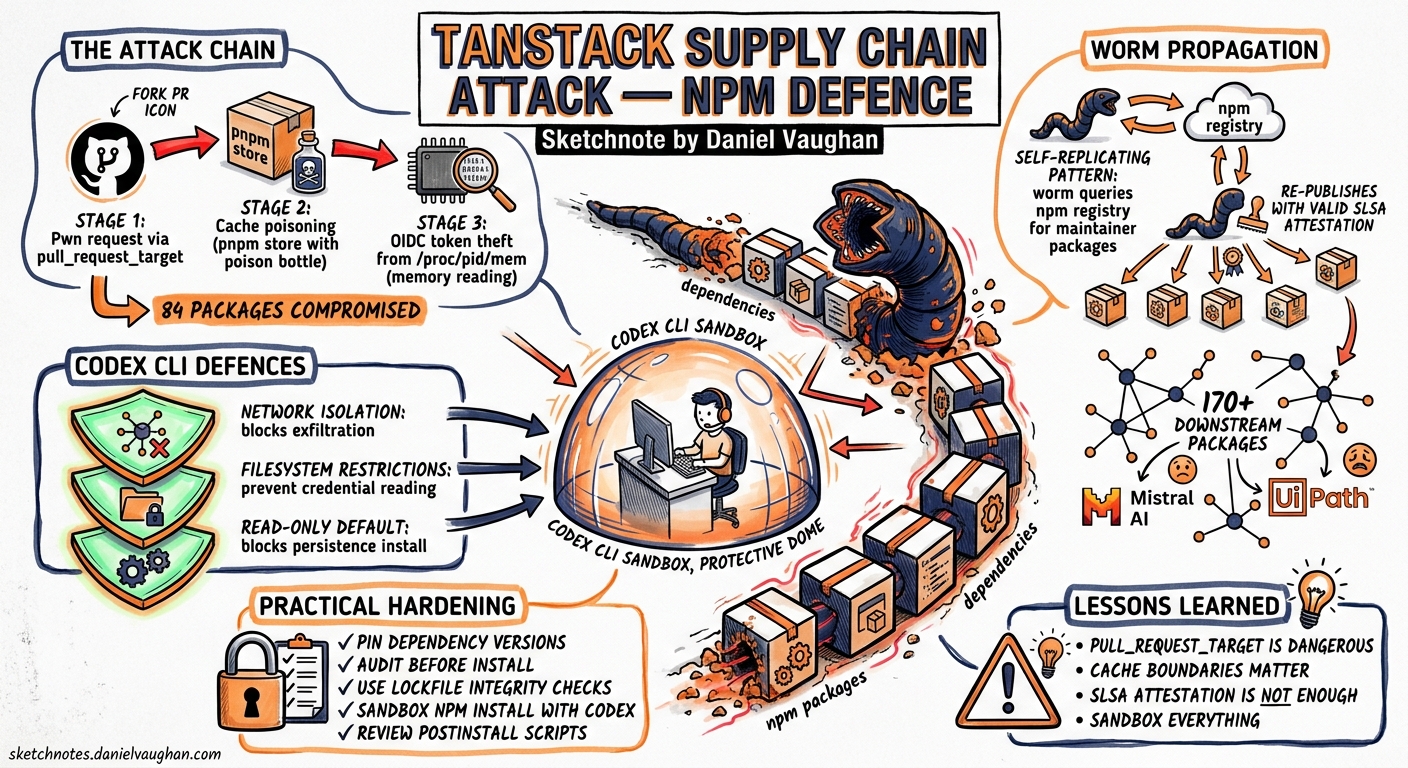
On 11 May 2026, a coordinated supply chain attack compromised 84 npm package versions across 42 @tanstack/* packages, then self-propagated to over 170 additional packages including Mistral AI’s SDK and UiPath’s automation tooling 12. The malware—dubbed Mini Shai-Hulud by researchers—exfiltrated credentials from CI runners and developer machines, installed persistence mechanisms, and specifically targeted AI coding tool configurations including Claude Code session history 3. Two OpenAI employee devices were affected, forcing the company to re-sign every application—including Codex—across all platforms 4.
This article dissects the attack chain, explains the direct implications for Codex CLI users, and maps Codex’s existing security features to a practical defence posture against npm supply chain threats.
The Attack Chain: Three Vulnerabilities, One Worm
The Mini Shai-Hulud campaign, attributed to threat group TeamPCP (CVE-2026-45321, GHSA-g7cv-rxg3-hmpx), chained three weaknesses in GitHub Actions to mint legitimate npm publish tokens 12:
flowchart TD
    A["Attacker opens PR from fork"] --> B["pull_request_target workflow\nexecutes fork code in base context"]
    B --> C["Malicious vite_setup.mjs\npoisons pnpm store cache"]
    C --> D["Cache persists 8 hours\nacross trust boundary"]
    D --> E["Legitimate release workflow\nloads poisoned cache"]
    E --> F["Injected binary reads\n/proc/pid/mem for OIDC token"]
    F --> G["Authenticated npm publish\nwith valid SLSA attestation"]
    G --> H["Worm queries registry for\nmaintainer packages, re-publishes"]

    style A fill:#f66,color:#fff
    style G fill:#f66,color:#fff
    style H fill:#f66,color:#fff
Stage 1: Pwn Request
TanStack’s bundle-size.yml workflow used the pull_request_target trigger, which runs fork-contributed code with the base repository’s security context 1. The attacker’s PR #7378 injected a malicious vite_setup.mjs script (~30,000 lines) that executed automatically without maintainer approval.
Stage 2: Cache Poisoning
The script wrote a poisoned pnpm store (1.1 GB) to the GitHub Actions cache under the predictable key Linux-pnpm-store-${hashFiles('**/pnpm-lock.yaml')} 1. Cache writes use runner-internal tokens that are not gated by the workflow’s permissions block—a fundamental trust boundary gap in GitHub Actions.
Stage 3: OIDC Token Extraction
Eight hours later, when a legitimate release workflow ran, it restored the poisoned cache. Attacker-controlled binaries then read /proc/<pid>/maps and /proc/<pid>/mem to extract the runner’s OIDC token, using it to authenticate direct npm publishes 12. The resulting packages carried valid SLSA Build Level 3 attestations—provenance verification alone could not detect the compromise.
The Payload: What the Malware Did
The 2.3 MB router_init.js payload, protected by three obfuscation layers (JavaScript Obfuscator, Fisher-Yates substitution cipher, AES-256-GCM encryption), executed during npm install and performed the following 23:
| Capability | Detail |
|---|---|
| Credential harvesting | AWS IMDSv2, Secrets Manager, SSM; GCP metadata; Kubernetes service accounts; HashiCorp Vault tokens; GitHub PATs; SSH keys |
| AI tool targeting | .claude/projects/*.jsonl (session history), .claude/settings.json (hook injection) |
| Editor persistence | .vscode/tasks.json executing setup.mjs on folder open |
| System persistence | gh-token-monitor systemd service (Linux), LaunchAgent (macOS) |
| Destructive fallback | Wipes home directory if tokens are revoked |
| Exfiltration | Session/Oxen P2P network; GitHub GraphQL API dead drops |
| Self-propagation | Queries registry.npmjs.org/-/v1/search?text=maintainer:<user> and re-publishes with forged Sigstore attestations |
The malware was detected within approximately 20 minutes of publication by external researcher ashishkurmi at StepSecurity 5.
Impact on OpenAI and Codex CLI
OpenAI confirmed that two employee devices in the corporate environment were compromised 4. The key findings:
- Signing keys for Windows, macOS, iOS, and Android were impacted 4
- Limited credential material was exfiltrated from internal source code repositories
- No customer data, production systems, or deployed software was affected
- All OpenAI applications—including Codex CLI—are being re-signed with new certificates
macOS users must update by 12 June 2026 for applications to continue functioning, as OpenAI has blocked further notarisation with the impacted certificate material 4.
Verifying Your Codex CLI Installation
After updating, verify the binary signature:
# macOS: verify code signature
codesign --verify --deep --strict /usr/local/bin/codex 2>&1

# macOS: check notarisation status
spctl --assess --type execute /usr/local/bin/codex

# Windows: verify Authenticode signature (PowerShell)
Get-AuthenticodeSignature "C:\Program Files\Codex\codex.exe" | Select-Object Status, SignerCertificate
Defending Your Pipeline: Codex CLI’s Security Layers
Codex CLI’s architecture provides several built-in defences that map directly to the attack vectors exploited in this campaign.
1. Sandbox Isolation During Dependency Installation
Codex runs commands inside an OS-enforced sandbox. When Codex executes npm install or pnpm install, the sandbox restricts what the process can touch 6:
# .codex/config.toml — restrict dependency installation
sandbox_mode = "workspace-write"
approval_policy = "on-request"

[sandbox]
# Block network access to known C2 domains
blocked_domains = [
    "*.getsession.org",
    "litter.catbox.moe",
]
With sandbox_mode = "workspace-write", any attempt by a malicious postinstall script to read /proc/<pid>/mem, access ~/.ssh/, or write systemd services outside the workspace would be blocked at the kernel level (Seatbelt on macOS, Landlock + seccomp on Linux) 6.
2. Hooks for Install-Script Governance
Codex CLI hooks can intercept shell commands before execution. A before_command hook can enforce --ignore-scripts on dependency installation 7:
# .codex/config.toml
[[hooks]]
event = "before_command"
match = "npm install|pnpm install|yarn install"
action = "warn"
message = "Dependency install detected. Ensure --ignore-scripts is set for untrusted packages."
For stricter enforcement, use pnpm v11’s strictDepBuilds = true default, which blocks all preinstall and postinstall scripts unless explicitly allowed 8.
3. Lockfile Verification with Agent Assistance
Codex can audit lockfile changes in pull requests. A practical pattern is to use codex exec in CI to review dependency changes:
# In your GitHub Actions workflow
codex exec --approval-policy suggest-edits \
  "Review the changes in pnpm-lock.yaml. Flag any new packages, \
   changed registries, or unexpected optionalDependencies entries. \
   Check for packages added outside the normal dependency tree."
The TanStack malware injected itself via an optionalDependencies entry pointing to a Git reference (@tanstack/setup → github:tanstack/router#79ac49...) 1. Codex can flag such anomalies in lockfile diffs during code review.
4. Network Egress Control
The Codex CLI sandbox supports domain-level network restrictions. For CI pipelines, lock down egress to only known-good registries 6:
# requirements.toml (admin-enforced)
[network]
allowed_domains = [
    "registry.npmjs.org",
    "registry.yarnpkg.com",
    "github.com",
    "api.github.com",
]
This would have prevented the malware’s exfiltration to filev2.getsession.org and litter.catbox.moe.
CI/CD Hardening Checklist
The TanStack attack exploited weaknesses in GitHub Actions that apply to every project using Codex in CI:
flowchart LR
    subgraph "Before This Attack"
        A1["pull_request_target\nruns fork code"] --> A2["Cache shared\nacross trust boundary"]
        A2 --> A3["OIDC tokens\naccessible in memory"]
    end

    subgraph "After Hardening"
        B1["workflow_run\nisolates fork code"] --> B2["Cache keys include\nworkflow identity"]
        B2 --> B3["Least-privilege OIDC\nwith branch binding"]
    end

    A1 -.->|"migrate"| B1
    A2 -.->|"migrate"| B2
    A3 -.->|"migrate"| B3

    style A1 fill:#f66,color:#fff
    style A2 fill:#f66,color:#fff
    style A3 fill:#f66,color:#fff
    style B1 fill:#6b6,color:#fff
    style B2 fill:#6b6,color:#fff
    style B3 fill:#6b6,color:#fff
Immediate Actions
- Audit your lockfiles — search
node_modulesforrouter_init.js(SHA-256:ab4fcadaec49c03278063dd269ea5eef82d24f2124a8e15d7b90f2fa8601266c) 2 - Rotate credentials if you installed affected packages on 11 May 2026: AWS, GCP, Kubernetes, Vault, GitHub, npm, and SSH keys 1
- Disable the dead-man’s switch first — the malware wipes
$HOMEif it detects token revocation; remove editor persistence hooks in.claude/and.vscode/before rotating credentials 2 - Update Codex CLI to the latest re-signed build and verify the signature
Structural Hardening
| Defence | Implementation |
|---|---|
Replace pull_request_target |
Use workflow_run triggered by pull_request to isolate fork code from base secrets 1 |
| Pin actions to commit SHAs | Replace uses: actions/cache@v4 with uses: actions/cache@hash 1 |
| Block install scripts by default | Use pnpm’s strictDepBuilds = true or npm’s --ignore-scripts 8 |
Add repository_owner guards |
Reject workflow runs from forks with mismatched owners 1 |
| Set npm minimum release age | Configure npm config set min-release-age 7d to delay consumption of newly published versions 5 |
| Bind OIDC trusted publishers | Pin to specific branch and workflow file 1 |
| Implement Codex CLI dependency hooks | Use before_command hooks to gate dependency operations 7 |
The Provenance Paradox
The most unsettling aspect of this attack: the malicious packages carried valid SLSA Build Level 3 provenance attestations 2. The attacker minted legitimate OIDC tokens from the real CI pipeline, so every attestation checked out. This breaks a common assumption in supply chain security: that provenance verification equals trust.
The lesson for Codex CLI users is clear: provenance answers which pipeline built this artifact, not whether the pipeline was compromised. Defence-in-depth remains essential—sandboxing, install-script blocking, lockfile auditing, and network egress control must work together.
Key Takeaways
- Update Codex CLI immediately and verify signatures; macOS users face a 12 June 2026 deadline 4
- Run dependency installations inside Codex’s sandbox with
workspace-writemode to contain malicious install scripts - Block install scripts by default using pnpm’s
strictDepBuildsor npm’s--ignore-scripts - Audit lockfile diffs with Codex — the malware’s injection point was an anomalous
optionalDependenciesentry - SLSA provenance is necessary but not sufficient — it cannot detect compromised-pipeline attacks
- Harden your GitHub Actions: eliminate
pull_request_target, pin actions to SHAs, bind OIDC publishers to specific branches
The npm ecosystem’s trust model was stress-tested to breaking point on 11 May. Codex CLI’s sandbox, hooks, and network controls provide genuine defence layers—but only if they are configured and enforced before the next worm arrives.
Citations
-
TanStack, “Postmortem: TanStack npm supply-chain compromise,” TanStack Blog, 12 May 2026. https://tanstack.com/blog/npm-supply-chain-compromise-postmortem ↩ ↩2 ↩3 ↩4 ↩5 ↩6 ↩7 ↩8 ↩9 ↩10 ↩11
-
Snyk, “TanStack npm Packages Hit by Mini Shai-Hulud,” Snyk Blog, 12 May 2026. https://snyk.io/blog/tanstack-npm-packages-compromised/ ↩ ↩2 ↩3 ↩4 ↩5 ↩6 ↩7
-
Wiz, “Mini Shai-Hulud Strikes Again: TanStack + more npm Packages Compromised,” Wiz Blog, 12 May 2026. https://www.wiz.io/blog/mini-shai-hulud-strikes-again-tanstack-more-npm-packages-compromised ↩ ↩2
-
OpenAI, “Our response to the TanStack npm supply chain attack,” OpenAI Blog, 14 May 2026. https://openai.com/index/our-response-to-the-tanstack-npm-supply-chain-attack/ ↩ ↩2 ↩3 ↩4 ↩5
-
StepSecurity, “TeamPCP’s Mini Shai-Hulud Is Back: A Self-Spreading Supply Chain Attack,” StepSecurity Blog, 11 May 2026. https://www.stepsecurity.io/blog/mini-shai-hulud-is-back-a-self-spreading-supply-chain-attack-hits-the-npm-ecosystem ↩ ↩2
-
OpenAI, “Agent approvals & security,” Codex Developer Docs, 2026. https://developers.openai.com/codex/agent-approvals-security ↩ ↩2 ↩3
-
OpenAI, “Hooks,” Codex Developer Docs, 2026. https://developers.openai.com/codex/hooks ↩ ↩2
-
Mondoo, “npm Supply Chain Security in 2026: What Your Package Manager Does (and Doesn’t) Protect You From,” Mondoo Blog, May 2026. https://mondoo.com/blog/npm-supply-chain-security-package-manager-defenses-2026 ↩ ↩2